



CAD-Audio CX2 Connect II USB Audio Interface
Introduction
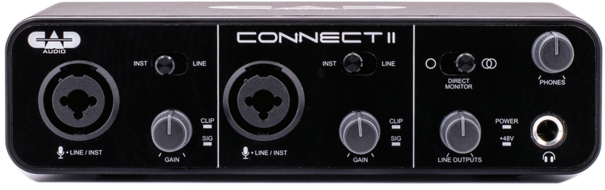
Record at home or on the go with the CAD Audio Connect II USB Audio Interface. The Connect II features 2 XLR combo inputs, which can accommodate either a microphone or instrument-level audio signal, making it a perfect solution for the singer/songwriter or a vocalist with an accompanying instrumentalist.
Description
The CX2 offers 48V phantom power and is fully USB powered; no external power source is required. You’ll get high-quality professional recordings with 24-bit/96kHz digital resolution, and the rugged all-metal body is built to withstand the toughest conditions.
The CX2 contains the following features:
- Value-packed 2-channel USB audio interface for home or mobile recording
- Record at professional-level 24-bit/96kHz resolution
- Includes +48V phantom power for use with studio condenser microphones
- USB bus powered
- Two preamps with combo inputs for recording either microphone or instrument-level audio
- Compatible with nearly any recording software on Windows® or Macintosh® operating systems
Controls
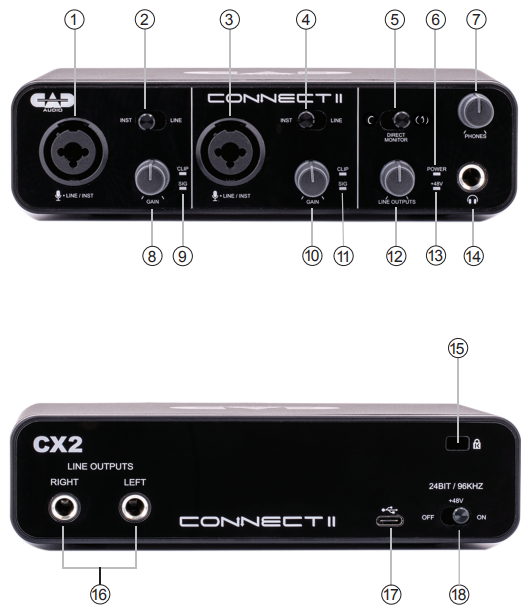
- Input Channel 1 – This input accepts both XLR and 1/4″ (6.35mm) style plugs. Connect a microphone, instrument, or line-level signal source here. The 1/4″ (6.35mm) plug may be of a TRS (tip-ring-sleeve) balanced or a TS (tip-sleeve) unbalanced configuration.
- Instrument/Line switch for channel 1. Select to optimize the level and impedance for a 1/4″ (6.5mm) signal source.
- Input Channel 2 – This input accepts both XLR and 1/4″ (6.35mm) style plugs. Connect a microphone, instrument, or line-level signal source here. The 1/4″ (6.35mm) plug may be of a TRS (tip-ring-sleeve) balanced or a TS (tip-sleeve) unbalanced configuration.
- Instrument/Line switch for channel 2. Select to optimize the level and impedance for a 1/4″ (6.35mm) signal source.
MONO/STEREO
- MONO mode sums channel 1 and channel 2 inputs to record left and right (useful for podcast interviews). STEREO mode passes channel 1 to record left and channel 2 to record right (for musical tracking or live stereo recording).
- POWER – This light indicates that Connect II is being powered by USB.
- PHONES – This knob controls headphone monitor volume.
- GAIN – This knob controls the gain (amplification factor) for channel 1.
- SIG – This light indicates that an audio signal is present on channel 1. CLIP – This light indicates that the signal may be overloading the channel
- GAIN – This knob controls the gain (amplification factor) for channel 2. SIG – This light indicates that an audio signal is present on channel 2. CLIP – This light indicates that the signal may be overloading channel 2.
- OUTPUT – This knob controls the LINE OUTPUT signal level.
- +48V – This light indicates that 48V phantom power is present at the XLR input connectors.
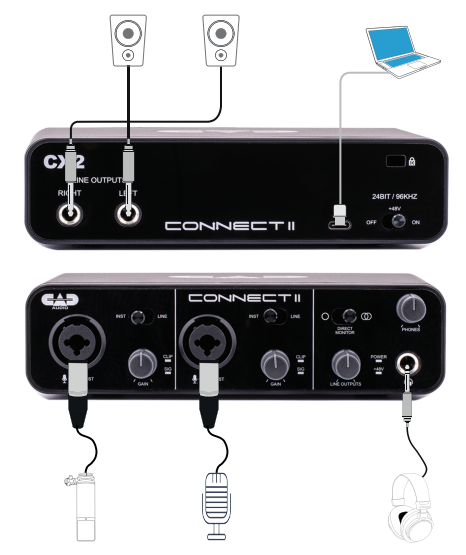
- Headphone output – Connect your monitor headphones here. This is a 1/4″ (6.35mm) TRS (tip-ring-sleeve) stereo jack.
- Kensington® Security Slot. Connect a Kensington® compatible security device here to help protect your interface.
- LINE OUTPUTS – These are the left and right line-level signal outputs. These jacks accept TS (tip-sleeve) and TRS (tip-ring-sleeve) 1/4″ (6.35mm) plugs.
- USB 2.0 Type-C connector. Use this to connect to your computer via USB.
- +48V – This switch enables +48V phantom power at the XLR input connector
Applications
Computer Interface
Windows
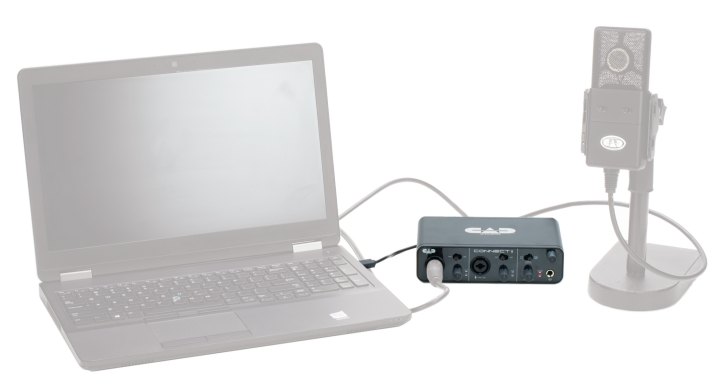
- Step 1: Connect this product to the computer via the USB cable
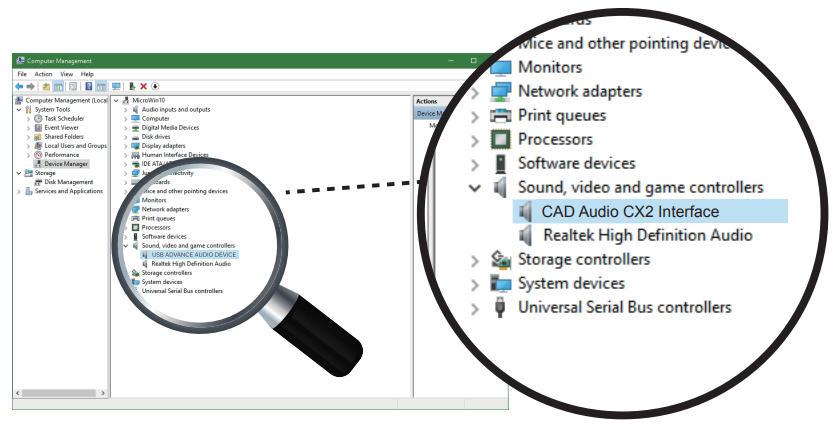
- Step 2: Open the device manager
- Step 3: The selected “Sound, video and game controllers” shows the device name: “CAD Audio CX2 Interface” of the product
Macintosh
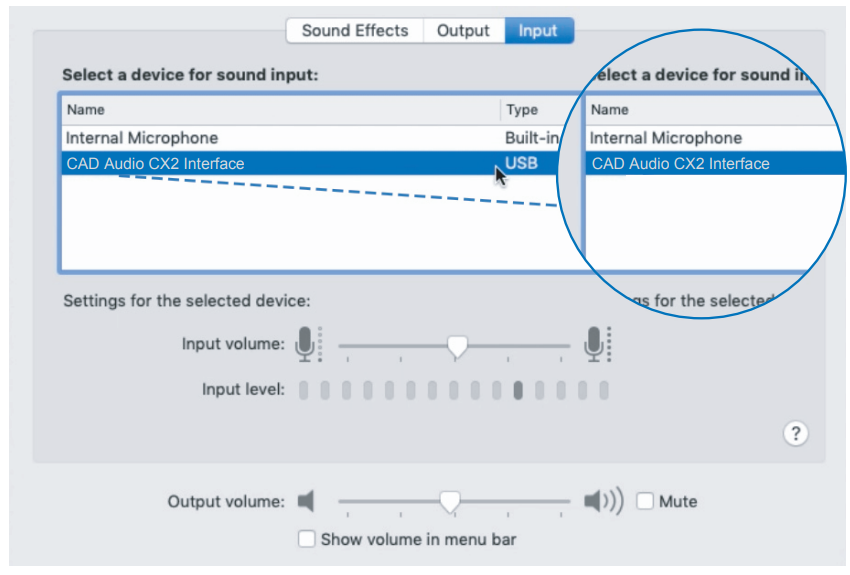
- Step 1: Open the Mac OS System Preferences.
- Step 2: Select “Sound”, then “Input”.
- Step 3: Select the device “CAD Audio CX2 Interface” for sound input.
When you need to monitor through this product, open the Mac OS System Preferences, select “Sound”, then “Output”. Select the device “CAD Audio CX2 Interface” for sound output.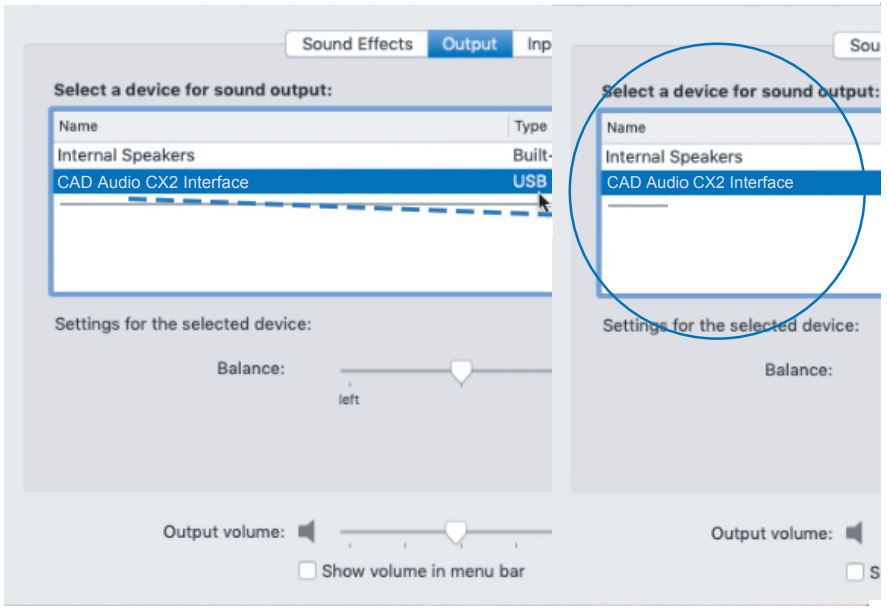
Specifications
- Frequency Response …………………………………………….. 20Hz-20kHz
- Resolution/Sample Rate ………………………………………… 24Bit/96kHz
- Phantom Power ………………………………………………………………..+48V
- Dynamic Range …………………………………………… 118dB (A-weighted)
- EIN …………………………………………………………… -110dBu (A-weighted)
- Max Input Level
- Mic………………………………………………………………………………….+8bBu
- Instrument …………………………………………………………………….. +11dBu
- Line……………………………………………………………………………….+19dBu
- Input Impedance
- Mic……………………………………………………………………………….3k ohms
- Instrument ……………………………………………………………………1M ohms
- Line…………………………………………………………………………….20k ohms
- Gain Range ……………………………………………………………………… 50dB
- Weight………………………………………………………………….. 1.1lbs (0.5kg)
- Dims ……………………………………………………………………7.5″ x 6″ x 2.1″ (19cm x 15.3cm x 5.4cm)
Two-Year Limited Warranty
CAD Audio hereby warrants that this product will be free of defects in material and workmanship for a period of two years from the date of purchase. In the unlikely event that a defect occurs, CAD Audio will, at its option, either repair or replace it with a new unit of equal or greater value.
Retain proof of purchase to validate the purchase date and return it with any warranty claim. This warranty excludes exterior finish or appearance, damage from abuse, misuse of the product, use contrary to CAD Audio’s instructions, or unauthorized repair.
This warranty gives you specific legal rights, and you may have other rights that vary from state to state. Some states do not allow the exclusion or limitation of incidental or consequential damages or limitations on how long an implied warranty lasts, so the above exclusions and limitations may not apply to you.
Customer Service
CAD Audio Corporate Offices
- Address: 6573 Cochran Rd., Bldg. I Solon, OH 44139 U.S.A.
- Tel: (440) 349-4900
- Fax: (440) 248-4904
- Website: www.cadaudio.com
- Distributor: Distributed Worldwide by American Music and Sound
- Address: 925 Broadbeck Drive, Suite 22, 0 Newbury Park, CA 91320 U.S.A.
- Tel: (800) 431-2609
- Fax: (800) 431-3129
FAQs
What devices are compatible with the CAD-Audio CX2 Connect II USB Audio Interface?
With the right adapters, the CX2 Connect II may be used with iOS devices that have USB audio interfaces as well as Windows and macOS computers. It is compatible with the majority of recording applications and DAWs (Digital Audio Workstations).
Do I need to install drivers to use the CX2 Connect II?
The interface is often class-compliant, which means that it requires no extra drivers to function plug-and-play on the majority of contemporary operating systems. You might need to download drivers from the CAD-Audio website for certain older computers.
How many inputs and outputs does the CX2 Connect II have?
The CX2 Connect II has two balanced TRS outputs for speakers or other external devices and two XLR/TRS combination connections for microphones or instruments.
Can I use phantom power for condenser microphones?
Yes, professional condenser microphones can be used with the CX2 Connect II because it offers +48V phantom power on both XLR inputs.
How do I monitor my recording with zero latency?
Turn the corresponding knob on the interface to activate the direct monitoring option. This eliminates delay and lets you hear your input signal in real time.
What sample rates and bit depths does the interface support?
The CX2 Connect II ensures high-quality recording and playback by supporting audio resolutions up to 24-bit/96kHz.
Is the CX2 Connect II bus-powered ,or does it require an external power supply?
When connected to a computer or other compatible device, the interface is bus-powered by USB, negating the need for an external power source.