



CAD-Audio WXGTS Wireless Guitar System
Introduction
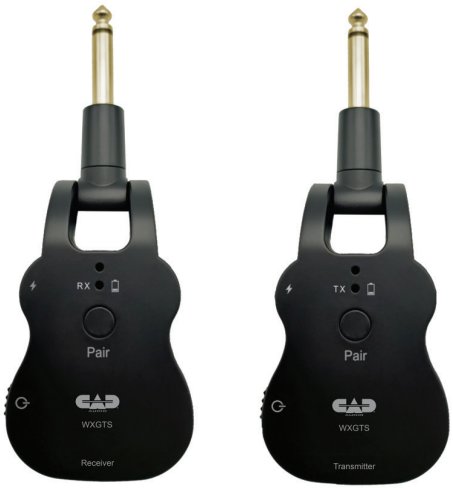
The CAD Audio WXGTS Digital Wireless Guitar System makes it easy to cut the cord, providing high-quality audio in an easy-to-use, compact design. The WXGTS operates in the 2.4GHz ISM frequency band, allowing unlicensed operation throughout the world.
The WXGTS can support up to 6 units operating simultaneously in the same area. Alternatively, one transmitter can sync to multiple receivers at the same time. You will enjoy up to 100 feet (30.5m) of operating range and up to 5 hours of battery life for maximum freedom of movement for the entire gig.
The compact design eliminates the need for bodypacks or wires, making mid-show instrument swaps easier than ever before. The WXGTS may be used with other electronic instruments, such as bass and keyboards. The WXGTS Digital Wireless Guitar System contains the following features:
- 2.4GHz operating frequency allows for
license-free use worldwide. - 24-bit/48KHz uncompressed digital conversion.
- Up to 100′ (30.5m) operating range.
- Built for guitars, but compatible with a wide range
of electronic instruments. - 280° rotating body fits most instrument body styles.
- Built-in rechargeable batteries last up to 5 hours per charge.
- 2 Year Warranty.
Power Supply
The USB cable is mainly for charging. Please use this to connect to the USB interface of your devices and make sure you use a qualified adapter.
While charging, please make sure that the device is shut down to avoid the loss of electricity during charging, which will lead to longer charging time and shorter battery life.
When the device is not in use, please shut it down in time to avoid continuous battery consumption.
Connections
Please always turn off the power to the equipment when connecting or disconnecting from the guitar. It will help to prevent the damage caused to this product and other relevant equipment.
Interference
Operation is subject to the two following conditions: (1) this device may not cause harmful interference, and (2) this device must accept any interference received, including the interference that may cause undesired operation.
Operating Instructions
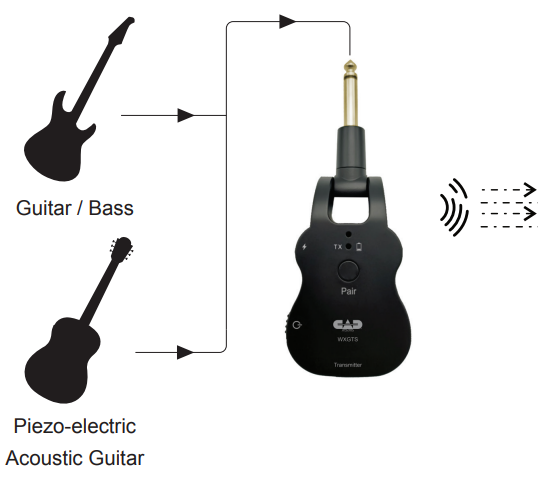
- Plug the transmitter into your instrument output jack.
- Plug the receiver into your instrument amplifier, effect pedal input, or mixer input.
- The devices should be charged before use via the USB Charging Ports, with the device powered off.
- Power up the transmitter and the receiver.
- The Status Indicators will slowly flash, letting you know the devices are not yet paired.
- Press and hold the Pairing Key of the receiver.
- The Status Indicator will flash, indicating pairing mode.
- Press and hold the Pairing Key of the transmitter.
- Momentarily, the Status Indicators of both devices will reach a steady state, and pairing will be complete.
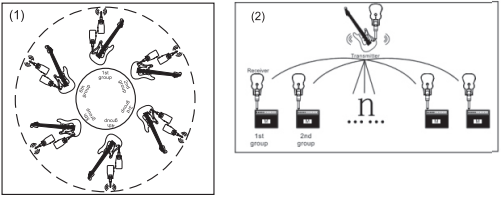
- Up to 6 separate systems may be used simultaneously in the same area (See drawing 1).
- Alternatively, multiple receivers may be used with one transmitter (See drawing 2).
- To operate this way, initiate pairing mode with all receivers.
- Then initiate pairing mode on the transmitter.
- When the pairing mode is finished, one transmitter may be received by all receivers.

Transmitter
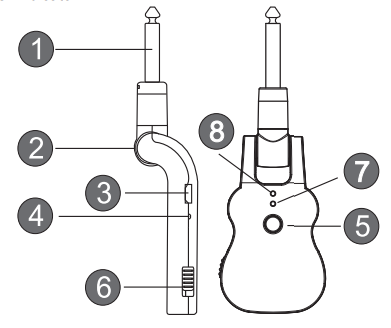
- Transmitter Signal Input. Plug into the output jack of your instrument.
- 280° Rotating Plug, convenient for most musical instruments.
- USB Charging Port.
- Charging Indicator.
- Pairing Key. Press and hold for 3 seconds to initiate pairing, press again to confirm.
- Power switch.
- Status Indicator: Steady state indicates the transmitting mode. Slow flash indicates low battery. Quick flash indicates pairing.
- Power Indicator
Receiver
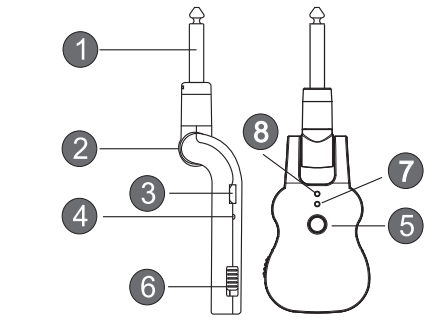
- Receiver Output. Plug into the amplifier, mixer, or effects pedal input jack.
- 280° Rotating Plug. Convenient for most applications.
- USB Charging Port.
- Charging Indicator.
- Pairing Key. Press and hold for 3 seconds to initiate pairing. The Tri-Status Indicator will flash after receiving a signal from the transmitter.
- The flash number indicates the number of transmitters received.
- Power Switch.
- Status Indicator: Steady state indicates pairing successful, receiving. Slow flash ind
- Power Indicator.
Specifications
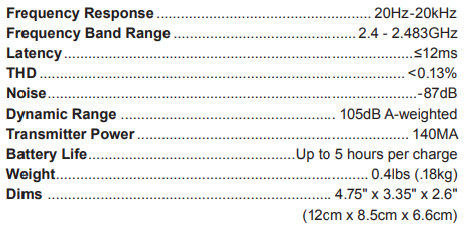
Troubleshooting
- Be sure to charge the battery before use.
- The battery can enter protection mode if left uncharged for a long time.
- Charging for more than 10 minutes will bring the battery out of protection mode and into charge mode.
- It is best to charge the device when powered off.
- The device is powered on; however, no audio transmission.
- The system has likely not been paired. Initiate pairing procedure. Unpleasant noise while in use:
- This could be due to strong electromagnetic interference or the receiver being out of usable range.
- Reduce the distance between the transmitter and the receiver.
Applications

Two-Year Limited Warranty
CAD Audio hereby warrants that this product will be free of defects in material and workmanship for a period of two years from the date of purchase. In the CAD-Audio WXGTS Wireless Guitar System unlikely event that a defect occurs, CAD Audio will, at its option, either repair or replace it with a new unit of equal or greater value.
Retain proof of purchase to validate the purchase date and return it with any warranty claim. This warranty excludes exterior finish or appearance, damage from abuse, misuse of the product, use contrary to CAD Audio’s instructions, or unauthorized repair.
This warranty gives you specific legal rights, and you may have other rights that vary from state to state. Some states do not allow the exclusion or limitation of incidental or consequential damages or limitations on how long an implied warranty lasts, so the above exclusions and limitations may not apply to you.
Customer Service
CAD Audio Corporate Offices
- Address: 6573 Cochran Rd., Bldg. I Solon, OH 44139 U.S.A.
- Tel: (440) 349-4900
- Fax: (440) 248-4904
- Website: www.cadaudio.com
- Distributor: Distributed Worldwide by American Music and Sound
- Address: 925 Broadbeck Drive, Suite 22, 0 Newbury Park, CA 91320 U.S.A.
- Tel: (800) 431-2609
- Fax: (800) 431-3129
FAQs
What is the wireless range of the WXGTS system?
In open line-of-sight situations, the system’s usual range is up to 100 meters (330 feet). This distance could be shortened by obstructions like walls or electrical interference.
Which frequencies or channels does the WXGTS operate on?
Operating in the UHF frequency band, the WXGTS provides several customisable channels to reduce interference and guarantee dependable transmission.
What type of batteries does the transmitter use, and how long do they last?
Depending on the battery type and usage, the transmitter can run continuously for up to 8–10 hours using rechargeable lithium-ion or AA batteries.
Can I charge the transmitter while playing?
Depending on the device, charging occurs while in use. Consult the handbook; certain models permit USB power charging during transmission; however, it is advisable to utilise fully charged batteries before performances.
How do I pair the transmitter and receiver?
When turned on and configured to the same frequency, the majority of systems pair automatically. Refer to the handbook to manually sync or reset both units if pairing doesn’t work.
Is the WXGTS system compatible with all electric guitars and basses?
Yes, it is compatible with the common 1/4″ output jacks found on basses and electric guitars. With high-fidelity wireless transmission, it is intended to maintain the tone of your instrument.
Can I connect the receiver to a pedalboard or effects chain?
Of course. An amplifier, pedalboard, or effects processor can be directly attached to the receiver’s standard 1/4″ output signal.
Where can I find firmware updates or technical support?
For the most recent firmware, software updates, and customer service, visit the official CAD-Audio website or get in touch with your authorised dealer.