

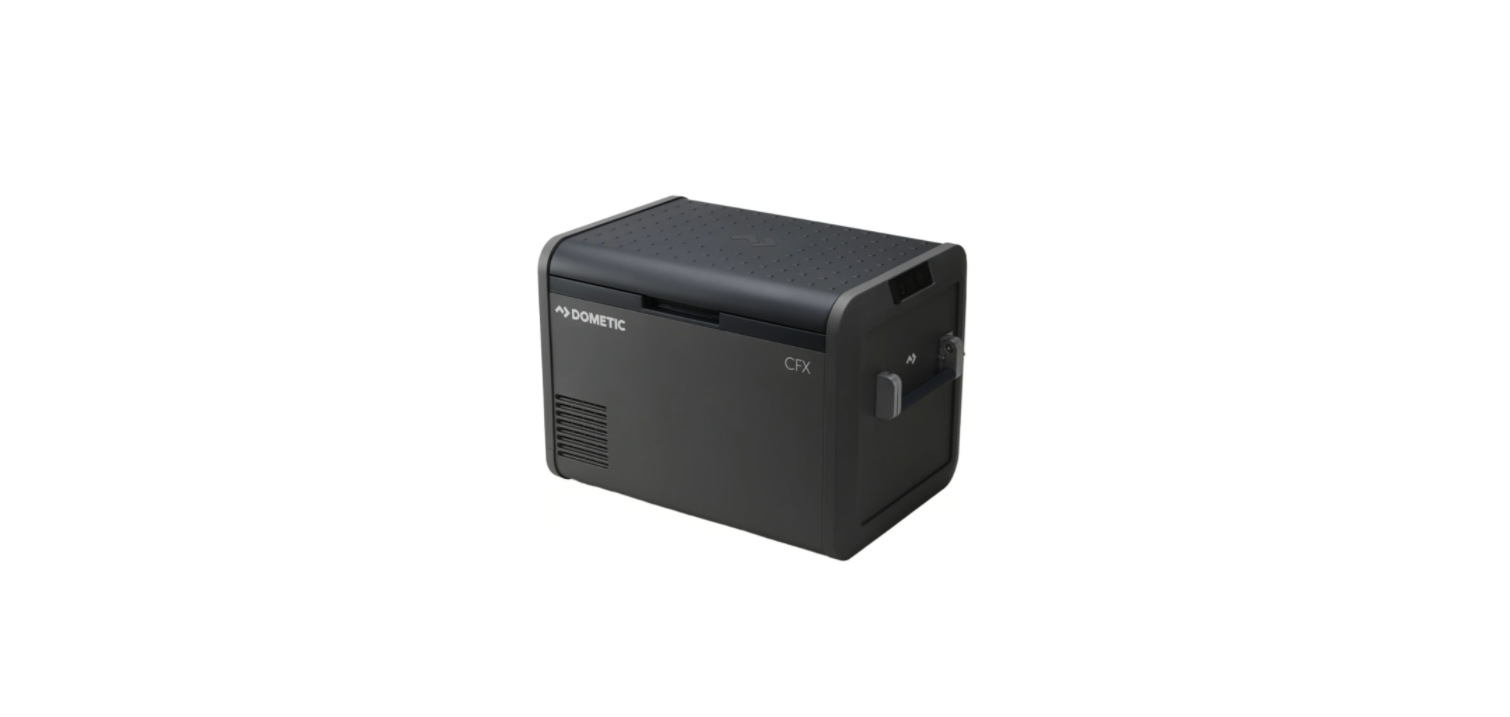

Dometic CFX5 Series Mobile Cooling
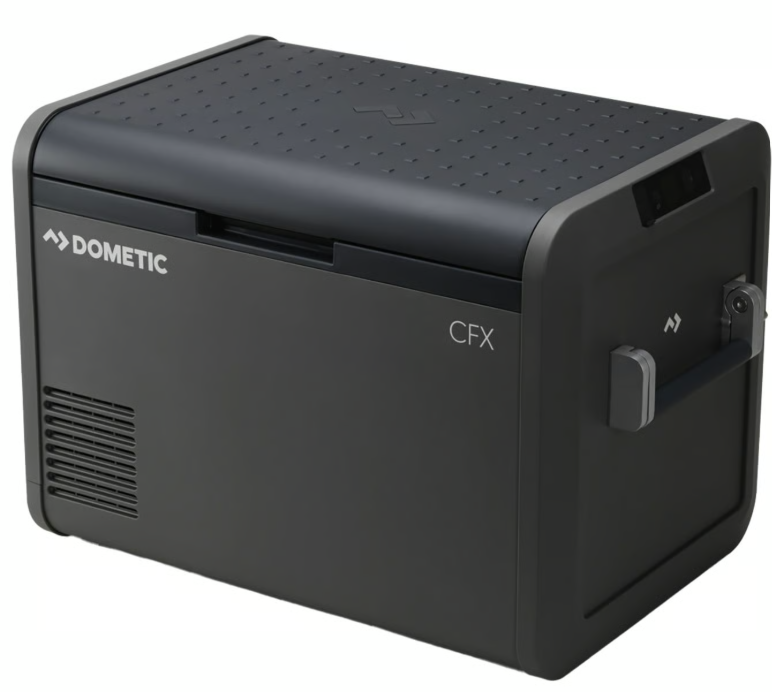
Safety instructions
- Installation and removal of the refrigerator may only be carried out by qualified personnel.
- Installation in washrooms and areas exposed to water must be performed by a qualified technician.
- If installing the refrigerator under a canopy or similar environment, ensure that the refrigerator is protected from rain and splashing water.
- Do not operate the refrigerator if it is visibly damaged.
- This refrigerator may only be repaired by qualified personnel. Improper repairs can result in considerable danger or damage to the refrigerator.
- Keep naked flames and potential ignition sources away from the refrigerator.
- Ventilate the room well.
- Switch off the refrigerator.
- For refrigerators with flammable refrigerant:
- It does not damage the ozone layer and does not increase the greenhouse effect. Any leaking refrigerant may ignite.
- For refrigerators with flammable refrigerant: Do not use or store the refrigerator in confined spaces with no or minimal air flow.
- Do not store any explosive substances, such as aerosol cans with propellants, in the refrigerator.
- Before disposing of your old refrigerator:
- Dismantle the drawers.
- Leave the shelves in the refrigerator so that children cannot climb inside.
- Take off the doors.
Explanation of symbols
- A signal word will identify safety messages and property damage messages, and will also indicate the degree or level of hazard seriousness.
Explanation of symbols on the device
Warning! Risk of fire / Flammable materials
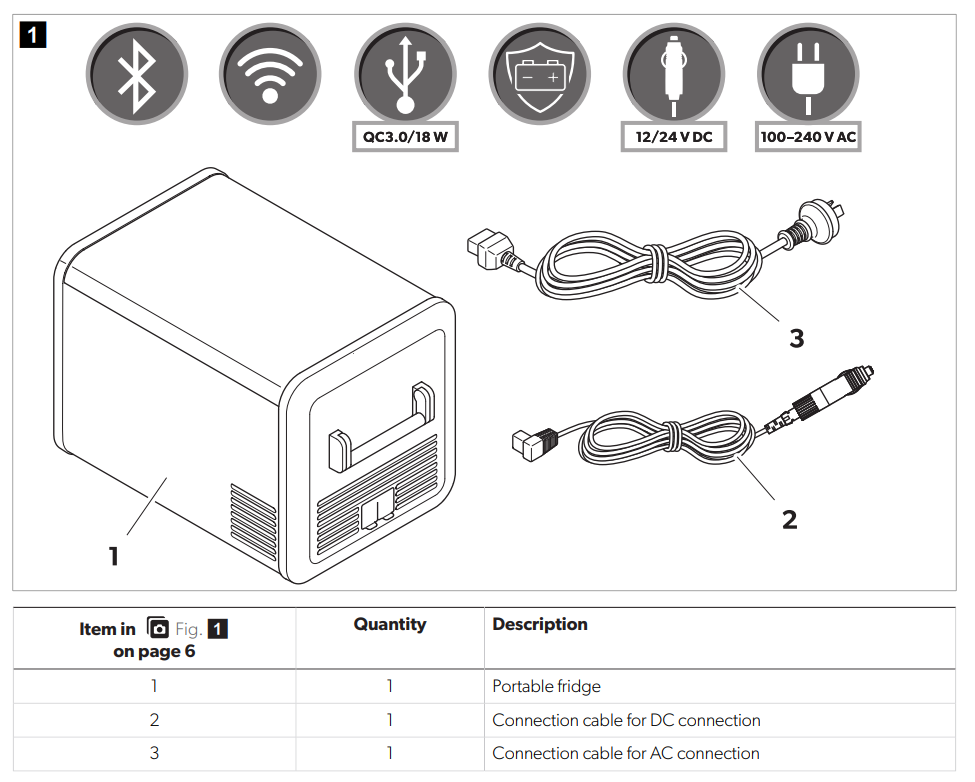
Scope of delivery
Accessories
Available as an accessory (not included in the scope of delivery)
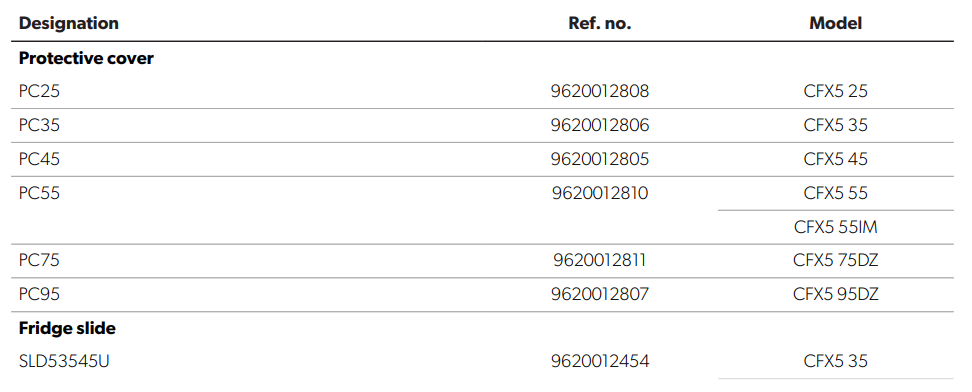
Designation Ref. no. Model
SLD55U 9620012455 CFX5 55 CFX5 55IM SLD75U 9620012456 CFX5 75DZ SLD95100U 9620012457 CFX5 95DZ Quick fixing kit QFK25 9600000166 CFX5 25 QFK3545 9600029599 CFX5 35 CFX5 45 Dometic Anderson cable ANDC-DC 9620012862 suits all models Hardwiring Kit HWK-DC 9600024832 suits all models Mobile Cooling app – suits all models
Note that the app may not be available in your country.
Intended use
- Staff kitchen areas in shops, offices, and other working environments
- Farm houses
- Clients in hotels, motels, and other residential-type environments
- Bed and breakfast-type environments
- Catering and similar non-retail applications. This product is only suitable for the intended purpose and application in accordance with these instructions. This manual provides information that is necessary for the proper installation and/or operation of the product. Poor installation and/or improper operation or maintenance will result in unsatisfactory performance and a possible failure. The manufacturer accepts no liability for any injury or damage to the product resulting from:
- Incorrect installation, assembly, or connection, including excess voltage
- Incorrect maintenance or use of spare parts other than the original spare parts provided by the manufacturer
- Alterations to the product without express permission from the manufacturer
- Use for purposes other than those described in this manual. Dometic reserves the right to change product appearance and product specifications
Technical description
A low-maintenance refrigerant circuit with a compressor provides the cooling. The generous insulation and the powerful compressor ensure efficient and fast cooling. The cooling device is portable. The cooling device can withstand a short-term inclination of 30°, for example, on a boat.s
Scope of functions
- Power supply with h priority circuit for connecting to the AC power supply
- Three-level battery monitor to protect the vehicle battery (switches off automatically at low battery voltage)
- Display with temperature gauge in °C and °F
- Temperature setting: In steps of 1 °C (1 °F)
- Integrated Bluetooth and WiFi function, hence controllable using an app
- Foldable carry handles
- USB charger for portable devices such as mobile phones
- Removable wire basket
- Integrated bottle opener
- CFX5 55IM only: Ice maker
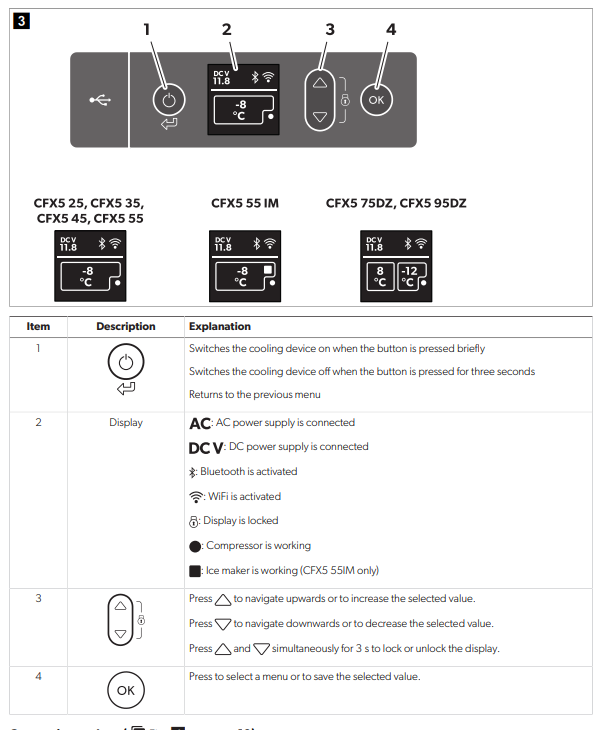
Operating and display elements
Dometic CFX5 EN
EN Dometic CFX5
Before first use
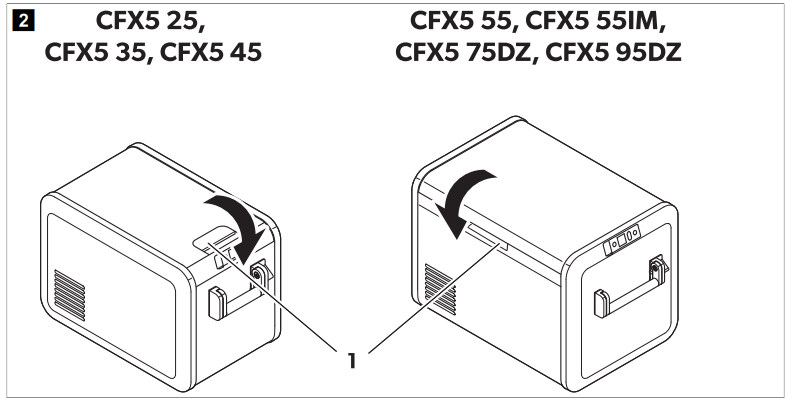
Reversing the lid opening
To reverse the lid open, proceed as shown: CFX5 55, CFX5 55IM
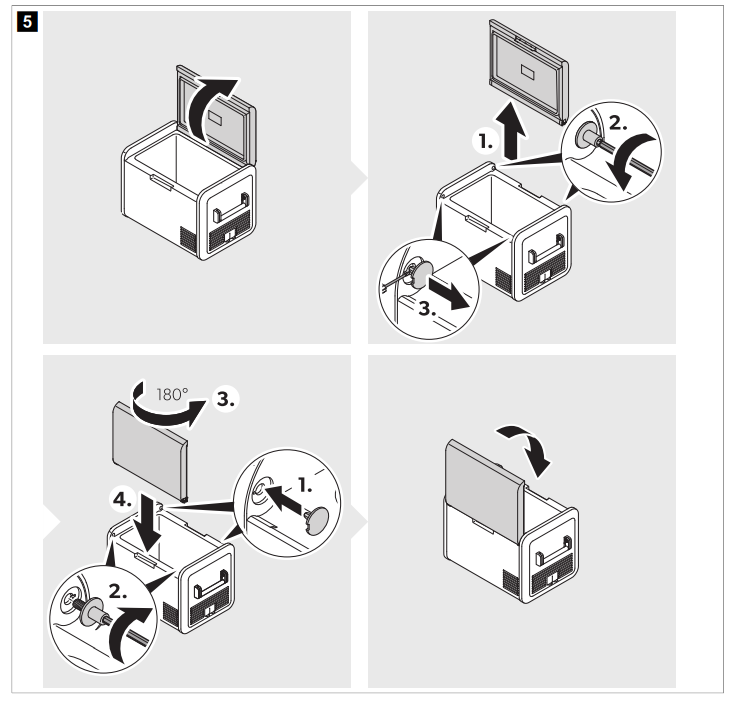
CFX575DZ, CFX5 95DZ
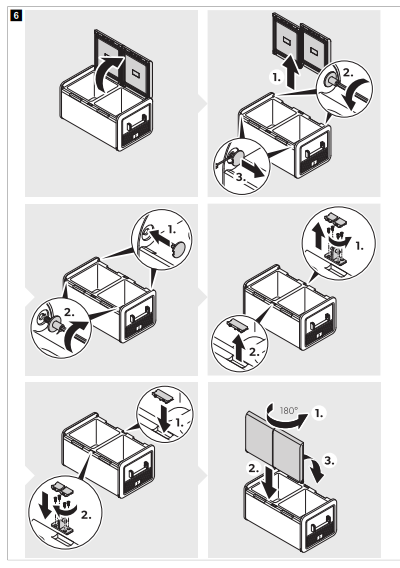
Selecting the temperature units
Select the temperature as shown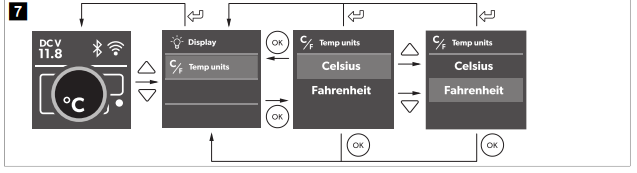
Operation
Avoiding food waste. To avoid food waste, note the following: Keep temperature fluctuation as low as possible. Only open the cooling device as often and for as long as necessary. Store the food in such a way that the air can still circulate well. Adjust the temperature according to the quantity and type of the foodstuff. Foodstuffs can easily absorb or release odor or taste. Always storefoodstuffsf covered or in closed containers/ bottles.
Saving energy
Choose a well-ventilated location that is protected from direct sunlight. Allow warm food to cool down first before placing it in the cooling device to keep cool. Do not open the cooling device more often than necessary. Do not leave the cooling device open for longer than necessary. If the cooling device has a basket: For optimal energy consumption, position the basket according to its position on deliveryRegularlyys, ensure the lid seal still fits properly. Avoid unnecessarily low temperatures.
Connecting the cooling device
NOTICE! Damage hazard
For the protection of the device, the DC cable supplied includes a fuse inside the plug. Do not remove the
fused DC plug. Only use the DC cable supplied.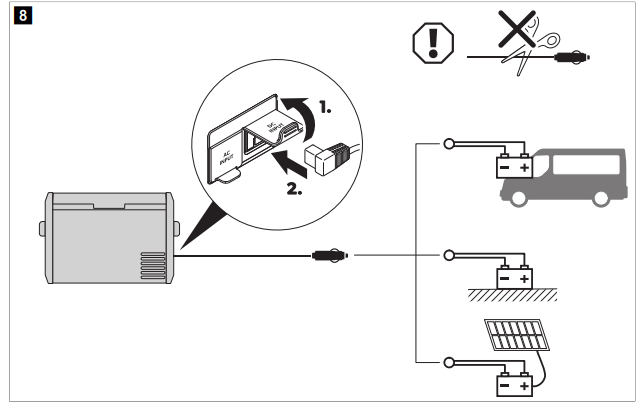
Connecting to the Portable Battery Pack PLB40 or the Hardwiring Kit HWK-DC (accessories)
Connect the device to PLB40 or HWK-DC as shown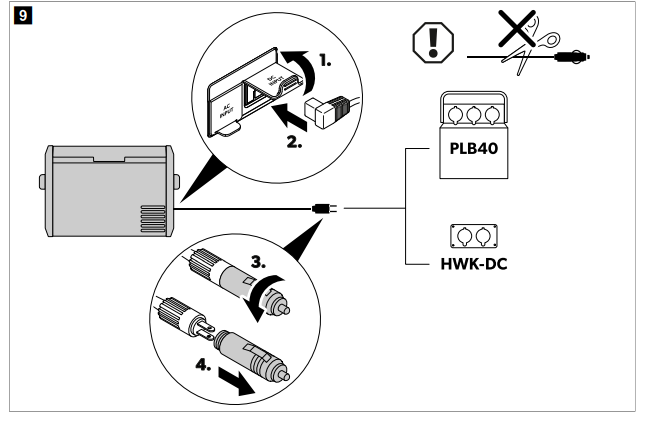
Never handle plugs and switches with wet hands or if you are standing on a wet surface.
If necessary, seek advice from a trained technician. Connect the device to an AC power supply as shown.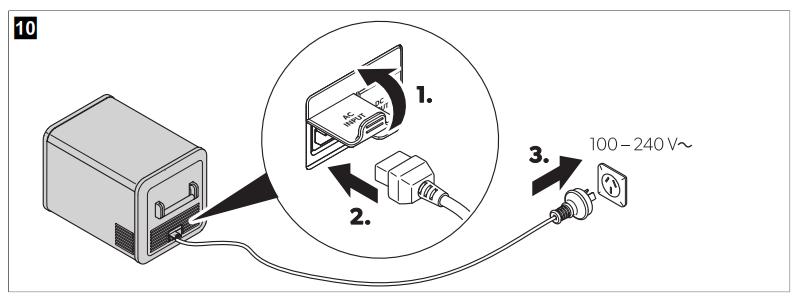
Using the battery monitor
The cooling device is equipped with a battery monitor that provides a 3-stage battery protection. The battery protection prevents excessive discharging when the cooling device is connected to a vehicle starter battery or maximizes the use of a supply battery.
If the cooling device is operated when the vehicle ignition is switched off, the cooling device switches off automatically as soon as the supply voltage falls below a set level. The cooling device will switch back on once the battery has been recharged to the restart voltage level.
Set the battery monitor as shown. 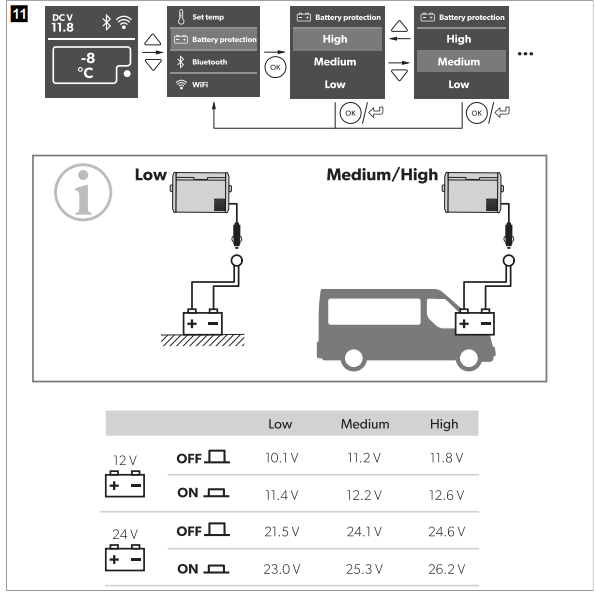
Using the cooling device
- When the voltage is < 8 V, the display switches off automatically.
- When the voltage is ≥ 8 V and ≤ 12 V, the display may show “!ALERT – Voltage low” depending on the
Switch the cooling device on: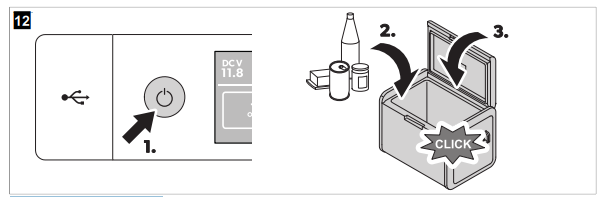
Switch the cooling device off: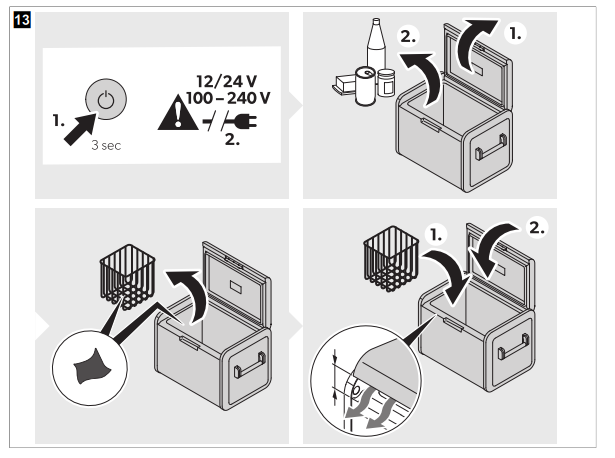
Using the display
Display states
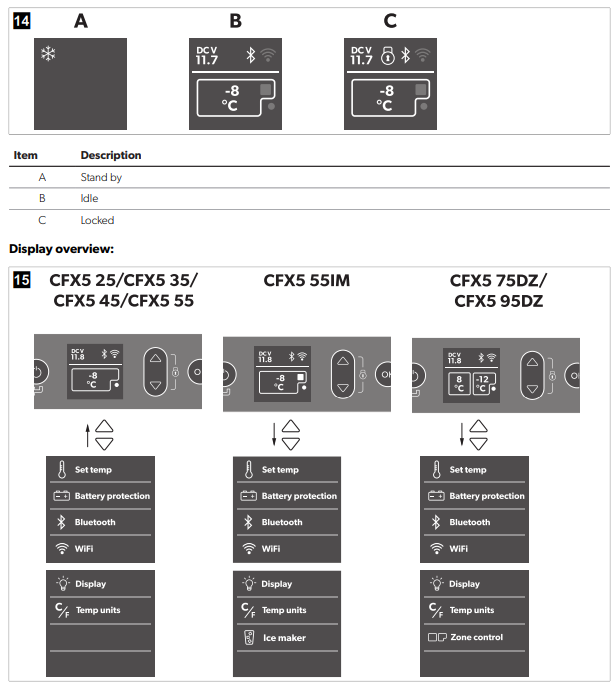
Navigating through the menus
The highlighted menu is selected. Press to navigate upwards. Press to navigate downwards.
Choosing a menu
Press to select the required m
Changing settings
The highlighted value or setting is selected. Press to increase the selected value or to choose the previous setting. Press to decrease the selected value or to choose the next setting.g
Returning to the previous menu
Press to return to the previous menu without saving
Locking/unlocking the display
Press and simultaneously for 3 s to lock or unlock the display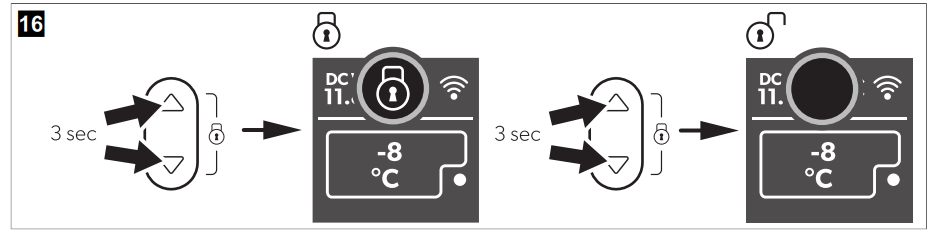
Setting the display brightness
Set the display brightness as shown.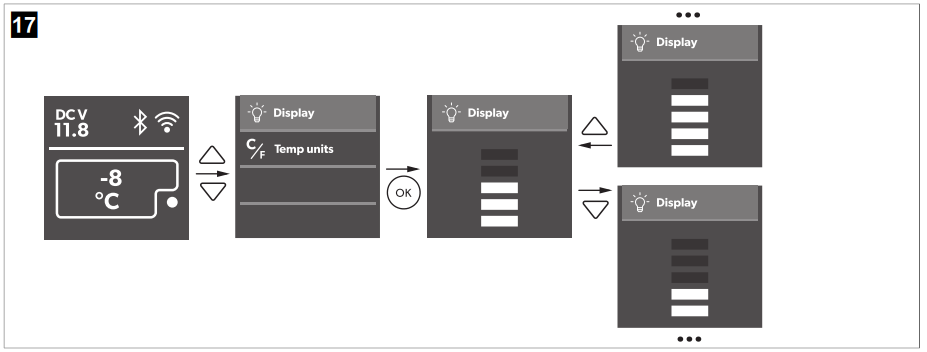
Setting the temperature
Set the temperature as shown.
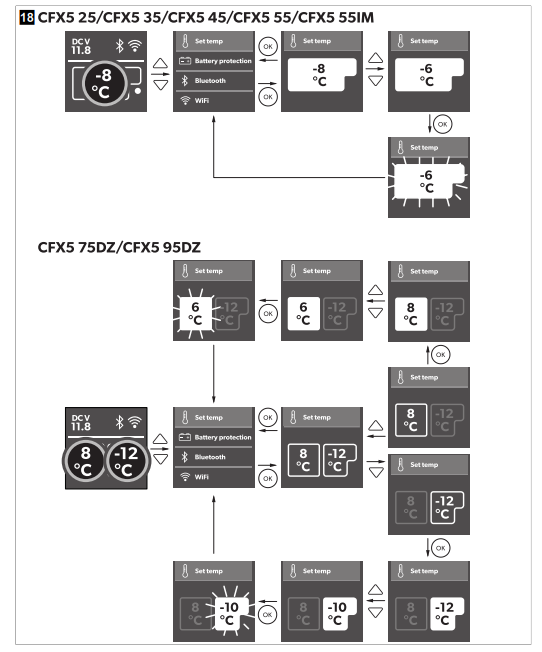
Switching a compartment off or on (CFX5 75DZ, CFX5 95DZ only)
You can activate each zone individually or both of them. Activate or deactivate the zones as shown.
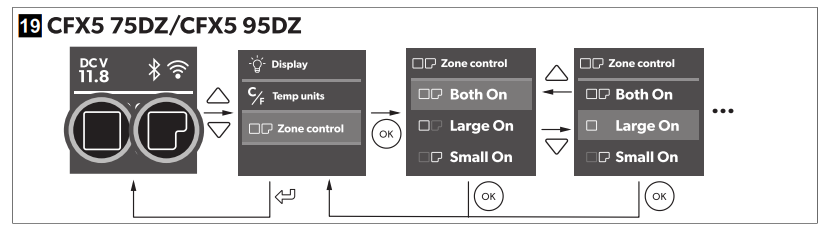
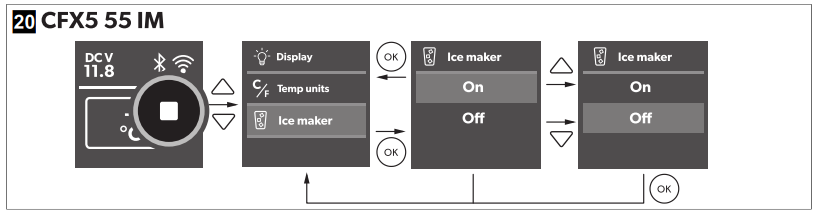
Using the ice maker (CFX5 55IM only)
- The ice maker makes ice fast for a number of hours aer switching on and then automatically goes into an ice maintenance mode to reduce energy consumption.
- If multiple batches of ice are required as quickly as possible, switching the ice maker off and back on will set it back into fast ice-making mode. Repeat as required.
- Low freezer temperature settings in the main compartment may not be maintained in high ambient temperature conditions with the ice maker switched on. To turn the ice maker on or off, proceed as shown:
Filling the ice trays with water
Remove the ice trays ( Fig. on page 221) from the ice maker housing ( Fig.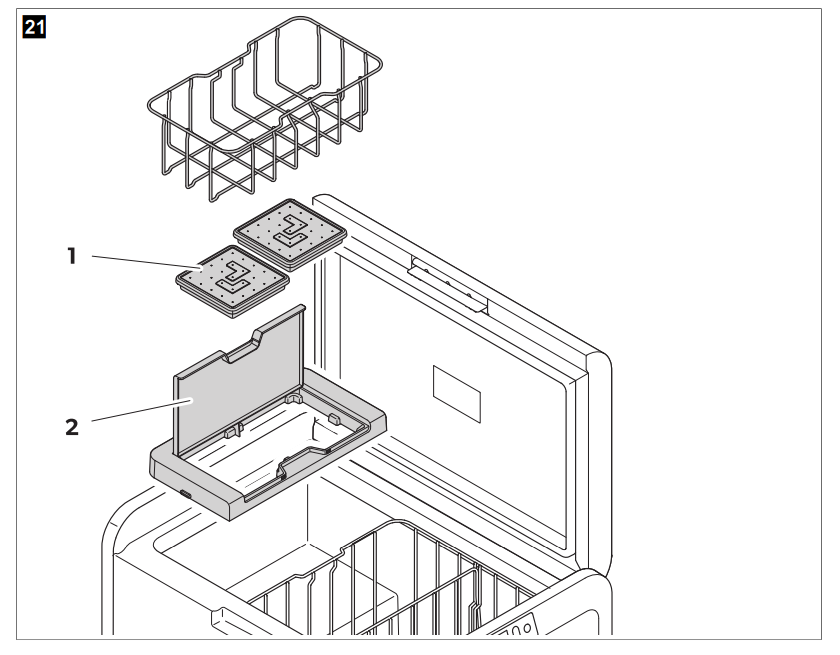 Removal may require additional force using two hands in high humidity conditions, which may create an
ice bond underneath the ice trays.
- Open the ice maker housing lid and li under the front of the ice trays.
- . Remove the ice tray covers and twist trays to release the ice cubes.
Removing the ice maker housing
- The ice maker housing can be removed for cleaning or when not in use to increase usable space inside the cooling device.
- Lift the housing at one end until the lug unclips, then remove.
- Reverse procedure for re-fit, pushing down on lugs to snap into position.
Cleaning and drying the ice maker
- When not in use, clean and dry the ice trays and the inside of the ice maker housing to prevent mould
Using Bluetooth and Wi-Fi
Downloading the Mobile Cooling app
The cooling device can be monitored and controlled via Bluetooth or Wi-Fi using an app that you can install on a compatible device.
Download the Mobile Cooling app.

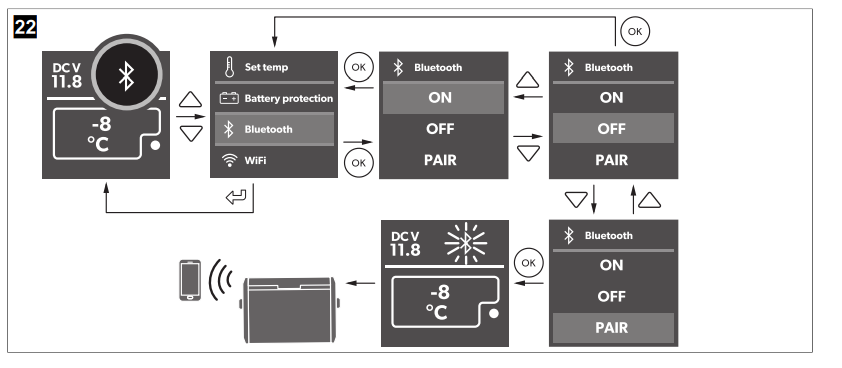
Setting the Bluetooth signal and connecting to the app
The cooling device can be monitored and controlled via Bluetooth. To do so, pair the cooling device with your
Bluetooth device.
NOTE
- Pairing must be done within the Mobile Cooling app, not in device settings.
- There is no password required for Bluetooth connection.
- Set the Bluetooth signal and connect the app as shown.
Setting the Wi-Fi signal
Set the Wi-Fi signal as shown
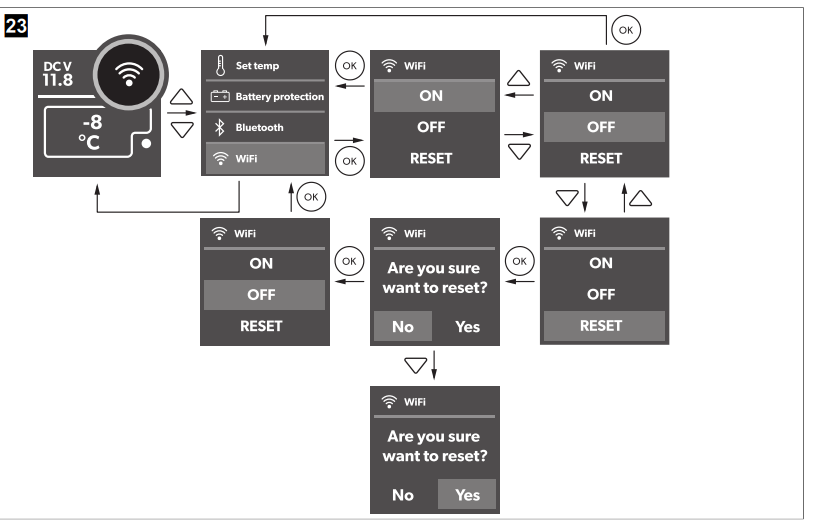
Operating Bluetooth and Wi-Fi
Follow the instructions in the mobile cooling Dometic CFX5 Series Mobile Cooling app. The Bluetooth or Wi-Fi LED lights up when the cooler is connected.
Resetting to factory settings
The reset function changes all display menus and app fields to the original factory settings.
Reset the device to factory settings as shown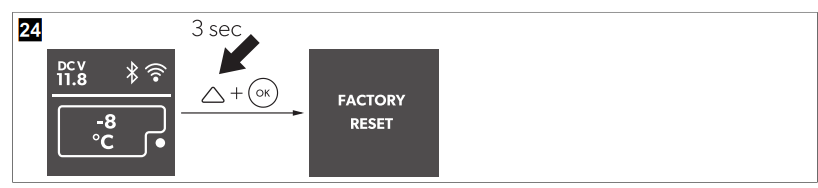
USB port for power supply
- The USB port allows you to charge small devices like mobile phones, MP3 mp3 players.
Use the USB port as shown.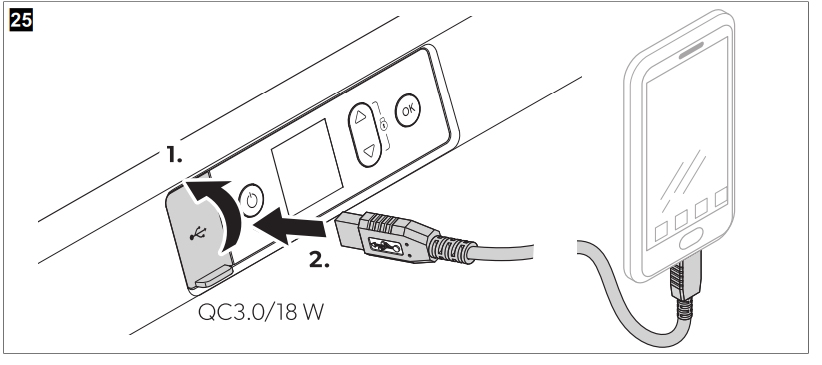
Defrosting the cooling device
- Humidity can form frost in the interior of the cooling device or on the evaporator.
- This reduces the cooling capacity.
- Never use hard or pointed tools to remove ice or to loosen objects that have frozen in place.
- To defrost the cooling device, proceed as follows
- Remove the contents of the cooling device.
- If necessary, place the contents in another Dometic CFX5 Series Mobile Cooling cooling device to keep them cold.
- Switch off the cooling device.
- Leave the lid open.
- Wipe off the defrosted water.
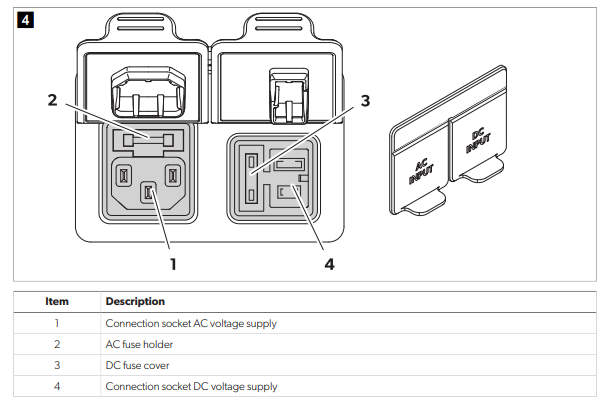
Replacing the AC fuse
Disconnect the power supply and the connection cable before you replace the device fuse.
- Disconnect the power supply to the device.
- Remove the connection cable.
- Pry out the fuse insert ( Fig. on page 10 2) with a screwdriver.
- Replace the defective glass fuse with a new one of the same type and rating (Fast acting, 4 A, 250 V).
- Press the fuse insert back into the housing.
- Reconnect the power supply to the device.
Replacing the DC fuse
- Disconnect the power supply to the cooling device.
- Pry out the fuse cover ( Fig. on page 10 3) with a screwdriver.
- Reverse the fuse cover and use the hook to remove the defective blade fuse.
- Push in a new fuse of the same type and rating.
- CFX5 25, CFX5 35, CFX5 45, CFX5 55, CFX5 55IM: 10 A
- CFX5 75DZ, CFX5 95DZ: 15 A
- Re-fit the fuse cover.
- Reconnect the power supply to the cooling device.
Replacing the DC plug fuse
- Replace the defective fuse with a new fuse of the same type and rating as shown
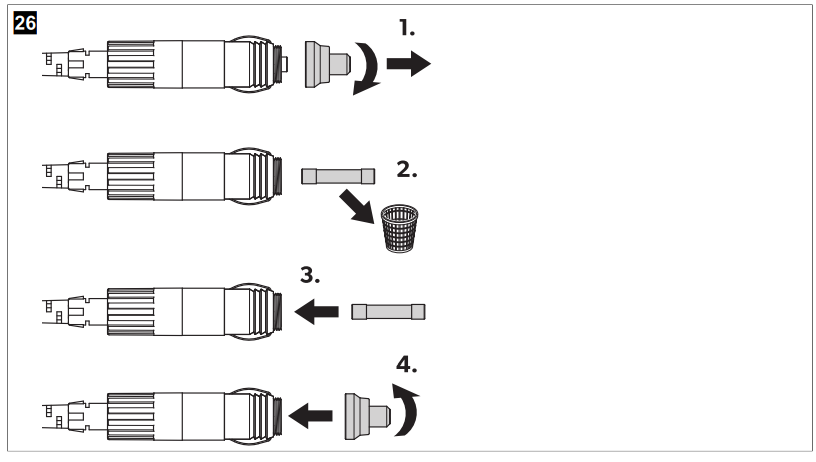
CFX5 25, CFX5 35, CFX5 45, CFX5 55, CFX5 55IM: 10 A • CFX5 75DZ, CFX5 95DZ: 15 A
Replacing the light PCB
- The lamp can only be replaced by the Dometic CFX5 Series Mobile Cooling manufacturer, a service agent, or a similarly qualified person to avoid hazard
Cleaning and maintenance
- Ensure that the cooling device is disconnected from the power supply before any cleaning or
maintenance work - Never clean the cooling device under running Dometic CFX5 Series Mobile Cooling water or in a dishwasher. Do not use abrasive cleaning agents or hard objects during cleaning.
- Occasionally, clean the device’s interior and exterior with a damp cloth. Ensure that the air inlet and outlet vents on the cooling device are free of any dust and dirt, so that heat can be released and the cooling device is not damaged.
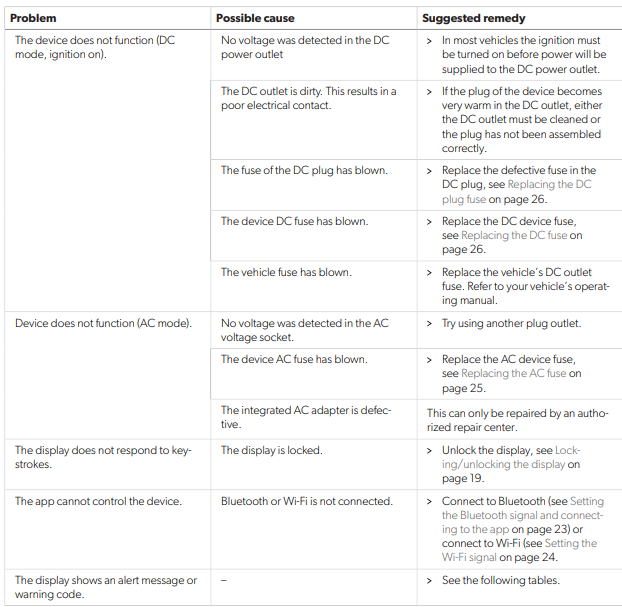
Troubleshooting
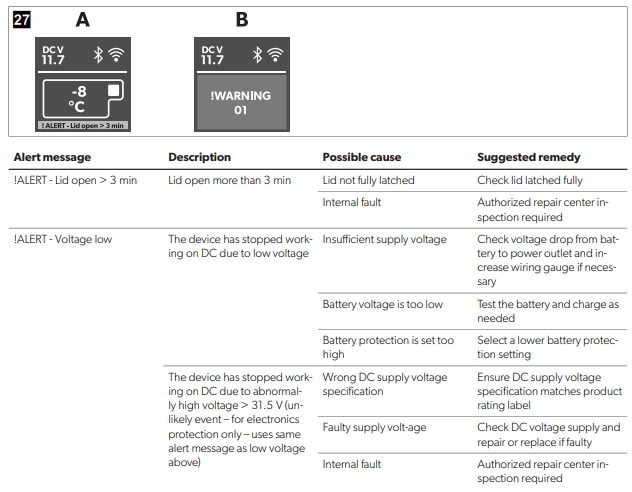
Alert messages
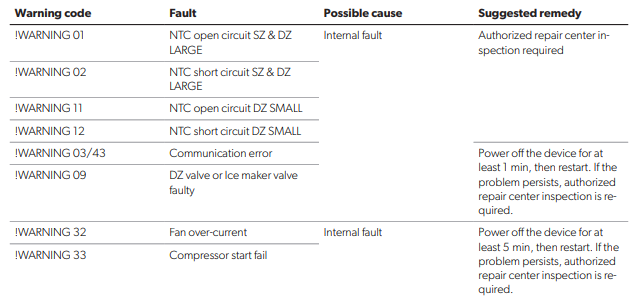
Dometic CFX5 EN
- High ambient temperature
- Air vent blocked or insufficient clearance
- Internal fault
- Power off the device for at least 30 minutes or Dometic CFX5 Series Mobile Cooling move to a cooler location, then restart.
- Clear the vents
- Authorized repair center inspection required
Warranty
If the product does not work as it should, please contact your retailer or the manufacturer’s branch in your country.
(see dometic.com/dealer). The warranty applicable to your product is 5years r(s).
For repair and warranty processing, please include the following documents when you send in the device.
- A copy of the receipt with the purchasing date
- A reason for the claim or description of the fault
Note that self-repair or nonprofessional repair can have safety consequences and might void the warranty.
Australia only
This warranty policy is subject to the conditions and guarantees that are mandatory as implied by the Consumer Guarantees Act 1993(NZ)
Disposal
Recycling packaging material: Place the packaging material in the appropriate recycling waste bins
wherever possible.
WARNING! Risk of child entrapment
Before disposing of your old cooling device, dismantle the lid. Leave the baskets in place so that children
may not easily climb inside. Recycling products with non-replaceable batteries, rechargeable batteries, or light sources
- If the product contains any non-replaceable batteries, rechargeable batteries, or light sources, you
don’t have to remove them before disposal. - If you wish to finally dispose of the product, ask your local recycling center or specialist dealer for
details about how to do this in accordance with the applicable disposal regulations
Technical data
The minimum temperature shown in “Cooling capacity” may be attained if the ambient temperature
temperature is above 32°C
FAQs
What type of cooling system is the Dometic CFX5 Series?
Reliable off-grid cooling performance is offered by the CFX5 Series, a line of portable compressor coolers and freezers made for mobility, such as camping, boating, and RV excursions.
What sizes and capacities are available in the CFX5 Series?
Models in the series range in capacity from roughly 18 to 55 litres, providing choices for both single users and larger groups.
How energy efficient is the CFX5?
The CFX5’s variable speed compressor and sophisticated insulation reduce power consumption, which makes it perfect for long excursions with limited battery capacity.
Is the CFX5 easy to carry and transport?
Indeed, the coolers’ sturdy handles and durable design allow for transportation and longevity in outdoor settings.
How do I control the temperature settings?
A digital touch panel on the device controls the temperature, providing accurate adjustments and access to other features, including battery protection.
Does the CFX5 have built-in battery protection?
Yes, the device has low-voltage battery protection to keep your car’s or your auxiliary battery from being overcharged.