

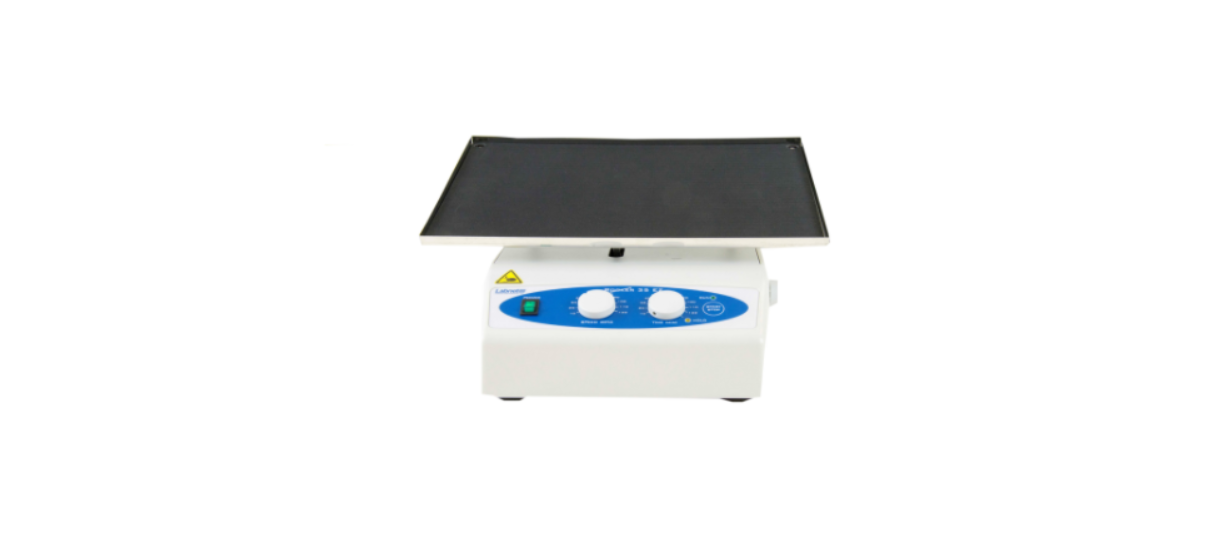

Labnet S2035-E 35 EZ Capacity Rocker User Manual
Introduction
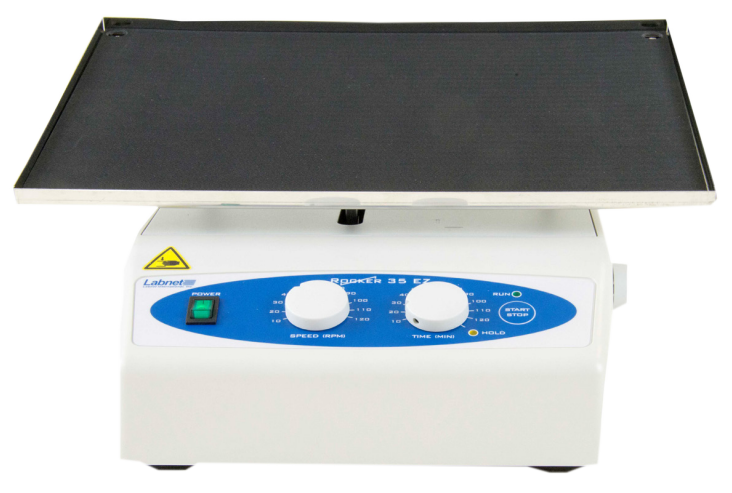
The Labnet Rocker 35 EZ is a general-purpose adjustable tilt rocker with digital time and speed controls. The tilt angle is easily adjustable without tools using the knob on the right side of the unit. This reliable, rugged unit is designed for extended use and comes with a 5-year warranty. The motor is designed to generate a rocking effect, while the electronic interface controls the RPM and Time features.
Safety Information
Do not use the rocker near water. Ensure that water does not get on the device, particularly during cleaning.
Do not rock flammable or explosive samples.
- If the unit is used in a manner not specified in this manual, then the unit may become unsafe to operate and may void the warranty.
- This product must be connected to a grounded power outlet for safe functioning.
- Use only the power cord supplied with the product.
- The equipment will not restart if the main power source is interrupted.
- The equipment will restart in cases of mechanical interruption.
- Do not expose the rocker to aggressive vapors (e.g., organic solvents).
- Do not insert any objects into the rocker (such as a screwdriver or metal rods).
- Never operate the rocker without the platform securely attached.
- Hazardous samples should be shaken only in appropriate containment vessels.
- The electrical warning symbol indicates the presence of a potential hazard that could result in electrical shock.
Installation of the Rocker
Unpacking
- Open the box and carefully remove the padding. Check that the rocker has not been visibly damaged during transportation. Keep the packing material until you ensure that the rocker works properly.
- Carefully lift the device out of the box.
- Be sure that the following information is included on the serial label located on the back of the unit: serial number, catalog number, and electrical rating.
- Check that the power cord plug has a pin configuration that matches a wall socket according to the local standard. Should any kind of damage have occurred during transportation, contact the carrier immediately. The carrier is responsible for shipping damage.
Selecting the Location
- Put the rocker on a horizontal, level, and stable surface.
- Leave enough space around the rocker for normal air circulation (6 in./15 cm minimum).
- Leave enough space around the rocker for easy access and maintenance.
- Avoid locations subject to shocks and vibrations.
- Avoid locations subject to frequent power fluctuations or power losses, as this may affect the rocker’s performance.
- Select a location that is dry and not subject to drafts or moving air from heating or air conditioning vents or air blown by other equipment.
Attaching the Power Cord
Connect the main power cord to the rocker and then connect the plug end of the cord to a grounded wall socket. Avoid lines to which powerful electric motors, refrigerators, and similar devices are connected.
Be careful when you plug the cord into a grounded wall socket. Do not touch the plug with wet hands. Do not pull the plug by the cord.
Operating Instructions
Controls

- POWER switch: Turns the rocker ON (power switch illuminates) or OFF
- SPEED knob: Sets the rocker Speed
- TIME knob: Sets the Time of the rocker
- HOLD yellow signal light: Illuminates when the rocker is set for continuous running
- START/STOP button: START or STOP rocking
- RUN green signal light: Illuminates when the rocker is running
Operation
- Turn the POWER switch ON (it should illuminate).
- Set the SPEED knob to the desired value.
- Set the TIME knob to the desired value or to HOLD – continuous operation (the yellow signal light HOLD must illuminate).
- Press the START/STOP key to start the rocking operation.
- The device automatically stops after the set time passes.
- If you want to stop the rocking operation before the set time passes, or when the TIME knob is set to HOLD, press the START/ STOP key.
NOTE: Pressing the START/STOP key during operation will reset the timer. It is possible to change the Speed during operation, but you cannot change the Time. If you want to change the Time, stop the rocker, set the desired Time, and start it again.
Do not put your fingers between the platform and the housing. Danger of mechanical injury
Adjusting the Rocker Platform Tilt Angle
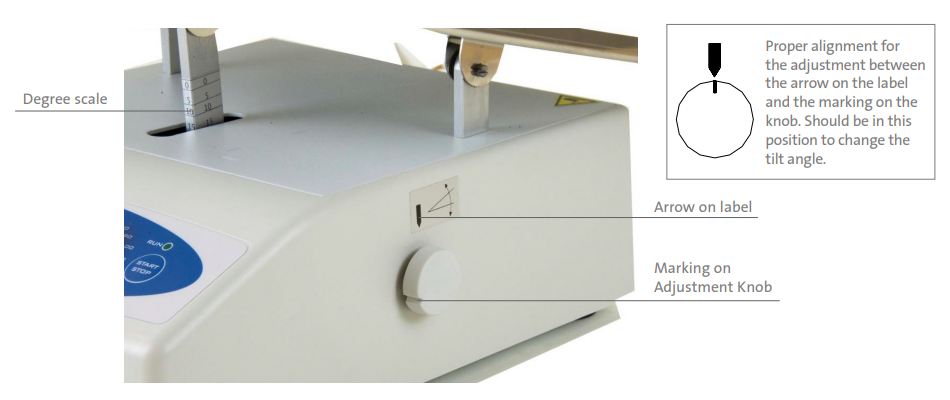
Figure 1. Adjusting the rocker platform tilt angle.
How to adjust the tilt angle
- Stop the rocker in a position described above, and unload the platform.
- Loosen the knob on the right side of the rocker housing by rotating it counterclockwise.
- Adjust the platform to the desired tilt angle by moving it up or down and looking at the degree scale (see above) on the platform drive shaft (front center under the platform).
- Tighten the knob on the right side by turning it clockwise. Test the unit without a load to ensure the platform is tight. Now the rocker is ready for operation with the new desired tilt angle.
Troubleshooting
Should you have a question about the operation of the Labnet Rocker 35 EZ or if service is required, contact your Corning representative. Do not send in a unit for service without first calling to obtain a repair authorization number. Should the unit require return to Corning for service, it should be properly packaged to avoid damage. Any damage resulting from improper packaging shall be the responsibility of the user.
| The power switch doesn’t illuminate when turned on. | Check the connection to the main power supply. Check the fuses. |
| Call for authorized service. | |
| The rocker doesn’t start when you press START/STOP button. | Check the connection to the main power supply. Check the fuses. |
| Call for authorized service. | |
| HOLD yellow signal light and RUN green signal light are blinking. | Motor overload. Reduce the load on the platform. Call for authorized service. |
Cleaning and Maintenance
Prior to any cleaning or maintenance of the device, unplug the power cord from the wall socket. Do not immerse the device or spill liquids on the device.
Specifications
The Labnet Rocker 35 EZ housing is made of plastic and a steel plate varnished with high-resistant polyurethane lacquer
| Electrical 120V 230V | 120V ± 10%, 50/60Hz, 0.3A 230V ± 10%, 50/60Hz, 0.15A |
| Motor Power | 6 W |
| Fuse | 2 x 1AT |
| RPM Regulation | Microcontroller, load independent, from 10 to 120 rpm |
| Tilt Angle | 0° to 20° from horizontal |
| Timer | 10 to 120 min., HOLD function |
| Load | Max. 11 lbs. (5 kg) |
| Dimensions (W x L x H) Single platform Double platform | 14.2 x 14.2 x 6.7 in. (360 x 360 x 170 mm) 14.2 x 14.2 x 10.2 in. (360 x 360 x 260 mm) |
| Platform Dimensions (W x L) | 14.2 x 11 in. (360 x 280 mm) |
| Weight Single platform Double platform | 14.3 lbs. (6.5 kg) 17.2 lbs. (7.8 kg) |
| Operating Conditions | 4°C to 65°C, up to 85% RH, non-condensing |
- Indoor use
- Altitude up to 2,000 meters
- Pollution Degree 2
Limited Warranty
Corning Incorporated (Corning) warrants that this product will be free from defects in material and workmanship for a period of one (1) year from the date Labnet S2035-E 35 EZ Capacity Rocker of purchase. Corning’s sole obligation shall be to repair or Labnet S2035-E 35 EZ Capacity Rocker replace, at its option, any product or part thereof that proves defective in material or workmanship within the warranty period, Labnet S2035-E 35 EZ Capacity Rocker provided the purchaser notifies Corning of any such defect. Corning is not liable for any incidental or consequential damages, commercial loss, or any other damages from the use of this product.
Corning’s Customer Service team will help arrange local service where available or coordinate a return authorization number and shipping instructions. Corning may elect for on-site service for larger equipment. Some states do not alllimitationsion on the length of implied warranties or the exclusion or limitation of incidental or consequential damages. This warranty gives you specific legal rights. You may have other rights that vary from state to state. No individual may accept Labnet S2035-E 35 EZ Capacity Rocker for, or on behalf of Corning, any other obligation of liability, or extend the period of this warranty.
Warranty/Disclaimer
Unless otherwise specified, all products are for research use or general laboratory use only.* Not intended for use in diagnostic or therapeutic procedures. Not Labnet S2035-E 35 EZ Capacity Rocker for use in humans. Corning Life Sciences makes no claims regarding the performance of these products for clinical or diagnostic applications. *For a listing of US medical devices, regulatory Labnet S2035-E 35 EZ Capacity Rocker classifications, or specific information on claims, visit www.corning.com/resources.
Equipment Disposal
Consequently, the buyer shall follow the instructions for reuse and recycling of waste electronic and electrical equipment (WEEE) provided with the products and available at www.corning.com/weee.
Customer Service
- Website: www.labnetlink.com.
- Visit: www.corning.com/lifesciencs
- Visit: www.corning.com/resources
- USA/Canada: 1.800.492.1110
- Others: +1.978.442.2200
- North America: 978.442.2200
- Australia/New Zealand: 61 427286832
FAQs
What is the Labnet S2035-E EZ Rocker used for?
It is perfect for applications including cell culture, hybridisation, staining, destaining, and washing.
What is the rocking speed range?
This rocker runs at a set pace of about 12 cycles per minute (cpm), which is ideal for steady and mild agitation.
What is the maximum load capacity?
The S2035-E is appropriate for big gel trays or several sample containers since it can hold up to 11 pounds (5 kg) of weight.
What is the tilt angle of the rocking motion?
It rocks at a constant tilt angle of ±8°, which is perfect for distributing solutions evenly without spilling.
Can I adjust the rocking speed or angle?
No, in order to simplify operation and minimise unpredictability, the EZ Rocker 35 operates at a constant speed and angle.
What are the platform dimensions?
There is enough room for several lab containers on the 14 x 12 inch (around 35 x 30 cm) platform.