

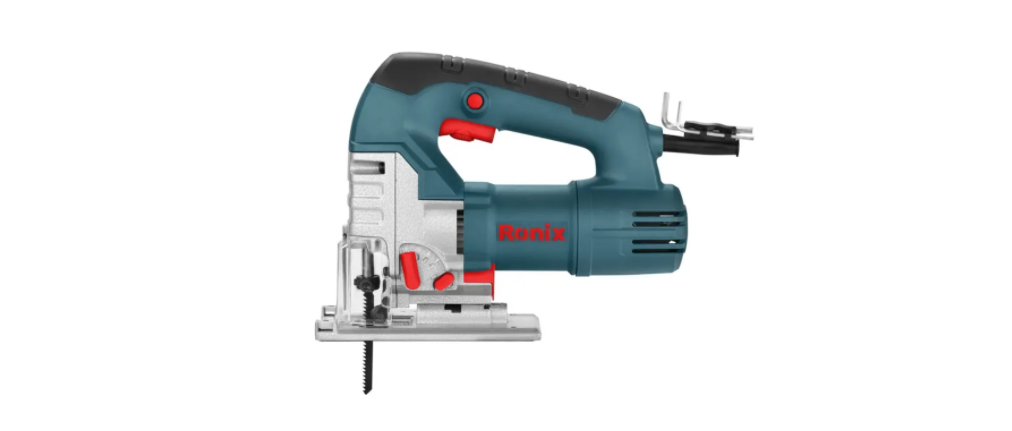

Ronix 4120 Global Electric Jigsaw

Safety Instructions
- Keep the work area clean. Cluttered areas and benches invite injuries.
- Consider the work area environment. Don’t use electric tools in damp locations.
- Keep children and visitors away. Don’t let children contact the tool or extension cord.
- All visitors should be kept away from work workplace.
- Don’t force the tool. It will do the job better and safer at the rate for which it was intended.
- Avoid unnecessary overload, which may put the operator at risk and impair the functions of the tools.
- Use the right tool. Don’t force small tool attachments to do the job of a heavy-duty tool.
- Don’t use tools for a purpose not intended; don’t use an electric circular saw for cutting logs or trees.
- Dress properly. Don’t wear loose clothes or jewelry. They can be caught in moving parts.
- Wear a protective hair covering to contain long hair.
- Don’t abuse cables. Never carry a plug by cable or yank it to disconnect it from the socket.
- Keep cable from heat, oil, and sharp edges.
- Don’t overreact.h Keep proper footing and balance at all times.
- Maintain tools with care. Keep tools sharp and clean for better and safer performance.
- Follow instructions for lubricating and changing accessories.
- Keep handles dry, clean, and free from oil and grease.
Specfications
- Model 4101
- Voltage 220-240V
- Frequency 50-60Hz
- Power 550W
- No Load Speed 0~3000RPM
- Max. Saw Capacity Wood 0°: 65mm
- Steel 0°: 6mm
- Weight 2Kg
- Accessories
- Wood Blade: 1pc
- Dust Pipe Connector: 1pc
- Wrench: 1pc
- Guide Ruler: 1pc
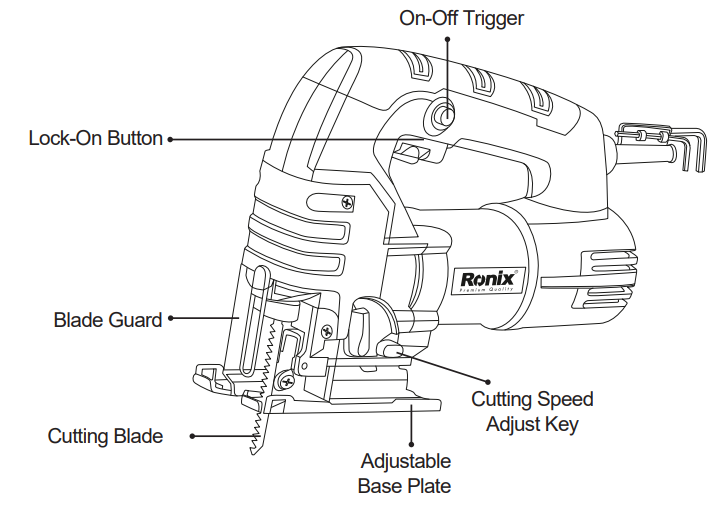
Part List
Operation
Before assembly and adjustment, always unplug the tool. This tool has an SDS system for quick and easy changing of the saw blade.

Fitting the Blade
- Insert the saw blade into the blade holder, guiding the back of the blade into the groove of the guide roller.
- Open the blade holder by fully retracting the blade latch.
- Release the blade latch; the blade is assembled well.
- Release the blade latch, fully retract the blade latch, and pull the blade out of the holder.
Setting the Pendulum
The four pendulum action settings allow optimum adaptation of cutting speed, cutting capacity, and cutting pattern to the material being sawed. The pendulum action can be adjusted in four steps with the adjustment lever. Switching is possible while the machine is running:

| Position | Cutting method | example |
| 0 | no pendulum action | Cutting mild steel, stainless steel or plastic, or wood. |
| 1 | Small pendulum action | Cutting mild steel, Aluminum, and hardwood |
| 2 | Medium pendulum action | Cutting wood and plywood, fast, cutting aluminum and mild steel |
| 3 | Large pendulum action | Fast cutting of wood and plywood |
Setting the Bevel Angle
The adjustable shoe allows cutting of left-hand or right-hand bevel angles from 0 -45°. The bevel scale has preset positions at 0° , 15° , 30° , 45°
- Slide the shoe toward the saw blade.
- Tilt the shoe and set the desired bevel angle by using the scale
- Tighten the screw with a wrench.
Switching on and Off
Note: Please make sure that the switch is off when the tool plugs into the electricity socket.
- To run the tool, pull the on / off switch forward. The device will stay on continuously.
- To turn off the device, pull the on/off switch backward.

Setting the Speed
To preset the sawing speed, turn the control dial to the desired level. The higher the rate, the higher the sawing speed. The required setting depends on the thickness and kind of material. Use high speeds for sawing soft materials such as wood. Use low speeds for sawing metal. Please refer to the information below.

| Working objective | Control dial level |
| Wood | 5-6 |
| Sheet steel | 3-6 |
| Stainless steel | 3-4 |
| Aluminum | 2-3 |
| Plastic | 1-4 |
Effective and Safe Cutting
- Drill a hole (min. 12mm) and insert the saw blade. Switch the tool on.
- For pendulum cutting. Please move the tool slightly. Sawing in metal
- Mount an appropriate saw blade.
- Proceed as described above.
- Use a cooling lubricant (cutting oil) to prevent overheating of the saw blade or the workpiece.
- Use the sawdust blower button. The sawdust conducts an adjustable stream of air to the saw blade, keeping the workpiece clear of sawdust during operation.
- Set the sawdust blower using the lever.r
- Low For working with metals, when using coolants and lubricants, and for use with dust extraction.
- Intermedia for working with wood and similar materials at low speeds.
- High For working with wood and similar materials at high speed.

Dust extraction. When the tool is used indoors for extended periods of time, use a suitable dust extractor designed to comply with applicable directives regarding dust emission. The dust extraction tube, in combination with the dust protector, helps extract the dust from the workpiece surface when connected to a suitable dust extraction system.

Service & Maintainance
- Always disconnect the tool before carrying out an Ronix 4101 550W Cordless Electric Jigsaw inspection or cleaning.
- Never use water or other liquids to clean the tool. Clean the tool by brushing it with a brush.
- Check and replace the carbon brush frequently.
- Always check if the components of the tool are fixed well.
- The parts of the tool should be without traces of cracks or damage.
- Always check if the cable is without damage.
Replacing the Carbon Brushes
- Replace the carbon brushes when the tool does not run and makes too many sparks.
- The brushes have to fall into the holders easily.
- After placing the new carbon brushes, let the tool run for some minutes so that the brushes fit better.
Repairs
- Please only use accessories and spare parts recommended by Ronix.
- If the tool malfunctions, please hand over the tool to our dealer or appointed maintenance station.
- Don’t disassemble the tool by yourself or replace the Ronix 4101 550W Cordless Electric Jigsaw parts supplied by other factories.
Customer Support
- Address: Lyoner Str. 36 60528 Frankfurt am Main
- Tel:+49 69 310 900 66
- Website: www.ronixtools.com
1 Comment
Pingback: Ronix RC-1010 10 Liter Air Compressor | Safety, Specs & FAQs