

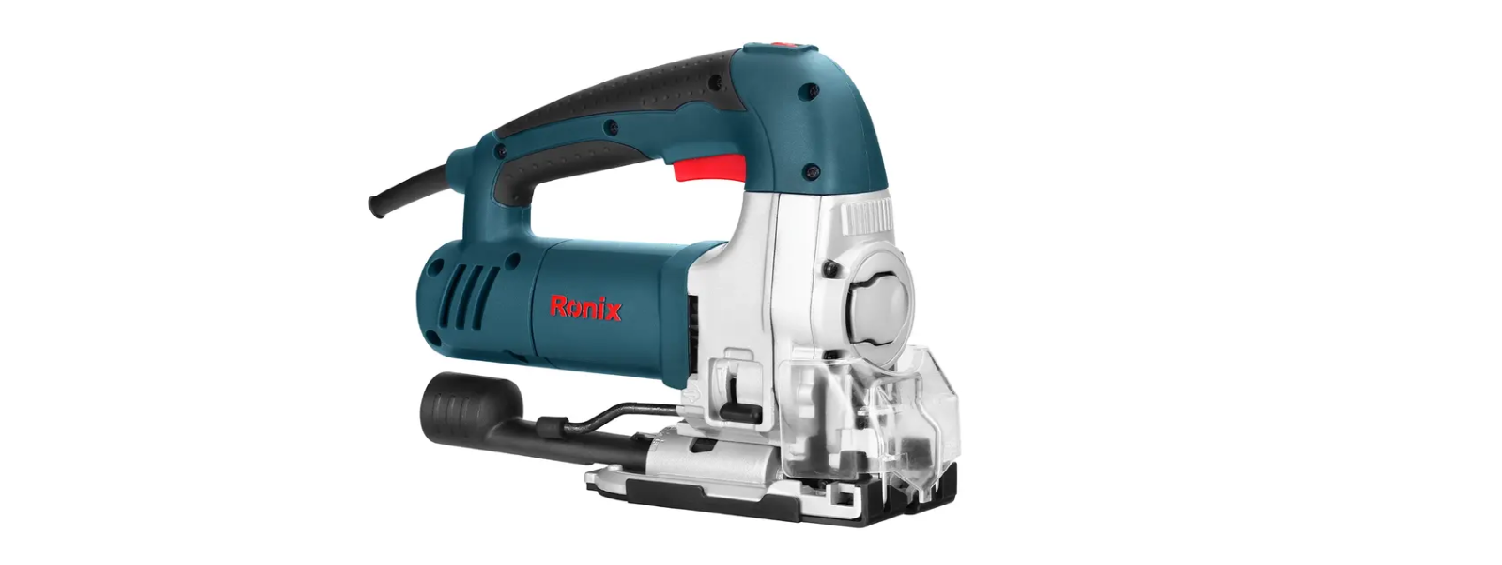

Ronix 4110 600 W Electric Jig Saw

The Ronix 4110 600 W Electric Jig Saw is designed for precise cutting of wood, metal, aluminum, and plastic, making it suitable for DIY and professional woodworking projects.
Safety Instructions
The Ronix 4110 600 W Electric Jig Saw is designed for safe and efficient cutting. Before use, always follow these safety guidelines to ensure both your protection and optimal performance of the tool.
- Keep the work area clean. Cluttered areas and benches invite injuries.
- Consider the work area environment. Don’t use electric tools in damp locations.
- Keep the work area well. In particular, no inflammable liquids or gases must be present.
- Keep children and visitors away. Don’t let children contact the tool or extension cord.
- Avoid unnecessary overload, which may put the operator at risk and impair the functions of the tool.
- Use the right tool. Don’t force small tools and attachments to do the job of a heavy-duty tool.
- Dress properly. Don’t wear loose clothes or jewelry.
- Rubber gloves and non-skid footwear are recommended when working outdoors.
- Use safety goggles. Always wear safety goggles.
- Don’t abuse cables. Never carry a tool by cable or yank it to disconnect it from the socket.
- Keep cable from heat, oil, and sharp edges.
- Don’t overreach. Keep proper footing and balance at all times.
- Maintain tools with care. Keep tools sharp and clean for better and safer performance.
- Avoid unintentional start. Don’t carry a plugged-in tool with your finger on the switch.
- Make sure the switch is off when connecting the plug to the socket.
- Stay alert. Watch what you are doing. Use common sense.
- Otherwise, it may cause considerable danger to the user.
Part List

Use
- This jigsaw is intended for the cutting of wood pieces, steel, aluminum, and plastic with different types of cutting blades. For heavy-duty metal cutting or demolition work, you might also consider using the Ronix RA-1701 45 BPM Air Hammer Kit alongside your Ronix 4110 600 W Electric Jig Saw for more efficient results.
- Before assembly and adjustment, always unplug the tool. This tool has an SDS system for quick and easy changing of the saw blade.
Fitting the Blade
- Open the blade holder by fully retracting the blade latch.
- Insert the saw blade into the blade holder, guiding the back of the blade into the groove of the guide roller.
- Release the blade latch; the blade is assembled well.
- Release the blade latch, fully retract the blade latch, and pull the blade out of the holder.
Saw Blades Instructions
The blade is supplied according to the customer’s rrequirementsabove blades may not be supplied with a tool.
| Blade Type | Application |
| Fine-Toothed Cutting Blade | For Smooth Straight Cuts |
| Coarse-Toothed Cutting Blade | For Fast Straight Cuts |
| Metal Cutting Blade | For Ferrous And Non-Ferrous Metals |
| Flush Cutting Blade | For Finishing Off Cuts Up To A Wall Or Edge |
Pendulum Action
The Ronix 4110 600 W Electric Jig Saw comes with four pendulum action settings, allowing you to adjust cutting speed, capacity, and pattern for different materials. The pendulum action can be adjusted in four steps with the adjustment lever, and switching is possible while the machine is running.

Bevel Angle
The adjustable shoe allows cutting of left-hand or right-hand bevel angles from 0 – 45°. The bevel scale has preset positions at 0° , 15° , 30° , 45°
- Release the shoe level.
- Slide the shoe toward the saw blade.
- Tilt the shoe and set the desired bevel angle by using the scale
- Tighten the shoe lever.
ON And OFF
- To run the tool, press the on/ off switch.
- For continuous operation, press and hold down the switch, press the lock-on button, and release the switch.
- To stop the tool, release the switch.
- To stop the tool from continuous operation, press the switch briefly and release it.
- Always switch off the tool when work is finished and before unplugging.

Electronic Sawing Speed
To preset the sawing speed on the Ronix 4110 600 W Electric Jig Saw, turn the control dial to the desired level. The higher the rate, the higher the sawing speed. The required setting depends on the thickness and kind of material. Using high speeds for sawing soft materials such as wood. Use low speeds for sawing metal. Please refer to the information below.
| Working Objective | Control Dial Level |
| Wood | 5-6 |
| Sheet steel | 3-6 |
| Stainless steel | 3-4 |
| Aluminum | 2-3 |
Effective & Safe Cutting
When using the Ronix 4110 600 W Electric Jig Saw, if necessary, draw a cutting line. Drill a hole (¢ Min.12mm) and introduce the saw blade. Switch the tool on. Follow the line when cutting straight. For pendulum cutting, please move the tool slightly.
- Sawing in metal. Mount an appropriate saw blade. Proceed as described above. Use a cooling lubricant (cutting oil to prevent overheating of the saw blade or the workpiece)
- Mounting the plastic ananti-scratchhoe cover. When cutting some decorative or plastic workpiece, please use the anti-scratch cover in order to protect the working surface.

- Se sawdust blower lever The sawdust conducts an adjustable stream of air to the saw blade to keep the workpiece clear of sawdust during operation.
- Set the sawdust blower using the lever to low or working with metals, when using coolants and lubricants, and for use with dust extraction.
- Intermediate: For working with wood and similar materials at low speeds. 20| Electric Jig Saw High For working with wood and similar materials at high speed.

- Dust extraction: When the tool is used indoors for extended periods of time, use a suitable dust extractor designed in compliance with applicable directives regarding dust emission.
- The dust extraction tub, in combination with the dustprotectorr helps to extract dust from the workpiece surface connected to a suitable dust extraction system.

Service & Maintainance
For proper care and maintenance of your Ronix 4110 600 W Electric Jig Saw, follow these guidelines:
- Always disconnect the tool before carrying out an inspection or cleaning.
- Never use water or other liquids to clean the tool.
- Clean the tool by User Manual |2,1, brushing it with a brush.
- Check and replace the carbon brush frequently.
- The air vent of the tool should be cleaned regularly to avoid the motor too hot due to the air vent.
- Always check if the components of the tool are fixed well.
- The parts of the tool should be without traces or damage.
- Always check if the cable is without damage.
Carbon Brushes
The carbon brush of this tool is an internal type. Please replace the carbon brush only through our maintenance service center or dealers. Don’t replace it by yourself.
- Replace the carbon brushes when the tool does not run and makes the tool sparkle.
- Carbon brushes that are worn out ( burned, broken, or shorter than 5mm) have to be replaced with new ones.
- Always replace both carbon brushes at the same time and use the brush by RONIX SERVICE.
- The brushes have to fall into the holders easily.
- After placing the new carbon brushes, let the tool run for some minutes so that the brushes fit better.
Specifcations
| Power | 600W |
| Voltage | 220-240V |
| Frequency | 50-60Hz |
| Max Capacity in Wood | 130mm |
| Max Capacity in Metal | 10mm |
| Jig Saw Blade Type | T-shank |
| Orbital Action | 4-Position |
| Bevel Cutting Capacity | 0-45° Degree |
| No-load Speed | 500-2500RPM |
| Weight | 3Kg |
| Supplied in | BMC |
| Includes | 2 Jigsaw Blades, Dust Extraction Connector, Guide rule |
Environmental Instructions
- Dispose of cardboard packaging and polyethylene (PE) bags in the appropriate containers for separate collection of municipal waste according to their description.
- If there are batteries in the device, remove them and separately return them to the collection and storage facility. Return the used device to a suitable collection and storage facility, as the hazardous substances in it may pose a threat to health and the environment.
- Waste electrical equipment is waste that contains substances harmful to humans, animals, and the environment.
- These substances can lead to contamination of the soil, water, or air, and through this they can get into the human body and lead to numerous health ailments, such a vision, hearing, and speech disorders; they can also lead to kidney, liver, and heart damage, and cause skin diseases.
- Harmful substances can also have adverse effects on the respiratory and reproductive systems and lead to cancerous changes. Consumption of plants growing on the contaminated soils, and products made from them, may risk the above-mentioned health effects.
- Do not dispose of the device in the municipal waste container!!! Service: If you wish to purchase spare parts or report any complaints, please contact directly with the seller who issued the receipt directly.
Customer Support
- Address: Lyoner Str. 36 60528 Frankfurt am Main
- Tel:+49 69 310 900 66
- Website: www.ronixtools.com
FAQs
Q: Can I use aftermarket blades?
Sure, provided that they work with the Ronix 4110 blade shank. Poor-quality blades can damage things or cut less effectively.
Q: Is the jigsaw suitable for professional use?
Yes, it is appropriate for light professional work, woodworking, and do-it-yourself projects due to its 600W motor and variable speed control.
Q: Can the jigsaw be used for professional woodworking?
Yes, it is appropriate for light to medium professional woodworking jobs as well as do-it-yourself projects due to its 600W motor, variable speed, and adjustable base.
Q: Why is there smoke or a burning smell?
Overuse of force or speed may result in overheating; the blade may be dull or unsuitable for the material. Choose the right blades and, if the motor overheats, let it rest.
Q: How do I reduce noise during operation?
Make use of sharp, material-appropriate blades. Keep the cutting speed constant while avoiding needless pressure. To lessen vibration noise, securely secure the material.
Q: How do I make long, straight cuts?
Clamp a straight edge or guide rail to the material. Make sure the blade follows the guidance by starting out slowly. After the cut is established, gradually increase the speed.
2 Comments
Pingback: Ronix 7514 Electric Stapler Nail Gun Manual | Safety Guide
Pingback: Ronix 8658 20V 8 Inch Brushless Chainsaw Manual | Full Guide