

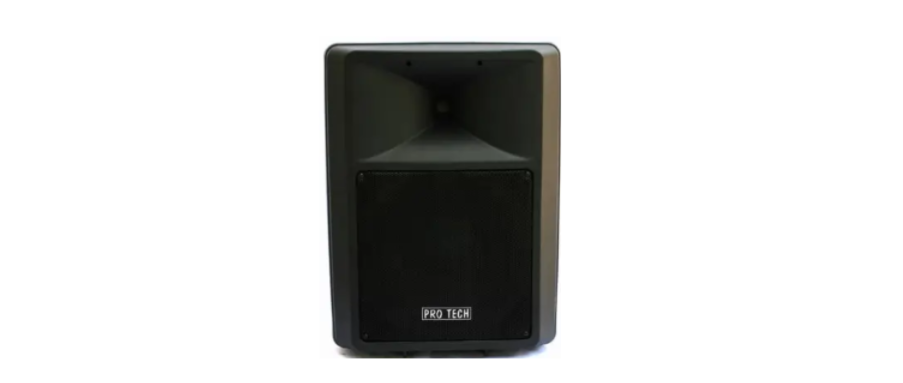

PROTECH 400N-BT 500N-BT Portable Speaker
Safety Instructions
- Heed all warnings. Follow all instructions. Do not use this apparatus near water.
- Clean only with a dry cloth. Do not block any ventilation openings.
- Install in accordance with the manufacturer’s instructions.
- Do not defeat the safety purpose of the polarized or grounding-type plug.
- A polarized plug has two blades with one wider than the other.
- A grounding-type plug has two blades and a third grounding prong.
- The wider blade or third prong is provided for your safety.
- Only use attachments/accessories specified by the manufacturer.
- Unplug this apparatus during lightning storms or when unused for long periods of time.
- Refer all servicing to qualified personnel.
- Servicing is required when the apparatus has been damaged in any way, such as power-supply cord or plug is damaged, liquid has been spilled or objects have fallen into the apparatus, the apparatus has been exposed to rain or moisture, does not operate normally, or has been dropped.
System Setup
Connection and Control
- Indicator light: Displays the input signal status in color.
- Green: Signal Power
- Yellow: Signal
- Red: Signal Limit
Bluetooth & TWS
- Used the Bluetooth Button to set up pairing with Bluetooth-capable devices, such as mobile phones, tablets, and laptops. Press the TWS button at the same time on both 2 speakers, and wait for them to pair (one TWS LED blinks slowly, the other one doesn’t blink), then connect Bluetooth-capable devices to the systems to achieve stereo sound play.
- Line input channel 1: RCA and XLR/6.3 mm jacks for connecting audio units with line level output (e.g., mixer, CD player, music instrument).
Feed-through output LINK
- Balanced XLR jack to pass either the input signal of channel 2 or the master signal to another device, e.g., a further active speaker system. If you are looking for a different type of audio system, you can also check the Bose ShowTime SK12 Surface Mount Loudspeaker User Manual, which is designed for fixed installations and wall-mounted audio setups.
- Output selector switch CH 1/MIXED: Determines the signal at the link output. Switchh disengaged = Output of the input signal of channel 1. Switch engaged = Output of the master signal.
- Mic/line input channel 2: Combo input (XLR/6.3 mm jack) for connecting microphones or audio units with line level output (e.g, mixer, CD player, music instrument). Fan: Do not cover to avoid overheating.
- DSP PRESET switch: To select various equalizer presets: FLAT = neutral frequency response, MUSIC = low and high frequency boost, LOW CUT = low and high frequency cut, mid boost.
Level control CH 1 VOL
- Adjust the level of channel 1. D Input selector switch Bluetooth/LINE: Switches the signal input of channel 1 between Bluetooth and line input. Switch disengaged = Bluetooth input. Switchengaged = Line 1 input.
- Level control CH 2 VOL: Adjust the level of channel 2.
- Input selector switch MIC 2 / LINE 2: Switches the signal input of channel 2 between line and microphone input.
- Switch disengaged = microphone input.
- Switch engaged = line input.
- Power switch: Turns power to the speaker system on and off.
- Power input with fuse holder: Used to plug in the supplied power cord. Only replace the fuse when the device is disconnected from the mains. Only use fuses of the same rating and power. The correct fuse value is specified on the rear panel.\
Overview/Dimensions

Specifications

One-Year Limited Warranty
Should your PROTECH product prove defective within one year from the date of purchase, contact PROTECH’s Customer Support Team with the serial number and proof of purchase to make a warranty claim.
Under this warranty, PROTECH will repair or replace any parts found defective with new or remanufactured parts or exchange the defective product with a new, refurbished, or remanufactured product at our discretion.
This warranty is not transferable. After the expiration of the warranty, the cost of labor and parts will be the responsibility PROTECH CDM-600BW Freestanding Refrigerator of the original owner.
Please package the product carefully in its original packaging to avoid damage in transit. PROTECH is not responsible for damage resulting from shipper mishandling or improper packaging. Please retain the original box and packaging materials.
Warranty Does Not Cover
- Acts of God, such as fire, flood, hurricanes, earthquakes, and tornadoes.
- Improper power supply, such as a power surge, low voltage, defective household wiring, or inadequate fuses.
- Damage, accidental or otherwise, to the product while in the possession of a consumer, not caused by a defect in material or workmanship.
- Damage caused by consumer misuse, PROTECH CDM-600BW Freestanding Refrigerator tampering, lack of maintenance, or failure to follow the care and special handling provisions in the instructions.
- Damage to the finish of the case or other appearance parts caused by wear.
- Damage caused by repairs or alterations to the product by anyone other than authorized by the
manufacturer. - Removal, Replacement, Packaging, Freight, and Insurance costs for the warranty service.
- Products sold AS IS or from an unauthorized reseller.
- Products that have had their serial numbers removed or defaced.
Customer Support
- Email: support@whynter.com
- Website: WWW.WHYNTER.COM
- Tel: 800-443-6153