

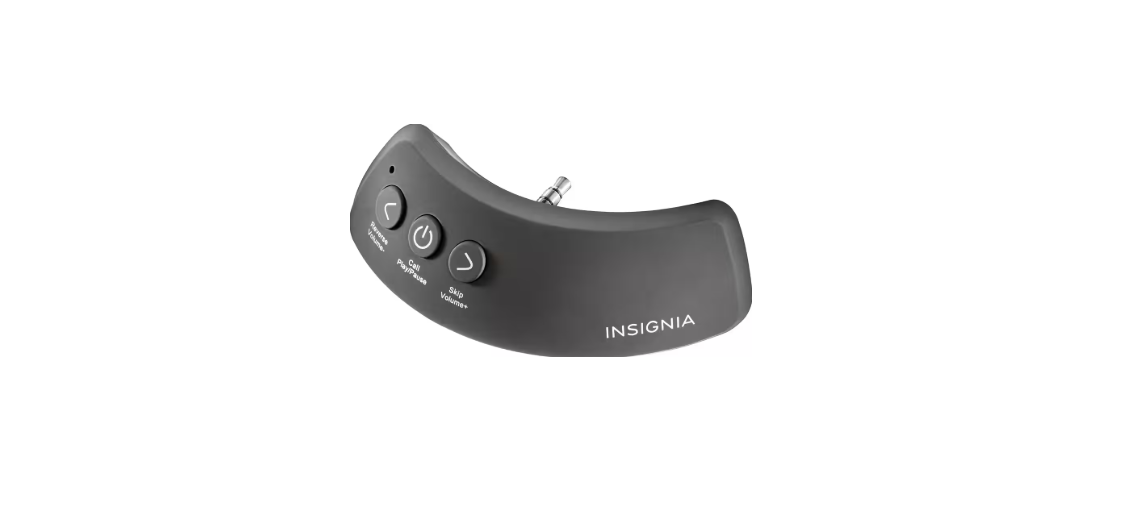

Insignia NS-CAHBTAD Bluetooth Receiver

Package Content
- Bluetooth receiver
- Micro USB cable
- Foam spacer
- Quick Setup Guide
Features

- 3.5 mm headphone plug
- Microphone
- Micro USB charging port
- Volume up/Next
- Multi-function button (MFB): Power on/off, play, pause, call
- Volume down/Previous
- LED indicator
Charging
Fully charge your receiver before you use it for the first time. When the red LED starts to blink during use, the battery is low and needs charging.
- Plug the micro USB end (small plug) of the USB cable into the micro USB port on your receiver.
- Plug the USB end (large plug) of the cable into an active USB port or any USB charger. The LED lights are ed while charging. When fully charged, the LED turns off. Charging may take up to three hours.

- When charging is complete, unplug the USB cable from your receiver. Your receiver is ready to use.
Pairing
- With your receiver turned off, press and hold the MFB until the LED starts flashing blue. (about three to five seconds). Your receiver turns on and enters pairing mode.
- Turn on the Bluetooth feature on your phone or device, then search for and click your receiver (NS CAHBTAD). See the instructions that came with your Bluetooth device for information about pairing.
- If you are asked for a password, enter 0000. When pairing is complete, the LED lights turn solid blue
Reconnecting to Device
- Turn on your receiver. It automatically connects to the last connected device.
- If your receiver does not automatically reconnect, reselect NS-CAHBTAD on your Bluetooth device.
- If you want to pair with another device, turn off the Bluetooth feature on the connected device, then repeat the pairing procedure to connect to a new device
- Note: If your receiver is not paired to a Bluetooth device for three minutes, it automatically turns off.
Using the Device
- Press and hold the MFB for three to five seconds to turn on your receiver. The LED lights solid blue when your receiver is connected to a Bluetooth device (for example, your phone).
- Insert the 3.5 mm headphone plug into the 3.5 mm audio jack on your headphones. Make sure that the plug is fully inserted.

- To turn off your receiver, press and hold the MFB for two seconds
Adjusting the Fit
If there is a large gap between your receiver and headphones when you plug in your receiver, use the provided foam spacer to fill the gap.
- If your receiver is plugged into headphones, unplug it.
- Peel off the adhesive film on the foam spacer, then attach the foam spacer to your receiver.

- Plug your receiver back into the headphones.
Plug Your Receiver Back
- To play or pause audio, press the MFB once.
- To increase the volume, press the button once.
- To skip to the next track, press and hold.
- To skip to the previous track, press and hold
Making A Call
- To make a call, use your phone’s controls, then select your receiver as the audio source.
- To answer an incoming call, press the MFB
- To reject an incoming call, press and hold the MFB
- To reject an incoming call, press and hold the MFB
Troubleshooting

FCC Statements
Changes or modifications not expressly approved by the party responsible for compliance could void the user’s authority to operate this equipment.
This equipment generates, uses, and can radiate radio frequency energy and, if not installed and used in accordance with the instructions, may cause harmful interference to radio communications. However, there is no guarantee that interference will not occur in a particular installation.
- Reorient or relocate the receiving antenna.
- Increase the separation between the equipment and receiver.
- Connect the equipment to an outlet on a circuit different from that to which the receiver is connected.
- Consult the dealer or an experienced radio/TV technician for help.
One Year Warranty
Definitions
The Distributor* of Insignia-branded products warrants to you, the original purchaser of this new Insignia-branded product (“Product”), that the Product shall be free of defects in the original manufacturer of the material or workmanship for one (1) year from the date of your purchase of the Product (“Warranty Period”).
How to obtain warranty service?
If you purchased the Product at a Best Buy retail store location or from a Best Buy online website, please take your original receipt and the Product to any Best Buy store. Make sure that you place the Product in its original packaging or packaging that provides the same amount of protection as the original packaging. To obtain warranty service, in the United States and Canada, call 1-877-467-4289. Call agents may diagnose and correct the issue over the phone.
Where is the warranty valid?
This warranty is valid only in the United States and Canada at Best Buy branded retail stores or websites to the original purchaser of the product in the country where the original purchase was made.
Customer Service
- Call: 877-467-4289 (U.S. and Canada) or 01-800-926-3000 (Mexico)
- Website: www.insigniaproducts.com
INSIGNIA is a trademark of Best Buy and its affiliated companies. Distributed by Best Buy Purchasing, LLC 7601 Penn Ave South, Richfield, MN 55423 U.S.A. ©2020 Best Buy. All rights reserved.
FAQs
Q: What is the Insignia NS-CAHBTAD Bluetooth Receiver used for?
You may play music wirelessly from your computer, tablet, or smartphone by adding Bluetooth streaming capability to non-Bluetooth devices, like wired headphones, automotive audio systems, or home stereos, with the Insignia NS-CAHBTAD.
Q: Can I use it in my car?
Indeed! Using the supplied 3.5mm cable, connect the receiver to your car’s AUX input. Then, power it using a USB port or a 12V USB converter.
Q: Does it support both transmitting and receiving Bluetooth signals?
No, the NS-CAHBTAD is not a transmitter; it is merely a Bluetooth receiver. It is unable to send audio to Bluetooth speakers or headphones, but it can receive music from Bluetooth-enabled devices.
Q: How long does the battery last?
The internal rechargeable battery can play music for up to eight hours when fully charged. Depending on usage and volume level, actual performance may change.
Q: How do I charge the receiver?
To charge, use the accompanying micro-USB charging cable and plug it into a USB power source, such as a computer, USB wall adapter, or car charger.
Q: Can I pair it with more than one device at the same time?
Although it can only connect to one device at a time, the NS-CAHBTAD can remember up to two linked devices. Disconnect the old device and manually attach the new one to make the changeover.
Q: Does it support high-quality audio codecs like aptX?
Yes, the NS-CAHBTAD supports SBC and aptX codecs for better sound quality and lower latency, depending on your phone or Bluetooth source device.
Q: How far is the Bluetooth range?
In an open area, the wireless range of the receiver is up to 33 feet (10 meters).