



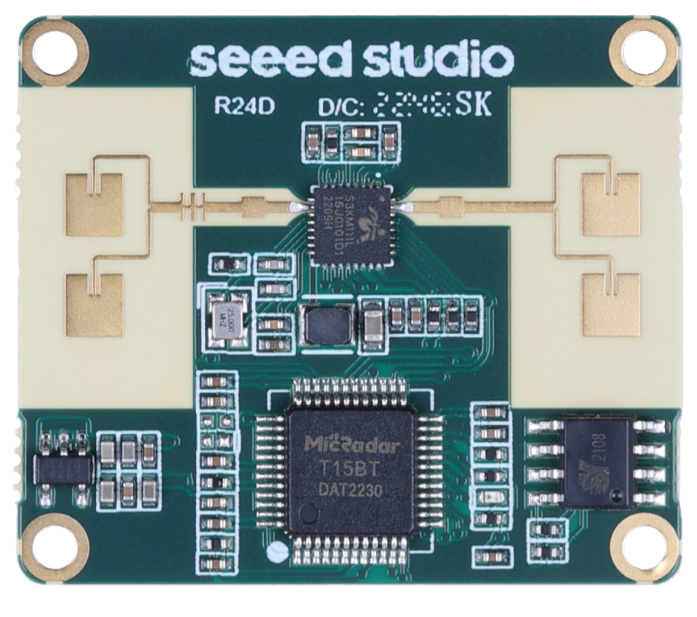
Seeed Studio MR24HPC1 Human Static Presence Module
Introduction
The Seeed Studio MR24HPC1 Human Static Presence Module is used in many real-life scenarios, and the following guide provides commonly used settings and reference values. When using them for the first time, you can set them based on the reference values. If the effect is not good, you can flexibly adjust them based on the parameter introduction in the User Manual. This template will be divided into two parts: one is the parameter setting under Standard mode, and the other is the parameter setting under Custom mode.
For the vast majority of users, the standard mode functions are sufficient. If you are also interested in monitoring sudden movements or fall detection in addition to static presence, check out the MR60FDA1 Fall Detection Pro Module from Seeed Studio. We recommend that you first try using the standard mode, and if the desired effect cannot be achieved, consider using the custom mode. Under custom mode, the parameter settings require the user to send a command to the radar to enable the custom mode function before they can be set. After sending the command to end the setting to the radar, it should be saved and take effect.
Parameter Setting
Bathroom Scene
When using the Seeed Studio MR24HPC1 Human Static Presence Module in a bathroom setup, the room area is typically between 3.5–6㎡. There may be a washbasin, glass door, exhaust fan, and toilet, with the exhaust fan acting as the main interference source. For best performance, install the sensor at the top center of the bathroom. Select “Bathroom Mode” and set sensitivity to “1”.
The format of the command to be sent is (in hexadecimal): 53 59 05 07 00 01 03 BC 54 43 53 59 05 08 00 01 01 BB 54 43 Reason: Due to the small size of the bathroom, the bathroom mode with sensitivity 1 can be selected (the radar wave cannot penetrate solid walls, but can penetrate glass, partition walls, etc.). The radar should be at least 0.5m away from the exhaust fan.
Bedroom Scene
Environmental description: When using the Seeed Studio MR24HPC1 Human Static Presence Module in a bedroom, the room is approximately 20 ㎡ in size and contains facilities such as air conditioning, fans, and a bed. Interference sources in the room include air conditioning and fans. The radar cannot accurately distinguish between humans and pets, so pets may also interfere with the normal detection of the radar. Sensor installation suggestion:
It is recommended to install the radar at a central position in the bedroom, preferably slightly closer to the bed, to ensure coverage of the sleeping area. Setting Template: Select “Area Detection Mode” for scene mode and set sensitivity to “2”. The format of the command to be sent is (in hexadecimal): 53 59 05 07 00 01 04 BD 54 43 53 59 05 08 00 01 02 BC 54 .43
Reason: If the dynamic detection range is too large/small, you can correspondingly set the Bathroom/Bedroom Mode. If the static detection range is too large/small, you can correspondingly set the sensitivity to 1/sensitivity 3. (Radar waves cannot penetrate solid walls, but can penetrate glass, partition walls, etc.)
Bathroom
When using the Seeed Studio MR24HPC1 Human Static Presence Module in a bathroom, the environmental interference factors that cannot be controlled by the standard mode include: In the Bathroom Scene, there may be facilities such as exhaust fans, glass doors, and curtains, and the potential sources of interference may include slight vibrations caused by the exhaust fan or slight swinging of metal rings on the curtain. Sensor installation suggestion: Suggested installation is to place the radar sensor at the top and center of the bathroom, and slightly away from the exhaust fan to reduce interference
Setting suggestion
| Parameter value settings | Parameter value range | Instruction |
| Existence judgment threshold: 33 (Default)
53 59 08 08 00 01 05 C2 54 43 |
0~250 | When there are micro-interference sources (such as vibration from exhaust fans) that prevent entering an unmanned state, it is possible to increase the existing judgment threshold appropriately. |
| Motion trigger threshold: 4 (Default)
53 59 08 09 00 01 03 C1 54 43 |
0~250 | When there are motion interference sources that prevent entering a static state, it is possible to increase the |
| MotioMotioner threshold appropriately. | ||
| Existence perception boundary: 2.5m
53 59 08 0A 00 01 05 C4 54 43 |
0.5m~5m | The detection range of static/dynamic can be adjusted flexibly according to the actual application environment to reduce interference (e.g., human interference beyond the boundary of |
| Motion Trigger Boundary: 2.5m
53 59 08 0B 00 01 05 C5 54 43 |
0.5m~5m | 2.5 meters from the room’s motion
trigger). |
| Time for entering no person state: 30s
53 59 08 0E 00 04 00 00 75 30 6B 54 43 |
0~3600s | The time to enter the unmanned state can be adjusted flexibly according to actual needs. |
Bedroom
Interference sources may exist, such as the operation of fans, air conditioners, and floor cleaning robots. Radar cannot accurately distinguish between humans and pets, so pets may also become interference sources and cause false alarms for the radar.
Bedroom Setting suggestion
| Parameter value settings | Parameter value range | Instruction |
| Existence judgment threshold: 33 (Default)
53 59 08 08 00 01 05 C2 54 43 |
0~250 | When there are micro-interference sources (such as vibration from exhaust fans) that prevent entering an unmanned state, it is possible to |
| Increase the existing judgment threshold appropriately. | ||
| Motion trigger threshold: 4 (Default)
53 59 08 09 00 01 03 C1 54 43 |
0~250 | When there are motion interference sources that prevent entering a static state, it is possible to increase the motion trigger threshold appropriately. |
| Existence perception boundary: 3m
53 59 08 0A 00 01 06 C5 54 43 |
0.5m~5m | The detection range of static/dynamic can be adjusted flexibly according to the actual application environment to reduce interference (e.g., human interference beyond the boundary of |
| Motion Trigger Boundary: 3m
53 59 08 0B 00 01 06 C6 54 43 |
0.5m~5m | 2.5 meters from the room’s motion
trigger). |
| Time for entering no person state: 30s
53 59 08 0E 00 04 00 00 75 30 6B 54 43 |
0~3600s | The time to enter the unmanned state can be adjusted flexibly according to actual needs. |
Warehouse and Logistics
The stationary metal storage shelves will not interfere with the radar’s detection performance, while moving loading and unloading forklifts and pedestrian traffic can trigger the radar to detect the presence of people as usual.
Washroom/Logistics Setting suggestion
| Parameter value settings | Parameter value range | Instruction |
| Existence judgment threshold: 33 (Default)
53 59 08 08 00 01 05 C2 54 43 |
0~250 | When there are micro-interference sources (such as vibration from exhaust fans) that prevent entering an unmanned state, it is possible to increase the existing judgment threshold appropriately. |
| Motion trigger threshold: 4 (Default)
53 59 08 09 00 01 03 C1 54 43 |
0~250 | When there are motion interference sources that prevent entering a static state, it is possible to increase the motion trigger threshold appropriately. |
| Existence perception boundary: 5m
53 59 08 0A 00 01 0A C9 54 43 |
0.5m~5m | The detection range of static/dynamic can be adjusted flexibly according to the actual application environment to reduce interference (e.g., human interference beyond the boundary of |
| Motion Trigger Boundary: 5m
53 59 08 0B 00 01 0A CA 54 43 |
0.5m~5m | 2.5 meters from the room’s motion
trigger). |
| Time for entering no person state: 30s
53 59 08 0E 00 04 00 00 75 30 6B 54 43 |
0~3600s | The time to enter the unmanned state can be adjusted flexibly according to actual needs. |
Customer Support
- Website: www.seeedstudio.com
- Ph: +86-0755-86095676
2008-2025 Seeed Technology Co., Ltd. All rights reserved.
1 Comment
Pingback: Seeed Studio SenseCAP Indicator 4-inch Touch Screen | Full Guide