Close Menu
onyxguides.comonyxguides.com

    Subscribe to Updates

    Get the latest creative news from FooBar about art, design and business.

    What's Hot

    Harman Kardan OMNI BAR Plus Bluetooth Soundbar User Manual

    January 14, 2026

    Aurzen D1R Roku TV Bluetooth Smart Projector User Manual

    January 13, 2026

    Aurzen EAZZE D1 MAX 1000 ANSI Lumens Projector User Manual

    January 12, 2026
    Facebook X (Twitter) Instagram
    onyxguides.comonyxguides.com
    Facebook X (Twitter) Instagram Pinterest
    • Home
    • About us
    • Terms & Conditions
    • Privacy Policy
    • FAQs
    • Contact us
    onyxguides.comonyxguides.com
    Home » Seeed Studio MR60FDA1 Fall Detection Pro Module User Guide

    Other

    Seeed Studio MR60FDA1 Fall Detection Pro Module User Guide
    By Gabriel SmithNovember 18, 2025Updated:November 20, 20253 Comments6 Mins Read
    Facebook Twitter Pinterest LinkedIn Tumblr WhatsApp Telegram Email
    Seeed Studio MR60FDA1 Fall Detection Pro Module
    Share
    Facebook Twitter LinkedIn Pinterest Email

    Seeed logoSeeed Studio MR60FDA1 Fall Detection Pro Module

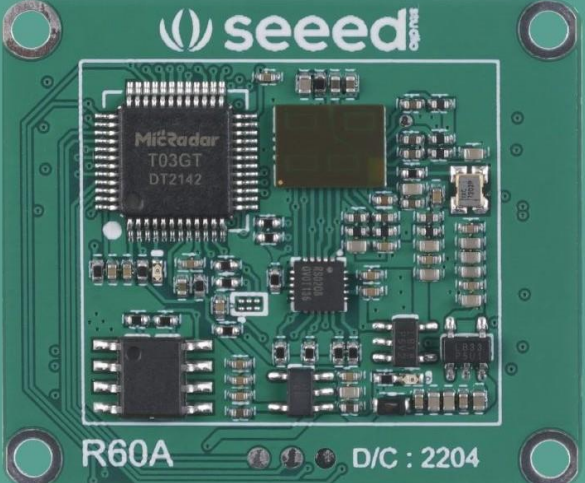
    60GHz radar module showing PCB layout and antenna structure

    Introduction

    • The Seeed Studio MR60FDA1 Fall Detection Pro Module follows hardware circuit reference design, radar antenna, and housing layout requirements, helping distinguish interference and supporting multi-functional standard UART protocol output.
    • The MR60FDA1 Fall Detection Pro Module is a self-contained space sensing sensor consisting of an RF antenna, radar chip, and high-speed MCU.
    • The radar is a self-contained sensor with a combination of an RF antenna, a radar chip, and a high-speed main frequency MCU.

    Working Principle
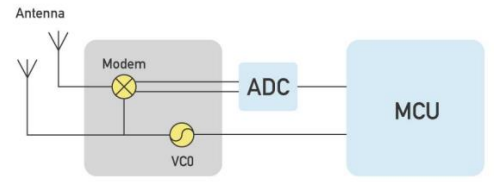
    Top view of the sensor’s RF antenna and circuit design

    The Seeed Studio MR60FDA1 Fall Detection Pro Module radar transmits a 60 GHz millimeter wave signal, and the target reflects the electromagnetic wave signal, which is then demodulated from the transmitted signal. The signal is demodulated, amplified, filtered, processed by the ADC, and further handled to obtain the echo demodulation signal data. In the MCU unit of the MR60FDA1 Fall Detection Pro Module, the amplitude, frequency, phase, and other characteristics of the echo signal are decoded, and the target parameters—such as sleep quality, respiration, tossing, and body movement—are measured and evaluated accurately.

    For users who also need heartbeat monitoring capabilities, see the Seeed Studio MR60BHA1 Heartbeat Detection Sensor User Guide for a detailed setup and operating instructions.

    Hardware Design Considerations

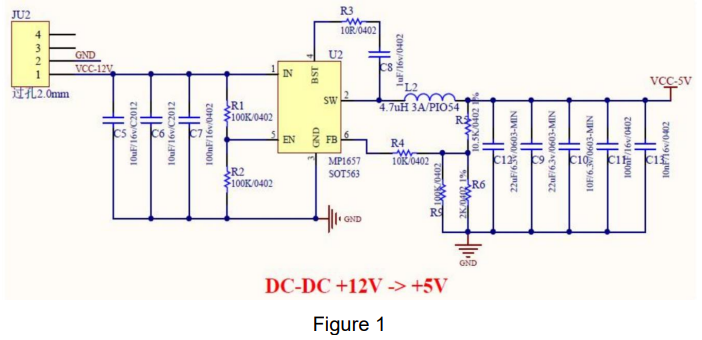
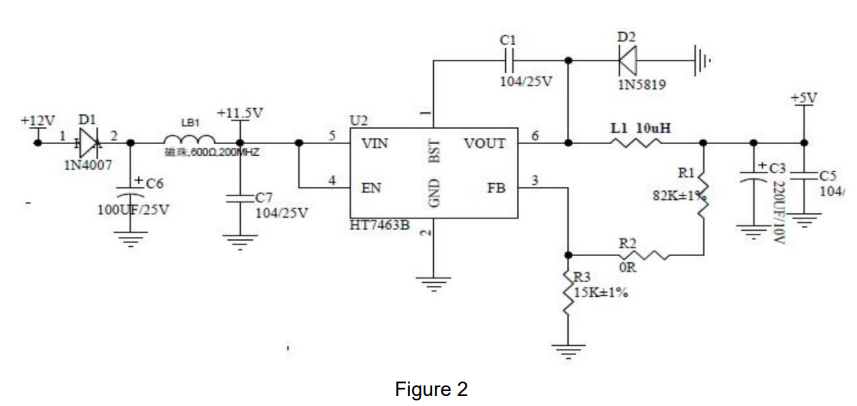
    The rated supply voltage of the radar needs to meet 4.9 – 6V, and the rated current needs to be 200mA or more. Input is required. The power supply is designed to have a ripple of ≤ 100mv.

    Power supply can refer to the following circuit design

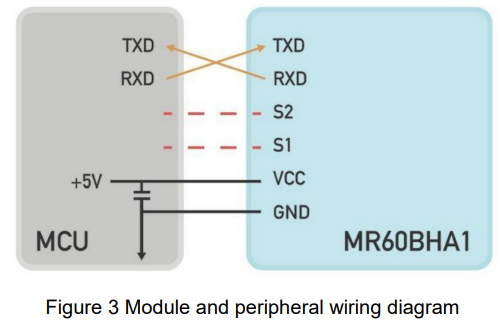
    Wiring diagram illustrating voltage input and connection pinsRecommended power supply circuit with stable ripple designWiring Diagram

    Housing and antenna spacing guidelines for accurate sensing performance

    Antenna and housing layout requirements

    • PCBA: Need to keep the radar patch height ≥ 1mm higher than other devices.. Housing structure: need to keep the radar antenna surface and the housing surface at a distance of 2 – 5mm distance
    • Housing detection surface: non-metallic housing, needs to be straight to avoid bending surface affecting the performance of the whole sweep surface area.
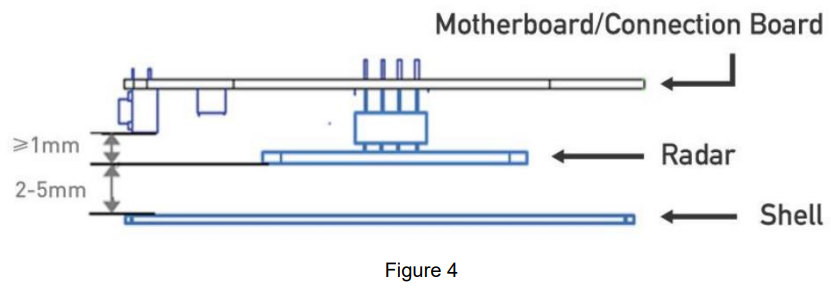
    Housing and antenna spacing guidelines for accurate sensing performance

    Electrostatic protection

    Radar products, such as the Seeed Studio MR60FDA1 Fall Detection Pro Module, have electrostatic-sensitive circuitry inside and are vulnerable to electrostatic hazards. Therefore, they need to be carefully handled during transport, storage, work, and other handling processes to ensure proper electrostatic protection.

    It is essential to follow strict precautions when dealing with the MR60FDA1 Fall Detection Pro Module. Do not touch or grab the radar module antenna surface and connector pins; only handle the corners. When handling the radar sensor, wearing anti-static gloves is strongly recommended to prevent damage.

    Function Description

    Function Status change time/function explanation
    DP1: occupied/unoccupiedFrom unoccupied to occupied, report within 0.5s
    From occupied to unoccupied, report within 30 s
    DP2: Fall AlarmInstantly report when fall alarm conditions are met
    DP3: Stationary residence alarmAbnormal hold stationary for 5 minutes, alarm

    Protocol Description

    • Interface level: TTL
    • Baud rate: 115200bps
    • Stop bit: 1
    • Data bits: 8
    • Parity check: None
    Communication ,,comma,,nd and parameter definition
    • Frame structure definition and description
    • Definition of frame structure
    Frame header Control word Command word Length identifier Data Checksum End of frame
    0x53 0x59ControlCommandLenth_HLenth_LDataSum0x54 0x43
    2 Byte1 Byte1 Byte1 Byte1 Byten Byte1 Byte2 Byte

    Description of the frame structure

    • Frame header: 2 Byte, fixed to 0x53,0x59;
    • Control word: 1 Byte
      • (0x01 – heartbeat packet identification, 0x02 – product information, 0x03 – OTA upgrade, 0x05 – operation status, 0x07 – radar detection range information, 0x80 – human presence, 0x81 – breath detection, 0x84 – sleep monitoring, 0x85 – heart rate monitoring)
    • Command word: 1 Byte (to identify the current data content)
    • Length identification: 2 bytes, equal to the specific byte length of the data
    • Data: n Byte, defined according to the actual function
    • Checksum: 1 Byte. (Calculation method of checksum: “frame header + control word + command word + length identifier + data” summed to the lower eight bits)
    • End of frame: 2Byte, fixed to 0X54,0X43;

    Address Assignment and Data Information

    Function Category Function Description Transfer direction Frame header Control word Command word Length

    Identification

    Data Checksum field End of frame Note
    System FunctionsHeartbeat Pack ReportReport0x53 0x590x010x010x000x010x0Fsum0x54 0x43Report per minute
    Module ResetSend0x53 0x590x010x020x000x010x0Fsum0x54 0x43
    Response0x53 0x590x010x020x000x010x0Fsum0x54 0x43

    About the calculation of the check digit

    Let’s take the command to send a human presence information query as an example. The data construction for the presence information query, confirmed by the protocol table above, is

    • Frame header: 0x53 0x59
    • Control word: 0x80
    • Command word: 0x81
    • Length identifier: 0x00 0x01
    • Data: 0x0F
    • Checksum: 1Byte (SUM)
    • End of frame: 0x54 0x43

    Combined into a complete instruction as follows

    • 53 59 80 81 00 01 0F sum 54 43
    • Check digit sum : 0x53 + 0x59 + 0x80 + 0x81 + 0x01 + 0x0F (0x53 + 0x59 + 0x80 + 0x81 + 0x00 + 0x01 + 0x0F) = 0x01BD
    • The lower byte is sum = 0xBD

    So the complete existence information query instruction is: 53 59 80 81 00 01 0F BD 54

    Customer Support

    • Website: www.seeedstudio.com
    • Ph: +86-0755-86095676

    2008-2025 Seeed Technology Co., Ltd. All rights reserved.

    FAQs

    Q: What is the MR60FDA1 module?

    It is perfect for safety systems, healthcare monitoring, and senior care because it combines a gyroscope, accelerometer, and AI algorithms to detect abrupt changes in motion and orientation that point to a fall.

    Q: Is the module safe to wear?

    Indeed. The MR60FDA1 is non-invasive, low-power, and safe for long-term use.

    Q: Does orientation matter when the module is worn?

    Consistent alignment is crucial because the module detects changes in orientation with respect to gravity.  To ensure constant algorithm accuracy, mark the “top” or forward-facing side. For sideways or backward falls, misalignment may decrease the reliability of detection.

    Q: How do I integrate alerts with IoT or mobile apps?

    Attach a microcontroller (such as an Arduino, ESP32, or Raspberry Pi) to the DO output. For real-time emergency response, combine with automated alarms, SMS, or push notifications.

    Q: How do I reduce false positives in active users?

    If the module has programmable thresholds, you can change the sensitivity settings using software. To ignore brief spikes, use filters or debounce logic in your microcontroller. For the most stable motion reference, mount the module at the chest or waist. Steer clear of loose apparel or accessories that could shake on their own.

    Q: Can the module detect faint or slow falls?

    To improve dependability when monitoring elderly or people with limited mobility, think about integrating fall detection with a motion sensor or heartbeat.

    Arduino Fall Sensor Elderly Care Sensor ESP32 Fall Detection Fall Detection Module Fall Detection Sensor Health Monitoring Module IoT Fall Detection MR60FDA1 Integration MR60FDA1 Manual OnyxGuides Manual Seeed Studio MR60FDA1 User Manual
    Share. Facebook Twitter Pinterest LinkedIn Tumblr Email
    Gabriel Smith

      Related Posts

      Aurzen D1R Roku TV Bluetooth Smart Projector User Manual

      January 13, 2026

      HAPPRUN KC7 Pro 2500 ANSI Lumens Projector User Manual

      January 11, 2026

      Kogan HSD01 8GB, 128GB Full HD Wi-Fi Speakers User Manual

      January 10, 2026

      Aurzen EAZZE D1R Cube Roku TV Smart Projector User Guide

      January 9, 2026

      Devialet Dione White Dolby Atmos Soundbar User Manual

      January 7, 2026

      Tribit BTH80 CallElite 81 Wireless Headset User Guide

      January 4, 2026
      View 3 Comments

      3 Comments

      1. Pingback: Seeed Studio MT7688 BG96 Module Setup & IoT Guide

      2. Pingback: Seeed Studio MR24HPC1 Human Static Presence Module

      3. Pingback: Seeed Studio MR60BHA1 Heartbeat Detection Sensor User Guide

      Don't Miss
      Harman Kardon

      Harman Kardan OMNI BAR Plus Bluetooth Soundbar User Manual

      January 14, 2026

      Harman Kardon OMNI BAR Plus Bluetooth Soundbar Introduction We’ve created a system that harnesses the…

      Aurzen D1R Roku TV Bluetooth Smart Projector User Manual

      January 13, 2026

      Aurzen EAZZE D1 MAX 1000 ANSI Lumens Projector User Manual

      January 12, 2026

      HAPPRUN KC7 Pro 2500 ANSI Lumens Projector User Manual

      January 11, 2026
      Stay In Touch
      • Facebook
      • Twitter
      • Pinterest
      • Instagram
      • YouTube
      • Vimeo

      Subscribe to Updates

      Subscribe to Updates

      Follow us

      Facebook X-twitter Instagram Pinterest

      © 2025 All rights reserved Onyx Guide.