

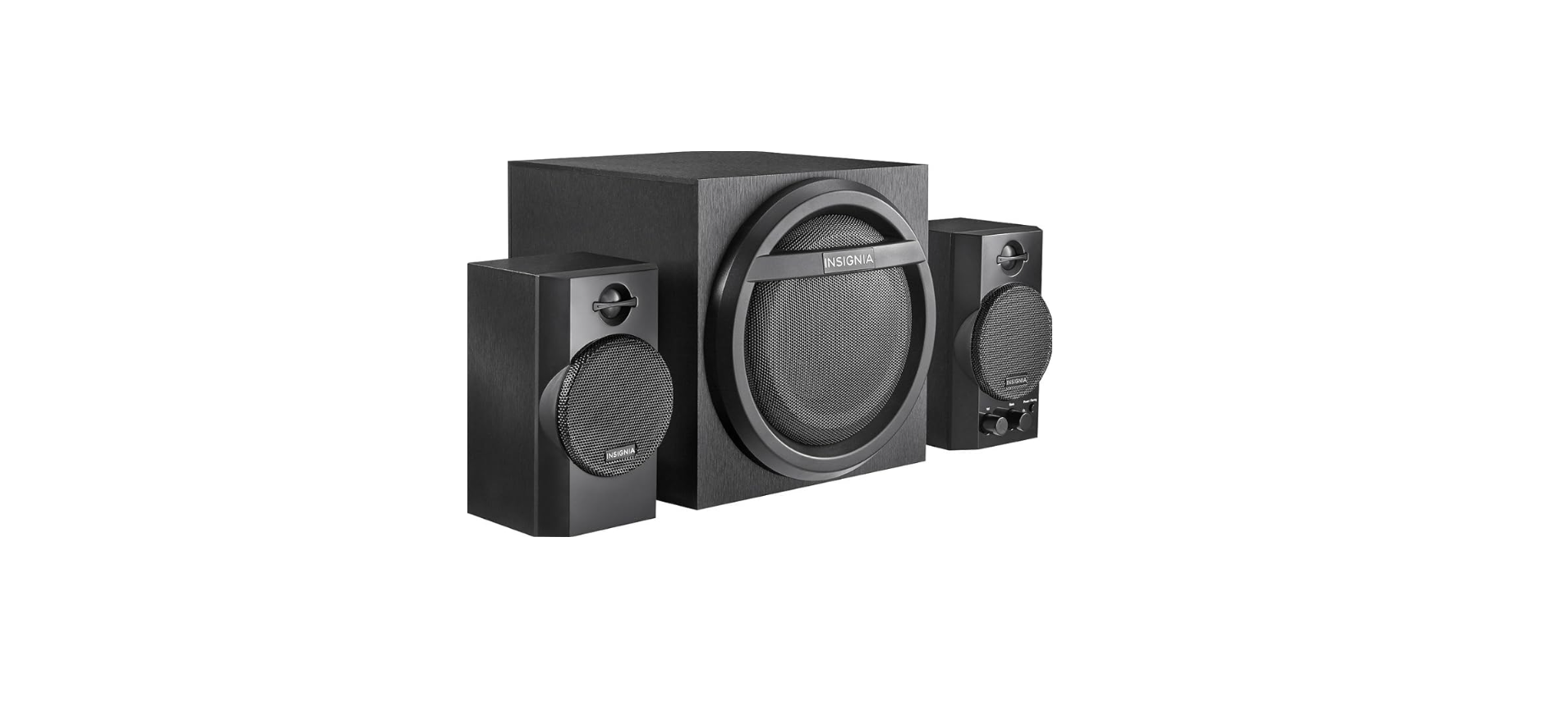

Insignia NS-PSB4521-C 2.1 Bluetooth Desktop Speaker
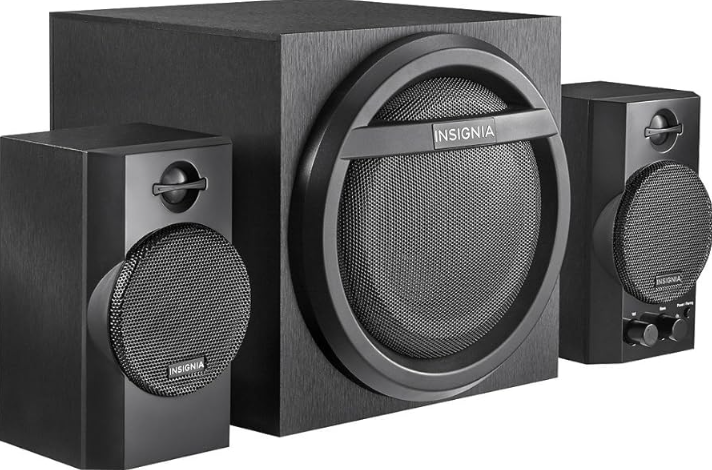
Pakage content
- Subwoofer with an attached 5-foot (1.5-meter) power cord
- The right satellite speaker with an attached 5-foot (1.5-meter) cable
- Left satellite speaker with an attached 5-foot (1.5-meter) cable
- 3.5 mm 5-foot (1.5-meter) stereo audio cable
- Quick Setup Guide
Safety Instructions
- Read these instructions.
- Keep these instructions.
- Heed all warnings.
- Follow all instructions.
- Do not use this apparatus near water.
- Clean only with a dry cloth.
- Do not block any ventilation openings. Install according to the manufacturer’s instructions.
- Do not install near any heat sources such as radiators, heat registers, stoves, or other apparatus (including amplifiers) that produce heat.
- Do not defeat the safety purpose of the polarized or grounding-type plug. A polarized plug has two blades, with one wider Insignia NS-PSB4521-C 2.1 Bluetooth Desktop Speaker than the other.
- A grounding-type plug has two blades and a third grounding prong. The wide blade or the third prong is provided for your safety.
Features
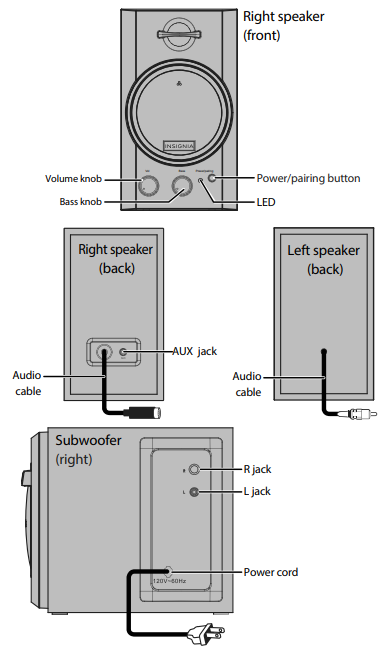
Setting Up and Turning On

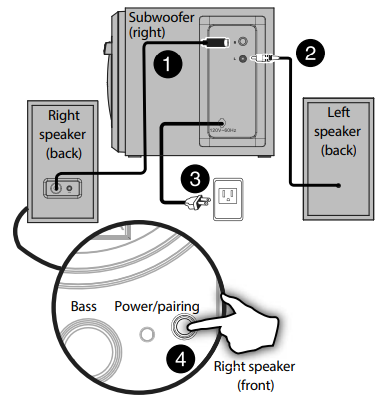
- Plug the cable attached to the right speaker into the R jack on the subwoofer.
- Plug the cable attached to the left speaker into the L jack on the subwoofer.
- Plug the power cord attached to the subwoofer into a power outlet.
- Press the Power/pairing button for about half a second. Your speaker system turns on.
- Follow one of the connection methods (Bluetooth or wired) to connect the speaker system to a source.
Connecting with a Bluetooth Device
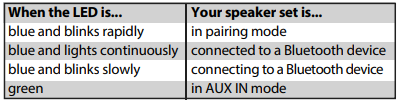
- If the blue LED is not blinking rapidly, press and hold the Power/pairing button for three seconds.
- Make sure that your Bluetooth device is within 33 feet (10 meters) of your speaker system.
- On your source device, Insignia NS-PSB4521-C 2.1 Bluetooth Desktop Speaker turn on the Bluetooth feature, then set your device to pairing mode. (For instructions, see the documentation that came with your Bluetooth device.) On your Bluetooth device, select
Reconnecting to a Paired Device
- If your speaker system is turned off, turn it on.
- Make sure that your Bluetooth device is turned on, the Bluetooth feature on the device is turned on, and the device is within range of your speaker system with no obstructions between your speaker system and the device.
Disconnecting a Paired Device
- Move the device out of range of your speaker system. OR
- Turn off the Bluetooth function on the Bluetooth device. OR
- Unpair your speaker system from the Bluetooth device list. OR
- Turn off your speaker system or the Bluetooth device.
Connecting to a Wired Device
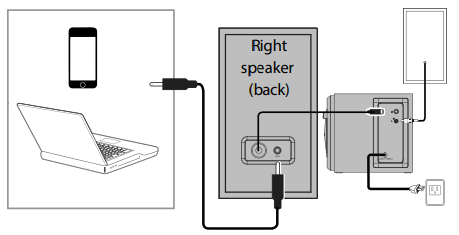
- Make sure that the source device is powered on.
- Connect one end of the included 3.5 mm stereo audio cable to the AUX jack on the back of the right speaker, then connect the other end of the cable to the audio out or headphone jack on the audio device.
Playing from a Wired Device
- Use the controls on your audio device to control playback.
- When you connect a 3.5 mm cable to the AUX jack, your speaker system switches to AUX IN mode, and the blue LED changes to green.
Trouleshooting
FCC and Ic Information
This device complies with Part 15 of the FCC Rules. Operation is subject to thThe eTheThe
following two conditions:
- This device may not cause harmful interference, and
- This device must accept any interference received, including interference that
may cause undesired operation.
This equipment generates, uses, and can radiate radio frequency energy and, if not installed and used according to the instructions, may cause harmful interference to radio communications. However, there is no guarantee that interference will not occur in a particular installation. If this equipment does cause harmful interference to radio or television reception, which can be determined by turning the equipment off and on, the user is
encouraged to try to correct the interference by one or more of the following measures
- Reorient or relocate the receiving antenna
- Increase the separation between the equipment and receiver.
- Connect the equipment to an outlet on a circuit different from that to which the receiver is connected.
- Consult the dealer or an experienced radio/TV technician for help. Warning:
- Changes or modifications not expressly approved by the party responsible for compliance could void the user’s authority to operate the equipment.
- This device complies with Industry Canada licence-exempt RSS standard(s).
Operation is subject to the following two conditions: This device may not cause interference, and this device must accept any interference, including interference that may cause undesired operation of the device
One-Year Limited Warranty
Visit www.insigniaproducts.com for details.
ONE-YEAR PARTS AND LABOR
Visit www.insigniaproducts.com for details.
CONTACT
- For customer service, please call: US & Canada 1-877-467-4289
- www.insigniaproducts.com
- INSIGNIA is a trademark of Best Buy and its affiliated companies.
- Registered in some countries. Distributed by Best Buy Purchasing, LLC 7601 Penn Ave South, Richfield, MN 55423 U.S.A. ©2014 Best Buy. All rights reserved.
FAQs
How do I pair my device using Bluetooth?
Holding down the Bluetooth button on the remote or control panel will cause the indicator light to flash. Open the Bluetooth settings on your computer, tablet, or phone, choose “Insignia NS-PSB4521-C,” and then confirm pairing. The light will become solid after it is linked.
Can I connect multiple devices at once?
No, only one Bluetooth device can be connected to the NS-PSB4521-C at a time. Disconnect the existing device and pair a new one to swap.
Can I use this speaker with non-Bluetooth devices?
Indeed! Use the 3.5mm AUX cable that comes with your device to connect it. Select “AUX” as the input mode to play from a wired source.
What is the Bluetooth range?
In an open area, the wireless range is roughly 33 feet (10 meters). The range may be shortened by metal items, walls, or other wireless devices.
How do I switch between Bluetooth and AUX mode?
On the remote or control panel, press the Input or Mode button. The chosen input mode will be displayed via the indicator light.
How do I adjust the bass or treble levels?
To adjust the subwoofer’s low-frequency output, turn the bass control knob. You can also change the tone and volume on the device you’re linked to.
Can I use the NS-PSB4521-C with my TV or gaming console?
Indeed. If your TV has audio output, you can connect it via an RCA adapter or an AUX wire. For consoles, connect the speakers to the audio-out or headphone connector on your TV.