
Close Menu
onyxguides.comonyxguides.com

    Subscribe to Updates

    Get the latest creative news from FooBar about art, design and business.

    What's Hot

    Sony HDIH-1200 HD Projection Head Instruction Manual

    May 11, 2026

    Do Ceiling Fans Use a Lot of Electricity

    May 11, 2026

    Which Retro Gaming Console Is Best

    May 8, 2026
    Facebook X (Twitter) Instagram
    onyxguides.comonyxguides.com
    Facebook X (Twitter) Instagram Pinterest
    • Home
    • About us
    • Terms & Conditions
    • Privacy Policy
    • FAQs
    • Contact us
    onyxguides.comonyxguides.com
    Home » Swellpro GC3-S Waterproof 4K 3 Axis Gimbal Camera User Guide
    Other

    Swellpro GC3-S Waterproof 4K 3 Axis Gimbal Camera User Guide

    By Gabriel SmithMarch 26, 2026Updated:April 7, 2026No Comments2 Mins Read
    Facebook Twitter Pinterest LinkedIn Tumblr WhatsApp Telegram Email
    Swellpro-GC3-S-Waterproof-4K-3-Axis-Gimbal-Camera-featured
    Share
    Facebook Twitter LinkedIn Pinterest Email

    Swellpro logo

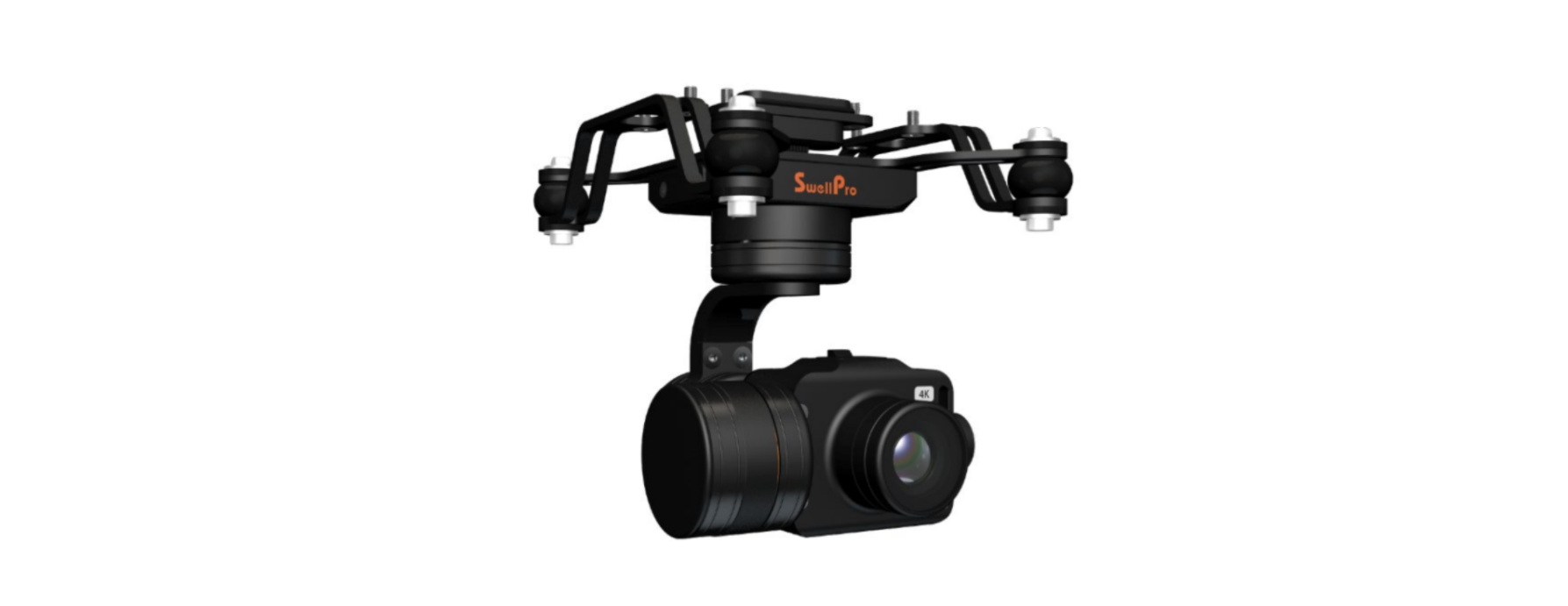
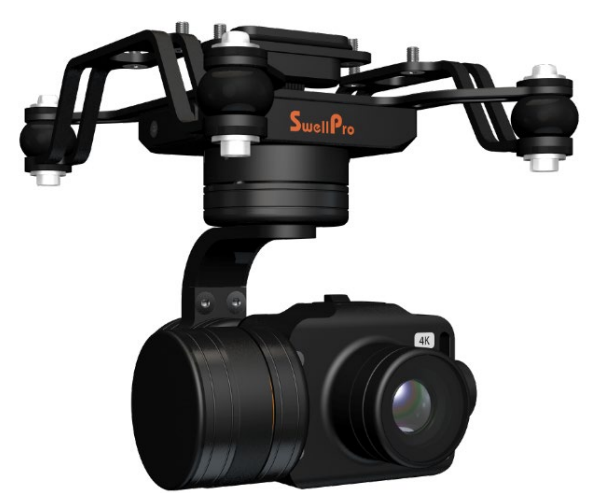
    Swellpro GC3-S Waterproof 4K 3 Axis Gimbal Camera

    Swellpro-GC3-S-Waterproof-4K-3-Axis-Gimbal-Camera-product


    Safety Instructions

    • The GC3-S is a piece of precision electronics with corrosion-resistant materials that allow for use in
      harsh marine environments.
    • As with any marine equipment, trouble-free and lasting operations depend on proper attention and maintenance of the equipment.
    • When taking off or landing, slowly proceed to avoid damage to the gimbal camera, which can be caused by the huge impact when contacting the surface at high speeds.
    • Dropping or crashing directly into the water from above will result in significant damage to the drone and the gimbal camera.
    • After using in seawater, soak and rinse thoroughly with clean fresh water before the seawater dries out. If seawater or other sediments form on the gimbal camera, soak thoroughly with fresh water and clean all sediments on the camera and motor before use.

    Installation
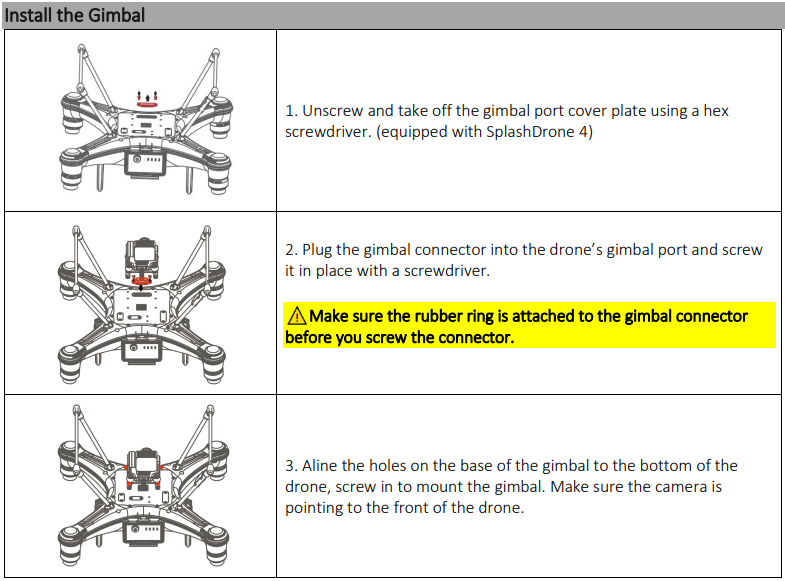
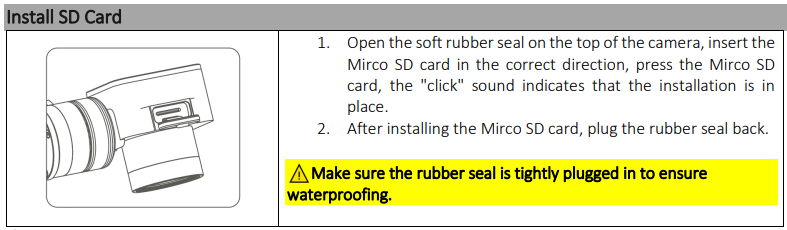
    Swellpro-GC3-S-Waterproof-4K-3-Axis-Gimbal-Camera-figure-1

    Swellpro-GC3-S-Waterproof-4K-3-Axis-Gimbal-Camera-figure-2

    • The GC1-S supports Micro SD cards with a maximum capacity of 128GB. Since the camera requires fast reading and writing of high-stream video data, please use Micro SD cards with Class 10 or UHS-1 or above to ensure proper functioning.
    • Do not insert or unplug the Micro SD card during aircraft shooting, as data files may be damaged or lost.
    • Once you are done recording, stop recording and save the file. If you turn off the power directly before saving the files, the recording file will be lost.

    After Use Casing

    After using the gimbal camera, you can choose not to take off the gimbal camera and put it directly into the case with the drone. Follow the following steps to make sure the gimbal camera is properly secured after casing.
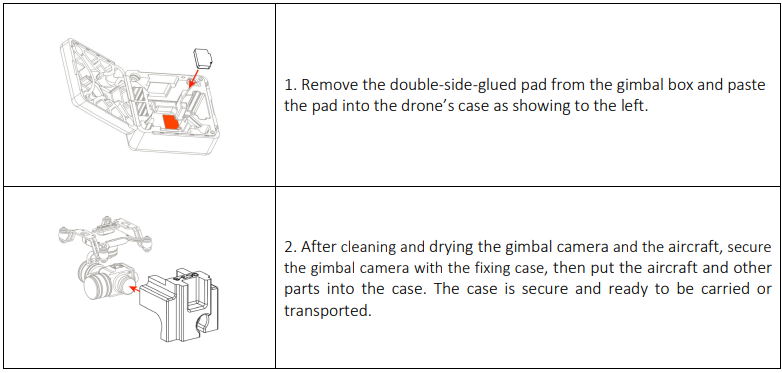
    Swellpro-GC3-S-Waterproof-4K-3-Axis-Gimbal-Camera-figure-3

    Control

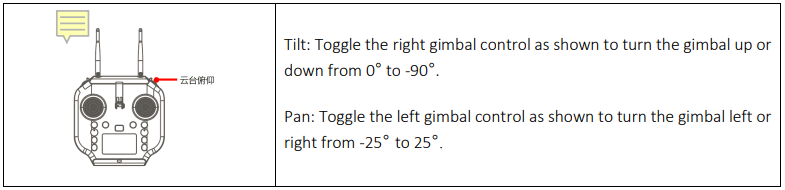
    Gimbal ControSwellpro-GC3-S-Waterproof-4K-3-Axis-Gimbal-Camera-figure-4

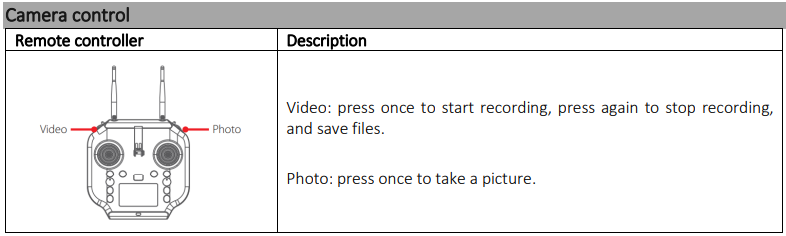
    Swellpro-GC3-S-Waterproof-4K-3-Axis-Gimbal-Camera-figure-5

    APP Interface

    To get into the APP’s camera interface: Power on the remote controller, then the aircraft. Connect the phone to the remote controller’s Wi-Fi hotspot. Then click “Login device”.
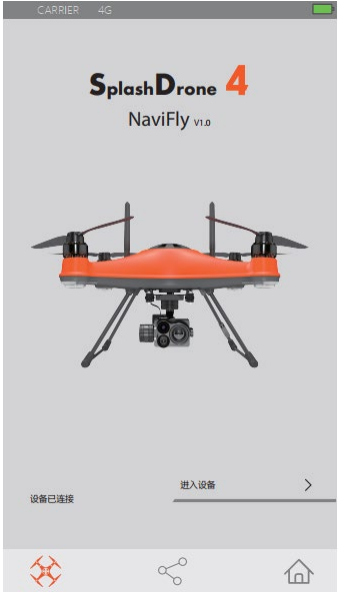
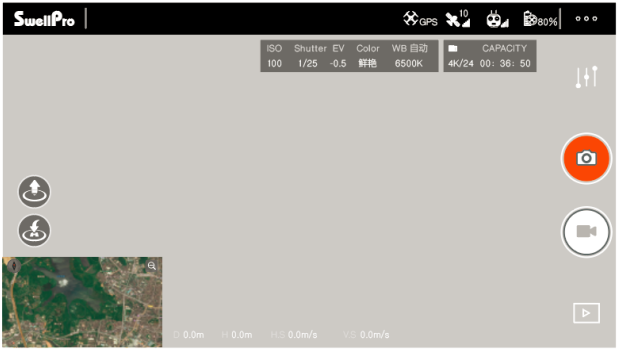
    Swellpro-GC3-S-Waterproof-4K-3-Axis-Gimbal-Camera-figure-6

    Swellpro-GC3-S-Waterproof-4K-3-Axis-Gimbal-Camera-figure-7

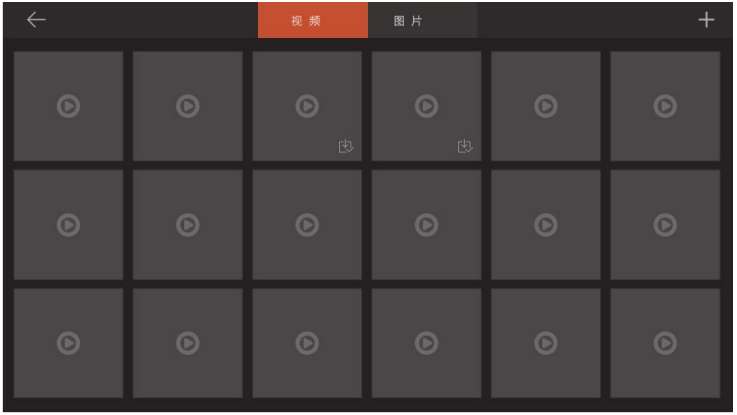
    Swellpro-GC3-S-Waterproof-4K-3-Axis-Gimbal-Camera-figure-8

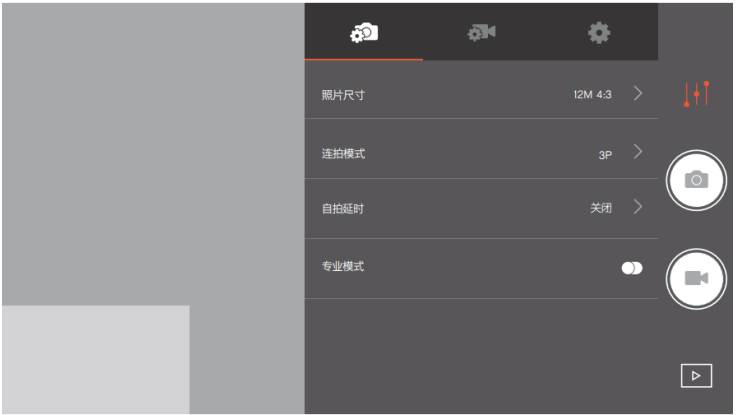
    Photo Setting InterfaceSwellpro-GC3-S-Waterproof-4K-3-Axis-Gimbal-Camera-figure-9

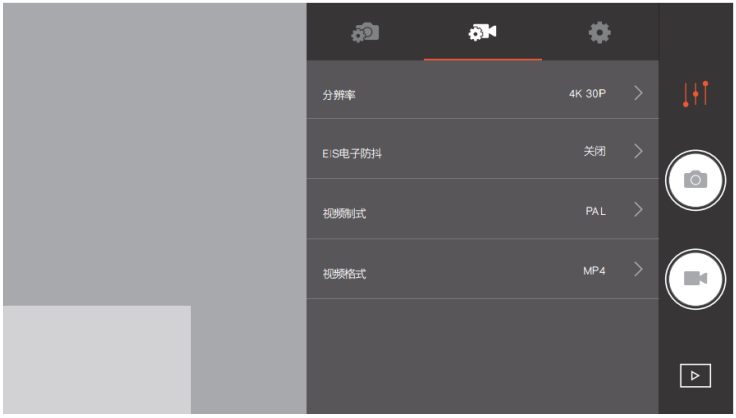
    Video Setting Interface

    Swellpro-GC3-S-Waterproof-4K-3-Axis-Gimbal-Camera-figure-10

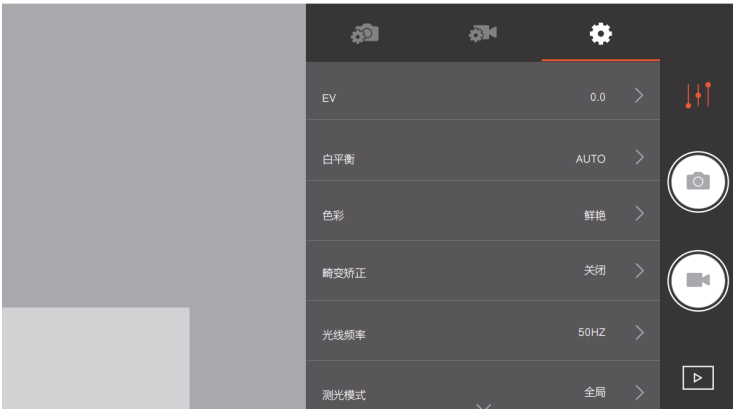
    Camera Setting InterfaceSwellpro-GC3-S-Waterproof-4K-3-Axis-Gimbal-Camera-figure-11

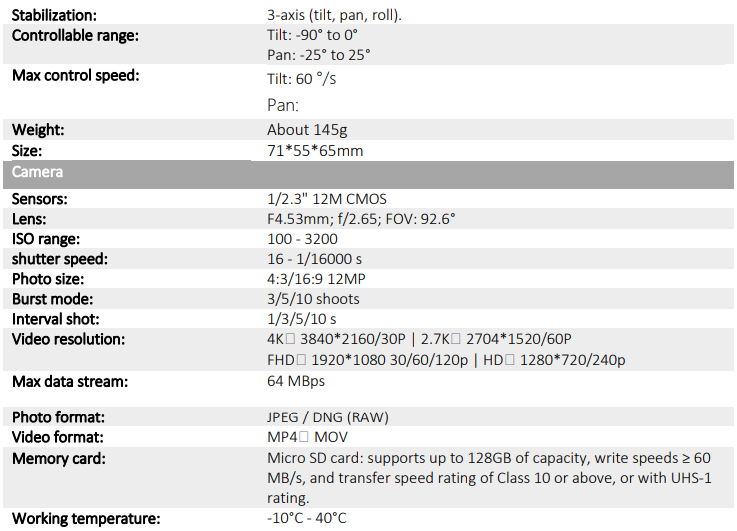
    Specification

    Gimbal

    Swellpro-GC3-S-Waterproof-4K-3-Axis-Gimbal-Camera-figure-12

    Customer Service

    • Website: www.swellpro.com
    • Phone: +1866-534-5788
    • Office hours: 9 00 – 17:00 (EST, UTC-5), Monday to Friday
    • Address: R413, Block 10A, Science and Technology Ecological Park, ShenZhen, 518063 Guangdong, China
    Share. Facebook Twitter Pinterest LinkedIn Tumblr Email
    Gabriel Smith

    Related Posts

    Sony HDIH-1200 HD Projection Head Instruction Manual

    May 11, 2026

    Do Ceiling Fans Use a Lot of Electricity

    May 11, 2026

    How to Use Lexar Portable SSD

    May 8, 2026

    Which Retro Gaming Console Is Best

    May 8, 2026

    Case Android Phone User Manual

    May 7, 2026

    How To Use Phone Gaming Controller

    May 7, 2026
    Add A Comment
    Leave A Reply Cancel Reply

    Don't Miss
    Other

    Sony HDIH-1200 HD Projection Head Instruction Manual

    May 11, 2026

    Sony HDIH-1200 HD Projection Head THIS APPARATUS MUST BE EARTHED IMPORTANT The wires in this…

    Do Ceiling Fans Use a Lot of Electricity

    May 11, 2026

    Which Retro Gaming Console Is Best

    May 8, 2026

    How to Use Lexar Portable SSD

    May 8, 2026
    Stay In Touch
    • Facebook
    • Twitter
    • Pinterest
    • Instagram
    • YouTube
    • Vimeo

    Subscribe to Updates

    Subscribe to Updates

    Follow us

    Facebook X-twitter Instagram Pinterest

    © 2025 All rights reserved Onyx Guide.