

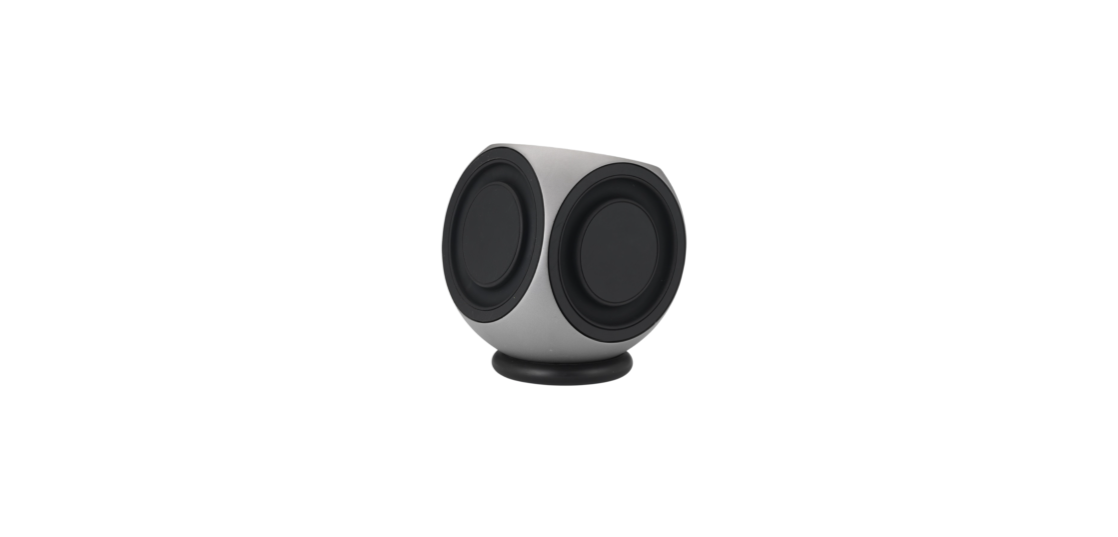

Bang & Olufsen BeoLab 2 High-end Quality Speakers
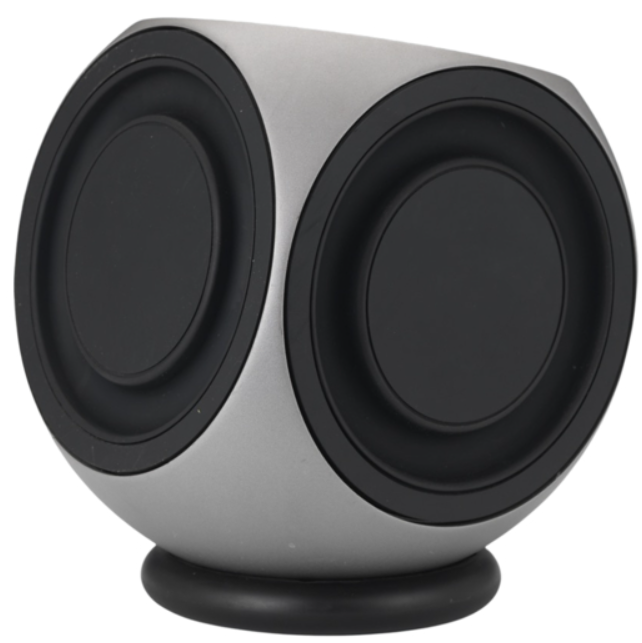
Safety Instructions
- The BeoLab 2 subwoofer is intended for use with Bang & Olufsen active (Power Link) loudspeaker systems only – it cannot be used with other speakers.
- Do not in any way block the free movement of the BeoLab 2 speaker units, and do not apply any force to them, as this may result in permanent damage!
- Place your BeoLab 2 on the floor on its black rubber foot.
- The BeoLab 2 is designed for indoor use in dry, domestic environments only, and for use within a temperature range of 10–40ºC (50–105º F).
- Remember that all speakers in a setup must be connected to a mains outlet, and that they are designed to be connected to the mains at all times, as this allows them to switch on automatically.
Operation
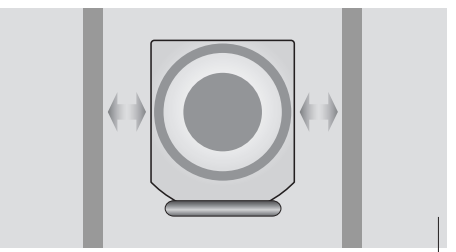
- Leave enough space for the speaker units to move – both in front and to the sides of BeoLab 2.
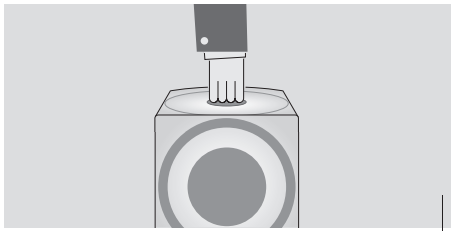
- Use the top hole as a carrying ’handle’ when you lift BeoLab 2.
- Take care not to damage the speaker units, and never lift BeoLab 2 by gripping its sides!

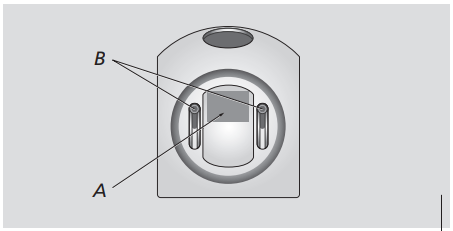
- Bottom view of BeoLab 2 showing the location of the product identification label (A).
- If you wish to adjust the black rubber foot, place BeoLab 2 upside down and use the two adjustment screws (B).
Before Using First Time
- Disconnect your system from the mains.
- Connect your speaker system as described in Connect your speaker system.
- Place BeoLab 2 according to the guidelines in Adapt BeoLab 2 to your setup.
- Finally, connect your system to the mains.
Product Overview
Cable Cover
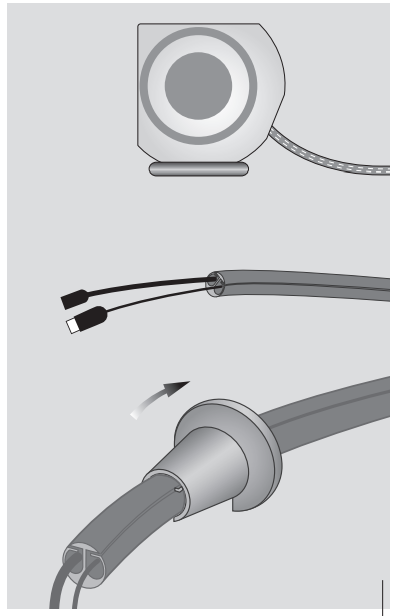
- Use the enclosed tool to seal the cable cover when you have placed both the mains cord and the Power Link cable inside it.
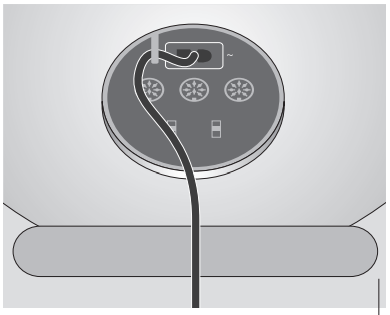
- For safety reasons, you must fasten the mains lead behind the mains cord bracket.
Connect your Speaker System
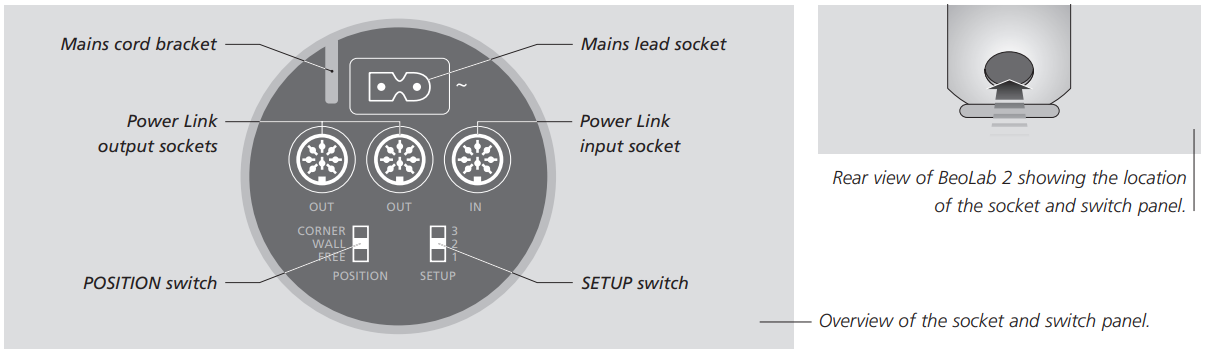
- You gain access to the BeoLab 2 socket panel through the hole on the rear.
- For reference, when locating the sockets, use the overview on the previous page and the graphics imprinted on the socket panel.
- For specific information about the other speakers and units in your Bang & Olufsen system, please refer to the Guides enclosed with these systems.
- You might find it easier to“thread” the cables into the enclosed cable cover before you connect them, as shown on the previous page.
Connect to the Mains
- Connect the BeoLab 2 to your system using the enclosed 8-pin Power Link cable.
- Connect the enclosed mains cord to the socket marked ~.
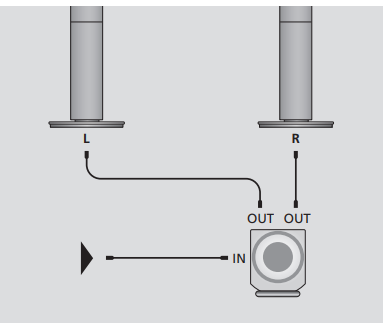
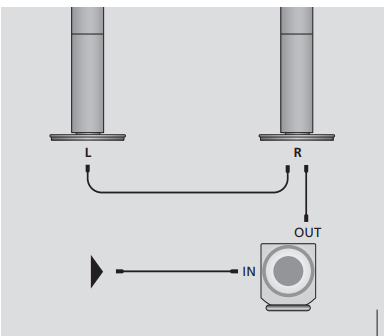
- Looping the signals through from speaker to speaker: To avoid cables running from both front speakers to the BeoLab 2, you may choose to loop the signal through from speaker to speaker.
Setup
- On the next page, you can see examples of three different setups: two surround sound setups and a stereo setup. In each example, it is explained which sockets to use.
Dolby Digital System
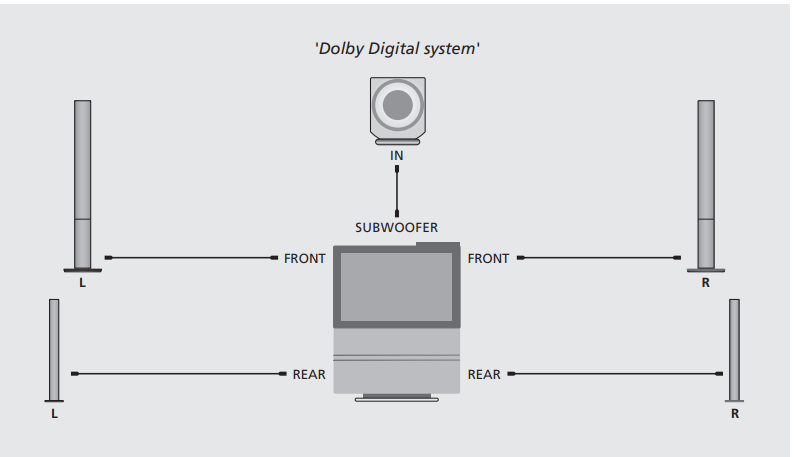
- The system has a dedicated SUBWOOFER socket, and all speakers are connected directly to your Bang & Olufsen system.
- Connect one end of the cable to the socket marked IN on BeoLab 2, and the other end to the socket marked SUBWOOFER on your Bang & Olufsen system.
- Connect your front set of speakers to the sockets marked FRONT on your Bang & Olufsen system.
- Connect your rear set of speakers to the sockets marked REAR on your Bang & Olufsen system.
Dolby Pro Logic System
This system has no dedicated subwoofer socket. The front set of speakers is connected to BeoLab 2, and BeoLab 2 is connected to your Bang & Olufsen system. The rear set of speakers is connected directly to your Bang & Olufsen system.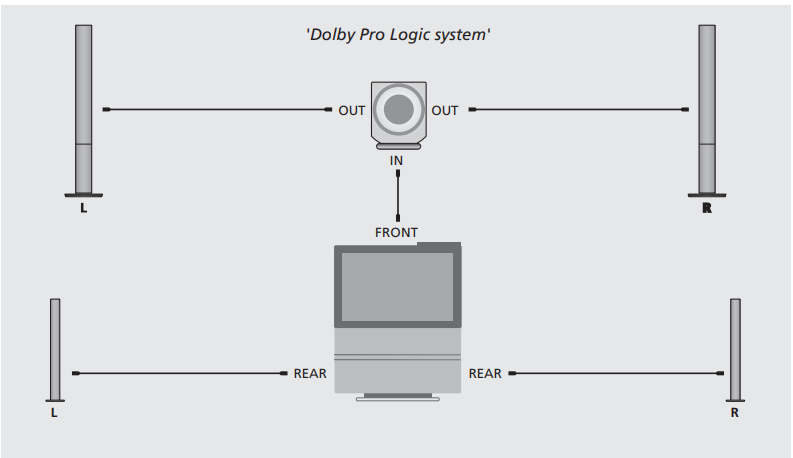
- Connect one end of the cable to the socket marked IN on BeoLab 2, and the other end to one of the sockets marked FRONT on your Bang & Olufsen system.
- Connect your front set of speakers to the sockets marked OUT on BeoLab 2.
- Connect your rear set of speakers to the sockets marked REAR on your Bang & Olufsen system.
Stereo System
The left and right speakers are connected to BeoLab 2, and BeoLab 2 is connected to your Bang & Olufsen system. Remember to set the L • R • LINE switch to the correct setting on each of your front and rear speakers.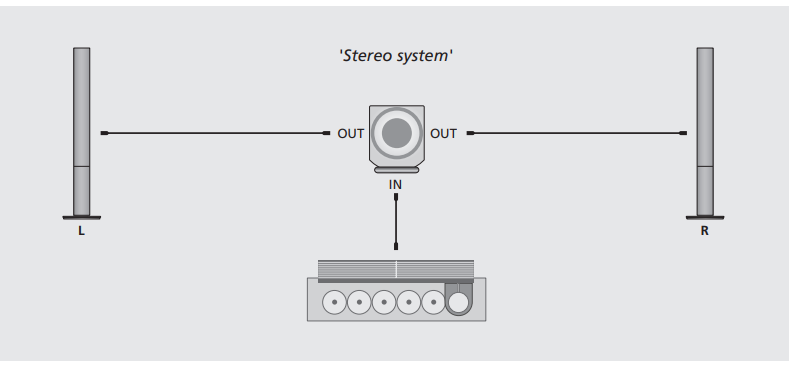
- Connect one end of the cable to the socket marked IN on BeoLab 2, and the other end to one of the speaker sockets on your Bang & Olufsen system.
- Connect your left and right sets of speakers to the sockets marked OUT on BeoLab 2.
Adapt BeoLab
- BeoLab 2 can be placed almost anywhere in a room. However, the most natural sound and best stereo/surround sound experience is obtained if BeoLab 2 is set up according to the guidelines on these two pages.
- To adapt to the sensitivity of the speaker system connected to BeoLab 2, it has a SETUP switch with three settings.
Setting the Setup Switch
- Use the SETUP switch to adapt the output from BeoLab 2 to the sensitivity levels of the different BeoLab speakers.
- The switch has three settings (1, 2, and 3), and which switch setting to choose depends on your speaker setup. The table to the right shows which setting to use with the different models of BeoLab speakers.
- If, for example, you have a pair of BeoLab 1 speakers connected to BeoLab, you should set the SETUP switch to 1, and so on…
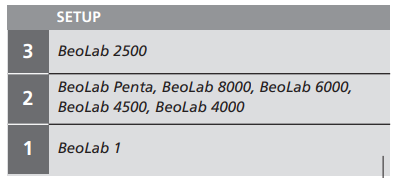
- If you connect BeoLab Penta to BeoLab 2, we recommend that you set the INPUT LEVEL switch on the BeoLab Penta to its middle position.
Placement
- Placement is flexible and easy with BeoLab 2. Due to its relatively small size, it can easily be integrated into most home environments and may be placed almost anywhere you wish in the room.
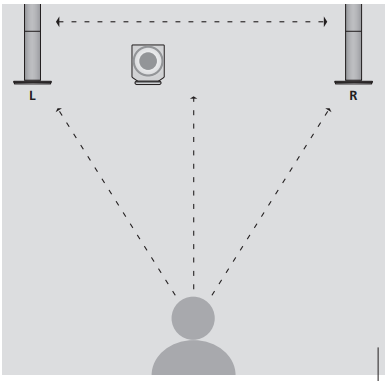
- However, to obtain the most natural sound, you should place BeoLab 2 on the floor in the front half of the room, with the front speaker unit facing your listening position.
- Ideally, BeoLab 2 should be placed at about the same distance from your favourite listening position as the front set of speakers, that is, the left, centreand the right speakers. If possible, you should choose a placement between the two front speakers.
Setting the Position Switch
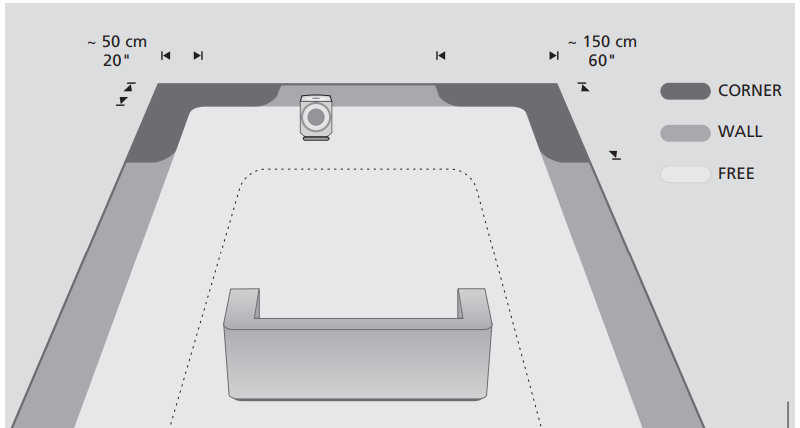
- Use the POSITION switch to ensure that the bass response suits the placement of BeoLab 2, and thus the surroundings.
- Which switch setting to choose depends on the distance from BeoLab 2 to the walls and corners of the room.
The Position switch has three settings
Corner
- Use this setting if BeoLab 2 is placed in a corner – shown by the dark grey areas in the illustration.
Wall
- Use this setting if BeoLab 2 is placed closer than approximately. 50 cm (20”) to a wall, and no closer to a corner than approx. 150 cm (60”) – shown by the medium grey areas along the walls in the illustration.
Free
- Use this setting if BeoLab 2 is placed more than Bang & Olufsen BeoLab 2 High-end Quality Speakers approximately. 50 cm (20”) from the wall – shown by the light grey area in the illustration.
- Never place BeoLab 2 behind your listening position.
- We recommend that you avoid placing any of your loudspeakers in the area inside the thin dotted line.
- The dimensions mentioned are guidelines only. You may, of course, set the switch to any of the three positions you prefer.
Daily Use
- When Beolab 2 is connected to the mains, the stand-by indicator lights up in red, indicating that Beolab 2 is in stand-by and ready to be used.
- BeoLab 2 is designed to be left in stand-by mode when not in use, i.e., the power should not be switched off at the mains.
- BeoLab 2 is designed to protect itself if the active speaker unit becomes overheated.
- The loudspeaker protection circuit may become active after a period of playing at a high volume level.
Switching on and off – Indicator
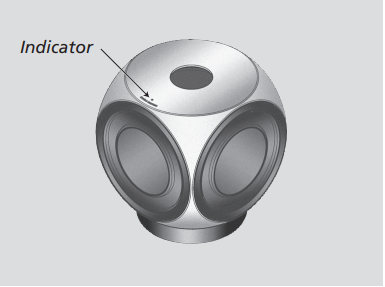
- When you switch on your Bang & Olufsen system, BeoLab 2 switches on simultaneously.
- When you switch off your system or mute the sound, the red indicator light appears immediately, indicating that BeoLab 2 is not in use.
Loud speaker Protection
- If the active speaker unit becomes overheated, BeoLab 2 will instantly reduce the sound level.
- Once the situation has stabilised, the sound level slowly returns to normal.
- Should BeoLab 2 mute the sound, the indicator light turns red. To restore the sound:
- Disconnect the eoLab 2 from the mains.
- Allow the active speaker unit time to cool off.
- Reconnect BeoLab 2 to the mains. Should the Bang & Olufsen BeoLab 2 High-end Quality Speakers problem persist, please contact your Bang & Olufsen retailer.
Cleaning
- Clean the surfaces of BeoLab 2 using a soft, lint-free cloth which you have wrung firmly in a solution of lukewarm water containing a few drops of e.g. dish dishwashing detergent.
- Never use alcohol or other solvents to clean any part of your BeoLab 2!
FCC Rules
This equipment generates, uses, and can radiate radio frequency energy and, if not installed and used in accordance with the instructions, may cause harmful interference to radio communications. However, there is no guarantee that interference will not occur in a particular installation.
- Reorient or relocate the receiving antenna.
- Increase the separation between the equipment and receiver.
- Consult the dealer or an experienced radio/TV technician for help.
Customer Support
- Visit: http://www.bang-olufsen.com
- Ph:+45 96841122
- Timing: 9:00 – 12:00
- Company name: Bang & Olufsen UK Ltd
- Company address: 7 Albemarle Street, London, W1S 4HQ, United Kingdom
FAQs
What are Bang & Olufsen BeoLab 2 speakers?
For perfect sound reproduction in homes, they have sophisticated acoustic design, strong amplifiers, and accurate drivers.
Are the BeoLab 2 speakers active or passive?
The BeoLab 2 speakers contain built-in amplifiers, making them active speakers.
Can I connect BeoLab 2 to modern devices like smartphones or Bluetooth receivers?
The main purpose of the BeoLab 2 is to support older Bang & Olufsen systems.
Are BeoLab 2 speakers compatible with surround sound setups?
Indeed. They can be included in surround or multi-room Bang & Olufsen systems, although careful pairing and placement are needed to maintain precise sound staging.
Where can I find the official user guide or replacement parts?
The official Bang & Olufsen website has the BeoLab 2 user manual and parts information. To find authorised repair centres and PDF manuals, search for the BeoLab 2 model name.
Are BeoLab 2 speakers upgradeable or serviceable?
Indeed. Authorised Bang & Olufsen technicians can service parts like drivers or amplifiers.