

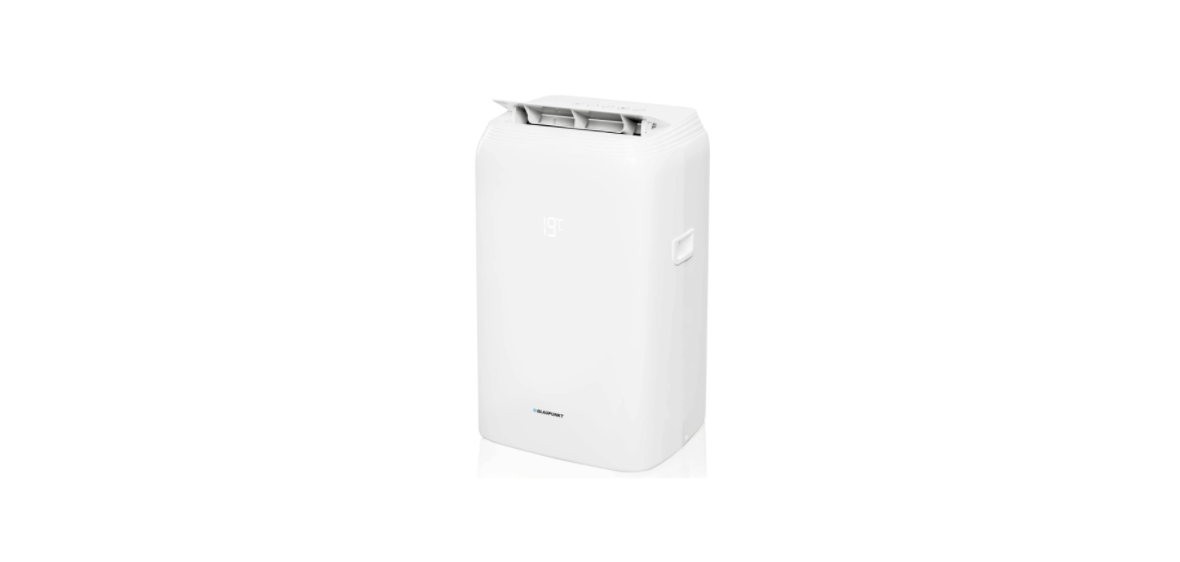

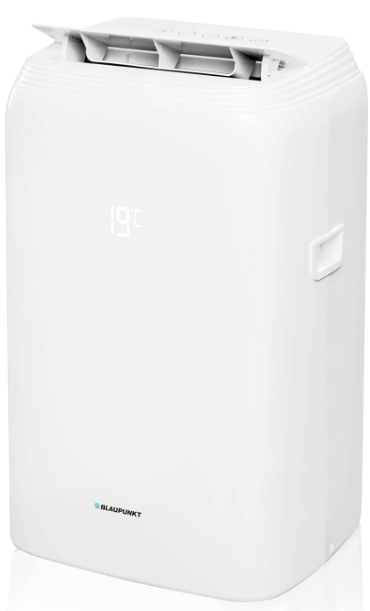
BLAUPUNKT ACP312 Portable Air Conditioner
Safety Instructions
- Store the device in a room where there are no permanent fire (e.g., operating gas equipment) and ignition sources (e.g., operating electric heater).
- Store the device in a way that prevents mechanical damage.
- Do not pierce or expose to fire.
- Refrigerant accumulation can cause a fire or explosion due to the presence of electric heaters, stoves, or other sources of ignition.
- Transport of equipment containing flammable refrigerant: see transport regulations.
- Equipment symbol designation: see local regulations.
- Disposal of equipment containing flammable refrigerant: see national regulations.
- Equipment/devices storage: Store in compliance with the manufacturer’s guidelines.
- Storage of packed (unsold) equipment: The protective packaging of stored equipment should prevent the refrigerant from leaking in case of mechanical damage to the equipment.
- Do not insert any objects into the inlet or outlet grilles.
- Do not direct the air flow towards animals or plants.
- Before the first use, remove all protective elements such as cardboard, foil, and foamed polystyrene.
Description
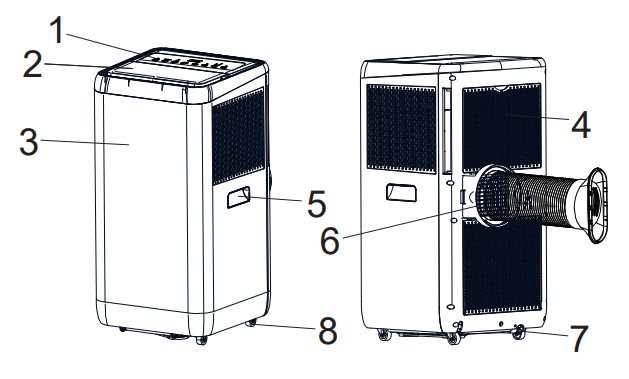
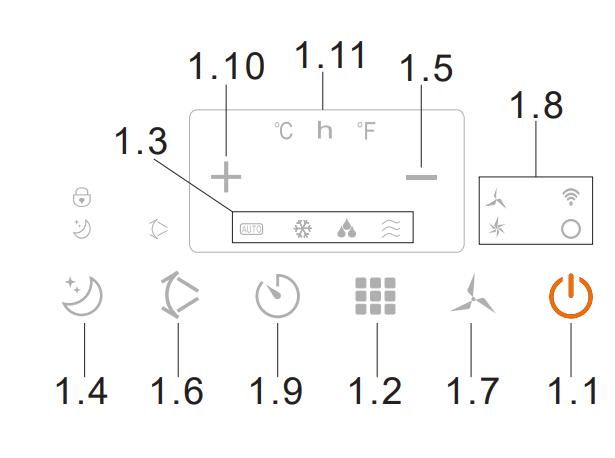
- 1. Control panel
- 1.1 On/Off switch (POWER)
- 1.2 MODE button
- 1.3 Operating mode indicator
- 1.4 NIGHT MODE button
- 1.5 Decrease button (temperature or timer value)
- 1.6 SWING button – automatic oscillating change of air direction
- 1.7 Button for air volume control (SPEED)
- 1.8 Fan speed and Wi-Fi network indicators
- 1.9 Timer setting button
- 1.10 Increase button (temperature or timer value)
- 1.11 Display
- 2. Air supply
- 3. Front panel
- 4. Air intake grille with filter
- 5. Handles
- 6. Air exhaust
- 7. Water drain with plug
- 8. Wheels
Prepairing
- The air conditioner requires air to be vented to the outside of the room being cooled.
- Connect the exhaust air pipe to the air conditioner, and direct the other end to the outside through a tilt window or to a ventilation grille prepared for this purpose.
- Take care to keep the outlet pipe as short as possible. Note that the discharge pipe heats up, and the heat will stay in the room.
- If necessary, use a longer heat removal pipe. It is advisable to use insulation, such as cladding the pipe with wool or polystyrene.
- The air conditioner does not normally require the installation of a condensate drainage pipe.
- In very high humidity conditions, or if you want to dehumidify the air in the room, this solution may be recommended.
- The water should be discharged using a hose to a drain to the sewage system.
- The water will be heavily demineralised and is not suitable for drinking or watering plants.
- Place the air conditioner in a location where the air flow will not be blocked.
- Leave at least 50 cm of free space around the air conditioner.
- Pay particular attention to curtains and other textiles so that they do not restrict the airflow.
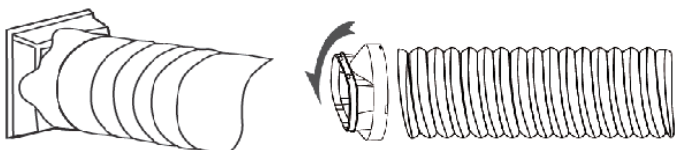
- Install an air discharge pipe. Connect the tube to the connector. At the other end, screw the fixing to the window seal.

- Place the discharge pipe in the window, then stretch it so that it reaches the air conditioner.
- Avoid kinks and angles on the pipe. Reduction in airflow will result in a decrease in the unit’s performance.
Operation
- Connect the appliance to the power source.
- Switch on the air conditioner using the POWER switch (1.1)
- Select the operating mode between cooling, dehumidification, fan, or heating by pressing the MODE selection button (1.2).
- To adjust the direction of the airflow, select the SWING fan function by pressing the oscillation button (1.6) and switch it off again by pressing the button when the grille is in the expected position.
- Set the expected temperature using the up and down arrow keys (1.10, 1.5).
- The blowing force can be changed by pressing the SPEED blowing control button (1.7).
Timer function
- Activating the TIMER mode when the unit is switched off sets the number of hours after which the unit will switch on.
- Activating the TIMER mode when the unit is switched on sets the number of hours after which the unit will switch off.
- The timer is set using the up and down arrow keys (1.10, 1.5) after pressing the timer button (1.9).
- When the TIMER function is set, the unit will enter the off/on timer mode.
- In this mode, the air conditioner will operate according to the selected setting.
- To switch the timer off, set the timer value to 00 or press the POWER switch (1.1).
Night mode function
- When this mode is activated, the air conditioner raises the target temperature by one degree after 1
hour, and by another degree after the next. - If the condensate drip tray overflows, the unit will stop operating.
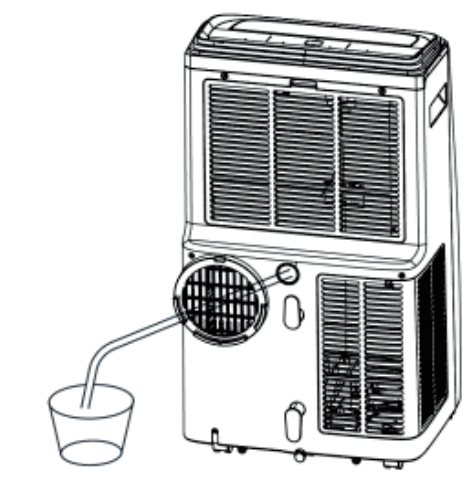
- Disconnect the air conditioner from the power supply and then place a vessel under the water drain.
- Remove the plug and wait for the water to drain.
- Then plug the drain hole again. Do not tilt the air conditioner during this operation, as water may spill out of the drip tray.
- You can connect a condensate drainage pipe.
- It should be BLAUPUNKT ACP312 Portable Air Conditioner connected to the upper drain hole.
- Ensure that the pipe slopes steadily towards the external vessel or drain grille.
Resetting
To connect the device to the local WiFi network, reset the WiFi BLAUPUNKT ACP312 Portable Air Conditioner connection settings. The device should be in sleep mode. Press the “+” buttons and hold for about 5 seconds. When the WiFi LED flashes quickly, the appliance will be ready to search.
Connection
- Press the “add device” button after starting the application.
- The appliance BLAUPUNKT ACP312 Portable Air Conditioner should be found after about 15 seconds.
- Press the button to continue adding.
- Select the available WiFi network and enter the BLAUPUNKT ACP312 Portable Air Conditioner’s appropriate password.
- Press the button to continue. After a while, a message indicating that the appliance has been added correctly should be displayed.
- Press the “add device” button after starting the application.
- In the “Add manually” section, select the product group “small appliances…” and then the “air conditioner”.
- Then select the available WiFi network and enter the appropriate password.
- The application should disconnect from the current WiFi network, connect with the appliance, and provide configuration parameters.
- The application should return to the previous network.
- After a while, a message indicating that the appliance has been added correctly should be displayed.

Cleaning & Maintainance
- Before you start cleaning the product, ensure that it has been disconnected from the power supply and
has fully cooled down. - Keep the inlet and outlet openings free of dust. Clean the outer surface of the unit with a slightly damp cloth, and then wipe it dry.
- The water tank should be cleaned on a regular basis with a sponge and dishwashing liquid, then rinsed and wiped dry, again with the sponge. Clean the air filter on a regular basis.
One Year Warranty
1 Year Warranty. If you have any issues with your product, please contact our Authorized Customer Care team. Blaupunkt Authorized Service Center: Envent World Wide Pvt Ltd. Khasra. No- 15/15(4-16), Village Samalkha, Tehsil Vasant Vihar, New Delhi- 110037 Email- wecare@blaupunktaudio.in Whatsapp Chat Support: 8860 022 600 Please submit the following information while claiming product warranty:
- Serial Number
- Date of purchase
- A copy of proof of purchase in case of warranty
Disposal
- Do not dispose of your old unit in the household trash.
- Use the return and collection systems available to dispose of the old device.
- This manual may be updated from time to time without notice.
Disclaimer
- Blaupunkt is not liable for any loss or damage caused or resulting from unauthorized disassembly or modification to the product.
- No warranty, whether express or implied, is provided in the U.S. and Canada.
Customer Service
- Tel: 1800 252 878 658
- Visit: http://www.blaupunkt.com
- Scan:

FAQs
Q: What room size is the ACP312 suitable for?
Ans: Rooms up to about 30 square meters (320 square feet) are suitable for the ACP312.
Q: How often do I need to empty the water tank?
Ans: By releasing moisture through the exhaust line, the unit’s automated evaporation system reduces the amount of water that collects. When the tank is full, the device will notify you.
Q: Is the ACP312 energy efficient?
Ans: To maximise power consumption while preserving comfort, the ACP312 has an Eco option and an energy-saving mode.
Q: What is the noise level of the ACP312?
Ans: The unit’s operating volume is between 52 to 60 dB, which is about the same as a typical discussion. Fan speed and operating mode have an impact on noise levels.
Q: How do I set the timer?
Ans: Set the timer for one to twenty-four hours using the control panel or remote. This helps save energy by enabling the machine to switch on or off automatically at predetermined periods.