



Blaupunkt ACP616H Portable air conditioner
Safety Instructions
- Store the device in a room where there are no permanent fire (e.g., operating gas equipment) and ignition sources (e.g.operating electric heater).
- Store the device in a way that prevents mechanical damage.
- Do not pierce or expose to fire.
- This device is for domestic use only. Do not use for any other purposes.
- It is necessary to check if the total current consumption of all devices plugged into the wall outlet does not exceed the fuse in the circuit.
- If you are using an extension cord, make sure that the total power consumption of the equipment plugged into the extension cord does not exceed the extension cord’s power rating.
- Do not let the cord hang over the edge of the counter or touch any hot surface.
- Before maintenance work, always disconnect the unit from the power supply
- Children without ensured supervision should not be allowed to perform the cleaning and maintenance of equipment.
- Additional precautions should be taken when using this device in the presence of children or pets. Do not allow children to play with the device.
- Never use the product close to combustibles.
- Never expose the product to atmospheric conditions such as direct sunlight or rain, etc
- Never use the product in humid conditions (like a bathroom or a camping house).
Specifications
- Cooling capacity: 4700 W / 16k BTU
- Heating capacity: 3280W
- High energy efficiency, EER 2.6, energy class A Air flow: 450 m³/h
- Dehumidification efficiency: 1.9 l/h
- Max noise level: LPA: 56 dB, LWA: 65 dB
- Rated power (energy consumption): 1712 W
- Power supply: 220-240V~50Hz
- Permissible excessive operating pressure for suction: 0.7 MPa
- Maximum allowable pressure: 3.2 MPa
- WiFi transmitter frequency range: 2.400 to 2.4835 GHz
- WiFi transmitter power: ≤17.5 dBm
Description
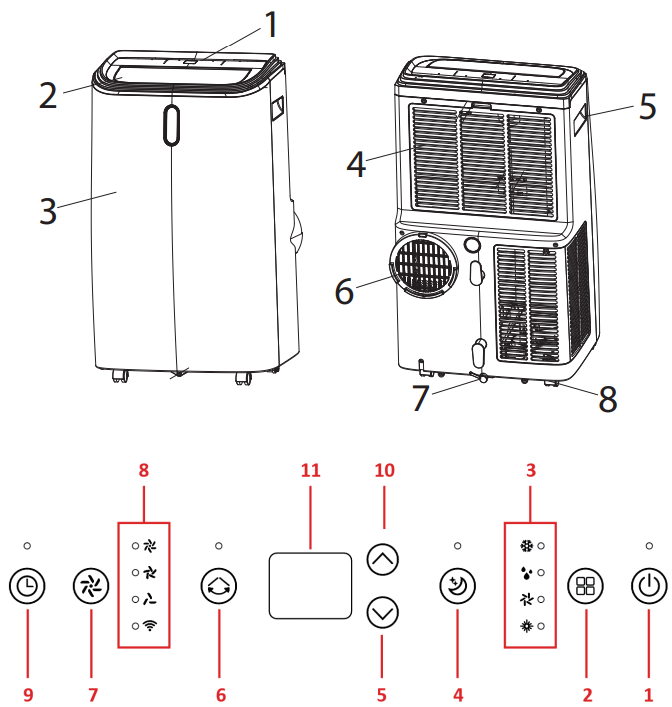
- Control panel
- Air supply
- Front panel
- Air intake grille with filter
- Handles
- Air exhaust
- Water drain with a plug
- Wheels
- On/Off switch (POWER)
- MODE button
- Operating mode indicator
- NIGHT MODE button
- Decrease button (temperature or timer value)
- SWING button – automatic oscillating change of air direction
- Button for air volume control (SPEED)
- Fan speed and Wi-Fi network indicators
- Timer setting button
- Increase button (temperature or timer value)
- Display
Operation
- Connect the appliance to the power source.
- Switch on the air conditioner using the POWER switch (1.1)
- Select the operating mode between cooling, dehumidification, fan, or heating by pressing the MODE selection button (1.2).
- In this mode, the air conditioner will operate according to the selected setting. To switch the timer off, set the timer value to 00 or press the POWER switch (1.1).
- You can connect a condensate drainage pipe. Ensure that the pipe slopes steadily towards the external vessel or drain grille.
Resetting
To connect the device to the local WiFi network, reset the WiFi connection settings. The device should be in sleep mode. Press the “TIMER” buttons and hold for about 5 seconds. When the WiFi LED flashes quickly, the appliance will be ready to search. CAUTION: The appliance operates only with 2.4 GHz wireless networks. The network should use WPA2-PSK encryption and AES protocol.
Connection
Press the “add device” button after starting the application. The appliance should be found after about 15 seconds. Press the button to continue adding. Select the available WiFi network and enter the appropriate password. Press the button to continue. After a while, a message indicating that the appliance has been added correctly should be displayed.
Press the “add device” button after starting the application. In the “Add manually” section, select the product group “small appliances…” and then the “air conditioner”. Then select the available WiFi network and enter the appropriate password.
The application should disconnect from the current WiFi network, connect with the appliance, and provide configuration parameters. The application should return to the previous network. After a while, a message indicating that the appliance has been added correctly should be displayed.
Cleaning & Maintainance
Before you start cleaning the product, ensure that it has been disconnected from the power supply and
has fully cooled down. Keep the inlet and outlet openings free of dust. Clean the outer surface of the unit with a slightly damp cloth, and then wipe it dry. Clean the air filter on a regular basis.
Customer Support
- WhatsApp: 9156910994
- Toll Free: 1800 209 6820
- Email: support@blaupunktcar.in
FAQs
What is the Blaupunkt ACP616H Portable Air Conditioner used for?
The portable climate control unit ACP616H is made to heat, cool, dehumidify, and fan spaces indoors. It is perfect for tiny flats, offices, bedrooms, and other spaces where permanent installation is not feasible.
What room size can it effectively cool or heat?
It works well in spaces up to 20–30 m² (215–325 sq ft), depending on the ceiling height, insulation, and sun exposure.
Does the unit work as a heater too?
Indeed! The ACP616H is a year-round, 4-in-1 appliance, with the letter “H” standing for heating.
Can I use the dehumidifier function without cooling?
Indeed. Particularly in humid settings, the dehumidify mode may eliminate surplus moisture from the air and functions autonomously.
Do I need to vent the unit?
Yes, the window kit and exhaust hose that come with the package must be used to vent the hot air outdoors. Cooling won’t work well without adequate ventilation.
Can I install the exhaust hose vertically or horizontally?
Indeed. Make sure the hose is as short and straight as it can be.
Is a remote control included?
Indeed, the ACP616H has a remote control that allows you to change the fan speed, temperature, mode, timer, and power without getting up from your chair.