

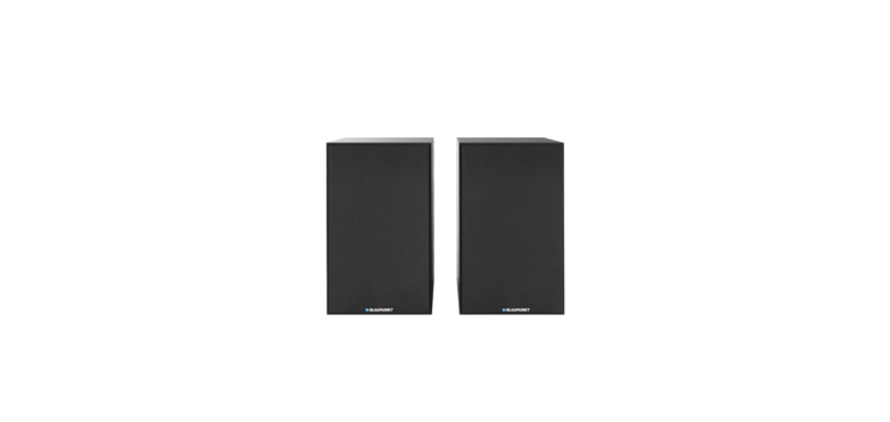

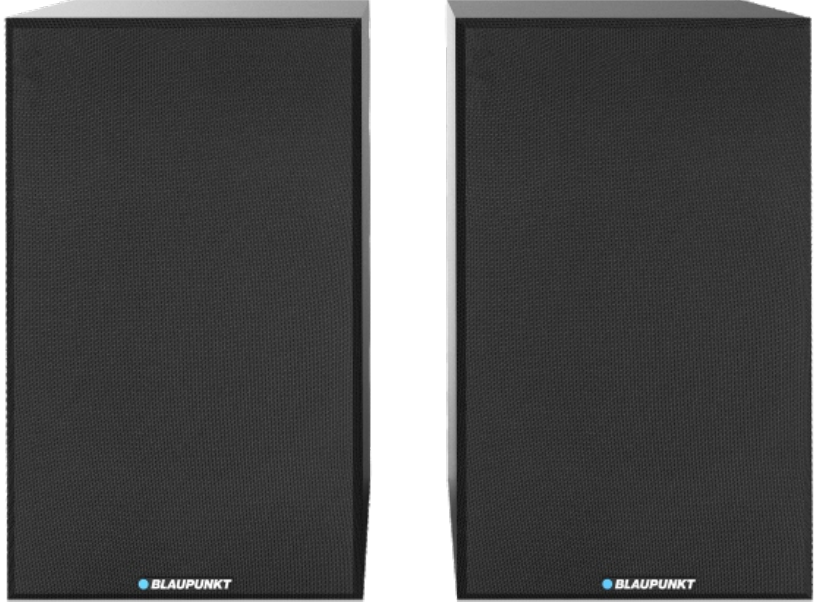
Blaupunkt BS40BK Bluetooth Bookshelf speaker
Safety Instructions
- Read Instructions – All the safety and operating instructions must be read before the product is operated.
- Retain Instructions – The safety and operating instructions should be kept with the product for future reference.
- Heed warnings – All warnings on the product and in the operating instructions should be adhered to.
- Follow instructions – All operating and users’ instructions should be followed.
- Installation – Install in accordance with the manufacturer’s instructions.
- Power sources – This product should be operated only from the type of power source indicated by the marking adjacent to the power cord entry. If you are not sure of the type of power supply to your home, consult your product dealer or local power company.
- Grounding or polarization – the product is not required to be grounded. Ensure that the plug is fully inserted into the wall outlet or extension cord receptacle to prevent blade or pin exposure. Some versions of the product are equipped with a power cord fitted with a polarized alternating line plug (a plug having one blade wider than the other).
- Power cord protection – Power-supply cords should be routed so that they are not likely to be walked on, kinked, or pinched by items placed on or against them, paying particular attention to cords from plugs, receptacles, and the point where they exit from the product.
- Overloading – Do not overload wall outlets, extension cords, or multiple sockets, as this can result in a risk of fire or electric shock.
- Ventilation – The product must be properly ventilated. Do not place the product on a bed, sofa, or other similar surface. Do not cover the product with any items such as tablecloths, newspapers, etc.
ERP2 (Energy Related Products) note
This product with ecodesign complies with the stage 2 requirements of Commission Regulation (EC) NO. 1275/2008 implementing Directive 2009/125/EC regarding standby and off-mode electric power consumption of electronic household and office equipment. After 30 minutes without any audio input, the device will automatically switch into standby mode. Follow the instructions manual to resume the operation.
BLUETOOTH
The Bluetooth® wordmark and logos are registered trademarks owned by Bluetooth SIG, Inc.,c. and any use of such marks by us is under license. Other trademarks and trade names are those of their respective owners. Many thanks for buying our model. Please read and reference this manual carefully before operating the unit. Please keep the manual for future operation reference.
Control panel
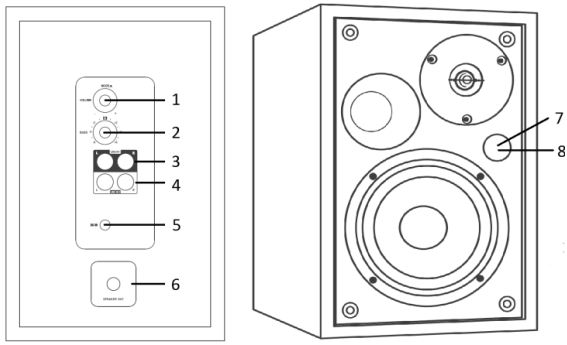
- Power/volume/mode knob: short-press it to power on the unit after connecting with the power adaptor; long-press for 3 seconds to put the unit; short-press it repeatedly to switch the play mode; rotate the knob to adjust the main volume.
- Bass knob: rotate it to increase or decrease bass.
- RCA Line in 1 jack.
- RCA line in 2 jacks.
- DC input power jack.
- Speaker out terminal: connect to the satellite speaker as a stereo.
- IR sensor for the remote controller and a signal LED window.
- RED color: in standby mode.
- Blue color: In Bluetooth mode.
- Light blue color: in Line in 1 mode.
- Yellow color: in Line in 2 mode.
Remote controller
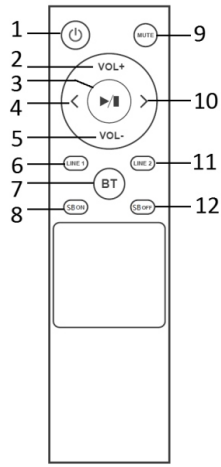
- 1-Power button: Press it to standby on/off the unit.
- 2,5–Volume+/- button: press it to adjust the output volume.
- 3- Play/pause: press it to play or pause the sound output in Bluetooth mode.
- 4,10- Previous/next button: press it to switch previous/next track in Bluetooth.
- 6,7,11- Line in 1/Bluetooth/Line in 2 button: press it to skip to the relevant play mode directly.
- 8,12- 3D on/off button: press it to turn on or off the super bass function.
- 9- Mute button: press it to silence the speaker, press again to resume the output.
Remote control battery installation
Open up the battery door and insert 2 x AAA dry batteries (included) into the compartment; please make sure the polarity of the battery will align with and correspond to Blaupunkt BS40BK Bluetooth Bookshelf speaker the positive and negative silkscreen-printed symbols in the compartment. Then close the battery door.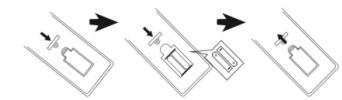
Notes
- The best working distance of the remote control is within 5 meters without any obstacles in between. Please aim the remote control sensor located on the front of the unit during operation.
- The sensitivity of the remote control will become weak Blaupunkt BS40BK Bluetooth Bookshelf speaker when the battery power is exhausted. Please replace it with a fresh one for operation.
- Please take out the battery in case of non-operation for a long time.
- Please dispose of the battery in an environmentally Blaupunkt BS40BK Bluetooth Bookshelf speaker friendly way. Please reference the local government requirement for the details.
Main and satellite speaker connection
Before powering on the unit, please kindly connect the unit first. Using the supplied RCA to RCA(single connector) audio cable, connect the speaker out and speaker terminals to the rear panel between the main and satellite speakers. Then the speaker will get stereo output.
Power setting and power on/off
Plug in the supplied AC/DC power adaptor to an AC household outlet in order to get a power source, and plug the DC connector of the power adaptor into the power jack on the rear panel of the main unit. Then the unit will enter standby mode and be ready to work for you. Press the power knob on the rear panel of the main unit or the remote controller can power on the speaker. Long-press (3seconds) the power knob from the rear panel, or short-press press power button from the remote controller, can turn the unit off.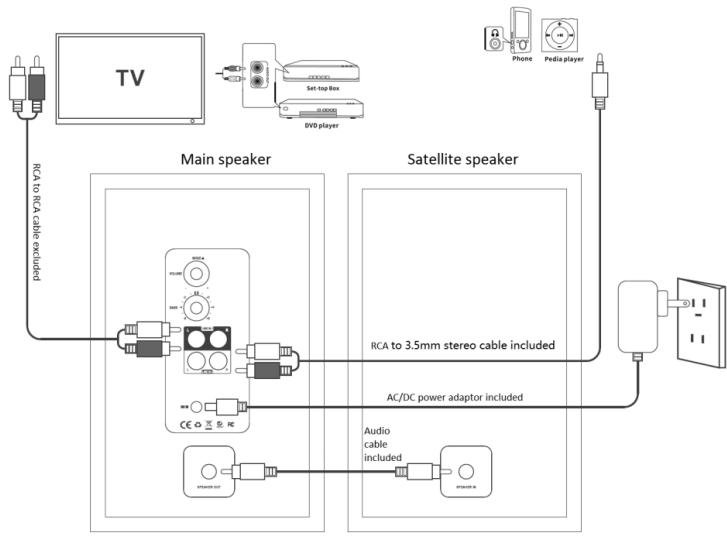
Speakers connect with devices like TVs, TV set-top boxes, DVDs, Blu-ray DVD players, MP3 players, etc.
The speaker has included 2 x RCA analogue ( Line in) inputs for Blaupunkt BS40BK Bluetooth Bookshelf speaker different sources. You can reference the above drawing for the connection, depending on what kind of connector is on your device.
Bluetooth operation
This product includes a Bluetooth function which can wirelessly playback music from other Bluetooth devices (like smartphones, tablets, TVs, etc).
- Power on the unit, press the mode button repeatedly on the rear panel or the Bluetooth button on the remote controller to enter Bluetooth mode. The blue color LED will flare on the signal LED window, which means the unit is ready to pair.
- Enable the Bluetooth function on your device, and search the available devices (please reference your device manual for operation), then check the available Bluetooth devices on the list. Select “ BP BS40” for pairing, and the blue color signal LED will become stable after pairing successfully.
- Select and play the music from your Bluetooth device, adjust the volume level properly, then the sound will come out from the speaker.
- In Bluetooth mode, you can do operations like previous/next track selection, play/pause, mute, etc. by pressing the relevant button on the remote controller.
Bluetooth connects with the TV.
In case of your TV device has a Bluetooth function, the Bookshelf speaker can wirelessly play back with your TV as well. You have to turn on the Bluetooth function on your TV screen and search for “ BP BS40” for connection. Please reference your TV’s manual for the details.
Specifications
General
- Power requirements: DC IN 19V/1.65A
- Power consumption (on mode): xxx Watt working mode
- Standby power consumption :< 0.5 Watt
- Output power RMS: 2 x 20W
- Total harmonic distortion: <1% (1 kHz, 1W)
- Audio input sensitivity: LINE IN 1: 550MV, LINE IN 2: 750MV
- Frequency response: 45 Hz – 20 KHz; S/R:>/= 80dB
- USB support music: MP3/WAV/WMA( not guarantee)
- USB support device: up to 32GB max.
- Unit dimensions: 155 x 248 x 175mm (W x H x D)
- Inputs: 2 x RCA Line in
Speakers
- Tweeter:1.25”/ 4Ω
- Woofer impedance: 4”/4 Ω
Bluetooth
- Bluetooth version: V5.3
- Work range: approx.10 meters
- Transmission frequency: 2.402~2.480GHz
- Protocols: 2DP/AVCTP/AVDTP/AVRCP/GAVDP/HFP/HID/OPP/RFCOMM/SPP
A2DP/AVRCP (Notes: the product spec may change without prior notice).
Accessories
- Remote Controller x 1pcs
- Remote control battery x 1 pair
- Instruction Manual x 1pcs
- Warranty card x 1 pcs
- Audio cable (3.5mm stereo to RCA) x 1pcs
- RCA to RCA single connector audio cable x 1pcs
- AC/DC Power adaptor x 1pcs
Troubleshooting
- The speaker cannot turn on.
- Please check if the power connection is correct.
- No sound output.
- Please try to adjust the volume knob, mute button, and check the play source.
- Please contact the service center for support if the issue remains.
- Sound distortion.
- Please try to adjust and play the music at a lower volume level.
- Check the status of the treble/bass setting.
- Please try to decrease the volume level on the outsourcing player, like T, V, etc.
- The sound is sounding intermittently in Bluetooth mode.
- Please try to move the Bluetooth device closer to the other speaker.
- Please try to repair the speaker with a Bluetooth device.
Customer Support
- WhatsApp: 9156910994
- Toll Free: 1800 209 6820
- Email: support@blaupunktcar.in
FAQs
Can I use the BS40BK while it’s charging?
It is possible to use the BS40BK while it is charging and plugged in.
Is there a warranty for this product?
Yes, a one-year limited guarantee covering manufacturing faults is normally offered by Blaupunkt. For claims, check your purchase receipt and get in touch with Blaupunkt support.
Does the BS40BK have a subwoofer or passive radiators?
The BS40BK lacks a separate subwoofer but has bass-reflex ports to improve low-end response. Its bookshelf design offers excellent sound in a small package.
Does it support Bluetooth multipoint pairing (two devices at once)?
No, only one Bluetooth connection may be made at a time with the BS40BK. To switch devices, unplug the old one and manually pair the new one.
Can I lock the speaker buttons to avoid accidental presses?
The BS40BK does not include a button-lock or child-lock feature.