



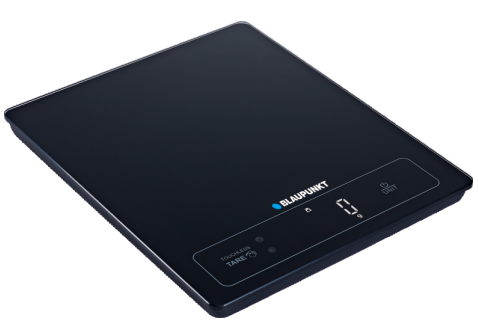
Blaupunkt FKS701 Digital Kitchen Scale User Manual
IMPORTANT NOTES
- Before operating the appliance, please read the instruction manual and follow the instructions provided.
- The manufacturer is not liable for any damages resulting from use of the appliance contrary to its intended use or inappropriate use.
- Keep the instruction manual for future reference.
- The appliance is intended for home use only.
- Do not use it for other purposes contrary to its intended use.
- Do not use for medical or commercial purposes.
- If supervised or instructed on its safe use, so that the risks associated with it are understandable.
- The scale is a precision device. Do not drop, hit, or shake it.
- If the scale is not used for a long time, remove the batteries.
- Batteries that are flat or out of use for a long time may leak.
Display Panel
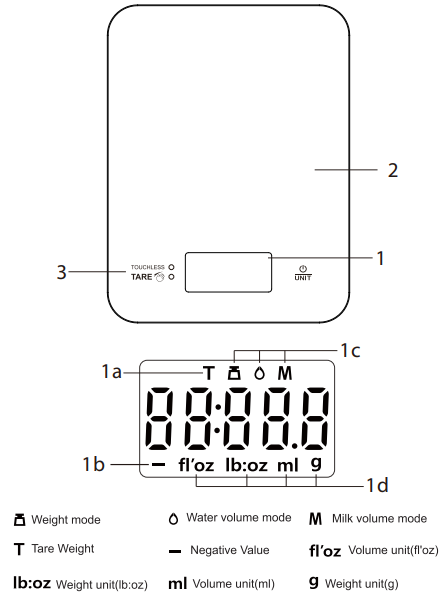
- Display
- Tare function active
- Negative value
- Operating mode (weight, water/milk volume)
- Weight/volume units
- Scale platform
- Tare sensor
Replacing the Batteries
- Open the battery cover on the bottom of the device. Remove the used battery.
- Insert a new battery, paying attention to the proper polarity
Operation
- To change the operating mode (weight/water volume/milk volume) or units (imperial/metric), press the UNIT button.
- Wipe the weighing platform with a damp cloth.
Weight Measurement
- Start the scale by pressing the button. Place the bowl on the product. The display will show the measurement result.
Function
- When the scale is turned on and there is a vessel on the scale platform, move your hand over the tare sensor (without touching it). The scale will Blaupunkt FKS701 Digital Kitchen Scale show 0 and the tare symbol on the display
Technical data
- Capacity up to 15kg, graduation 1g
- Power supply: 3 x 1.5V LR03 batteries (AAA)
Error Message
 Err – The scale has been overloaded.
- Lo – Low battery, replace the batteries.
- If an error is displayed and the scale does not turn off automatically after a longer time, remove the batteries for more than 5 seconds.
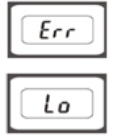 Err – The scale has been overloaded.
Environmental Information
We have tried to make the packaging easy to separate into three materials: cardboard (box), polystyrene foam (buffer), and polyethylene bag ( protective foam sheet). Please observe the local regulations regarding the disposal of packaging materials, exhausted batteries, and old equipment.
- The device is compliant with EU directives.
- An electromagnetic compatibility (EMC) Device marked CE mark on the label.
Disclaimer
- Blaupunkt is not liable for any loss or damage caused or resulting from unauthorized disassembly or modification to the product.
- USA & CANADA: Products not intended for sale in the United States and Canada. No warranty, expressed or implied, is provided in the U.S. and Canada.
- Some countries prohibit drivers from mounting anything on the windshield or restrict mounting to specific areas of the windshield.
- It is the owner’s responsibility to mount the device in compliance with local laws.
- An error may occur depending on the surrounding environment and the voltage of the car.
- Blaupunkt is not liable/responsible for non-recorded events, missing files, etc.
- If the car battery voltage is less than the setting value of the cut-off voltage, the device will stop recording, even in park recording mode.
Customer Support
- WhatsApp: 9156910994
- Toll Free: 1800 209 6820
- Email: support@blaupunktcar.in
FAQs
What is the maximum weight capacity of the FKS701?
The maximum capacity of the Blaupunkt FKS701 is 5 kg (11 lbs). Steer clear of going over this limit since it could harm the internal sensors or compromise accuracy.
What type of batteries does the FKS701 use?
According to your vendor, the scale requires two × AAA batteries, which may be supplied or sold separately. When the “Lo” signal shows on the screen, change the batteries.
Can I use the scale with hot ingredients?
Yes, but first let the components cool. Touching extremely hot objects directly on the scale could affect the high-quality surface or compromise sensor accuracy.
What does the “Err” message on the display mean?
Remove the item right away to avoid irreparable harm. Never exceed the 5 kg (11 lb) weight restriction.
Is the scale suitable for baking and precision measurements?
Indeed! The FKS701 is perfect for baking, portion control, and recipes requiring accuracy because it gives measures in 1-gram increments.
Can I disable the auto-off feature?
No, you cannot turn off the built-in auto-off feature, which is meant to save battery life. After about two minutes of idleness, it becomes active.
Does the FKS701 have a backlit display?
Yes, depending on your model variant, the scale has a clear LCD display with an optional lighting. In kitchens with low light levels, the backlight enhances visibility.