

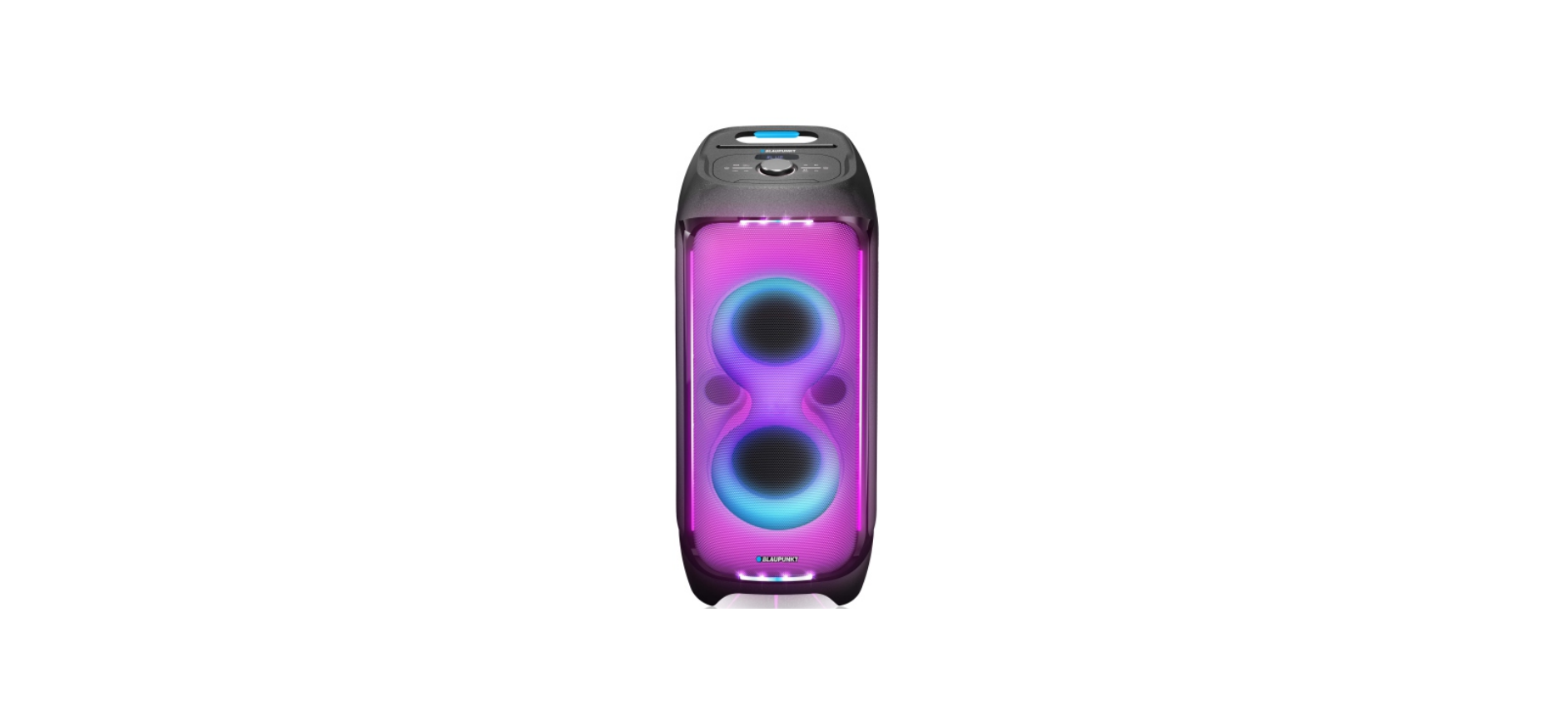

BLAUPUNKT PB100X Party Box System
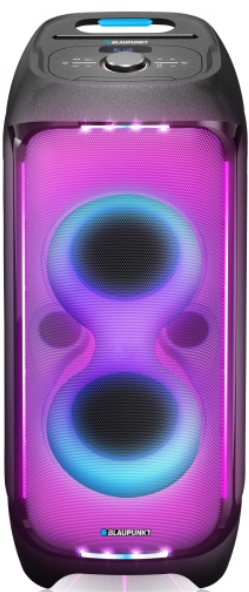
Safety Instructions
- If you are not sure of the type of power supply to your home, consult your product dealer or local power company.
- Overloading – Do not overload wall outlets, extension cords, or multiple sockets, as this can result in a risk of fire or electric shock.
- Ventilation – Do not place the product on a bed, sofa, or other similar surface. Do not cover the product with any items such as tablecloths, newspapers, etc.
- Water and moisture – To reduce the risk of fire or electric shock, do not expose the product to rain, dripping, splashing, or excessive moisture, such as in a sauna or bathroom. Do not use this product near water, for example, near a bathtub, washbowl, kitchen sink, or laundry tub.
- Moving the product – Quick stops, excessive force, and uneven surfaces may cause the product and cart combination to overturn.
- Servicing – Do not attempt to service this product yourself, as opening or removing covers may expose you to dangerous voltage or other hazards. Refer all servicing to qualified service personnel.
- Mains fuses – For continued protection against fire hazard, use fuses only of the correct type and rating.
- Do not turn up the volume while listening to a section with very low-level inputs or no audio signals.
- The only means of completely disconnecting the product from the power supply is by removing the power cord from the wall outlet or the product.
- The wall outlet or the power cord entry to the product must remain freely accessible at all times while the product is in use.
ERP (Energy Related Products)
This product with ecodesign complies with the requirements of Commission Regulation EU 2023/826 according to Directive 2009/125/EC regarding standby mode and off mode electric power consumption of electronic household and office equipment.
- Never use the device unsupervised! Switch off the device whenever you are not using it, even if this is only for a short while.
- The appliance is not intended to be operated through an external timer or separate remote control system.
- If the supply cord is damaged, it must be replaced by the manufacturer, its service agent, or similarly qualified persons to avoid a hazard.
- Before operating this system, check the voltage of this system to see if it is identical to the voltage of your local power supply.
- To prevent fire or shock hazard, do not expose this equipment to hot places, rain, moisture, or dust.
- Do not locate this unit near any water sources, e.g., taps, bathtubs, washing machines, or swimming pools. Ensure that you place the unit on a dry, stable surface.
- Do not place this unit close to a strong magnetic field.
- Do not place the unit on an amplifier or receiver.
- Do not place this unit in a damp area, as the moisture will affect the life of the electrical components.
- To prevent possible hearing damage, do not listen at high volume levels for long periods.
Bluetooth
The Bluetooth® wordmark and logos are registered trademarks owned by Bluetooth SIG, Inc., and any use of such marks by us is under license. Other trademarks and trade names are those of their respective owners. Many thanks for buying our model. Please read and reference this manual carefully before operating the unit. Please keep the manual for future operation reference.
Control panel
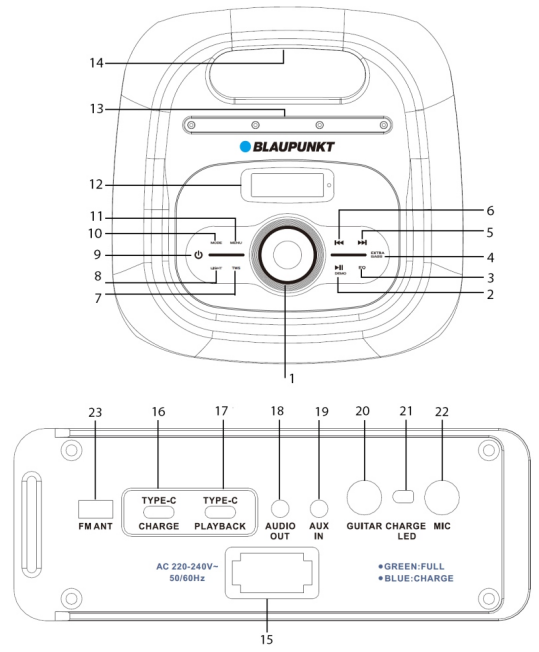
- Volume knob
- play/pause, demo button
- EQ button( equalizer between: standard/pop/classic/rock/jazz/natural/dance/rap)
- Extra bass button
- Next button
- Previous button
- Bluetooth TWS button
- Light button
- Power button
- Mode button
- Menu button
- Display
- Groove(for devices supporting such phones, etc.)
- Handle
- AC power outlet
- Type C charge out port
- USB playback by the Type-C port
- AUDIO OUT jack
- AUX IN jack
- Guitar input jack
- Battery charging LED indicator
- Wired microphone input jack
- FM antenna socket
Remote controller
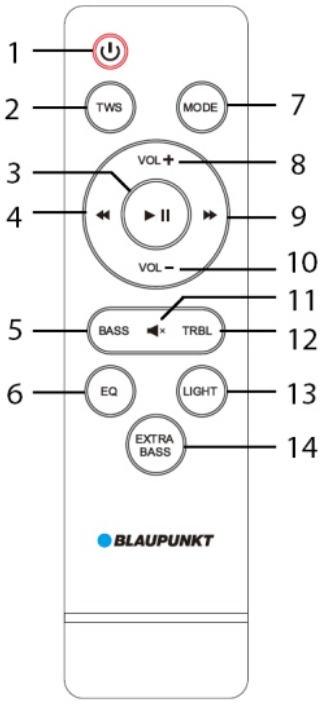
- Power button
- Bluetooth TWS button
- Play/pause button
- Previous button
- Bass button
- EQ button
- Mode button
- Volume + button
- Next button
- Volume – button
- Mute button
- Treble button
- Light button
- Extra bass button
Power connection
Please check if the power source corresponds to the rating voltage spec, which is located on the rear panel of the unit. If it does not match, please consult your dealer or service center. Insert the female terminal of the power cord into the AC outlet, and then connect the power plug to the wall-mount socket in order to get the power source.
Battery power charging
The unit built-in rechargeable battery that allows playback the music without an AC power connection. When the battery is charging, the charging LED will show in blue color, which is located on the rear panel. The charging LED will turn green after fully charged. The battery will also be charged even if you power off the uni, but with an available AC power source. The charging time of the battery is 6~7hours, and 28hours for playback time, depending on the playing volume level. The unit will power off automatically in case of low battery power. Please recharge it for playback.
Battery use
- When the battery is out of power or the battery is low, please charge it as soon as possible. If it is not charged for a long time, the battery’s internal storage capacity will be reduced, which will make it unable to be fully charged or shorten the operation time.
- If the battery needs to be replaced, please contact your local Blaupunkt after-sales service.
- Do not charge the battery for more than 24 hours. Over-discharging or overcharging shortens the life of the battery. Repeated charging and discharging affect the battery life as well as the playback time. Playing time cannot be guaranteed under all conditions. Variable battery life cannot be the basis for a warranty claim.
28 hours of battery playtime obtained with the following settings
- Source: USB
- Volume level: 10
- Lighting: off
- treble/bass: off
- extra bass: off
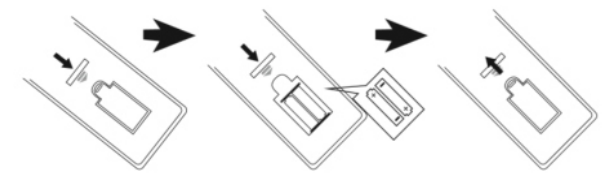
Remote control battery installation
Open up the battery door and insert 2 x AAA dry batteries (included) into the compartment; please make sure the polarity of the battery will align and correspond to the positive and negative silkscreen-printed symbol in the compartment. Then close the battery door.
- The best working distance of the remote control is within 5 meters without any obstacles in between. Please aim the remote control sensor located on the front of the unit during operation.
- The sensitivity of the remote control will become weak when the battery power is exhausted. Please replace it with a fresh one for operation.
- Please take out the battery in case of non-operation for a long time.
- Please dispose of he battery in an environmentally friendly way. Please reference the local government requirement for the details.
Operation
Power on/off
- Long-press (3seconds) the power button on he top panel to power on or off the unit; short press the power button from remote controller can power off the unit, but you have to long press the power button from top panel to power on the unit.
Play source selection
- Pressing the mode button on the top panel or the mode button on the remote controller can switch the play source between FM/Bluetooth/Line in/USB. Long-press this button to turn voice prompts on or off.
Volume adjustment
- Turning the main volume knob on the top panel or pressing the VOL+/- button on the remote control can increase or decrease the output volume level.
Treble & bass adjustment
- short-press the menu button on the top panel repeatedly to get the treble and bassshort-press= treble, B= bass), rotthe the ate the volume knob to adjust the level, and the relevant long-press shows on displMeanwhilehile, the output sound will change simultaneously. There can achieve same function by pressing the treble/bass and volume +/- buttons from the remote controller.
Sound silence
- The MUTE from the remote control can make the sound silent. Press it again to resume the sound output.
Preset EQ
- Press the EQ button repeatedly from the remote control or the top panel can switch the preset equalizer between standard/pop/classic/rock/jazz/natural/dance/rap.
Play/pause
- Press the button to pause the music, and press it again to resume the playback. Bluetooth/USB mode.
Disco light
- Pressing the light button repeatedly can switch the disco light color in 7 types and auto mode; long-pressing (3 seconds) the light button repeatedly can switch the LED light in 5 modes and light off .
The previous/next
- Short-press it to switch to the previous or next track in Bluetooth/USB mode. Press and hold the previous/next button to fast-forward and fast-rewind the current track in USB mode.
Music demo
- long-press the demo button to activate the music demo mode, and repeatedly play the built-in music every 45 seconds; long press the button again to stop and quit the music demo mode.
Extra bass
- Short-press the button to turn on super bass for sound. The unit is built into a subwoofer at the bottom.
Repeat playback
- long-press the EQ button to switch between repeat one and repeat all playback modes in USB.
Reset
- long-press the preset button to reset the system and settings.
FM radio operation
Before starting the FM radio listening, please try to move the unit next to the window or to another location, plug on the supplied FM antenna on the rear pane in order to better FM signal.
- Auto scan and preset radio station (All-in-one): long-press the play/pause button on the long-press remote controller to auto scan and save the available radio station. The unit will auto-play the first preset station after finishing scanning. ( max supported preset station: 50)
- Preset station picking up: In radio mode, press the next/previous button on the op panel or the remote control to pick up and play the last and next preset stations.
- Auto tune: press and hold the previous/next button for 2 seconds to scan the available stations in upward or downward frequency, and auto-play the station.
USB playback operation
The product includes a USB playback function through type C port( the USB to type C adaptor included), which can decode and playback the music from a USB storage device. Before starting the station, please copy the MP3/WMA format music into the device; and insert the device into the type C playback port on rear panel first, because the USB mode is only available when the device plugged on unit successfully. Then the unit will detect and play the inside MP3/WMA music automatically.
Bluetooth operation
- Press the mode button repeatedly to enter Bluetooth mode, and the Bluetooth symbol will flare on the display, which means the unit is ready to pair.
- Enable the Bluetooth function on your device, and search the available devices (please reference your device manual for operation), then check the available Bluetooth devices on the list. Select “ BP PB100X” for pairing, and the Bluetooth symbol will be stable on display after pairing successfully.
- Select and play the music from your Bluetooth device, and then the sound will come out from the speaker.
- The previous/next button can select the last and next track while playing.
- In Bluetooth mode, you can achieve play/pause, mute, treble, and bass adjustment, etc. Functions. Please reference the operation from the general operation part in this manual.
Bluetooth TWS( True wireless stereo) Playing
The speaker includes the TWS function via Bluetooth. In case you have two units on hand, switch to Bluetooth mode. At first time playing, you need to choose one of two speakers as a master, Then short press the TWS button on top panel of the other one to pair each other. The “Slave” stops flashing after TWS pairs successfully. The display shows “ SLAVE” in the stable state, which is the slave speaker, and a “ BLUE” flare on the display of master one.
Then you can start the Bluetooth pairing and operation as usual. But the sound will output from both speakers. In case you change to another play mode like USB/Line in via master speaker, the two speakers can auto pair with each other, and get sound output from both BLAUPUNKT PB100X Party Box System speakers. At the first time TWS pairing, there may be some” sa sa sa…” short noisthenoshort-presser, which is not the function.
In TWS playback mode, the main control will be achieved on the master speaker side. Some functions are not available on the lave speaker. Please kindly note that this is not BLAUPUNKT PB100X Party Box System malfunction. If you turn off the master speaker, the TWS will stop playing. In case you power off/on the speaker, you have to redo TWS pairing. Pressing the TWS button again can quit the TWS playback mode.
Line in and Audio out operation
Line in/AUX IN/MP3 link: In order to wire connect and playback the music with another player or amplifier, please follow up operation below. Using the audio cable (included), connect the AUX IN jack on the rear panel of unit, and the another terminal connect with lineout or headphone jack of outsourcing player like MP3, CD,DVD, Mixer etc. audio device.
Select a music and play it on the outsourcing player, then the sound will output from the speaker. In line-in playback mode, the main control is on the outsourcing BLAUPUNKT PB100X Party Box System player side. But you can also control the volume, mute the sound, and adjust treble & bass, etc. on the speaker side.
Audio out
Using the audio cable, connect the AUDIO OUT jack on the rear panel of the unit, and the other terminal connects with, AUX IN jack on active BLAUPUNKT PB100X Party Box System, etc. PPress the UX IN mode on your active LAN external, then you will get the sound output from the ROM loudspeaker devices at the same time.
Karaoke
The device has a standard 6.3mm microphone input jack. (No microphones included) Connect an optional wired microphone or optional wireless microphone BLAUPUNKT PB100X Party Box System receiver (we recommend Blaupunkt WM40U or WM60UDB) to the 6.3mm jack on the rear panel, then turn on the microphone to sing.
Guitar input
In case you need to connect a music instrument, BLAUPUNKT PB100X Party Box other accessories, like a guitar, you can connect with the 6.3mm guitar in jack on the rear pawipanelyour accessory cable(not include). Press the menu button on the top panel repeatedly to get the guitar output level setting(GT = Guitar output level), then rotate the volume knob to adjust the guitar output level; hold it for a while to quit the setting. Play the guitar, and then you will get the sound output from the speaker.
Power bank
Use the TYPE-C charging cable(not supplied) to connect TYPE- C charge out port on the rear panel with the external device in a power-on mode for charging. The rated charging output is 5V/0.5A.
Audio APP
Scan the code below, go to the BLAUPUNKT website to download the ShortUPUNKT power audio app to access all the features of the PB100X party box speaker. Use your smartphone pto pair with PB100X by Bluetooth first, tap and open the app for application controlling. 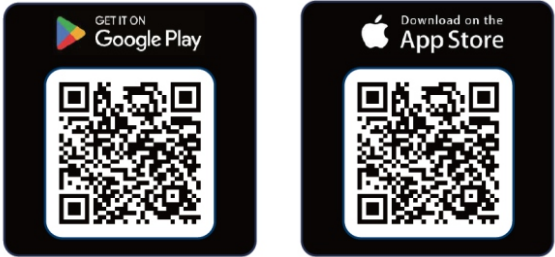
Specification
- Power source: AC 220-240V, 50/60 Hz.
- DC battery power: 12V/15AH.
- FM frequency: 87.5-108.0 MHz.
- Type C playback rating: 5V/0.5A.
- Type C charge out rating: 5V/0.5A.
- support music format: MP3, WMA, WAV, FLAC(not guarantee all such file).
- Bluetooth: V5.0, A2DP 1.3, AVRCP 1.6, within 10 meters for operation.
- Bluetooth maximum frequency transmission power: 6dBm
- Bluetooth frequency band: 2.402~2.480GHz
- RMS output power: 2 x 75W + 2 x 150W(Subwoofer).
- Speakers: 2 x 8inch mid-range, 2 x 2.5inch tweeter, 1 x 12inch subwoofer.
- System frequency response: 40Hz – 18kHz (-6 dB).
- Signal to noise ratio: > 80 dB ±3db.
- 1 x Guitar input, 1 x microphone input
- Power consumption: 450W.
- Power consumption in off mode: </=0.5W.
- Power consumption in standby mode: not applicable
- Power consumption in networked standby: not applicable (The above spec may update without prior notice.)
Troubleshooting
- The speaker cannot turn on.
- Please check if the power connection is correct.
- No sound output.
- Please try to adjust the volume knob and check the play source. Please contact the service center for support if the issue remains.
- Sound distortion.
- Please try to adjust and play the music at a lower volume level. Check the status of the reble/bass setting.
- Background noise on the FM station.
- Try to move the unit to another place for better reception. Scan and switch to another station for listening.
Disclaimer
- In no event shall Blaupunkt be liable for any direct, indirect, punitive, incidental, special, consequential damages to property or life, or whatsoever arising out of or connected with the use or misuse of our products.
- This product is not intended for sale in the United States and Canada. If purchased in the U.S. or Canada, this product is purchased on an as-is basis. No warranty, whether expressed or implied, is provided in the U.S. or Canada.
Recycling and Disposal
- Do not dispose of your old unit in the household trash! Use the return and collection systems available to dispose of the old device.
Customer Service
- Competence Center
- 2N-Everpol Sp. z o.o. Ul. Puławska 403A 02-801 Warsaw, Poland
- Call: +48 22 688 08 00
- E-mail: info@everpol.pl
- Visit: www.blaupunkt.com
- In case of questions or problems
- Tel: 00 48 22 688 08 33
- E-mail: sda@blaupunkt.pl
FAQs
Q: What is the BLAUPUNKT PB100X Party Box System designed for?
Ans: A powerful portable speaker system, the PB100X is ideal for outdoor gatherings, karaoke sessions, parties, and festivals. It has several input options, lighting effects, and a strong, bass-heavy sound.
Q: What is the power output of the PB100X?
Ans: With a strong output of up to 100 watts, the PB100X can produce loud, clear sound that can fill medium-sized to large rooms or outdoor areas.
Q: Is the PB100X battery-powered or does it require a power outlet?
Ans: In addition to having a built-in rechargeable battery that lasts for several hours, it can also be plugged into a wall outlet for continuous usage.
Q: How long does the battery last on a full charge?
Ans: You can usually anticipate 4–6 hours of playback on a full charge at medium volume, while battery life varies depending on lighting usage and volume level.
Q: Can I connect my phone or tablet via Bluetooth?
Ans: Indeed! With the PB100X’s Bluetooth connectivity, you can stream music wirelessly from computers, tablets, and smartphones.
Q: Does the PB100X support USB or SD cards for music playback?
Ans: Of course. You can play MP3 files straight from your flash drive or memory card with its USB and SD card connections, eliminating the need for an additional device.
Q: Is there a microphone input for karaoke?
Ans: Indeed. With its microphone and guitar inputs, the PB100X is perfect for live performances, announcements, and karaoke.
Q: Are microphones included with the PB100X?
Ans: This is contingent upon the particular model or bundle. While some machines come with a wired or wireless microphone, others need to be purchased separately.