



CAD-Audio WX1000BP Wireless Microphone System
Introduction
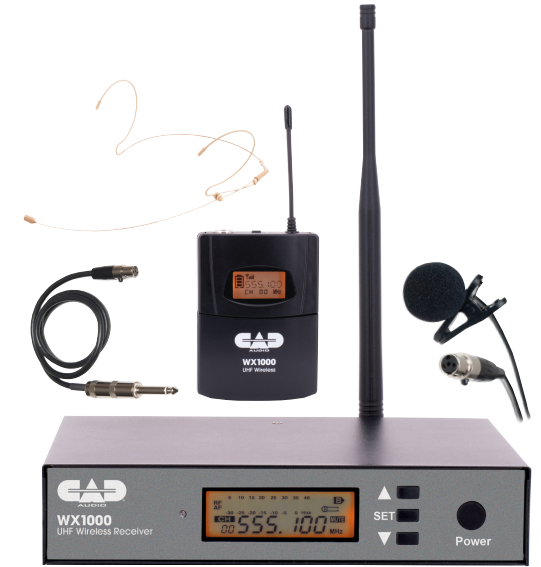
Enjoy the easy and exciting performance that the WX1000BP provides for your next performance. CAD Audio has been creating valued products since 1931 and prides itself on developing and supporting the live performer.
Our concept was straightforward – develop a high-value wireless microphone system that can cope with today’s challenging RF environment, that is both easy to operate and exciting to use.
The WX1000BP is a Frequency Agile UHF Wireless Body Pack System which operates in the 510 – 570MHz frequency band and features 100 channels for optimum clarity of signal.
Auto-scan and IR sync functions make setup and channel-changing a breeze. Enjoy up to 12 hours of run time using two AA batteries, with a battery level indicator on both the transmitter and receiver, so you’ll know when you need to replace them.
All metal construction and included rack mounting hardware help ensure your equipment will stand up to even the toughest conditions. The system includes a head-worn mic, a lavalier mic, and a guitar cable.
Features
- Frequency Agile Design (100 switchable frequencies)
- Use up to 20 systems at the same time
- Up to 295′ (90m) range between transmitter and receiver
- Rugged, all-metal construction
- Auto scan finds the optimal frequency setting
- IR sync wirelessly matches transmitter and receiver frequencies
- The transmitter features a battery life indicator
- Transmitter utilizes 2 AA Batteries with >12 Hrs of operation
- Rack mounting hardware and antenna relocation kit included
- Head-worn and lavalier microphones and guitar/instrument cable included
- 2 Year Warranty
- Power on/off
- Volume Up: short press ( )
- Volume Down: short press ( )
- Lock/unlock Setting: press ( )( ) at the same time, the “LOCK SIGN” on the LCD screen will display or conceal
Receiver
Front
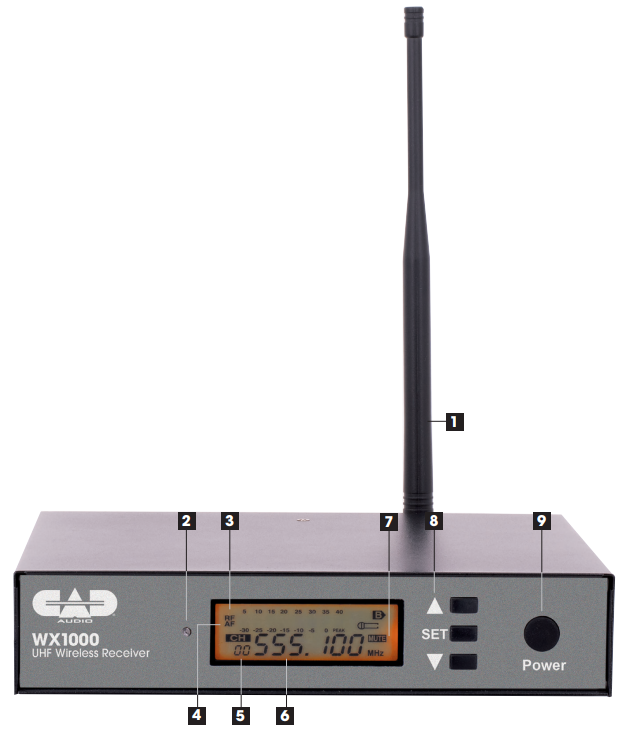
- Antenna
- IR node
- RF peak indicator
- AF peak indicator
- Channel display
- Frequency display
- Mute indicator
- Set Frequency, Channel up/down
- Power on/off
Rear
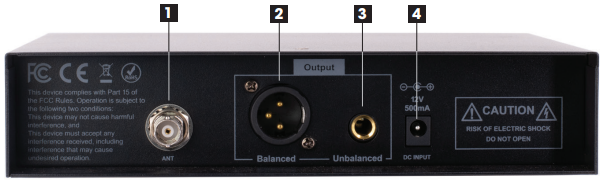
- Antenna jack
- XLR-type balanced output
- 1/4″ unbalanced output
- DC power jack (use included supply)
Bodypack Transmitter
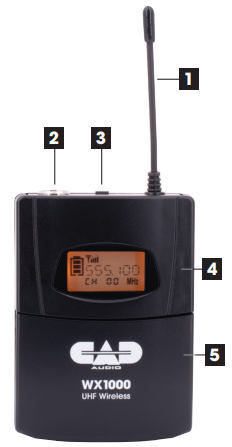
- Antenna
- Audio input jack
- Power Switch
- LCD
- Battery compartment
Specifications TX1000
Frequency Response………………………………………………………….. 30 – 18KHz Frequency Range…………………………………………………… 510MHz – 570MHz Transmit Mode……………………………………………………Micro power wireless Channels……………………………………………………………………………………… 100 Input Power……………………………………………………………………………..<10mW Signal-to-Noise Ratio ………………………………………………………………..>85dB Harmonic Distortion………………………………………………………………….. <0.5% Frequency Error……………………………………………………………………..<15ppm Frequency Stability ……………………………………………………………..≤±0.002% Modulation Mode ………………………………………………………………………… FM Working Current ……………………………………………………………… 100 – 120mA Antenna ………………………………………………………………..Sheltered antenna Power Requirements…………………………………………….2x AA batteries 1.5V
Two-Year Limited Warranty
CAD Audio hereby warrants that this product CAD-Audio WX1000BP Wireless Microphone System will be free of defects in material and workmanship for a period of two years from the date of purchase. In the unlikely event that a defect occurs, CAD Audio will, at its option, either repair or replace it with a new unit of equal or greater value.
Retain proof of purchase to validate the purchase date and return it with any warranty claim. This warranty excludes exterior finish or appearance, damage from abuse, misuse of the product, use contrary to CAD Audio’s instructions, or unauthorized repair.
This warranty gives you specific legal rights, and you may have other rights that vary from state to state. Some states do not allow the exclusion or limitation of incidental or consequential damages or limitations on how long an implied warranty lasts, so the above exclusions and limitations may not apply to you.
Customer Service
CAD Audio Corporate Offices
- Address: 6573 Cochran Rd., Bldg. I Solon, OH 44139 U.S.A.
- Tel: (440) 349-4900
- Fax: (440) 248-4904
- Website: www.cadaudio.com
- Distributor: Distributed Worldwide by American Music and Sound
- Address: 925 Broadbeck Drive, Suite 22, 0 Newbury Park, CA 91320 U.S.A.
- Tel: (800) 431-2609
- Fax: (800) 431-3129
FAQs
What frequency band does the WX1000BP use?
Operating in the UHF band, the WX1000BP offers dependable wireless performance with less interference and a greater range than VHF systems.
What is the typical wireless range of the WX1000BP system?
The wireless range is roughly 100 meters (330 ft) line-of-sight under ideal circumstances. Interference and physical barriers can shorten this distance.
Can I use multiple WX1000BP systems simultaneously?
In order to avoid interference and enable multi-microphone configurations, the system does indeed support several devices operating on various frequencies/channels.
What type of batteries does the handheld microphone use, and how long do they last?
AA batteries are typically used in handheld transmitters, and depending on the type and usage, the battery life can range from 8 to 10 hours.
Is there a way to check the battery status on the microphone?
An LED indicator that displays battery status or low battery warnings is a feature of several models. For information about your particular indication, consult your handbook.
Can the WX1000BP system be used outdoors?
Yes, you can use it outside, but keep it out of the rain and other bad weather. Make sure the system is shielded from moisture and powered safely.
How do I reset or pair the transmitter and receiver if they lose connection?
Turn off both devices, then turn on the microphone and receiver in that order. If necessary, re-establish a connection using the receiver’s manual channel sync or scan features.
Is the WX1000BP system compatible with mixers and amplifiers?
The majority of professional mixers, amplifiers, and PA systems may use the balanced (XLR) or unbalanced (1/4″) audio signals that the receiver outputs.