



Clarke CP5050N 5.0kVA Petrol Generator

Introduction
Thank you for purchasing this CLARKE Generator. Before attempting to use this product, please read this manual thoroughly and follow the instructions carefully. In doing so, you will ensure the safety of yourself and that of others around you, and you can look forward to your purchase giving you long and satisfactory service.
Safety Instructions
- ALWAYS ensure that there is adequate ventilation when using the generator.
- ALWAYS position the generator so that the exhaust is pointing away from people or animals.
- NEVER use the generator indoors or in an enclosed area. (i.,e, a in a warehouse, tunnel, well, or a hold).
- ALWAYS make sure the applied load does not exceed the generator rating.
- ALWAYS disconnect the generator when carrying out any maintenance.
- ALWAYS allow the generator to reach operating speed before connecting a load.
- NEVER allow the generator to run out of fuel when a load is connected.
- NEVER transport the generator with fuel in the tank.
- NEVER connect the generator to a commercial or residential power supply, e.g., ring main.
- NEVER allow the generator air vents to become blocked.
- NEVER alter or tamper with the internal wiring of the generator.
- NEVER allow anyone not fully familiar with generator sets to use this equipment
Symbols
The following safety symbols are shown on the product or its packaging. Please Read all of the safety and operating instructions carefully before using this product.
- Read the instruction manual before use.
- Hot surface – Do not touch
- Dangerous voltage
- Poisonous fumes – Do not use the generator in an enclosed space.
- Flammable
- Caution – The user should be aware of a general hazard.
- This product produces high noise levels during operation. Ear protection is advised.
Unpacking & Assmbly
- Unpack your generator and check that the following items are present. Should there be any missing or damaged items during transit, contact your CLARKE dealer.
Before First Use
Before using your generator, check that:
- The generator is in good condition and free from any damage.
- The generator is clean and free from fuel or oil spillage.
- The generator is correctly located for use.
- There is no leakage.
heck the Oil Level
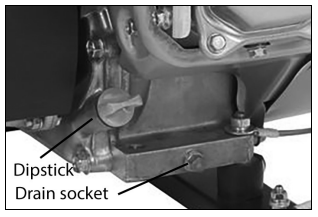
- Stand the generator on a level surface and check the oil level as follows.
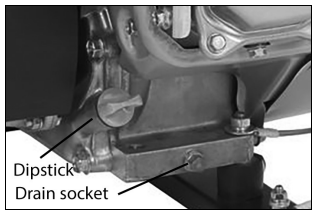
- Turn the oil filler cap/dipstick anticlockwise to remove it from the oil reservoir and wipe with a clean cloth.
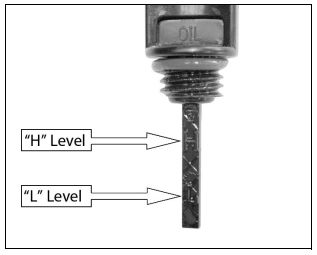
- Insert the dipstick back into the oil filler tube and then remove it again.

- If the oil is below the minimum level on the dipstick, top up the oil reservoir with fresh oil.
- Replace and tighten the oil filler cap.
Checking the Fuel
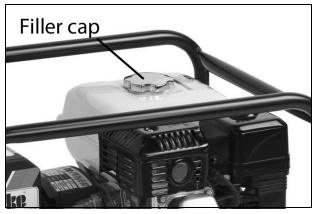
- To check the fuel level, open the fuel filler cap.
- Slowly add fuel to the fuel tank (maximum 3.6 litres).
- Replace the fuel filler cap securely.
Prepration For Use
All extension cables from the generator set to the appliance must be carefully selected, fitted, and maintained. Cables by IEC 245-4 should be used.
Cables should be inspected regularly and should be replaced, not repaired, in the event of a defect.
The length and cross-section of conductors should be selected according to the job to be done. The table below is an indication of the sizes that should be used.

Ensure the cable is fully unwound when in use to avoid overheating and the placing of extra load on the generator.
Operation
Start the engine as follows (referring to the engine manual) and allow it to run for a few minutes at full speed for it to warm up.
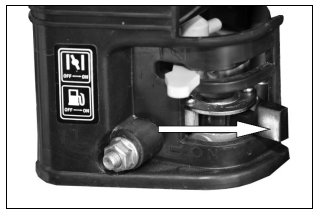
- Move the fuel valve lever to the ON position
- To start a cold engine, move the choke lever to the closed position.
- Pull the recoil starter grip lightly until you feel resistance, then pull briskly. Return the starter grip gently.
- To restart a warm engine, leave the choke lever in the Clarke CP5050N 5.0kVA Petrol Generator open position.
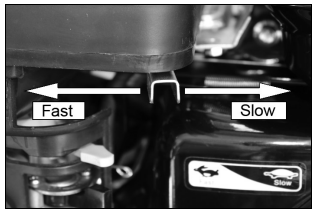
- Set the engine speed by moving the throttle lever away from the MI position.n
- Check the condition of the appliance, including the supply cable and the extension cable if used, and ensure it is switched OFF. Ensure also that the operating voltage is the same as the output from the generator.
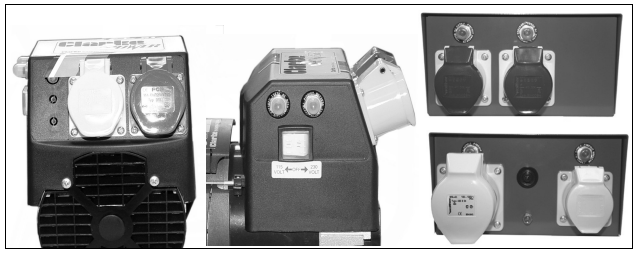
- For generators with dual output, ensure the voltage selector switch is set to deliver the appropriate output – 115V or 230V,
- With the engine running smoothly, connect the appliance Clarke CP5050N 5.0kVA Petrol Generator to the appropriate receptacle: BLUE – 230V, YELLOW – 115V.
Be Aware
Some appliances draw more current on start-up than their normal running current, i.e., electric motor and compressors. If in any doubt as to whether an appliance is compatible or not, please consult your CLARKE dealer. Additionally, please refer to the specifications sheet attached to ensure the machine is used under the correct operating conditions.
Shutting Down the Generator
To stop the generator in an emergency, I simply set the engine switch to ‘OFF’. Move the throttle lever to the MIN position.
- 1. Set the engine switch to the “0” (OFF) position.
- Turn the fuel valve knob to “OFF” (pointing left).
- Disconnect any electric devices.
Maintainance
ENGINE OIL (AFTER FIRST 20 HOURS OF USE)
- Turn the oil filler cap counterclockwise and remove Clarke CP5050N 5.0kVA Petrol Generator it from the oil reservoir.
- Tilt the generator to allow the oil to drain out of the oil reservoir into a suitable container.
- Fill the oil reservoir with fresh oil.
- Replace the oil filler cap and maintenance panel.
AIR FILTER (EVERY 50 HOURS OF USE)
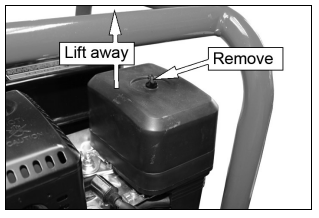
- Remove the air filter cover, unscrewing the securing nut.
- Remove the air filter panel and the air filter element.
- If the air filter is damaged, contact the CLARKE spare parts department for a replacement.
SPARK PLUG (EVERY 50 HOURS OF USE)
- Remove the spark plug cap from the spark plug.
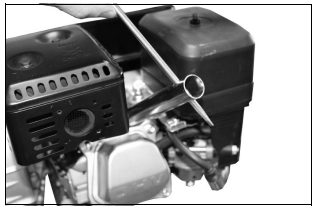
- Fit the spark plug box spanner over the spark plug as shown and use the lever to turn it.
- When the spark plug has been removed, check for discoloration and use a wire brush to remove any carbon buildup.
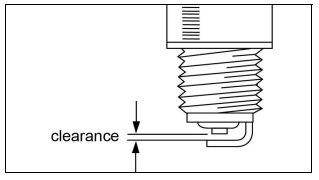
- Check the spark plug gap with a feeler gauge, which should be between 0.6 and 0.7 mm. Adjust if necessary.
- Check the overall condition of the spark plug and replace it if damaged.
- Reinstall the spark plug and replace the spark plug cap.
Storage
Spare Parts
| Frame | SH0211006 | Socket 115V-16A | SH0440001 |
| Alternator /engine mount | SH0270027 | Socket 230V-16A | SH0440002 |
| Alternator NAC3900 | SH0130084 | Socket 115V-32A | SH0440003 |
| IP23 Alternator cover | SH0130067 | Voltage selector switch | SH0430001 |
| Control box D/V wired/covers | SH0491000 | IP23 cover resets | SH0280043 |
| Capacitor 22uf | SH0370015 | Voltage selector switch | SH0280044 |
| Reset button -16 Amp | SH0360049 | Fuel tank | SH0211092 |
| Reset button -32 Amp | SH0360053 | Tank long run (plastic) | SH0212002 |
| Alternator end cover | SH0130067 | Cleat for the fuel tank | SH0270024 |
| Diode PCB assembly | SH0130073 | In-line fuel tap | SH0480002 |
| Collar | SH0130063 | Fuel filter (small in-line) | SH0480003 |
| Grommet | SH0130070 | Filler neck | SH0480005 |
| Dust cover IP23 Reset button | SH0360056 | Filler cap | SH0480006 |
Troubleshooting
| PROBLEM | CAUSE | SOLUTION |
| The generator fails to start | The engine switch is off | Set the engine switch to ON |
| Fuel valve OFF | Move lever to ON position. | |
| Choke open (Off) | Move the lever to the CLOSED position unless the engine is warm. | |
| Lack of engine oil. (with Oil Alert feature fitted) | Add more oil. | |
| No fuel | Add more fuel. | |
| Bad fuel due to long-term storage of fuel in the tank | Drain the fuel tank and carburetor. Refuel with fresh fuel. | |
| Spark plug defective, foul, or wrongly gapped. | Clean, re-gap, or replace the spark plug. | |
| The generator fails to generate electricity (no AC output) | The device you are trying to power is faulty | Make sure the device you want to power is working properly. |
| The selector switch is in the wrong position | Set the selector switch | |
| Tripped circuit breaker | Reset the AC safety trip | |
| Poor connection or defective lead | Check the connection and/or replace the lead | |
| The generator is difficult to start | The air filter is dirty | Clean the air filter. |
| Erratic supply | Incorrect engine rpm | Adjust engine speed |
| Internal alternator problem | Contact CLARKE servicing |
Specifications
| Item | Specification |
| Model No | CP5050N |
| Dimensions (L x W x H) | 690 x 480 x 540 mm |
| Weight | 59 kg |
| Engine type | Honda GX270 |
| Displacement | 270cc |
| Engine power | 9 HP |
| Fuel capacity | 6 L |
| Fuel consumption | 1.63 L/hr |
| Running time (full tank) | 3.7 Hr |
| Fuel type | Unleaded |
| Lubrication Oil Capacity/grade | 1.1 L (SAE 10W30) |
| Spark plug type | BPR 6ES |
| Alternator type | NAC4500 |
| Rated power | 5.0 kVA |
| Rated rotation speed | 3000 rpm |
| Voltage AC | 230/115 V |
| AC Rated frequency | 50 Hz 1ph |
| Earthing | Floating |
| Sound output | 71 dB(A) @7m |
| Measured sound power | 96.138 dB |
| Guaranteed sound power | 96 dB |
Environmental Protection
Recycle unwanted materials instead of disposing of them as waste. If disposing of this product or any damaged components, do not dispose of it with general waste. This product contains valuable raw materials. Metal products should be taken to your local civic amenity site for recycling of metal products.
Guarantee
This product is guaranteed against faulty manufacture Clarke CP5050N 5.0kVA Petrol Generator for 12 months from the date of purchase. Please keep your receipt, which will be required as proof of purchase.
This guarantee is invalid if the product is found to have been abused or tampered with in any way or not used for the purpose for which it was intended.
Faulty goods should be returned to their place of purchase; no product can be returned to us without prior permission. This guarantee does not affect your statutory rights.
Customer Service
- Tel: 0208 988 7400
- Website: parts@clarkeinternational.com
- Visit: service@clarkeinternational.com
FAQs
What is the maximum power output of the Clarke CP5050N generator?
With a 5.0 kVA (kilovolt-amperes) maximum output, the CP5050N can power a variety of tools, appliances, and equipment.
What type of fuel does the generator use?
The fuel used by the CP5050N is unleaded petrol. For best results, always use clean, fresh fuel with the proper octane rating.
How long can the generator run on a full tank?
Depending on the fuel tank capacity and operational circumstances, the generator normally runs for 6 to 8 hours at 50% load when fully charged.
How do I start the generator?
Pull the recoil starting cord firmly after turning the engine switch to “on,” setting the choke as necessary, and turning the fuel valve to “on.” For comprehensive beginning instructions, consult the manual.
What maintenance is required for the generator?
Inspecting spark plugs, cleaning or replacing the air filter, checking and changing the oil, and emptying the fuel tank if the generator will be idle for extended periods of time are all examples of routine maintenance.
How do I check the oil level?
Make use of the engine’s dipstick. To make sure the oil level is between the minimum and maximum markings, remove, clean, reinstall, and remove again.
What safety features does the CP5050N have?
The generator has a circuit breaker to safeguard connected equipment, overload protection, and low oil shutdown to guard against engine damage.