

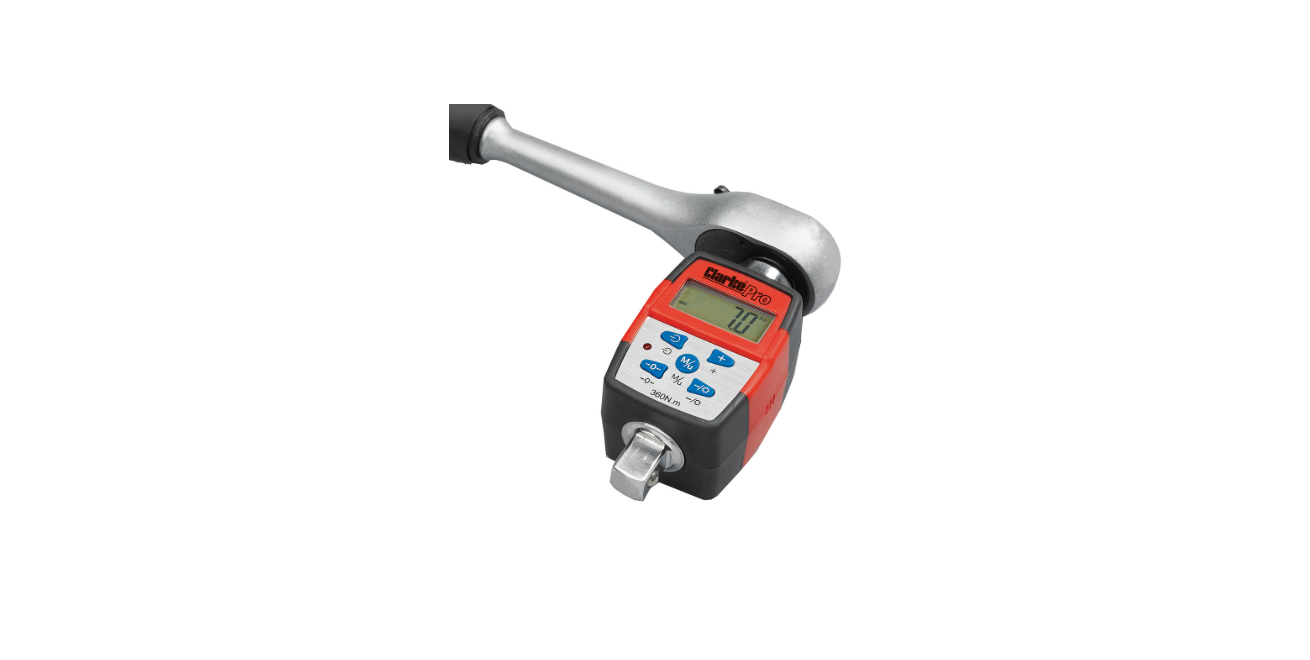

Clarke PRO238 Digital Torque Adapter
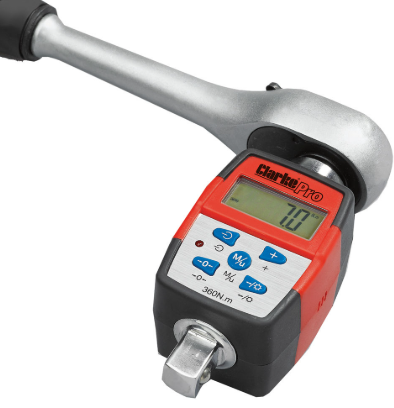
Introduction
Thank you for purchasing this CLARKE Torque Adaptor. This CLARKE product has been designed to give long and trouble-free service. If, however, having followed the instructions in this booklet carefully, you encounter problems, take the unit to your local CLARKE dealer.
Safety Instructions
- NEVER exceed the permitted maximum torque value for this device. Overloading could cause damage.
- ALWAYS use the correct size and type of socket for the nut/bolt.
- NEVER use sockets showing wear or cracks.
- ALWAYS pull the wrench towards you. NEVER push it away and adjust your stance to prevent a fall should something give way unexpectedly.
- NEVER operate the torque wrench or remove the batteries with wet hands.
Overview
Features of the torque adaptor include:
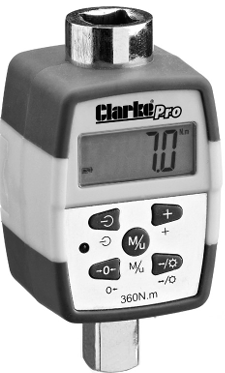
- LED Screen with Back Light
- Audible Alarm /LED Indicator
- Auto Power-Off
- Peak Value Hold/Track selection
- Target Torque Value Preset
- Low Battery Indication
- Moulded Storage Case
Control Panel
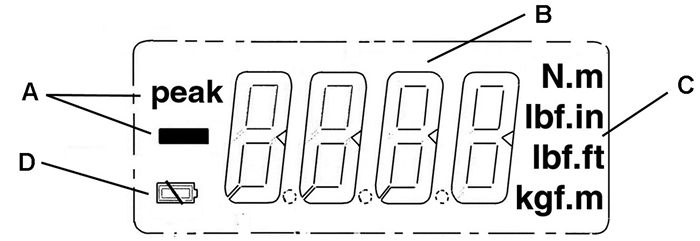
- Peak/Track mode indicator
- The value of the torque measured/preset value displayed
- Selectable units of measurement
- Battery Condition indicator
Push Buttons
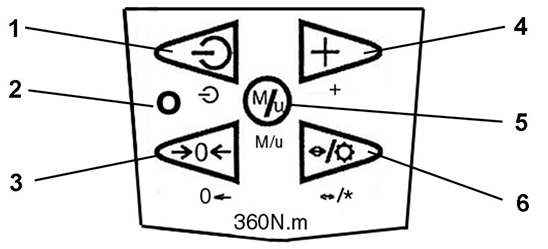
- Power ON/OFF button
- The warning LED illuminates when the pre-set torque is reached
- Zero/tare
- Change the value of the preset torque
- Measurement unit selection and selecting between ‘Track’ and ‘Peak’ modes
- Illuminating the display/press to move to the next digit
Prepration
- Remove the screw securing the battery cover to the back of the unit and lift off the cover.
- Install batteries (2 x CR2032) with their marked faces to the Clarke PRO238 Digital Torque Adapter right and refit the cover.
- If the batteries are in poor condition, the icon will flash during operation, and new ones should be fitted.
- The typical life of the batteries is 60 hours of continuous use.
Switching ON/OFF
- Press the button to turn the device on.
- The LCD panel will display all characters, and after 2 seconds, the display will show 0.0.
- The adaptor will be in ‘track’ mode, i.e., it will measure and display the actual torque detected.
- To manually turn the adaptor off, press and release the button.
- If you do not use the adaptor for 3-4 minutes, it will turn off automatically.
- NEVER turn the adaptor off while force is applied.
Display Lightning
- Press the button to illuminate the back light.
- Press again to turn the back light off.
How To Set Track
- Press the button to select the current torque value or Peak (the max torque value), if preferred.
- The display can alternate between Peak and Track (Track is the default mode, but only Peak will be displayed when selected).
Unit of Measurement
- Press and hold the button for 3 seconds.
- The display will scroll quickly through the available units of measurement. (N.m, lbs · in, lbf · ft, and Kgf · m).
- Release the button when your required unit is shown.
Torque Setting
- With the unit of measurement already chosen, press the. (Set will flash briefly) And the torque value will be displayed with the first digit flashing.
- The value will display for 3 seconds, then revert to 0.0, i.e., step 2 must be commenced within 3 seconds.
- The value chosen must always be at least 10% of the maximum capability of the wrench.
- Press and hold the button to zero the display and set Clarke PRO238 Digital Torque Adapter another value.
- Press the button to increase the number until the required value is reached.
- Press to move to the right and select the next number using the button.
- The target torque will display for 3 seconds, then revert to 0.0.
- Press to set the value.
Operation
- Connect any 1/2” square drive wrench to the top (female) socket of the adaptor.
- Smoothly tighten your fastening, applying even pressure.
- If in TRACK mode, the actual torque applied at any moment will be displayed.
- As the target torque setting is approached, the LED will flash and the alarm will bleep, before a continuous tone and light when the target torque is reached or exceeded.
- If in PEAK mode, the red LED will light up and the audible warning sound will be heard when the target torque is reached, and the highest measured reading will be displayed.
- Press the button to clear this reading before taking another measurement.
Care During Use
- Take care not to drop the adaptor on a hard surface and reset the unit as described under MAINTENANCE & CALIBRATION, should it be subjected to sudden shock.
- Take care not to damage the LCD.
- NEVER apply force with the adaptor when the power is off. ALWAYS turn the unit on before using it.
- Re-set the adaptor if you believe its capacity may have been exceeded.
- Check that the adaptor operating range is adequate for the anticipated load before proceeding. DO NOT exceed the maximum rating of the adaptor (360Nm or equivalent units).
- NEVER use the adaptor to undo bolts & nuts which may be excessively tight.
- DO NOT expose the adaptor to extreme temperature, humidity, or direct sunlight for extended periods.
- Avoid using knuckle or universal joints, as these could possibly result in inaccurate torque settings.
Storage & Cleaning
- Store in a clean, dry environment away from excess heat, humidity, or dust.
- Clean by wiping the adaptor and the display with a soft cloth. NEVER immerse it in water or any type of solvent or cleaning fluid.
Maintainance & Calibration
- To restore the factory calibration settings, perform the following procedure.
- In measuring mode, press and hold and buttons at the same time.
- Release the buttons until the screen appears showing the indicator “—-” to reset the wrench.
- DO NOT attempt to dismantle this device.
Battery Use & Care
- NEVER combine used batteries with old ones or mix battery types. NEVER either dump or incinerate old batteries.
Specifications
Guarantee
This CLARKE Torque Adapter is guaranteed against faulty manufacture for 12 months from the date of purchase. Please keep your receipt as proof of Clarke PRO238 Digital Torque Adapter purchase. This guarantee does not affect your statutory rights.
Environmental Policy
Through the purchase of this generator, the customer is taking on the obligation to deal with the WEEE in accordance with the WEEE regulations in relation to the treatment, recycling & recovery, and environmentally sound disposal of the WEEE.
Customer Service
- Tel: 0208 988 7400
- Website: parts@clarkeinternational.com
- Visit: service@clarkeinternational.com
FAQs
What torque range does the PRO238 support?
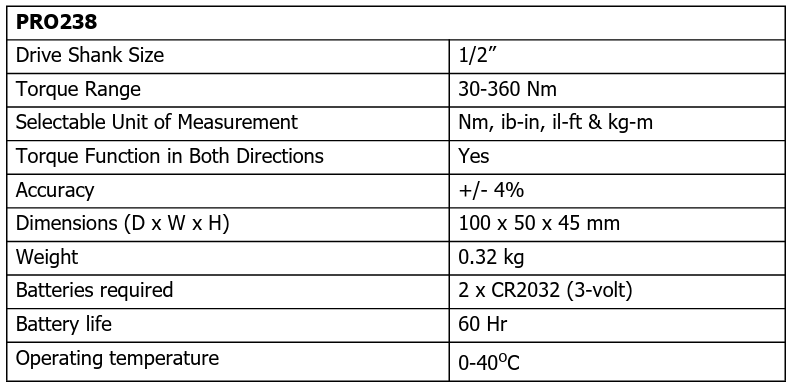
The torque range that the Clarke PRO238 measures is 20–200 Nm (Newton-meters). It is appropriate for the majority of medium- to heavy-duty engineering, automotive, and general workshop applications.
What drive size is compatible with the PRO238?
Standard ratchets, breaker bars, torque multipliers, and other instruments with a 1/2-inch drive are compatible with this adaptor.
How accurate is the torque measurement?
With an accuracy of ±2% in clockwise and ±3% in anticlockwise directions, the PRO238 is appropriate for both professional and do-it-yourself applications that demand accuracy.
Does the PRO238 have a memory function?
It does have trace and peak modes. It also lets you remember the last torque numbers you used and saves previous settings. For recurring tasks needing constant torque values, this is helpful.
How is the device powered, and how long do batteries last?
Two AAA batteries (not always included) are needed to power the PRO238. A new set of batteries will last for several months when used normally. To save battery life, the adapter has an auto shut-off functionality.
Can I calibrate the PRO238 myself?
Although the torque adapter is calibrated by the manufacturer, depending on how often it is used, periodic calibration is advised. Clarke might advise on approved calibration facilities or provide calibration services.
Is it suitable for both clockwise and counterclockwise torque applications?
Although the accuracy is somewhat decreased in counter-clockwise mode (±3%), the Clarke PRO238 does really measure torque in both directions.