



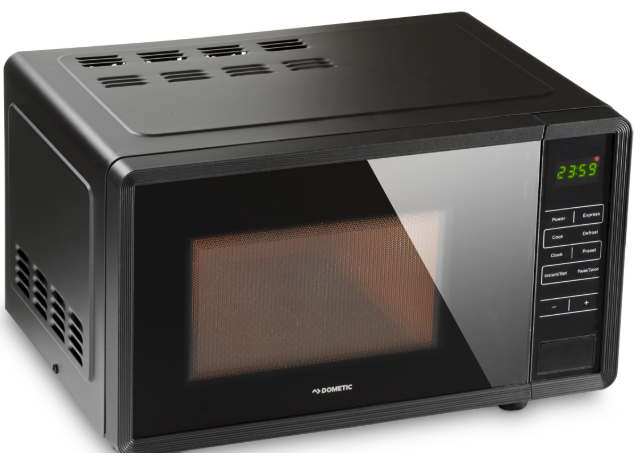
Dometic MWO240 Camping Cooking Microwave
Safety Instructions
- Use this device only for its intended use as described in this instruction manual.
- Do not use corrosive chemicals in this device.
- Do not operate the device when it is empty.
- Do not put this device into operation
- Always keep and use the device out of the reach of children under 8 years of age.
Scope of delivery
- Microwave oven
- Operating manual
Intended use
The microwave oven is designed for use in caravans and motorhomes. It is suitable for defrosting and heating food for short periods of up to 60 minutes. This type of microwave oven is specifically designed to heat or cook. It is not designed for industrial or laboratory use. The microwave oven is designed to operate on the AC mains.
Technical description
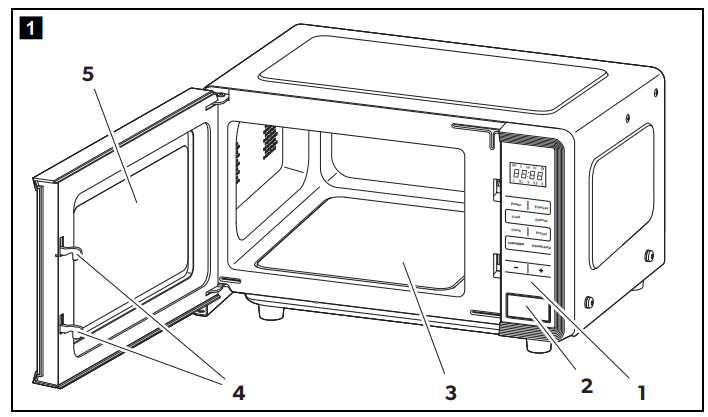
The microwave oven has the following components and control elements:
Components
| Item in fig. 1, page 3 | Explanation | |
| 1 | Control panel | |
| 2 | Door opener | |
| 3 | Ceramic plate | |
| 4 | Door lock | |
| 5 | Microwave window | |
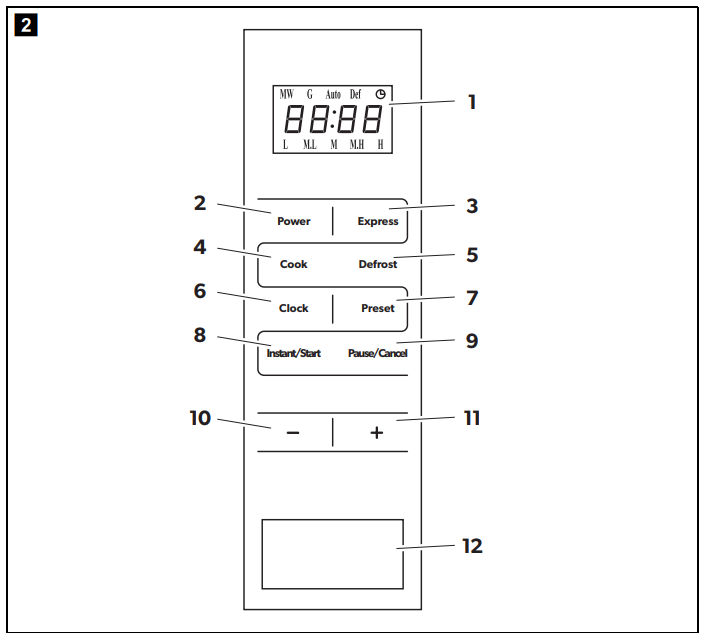
| Control elements | ||
| Item in fig. 2, page 3 | Explanation | |
| 1 | Display for indicating the cooking time, power, and current time | |
| 2 | POWER | Select the required microwave power 100P, 80P, 60P, 40P, 20P |
| 3 | EXPRESS | Select the EXPRESS operating mode: 0:30, 1:00, or 1:30 |
| 4 | COOK | Select the COOK operating mode |
| 5 | DEFROST | Select the DEFROST operating mode to defrost frozen food |
| 6 | CLOCK | Set the time |
| 7 | PRESET | Set the timer |
| 8 | INSTANT/ START | Start or stop the current cooking or defrosting program |
| 9 | PAUSE/ CANCEL | Cancel during settings During operation: Press once: Pause operation, press twice: Stop operation |
| Item in fig. 2, page 3 | Explanation | |
| 10 | – | Set the cooking time During operation: Reduce the cooking time or the weight during operation |
| 11 | + | Set the cooking time During operation: Increase the cooking time or the weight during operation |
| 12 | Door opener |
Connecting and Setting the Microwave
- Make sure that all packaging materials are removed from the inside of the door.
- Check the microwave oven for damage such as a misaligned or bent door, damaged door seals and sealing surfaces, broken or loose door hinges, and latches and dents inside or on the door.
- If you notice any damage, do not put the microwave oven into operation and contact qualified service personnel.
- The microwave oven must be placed on a flat, stable surface that can support its weight as well as the heaviest possible food.
- Do not place the microwave oven near heat, moisture, high humidity, or flammable materials.
- Proper operation of the microwave oven requires a sufficient air supply.
- Keep a sufficient distance (approx. 5 cm) from the outer walls in order to ensure heat exchange.
- Do not cover or block openings on the microwave oven. The feet should not be removed.
- Make sure that the connection cable is undamaged and does not run under the microwave oven or across a hot or sharp surface.
- Do not use the microwave oven outdoors.
Connecting the microwave oven to the power supply.
- Connect the power plug to the AC mains.
- The display flashes three times and displays “-: -”.
Setting the time
- Press the CLOCK button to set the time.
- The display shows 00:00.
- Press the + or – buttons to set the hours.
- Press the CLOCK button.
- Press the + or – buttons to set the minutes.
- Press the CLOCK button or wait 5 seconds to save the time
Operation
- Arrange the food carefully. Place the thickest areas towards the outside.
- Pay attention to the cooking time. Always cook for the shortest indicated time and increase it if necessary. Overcooked foods may produce smoke or catch fire.
- Cover food during cooking. Covers prevent splashing and ensure uniform cooking.
- Turn foods such as chicken and hamburger once during the cooking process. Large foods such as roasts must be turned over at least once.
- Rearrange foods such as meatballs after half the time from top to bottom and from the center outwards.
- The ideal material for a microwave oven is permeable to microwaves, allowing energy to penetrate the container and heat the food.
- Microwaves cannot penetrate metal, so metal dishes or dishes with metallic trim should not be used.
- Do not use recycled paper products for cooking in a microwave oven, as they may contain small metal fragments that may cause sparks and/or fires.
- Round/oval dishes are better than square/oblong dishes, because food may overheat in the corners of the dish.
Guidelines for Suitable Dishes
| Cookware | Microwave-safe |
| Heat-resistant glass | Yes |
| Non-heat-resistant glass | No |
| Heat-resistant ceramic | Yes |
| Microwave-safe plastic dishes | Yes |
| Plastic wrap | Yes (only at low power) |
| Metal bowls | No |
| Metal frames | No |
| Aluminum foil and aluminum foil containers | No |
| Bamboo tableware | No |
| Cardboard tableware | No |
Cooking
- Place the food in the microwave oven and close the door.
- If necessary, press the POWER button repeatedly to select the required microwave power:
- 100P 100% microwave power; quick heating of food
| 80P | 80% microwave power; heating food |
| 60P | 60% microwave power; steaming food |
| 40P | 40% microwave power; defrosting food |
| 20P | 20% microwave power; keeping food warm |
- Press the + or – buttons to set the cooking time.
- Press the INSTANT/START button.
- After the set cooking time is finished, the display shows “End”.
- Three consecutive signal tones sound if the door of the microwave oven has not yet been opened.
- Open the door and remove the heated food.
Opening the door during cooking
Opening the door stops the cooking process. The display shows the remaining time. Continue the cooking process as follows:
- Close the door.
- Press the INSTANT/START button.
Heating liquids (EXPRESS operating mode)
- Place the food in the microwave oven and close the door.
- If necessary, press the EXPRESS button repeatedly to select the required cooking time of 0:30, 1:00, or 1:30.
- Press the INSTANT/START button.
- After the set cooking time is finished, the display shows “End”. Three consecutive signal tones sound if the door of the microwave oven has not yet been opened.
- Open the door and remove the heated food.
Defrosting (DEFROST operating mode)
- Place the food in the microwave oven and close the door.
- Press the DEFROST button and enter the type of food according to the following table:
- d.1 Defrost meat (0.1 to 2.0 kg)
- d.2 Defrost poultry (0.2 to 3.0 kg)
- d.3 Defrost fish (0.1 to 0.9 kg)
- Press the + or – buttons to set the weight.
- Press the INSTANT/START button to start the defrosting program.
- Upon completion of the defrosting program, the display shows “End,” and three consecutive signal tones are sounded.
Heating specific dishes (COOK operating mode)
- Place the food in the microwave oven and close the door.
- If necessary, press the COOK button repeatedly to select the required dish:
A.1 Popcorn 85 g
For a typical pack of microwave popcorn with a package size of 85 g. Press the PAUSE/ CANCEL button when only 1 kernel of corn pops every 1 to 2 seconds.
A.2 Popcorn 100 g
As for A.1, for package size 100 g. A.3 Pizza Warm up 1 piece of frozen pizza (0.15 kg). A.4 Beverages 250 ml
For a cup containing 250 ml of liquid at a temperature of about 5 to 10 °C. Use a wide cup. Do not cover the cup. A.5 Beverages 500 ml
As for A.4, for a cup with 500 ml of liquid. A.6 Potatoes Cook potato strips (cut to 5-mm wide pieces). For a mass of 0.45 kg. Spread the strips out on a large plate. Cover the potatoes with suitable plastic wrap to prevent drying out. A.7 Potatoes As for A.6, for a mass of 0.65 kg. - Press the INSTANT/START button.
- After the set cooking time is finished, the display Dometic MWO240 Camping Cooking Microwave shows “End”. Three consecutive signal tones sound if the door of the microwave oven has not yet been opened.
- Open the door and remove the heated food.
Setting the multi-stage cooking program
You can adjust the microwave power and cooking time in up to 4 stages to meet your needs. Example of a 2-stage cooking program: You would like to cook a dish at 100P for 3 minutes, then at 20P for 9 minutes.
- Place the food in the microwave oven and close the door.
- If necessary, press the POWER button repeatedly until the required microwave power of 100P is selected.
- Press the + or – buttons to set the cooking time to 3:00.
- If necessary, press the POWER button repeatedly until the required microwave power of 20P is selected.
- Press the + or – buttons to set the cooking time to 9:00.
- Press the INSTANT/START button.
Programming the timer
The timer function allows you to set a preferred time to start microwave operation. An example of setting the timer function: It’s 12:30 pm. At 2:30 pm, you would like to cook a dish at 100P °C for 3 minutes.
- Place the food in the microwave oven and Dometic MWO240 Camping Cooking Microwave close the door.
- Press the CLOCK button to set the time.
- The display shows 00:00.
- Press the + or – buttons to set the hours to 12:00 pm.
- Press the CLOCK button.
- Press the + or – buttons to set the minutes to 12:30 pm.
- Press the CLOCK button again.
- If necessary, press the POWER button repeatedly until the required microwave power of 100P is selected.
- Press the + or – buttons to set the cooking time to 3:00 pm.
- Press the PRESET button to set the timer.
- Press the + or – buttons to set the hour to 2:00 pm.
- Press the PRESET button.
- Press the + or – buttons to set the minutes to Dometic MWO240 Camping Cooking Microwave 2:30 pm.
- Press the PRESET button again to save the timer setting.
- The microwave oven starts at the set time. Dometic MWO240 Camping Cooking Microwave You can check the timer function by pressing the PRESET button. The display shows the preset start time.
Locking the buttons
You can set a button lock as a child safety feature.
- To activate the button lock, hold the PAUSE/CANCEL button down for 3 seconds.
- To deactivate the button lock, hold the PAUSE/CANCEL button down for 3 seconds.
Cleaning and care
- Turn off the power and unplug the power plug before cleaning.
- Do not use scouring agents when cleaning the device.
- Keep the inside of the microwave oven clean. If food splashes or spilled liquids stick to the walls of the microwave oven, wipe them clean with a damp cloth. Use a mild detergent if the microwave oven is very dirty. Avoid the use of spray and other harsh cleaners, as they may cause stained, streaked, or dull surfaces on the door.
- Regularly wipe the door, the door seals, and the adjacent parts with a damp cloth to remove dirt or splashes.
- Clean it with a soft, damp cloth. Leave the door open to avoid accidentally turning on the microwave oven.
- If moisture accumulates inside or around the outside of the door, wipe it dry with a soft cloth.
- Pour and place them in a deep microwave-safe container and turn on the microwave oven for 5 minutes. Wipe it out thoroughly and dry it with a soft cloth.
- Have a defective microwave lamp replaced by a specialist dealer.
- The microwave oven should be cleaned regularly, and any food scraps should be removed. Not maintaining the device in a clean condition may damage the surface and shorten the service life of the device.
Technical Data
| MWO 240 | |
| Ref. no.: | 9600008377 |
| Rated voltage: | 230 V 50 Hz |
| Microwave power: | 700 W |
| Microwave frequency: | 2450 MHz |
| External dimensions H x W x D: | 283 x 451 x 353 mm |
| Internal dimensions H x W x D: | 181.5 x 303 x 321 mm |
| Capacity: | 17 liter |
| Weight: | 11.5 kg |
Troubleshooting
Fault Solution
- Make sure that the microwave oven is plugged in correctly.
- If it is not properly plugged in, unplug it, wait 10 Dometic MWO240 Camping Cooking Microwave seconds, and then plug the microwave oven in correctly.
- Check if a fuse is blown or a circuit breaker Dometic MWO240 Camping Cooking Microwave has tripped.
- If they are functioning correctly, test the socket with another device.
- Otherwise, the microwaves will not reach the interior of the microwave oven.
Warranty
Refer to the sections below for information about Dometic MWO240 Camping Cooking Microwave warranty and warranty support in the US, Canada, and all other regions.
Disposal
Place the packaging material in the appropriate recycling waste bins, wherever possible. Consult a local recycling center or specialist dealer for details about how to DOMETIC SB27150 90 Degree Bezel Kit Installation dispose of the product in accordance with the applicable disposal regulations.
Customer Service
SPAIN
- Address: Dometic Spain S.L. Avda. Sierra del Guadarrama, 16 E-28691 Villanueva de la Cañada Madrid
- Call: 8 +34 900 100 245.
- Email: info@dometic.es
GERMANY
- Address: Dometic WAECO International GmbH Hollefeldstraße 63 • D-48282 Emsdetten
- Call: 9 +49 (0) 2572 879-195
- Email: info@dometic-waeco.de
FRANCE
- Address: Dometic SAS ZA du Pré de la Dame Jeanne B.P. 5 F-60128 Plailly
- Call: +33 344633518
- Email: vehiculesdeloisirs@dometic.fr
AUSTRALIA
- Address: Dometic Australia Pty. Ltd. 1 John Duncan Court • Varsity Lakes QLD 4227
- Call: 8 +61 7 55076001|
- Email: sales@dometic-waeco.com.au
FAQs
What power sources does the MWO240 support?
The microwave runs on 230V AC power, which is frequently found at RV parks and campgrounds. For safe operation, a steady power source is necessary.
How much power does the microwave consume?
With a power rating of roughly 700 watts, the MWO240 is ideal for efficient heating without consuming a lot of energy.
Does it have preset cooking programs?
Indeed, the microwave has a number of pre-programmed cooking modes that make meal preparation easier, such as those for popcorn, pizza, warming beverages, and defrosting.
Can I use the microwave to defrost frozen food?
Of course! The defrost feature of the MWO240 safely thaws frozen items without cooking them by using reduced power settings.
How do I clean the microwave interior?
To clean the interior, use a gentle cloth and a light detergent. Steer clear of sharp things and abrasive cleaners to protect the cooking cavity.