

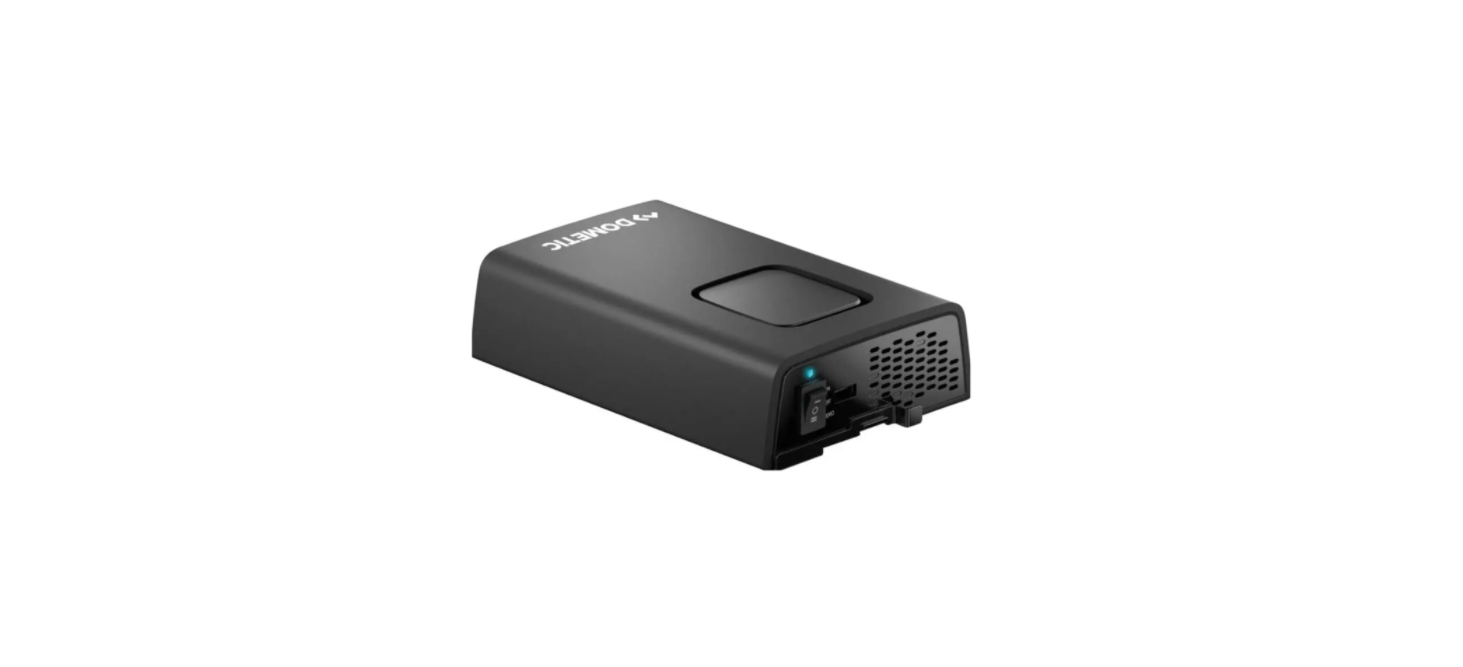

Dometic SinePower DPSI212 Sinewave inverter
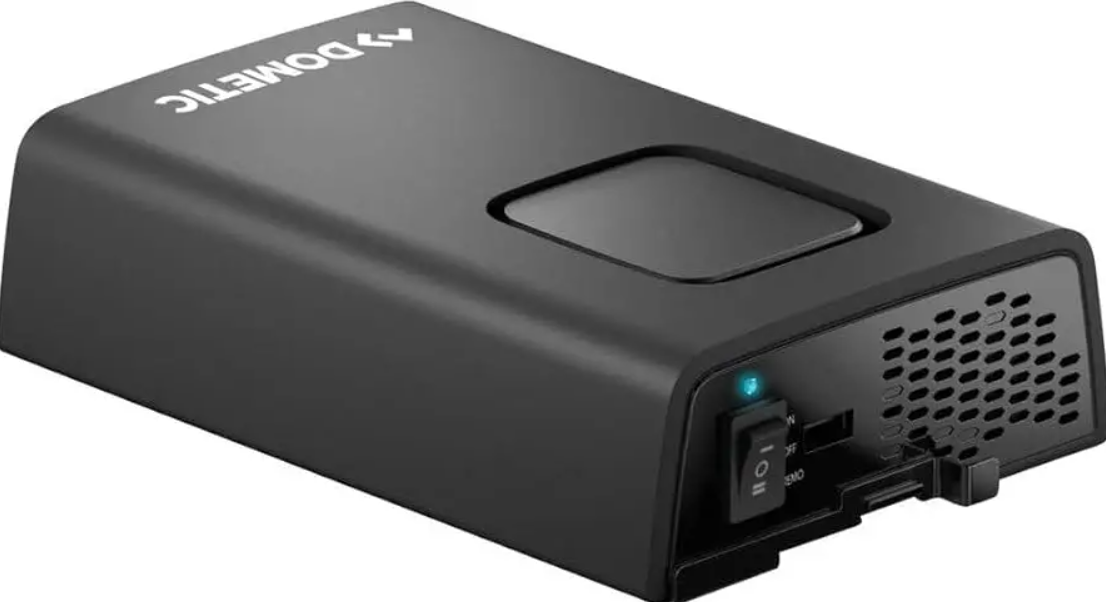
Safety Instructions
Also, observe the safety instructions and stipulations issued by the vehicle manufacturer and authorized workshops.
- Do not touch exposed cables with your bare hands.
- To be able to disconnect the device quickly from the AC power supply, the socket must be close to the device and be easily accessible.
- Installation and removal of the device may only be carried out by qualified personnel.
- Do not operate the device if the device itself or the connection cable is visibly damaged.
- If this device’s power cable is damaged, the power cable must be replaced to prevent safety hazards.
- This device may only be repaired by qualified personnel.
- Improper repairs can lead to considerable hazards.
- Only use accessories that are recommended by the manufacturer.
- Do not modify or adapt any of the components in any way.
- Do not disconnect any cables when the device is still in use.
- Disconnect the device from the power supply:
After Use
- In the event of fire, use a fire extinguisher that is suitable for electrical devices.
- Before start-up, check that the voltage specification on the data plate is the same as that of the power supply.
- Ensure that other objects cannot cause a short circuit at the contacts of the device.
- Ensure that the negative and positive poles never come into contact.
- Do not pull on the connection cables or use the cables as a handle.
- The device must not be exposed to rain or moisture. Store in a dry place.
Scope of Delivery
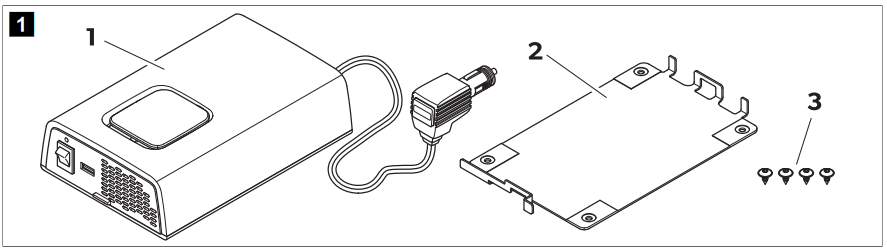
- Sine wave inverter 1
- Mounting plate 1
- Fixing screws 4
Intended Use
The inverter is intended to convert direct voltage into a pure sine wave 230 V alternating voltage (AC) for operation and a stable power supply for connected 230 V consumers. The inverter is intended for connection to:
- DPSI212, DPSI412: 12 V
- DPSI224, DPSI424: 24 V
- The inverter is suitable for
- Installation in recreational vehicles (RV)
- Stationary or mobile use
- Indoor use
- The inverter is not suitable for:
- Outdoor use
This product is only suitable for the intended purpose and application in accordance with these instructions. This manual provides information that is necessary for the proper installation and/or operation of the product.
Poor installation and/or improper operation or maintenance will result in unsatisfactory performance and a possible failure. The manufacturer accepts no liability for any injury or damage to the product resulting from:
- Incorrect installation, assembly, or connection, including excess voltage
- Incorrect maintenance or use of spare parts other than the original spare parts provided by the manufacturer
- Alterations to the product without express permission from the manufacturer
- Use for purposes other than those described in this manual
Technical Description
- The inverter is a DC-to-AC sine wave inverter.
- The inverter has the following protective mechanisms.
Overvoltage Shutdown
- The inverter switches off when the voltage exceeds the cut-off value.
- The inverter restarts automatically when the voltage drops to the restart value.
Undervoltage Shutdown
- The inverter switches off when the voltage falls below the cut-off value.
- The inverter restarts automatically when the voltage exceeds the restart value.
High Temperature Shutdown
- The inverter switches off when the internal temperature of the device exceeds the cut-off value.
- The inverter restarts automatically when the internal temperature drops to the restart value.
- High output current protection: The inverter switches off when too many loads are connected.
Protection against short circuit
- The inverter switches off when a short circuit has been generated. The inverter restarts automatically after a few seconds.
- If a short circuit is detected five times, the inverter does not restart automatically, and a manual restart is needed.
Control Elements and Connections
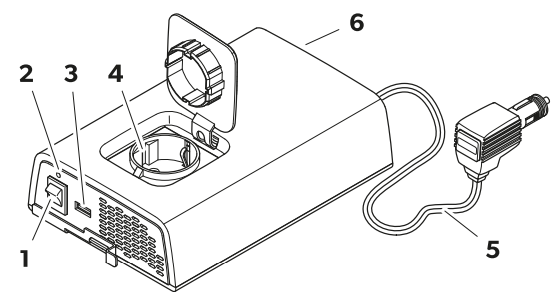
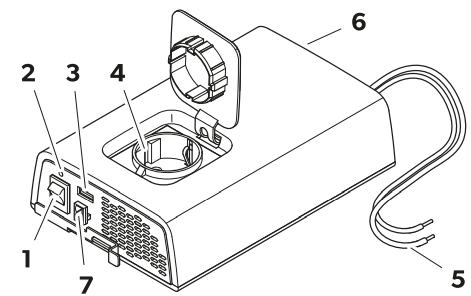
- On/off switch
- Status indication LED
- USB output
- AC outlet
- DC connection cable
- Fan
- External switch connection
Status Indication LED
- On: Inverter operation
- Flashing: Error (see chapter Troubleshooting on page 22)
- Off: No AC input present, inverter deactivated
Installation
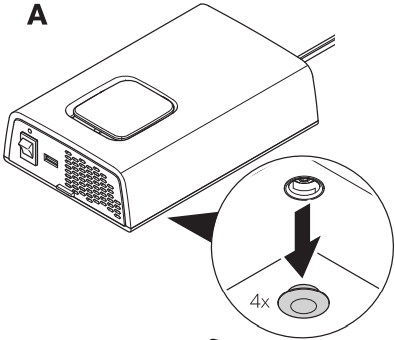
- Loosen the caps on the underside of the device.
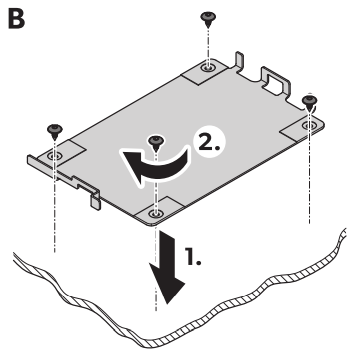
- Screw the mounting plate in place.
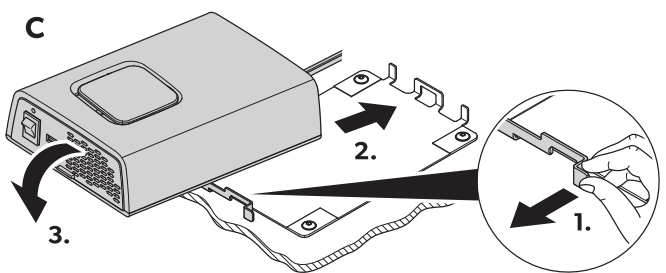
- Attach the device to the mounting plate
Installation location
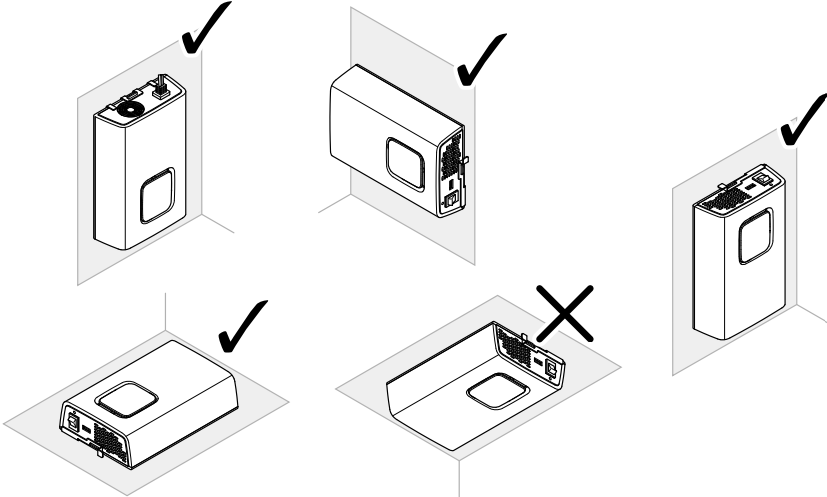
- Before drilling any holes, ensure that no electrical cables or other parts of the vehicle can be damaged by drilling, sawing, drilling.
- The inverter can be mounted either sitting or hanging.
- Observe the following instructions when selecting an installation location:
- Ensure that the mounting surface is solid and level.
- Observe the distance specifications for sufficient ventilation.
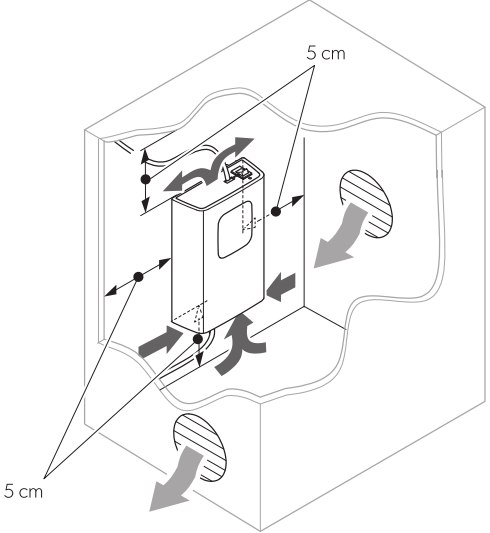
Connecting the Inverter
DPSI212, DPSI224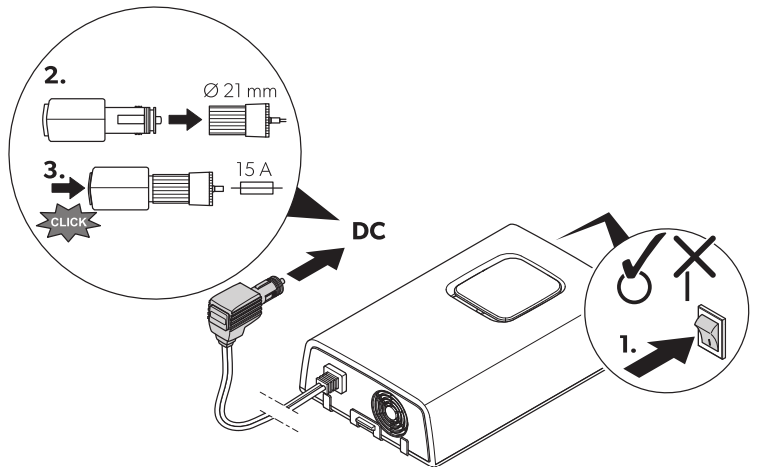
- Check that the device is switched off.
- Connect the power cable to the cigarette lighter socket of the vehicle.
DPSI412, DPSI424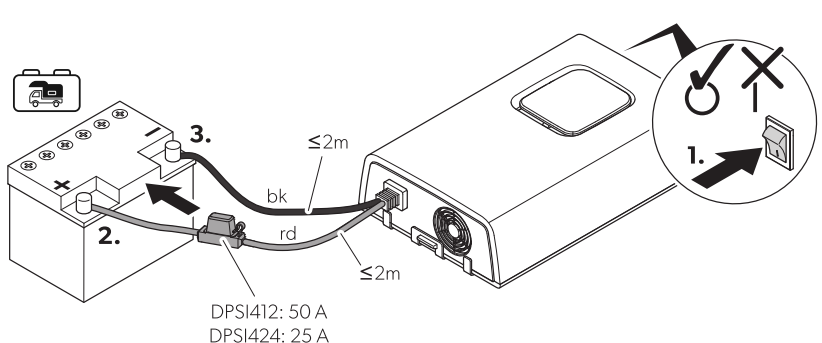
- See the recommended cable cross-sections, cable lengths, and fuse.
- Place the fuses near the batteries to protect the cable from short circuits and possible burning.
- Observe the connection sequence of the connection cables to avoid short-circuiting the device.
- Do not reverse the polarity.
- Protect the positive cable of the house battery with a fuse ( Fig. on page 20).
- Check that the device is switched off.
- Connect the black (bk) connection cable to the negative terminal of the house battery.
- Connect the red (rd) connection cable to the positive terminal of the house battery ( Fig. on page 20, 2).
Connecting the External Switch
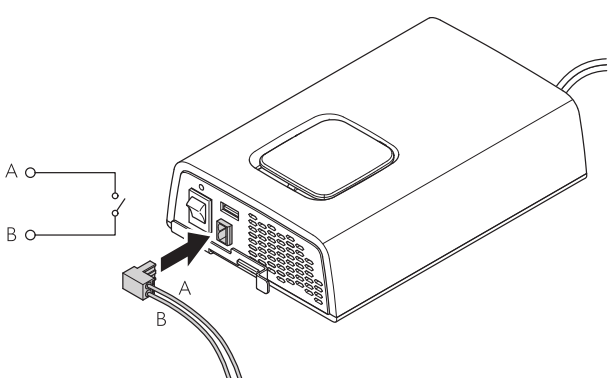
- Connect the external switch to the external switch Dometic SinePower DPSI212 Sinewave inverter connection.
Operation
Operating 230 V devices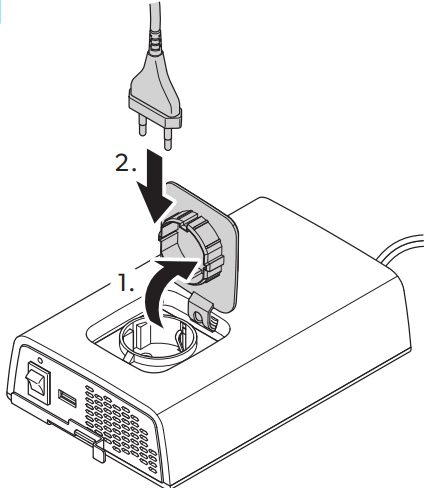
- Connect the inverter.
- Connect 230 V devices to the AC outlet of the Dometic SinePower DPSI212 Sinewave inverter inverter.
Charging via USB 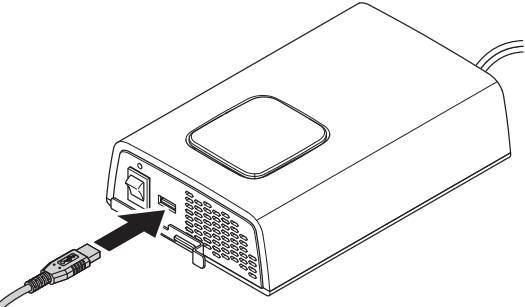
- Connect the rechargeable device to the USB terminal.
Switching the Inverter on and off
- To switch on the inverter, set the on/off switch to position I.
- To switch off the inverter, set the on/off switch to position 0.
- DPSI412, DPSI424 only: Use the external switch to switch the inverter on and off.
Cleaning and Maintenance
- Unplug the device from the power supply before cleaning and maintenance.
- Never clean the device under running water or in a dishwasher not use sharp or hard objects, abrasive cleaning agents, or bleach during cleaning, as these can damage Dometic SinePower DPSI212 Sinewave inverter the device.
- Ensure that the air inlet and outlet vents of the device are free of dust and dirt so that the heat can be released.
- Occasionally, clean the device with a so, damp cloth.
- Regularly check live cables or lines for insulation faults, breaks, or loose connections.
Troubleshooting
| Problem | Possible cause | Suggested remedy |
| The inverter does not work. The status indication LED is off. | A short circuit has been generated. | The device fuse must be replaced by an authorized service agent after it has been triggered by excess current. |
| Insulation faults, breaks, or loose connections in the live cables. | Check live cables for insulation faults, breaks, or loose connections. If you cannot find an error, contact an authorized service agent. | |
| The inverter does not work. The status indication LED flashes slowly. | High output current protection. | Reduce the connected loads. |
| High temperature shutdown. | 1. Switch off the inverter and the connected loads. 2. Check that the air inlets and outlets are not covered or obstructed. 3. Allow the inverter to cool down. | |
| Problem | Possible cause | Suggested remedy |
| The inverter does not work. The status indication LED flashes quickly. | Overvoltage shutdown | Reduce the connected voltages. The inverter restarts automatically when the voltage drops to the restart value ( 0 V). If the error still occurs: Increase the cable cross-sections. Reduce the cable length. |
| Undervoltage shutdown. | Allow the battery to recharge slowly. The inverter restarts automatically when the voltage exceeds the restart value. |
Specifications
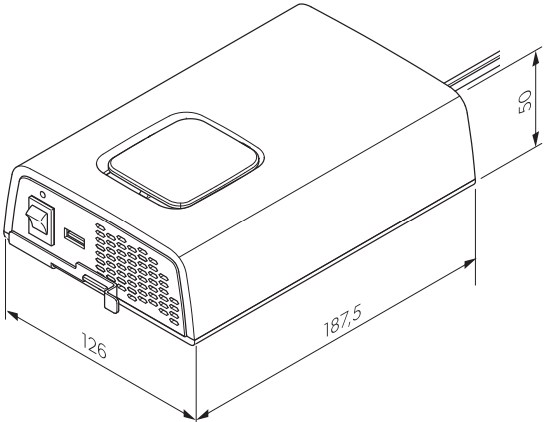
| DPSI 212 | DPSI 412 DPSI 224 | DPSI 424 |
| Output voltage range | 230 V ± 10% | |
| Output frequency | 50 Hz ± 1% | |
| Output waveform | Pure sine wave |
| Continuous output power Pnom | 150 W | 350 W | 150 W | 350 W |
| Maximum output power (1 min) | 170 W | 400 W | 170 W | 400 W |
| Maximum surge power (3 s) Psurge | 300 W | 700 W | 300 W | 700 W |
| No load power consumption | 0.6 A | 0.4 A | 0.6 A | 0.4 A |
| Ambient temperature for operation | 0 … 50°C | |||
| Ambient temperature for storage | 30°C … 70°C | |||
| Ambient humidity | 0 … 95%, non-condensing | |||
Warranty
Refer to the sections below for information about warranty and warranty Dometic SinePower DPSI212 Sinewave inverter support in the US, Canada, and all other regions.
Disposal
Place the packaging material in the appropriate recycling waste bins, wherever possible. Consult a local recycling center or specialist dealer for details about how to DOMETIC SB27150 90 Degree Bezel Kit Installation dispose of the product in accordance with the applicable disposal regulations.
Customer Service
SPAIN
- Address: Dometic Spain S.L. Avda. Sierra del Guadarrama, 16 E-28691 Villanueva de la Cañada Madrid
- Call: 8 +34 900 100 245.
- Email: info@dometic.es
GERMANY
- Address: Dometic WAECO International GmbH Hollefeldstraße 63 • D-48282 Emsdetten
- Call: 9 +49 (0) 2572 879-195
- Email: info@dometic-waeco.de
FRANCE
- Address: Dometic SAS ZA du Pré de la Dame Jeanne B.P. 5 F-60128 Plailly
- Call: +33 344633518
- Email: vehiculesdeloisirs@dometic.fr
AUSTRALIA
- Address: Dometic Australia Pty. Ltd. 1 John Duncan Court • Varsity Lakes QLD 4227
- Call: 8 +61 7 55076001|
- Email: sales@dometic-waeco.com.au
FAQs
What is the Dometic SinePower DPSI212?
For delicate electronics and appliances, the DPSI212 is a pure sine wave inverter that transforms 12V DC power from a battery into pure 120V AC power.
Why choose a pure sine wave inverter like the DPSI212?
Pure sine wave inverters reduce noise and damage risk by providing clean, steady power that is suitable for delicate equipment such as music systems, laptops, and medical devices.
What is the power capacity of the DPSI212?
With a continuous power output of roughly 2000 watts, the DPSI212 is appropriate for the majority of medium-sized to large appliances.
How do I connect the DPSI212 to my battery system?
Using wires of the proper size, connect the inverter’s DC input terminals directly to the battery terminals.
Does the DPSI212 have built-in safety features?
Indeed, it has reverse polarity protection, low battery alert and shutdown, overload protection, overheating shutdown, and short circuit protection.
Can the DPSI212 run multiple appliances simultaneously?
Absolutely, provided that the whole load stays below the inverter’s rated power capability of 2000W continuous.