



Hayward W3T-CELL-9 Turbo Cell Salt
Introduction
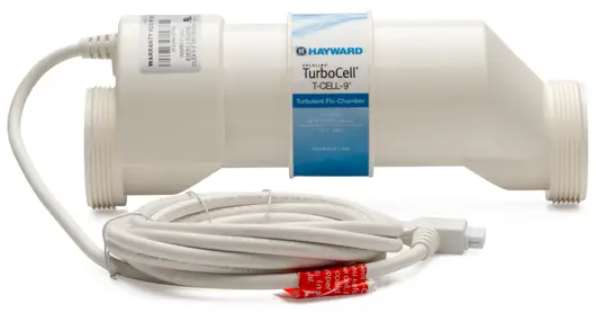
The W3TCELL920ABG cell is designed for pools Hayward W3T-CELL-9 Turbo Cell Salt up to 20,000 gallons. When replacing an existing W3TCELL920ABG cell, no re-configuration is necessary. If configuration is required, refer to the information below. An incorrect configuration will cause inaccurate salt readings, improper operation, and possible system shutdown.
Configuration Is Necessary with the Following Models
- AQR (Aqua Rite – all 2009 or later) – firmware version 1.5 or later
- AQR-PRO (Aqua Rite Pro)
- OmniLogic & OmniPL – refer to the owner’s manual for configuration, select T-CELL-5 as the type of chlorinator
- PL-P-4 (Pro Logic P4)
- PL-PS-x (Pro Logic PS)
- AQ-LOGIC-P-4 (Pro Logic P4)
- AQ-LOGIC-PS-x (Pro Logic PS)
- AQR900 series – all
- AQ-TROL
Connecting to an AQR or AQR900
- Slide the Main Switch to the “Auto” position.
- Push the Diagnostic button repeatedly until “t-xx” appears on the display. If “t-5” is displayed, skip to step 4.
- To change cell type, slide the Main Switch from “Auto” to “Super Chlorinate” and back to “Auto”. Repeat this process until the “t-5” is displayed.
- Push the Diagnostic button to exit.
To an AQR-PRO
- Access the Settings Menu by pushing the “Settings” button.
- Push “>” until Chlor. Config is displayed, then push “+”.
- Push “>” repeatedly until “Cell Type” is displayed.
- Push “+” or “-” until “T-CELL-5” is displayed.
- Exit Settings Menu by pushing the “Info” button.
To an AQ-LOGIC-P-4, AQ-LOGIC-PS-x, PL-P-4 or PL-PS-x
- Enter the Configuration Menu.
- Push “>” until Chlor. Config is displayed, then push “+”.
- With the Chlorinator Enabled, push “>” repeatedly until “Cell Type” is displayed.
- Push “+” or “-” until “T-CELL-5” is displayed.
- Exit Settings Menu by pushing the “Menu” button.
Information
These adjustments, while necessary and important, are APPROXIMATIONS to the actual adjustment your pool requires. After any chlorination adjustment, monitor the pool’s chlorine level closely for 1-2 weeks. If the readings stabilize in the 1-3 ppm range, then you are all set—otherwise, make another small adjustment (up or down) to increase or decrease the chlorine level. Once the chlorinator is set, it is good practice to check your chlorine levels weekly to ensure operation is normal.
When using 2-speed or variable-speed pumps on low speed, check to be sure your salt cell is receiving adequate flow. Low flow conditions can result in insufficient water in the cell, causing inefficient chlorine production. As a precaution, the cell can be installed vertically or in an inverted manner (see illustration) to keep it flooded with water.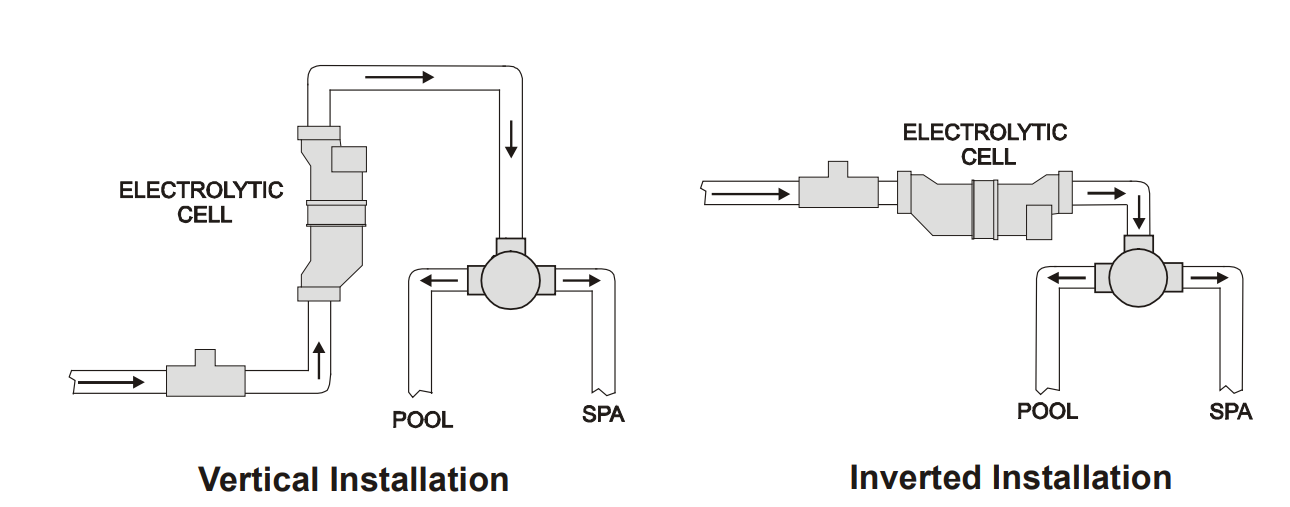
Customer Service
- Ph: 1-800-657-2287
- Website: www.haywardcommercialpool.com
FAQs
What is the Hayward W3T-CELL-9 Turbo Cell used for?
The W3T-CELL-9 is a salt chlorination cell that automatically sanitises pool water without the need of conventional chlorine pills or liquid by converting salt into chlorine when used with Hayward salt chlorinators (such as AquaRite® systems).
What pool size is this cell suitable for?
In-ground pools up to 25,000 gallons (about 95,000 litres) are compatible with the W3T-CELL-9. Take the W3T-CELL-15 into consideration for larger pools.
Is this cell compatible with all Hayward salt chlorination systems?
The majority of Hayward AquaRite®, AquaRite Pro®, AquaPlus®, and Pro Logic® systems are compatible with it. Verify compatibility with the model of your control device at all times.
How does the Turbo Cell work?
The cell sanitises the pool water by electrolysing the salt (NaCl) molecules in it to produce free chlorine. The process is eventually completed when the chlorine turns back into salt.
What kind of salt should I use in my pool?
Make use of high-purity (minimum 99%) sodium chloride, which is frequently referred to as food-grade or pool salt. Iodised salt, rock salt, and salt with additions should not be used.
How much salt do I need for optimal operation?
The W3T-CELL-9 system requires 3,200 parts per million (ppm) of salt. The range of acceptable operation is 2,700–3,400 ppm.
How do I check my pool’s salt level?
You can double-check accuracy with digital testers or salt test strips, or you can use the digital display on the control panel.
How long does the W3T-CELL-9 last?
Depending on usage, water chemistry, and frequency of maintenance, the cell can last anywhere from three to five years on average.