



INSIGNIA NS-5004BT Bluetooth Speakers
SAFETY INSTRUCTIONS
- Read, follow, and save all instructions and documentation.
- Do not use this apparatus near water. Clean only with a dry cloth.
- Do not block any ventilation openings. Install in accordance with the manufacturer’s instructions.
- Do not defeat the safety purpose of the polarized or grounding-type plug.
- A polarized plug has two blades with one wider than the other.
- A grounding type plug has two blades and a third grounding prong.
- The wide blade or the third prong is provided for your safety.
- Only use attachments/accessories specified by the manufacturer.
- Unplug this apparatus during lightning storms or when unused for long periods of time.
- Refer all servicing to qualified service personnel. Keep the unit in a well-ventilated environment.
- Do not install this equipment in a confined space such as a bookcase.
- The apparatus is classified as a Class II apparatus
Package Content
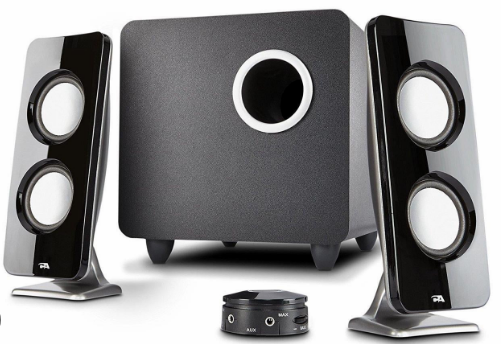
- Satellite speakers (2)
- Subwoofer
- Control pod
- 5 ft. (1.52 m) 3.5 mm to 3.5 mm audio cable
- Quick Setup Guide
Features
- Eight color modes (blue, green, red, purple, yellow, light blue, repeating six colors, and off) help set the mood
- 25W RMS:
- 16W RMS subwoofer
- 9W RMS satellites (4.5W + 4.5W)
- Bluetooth connectivity wirelessly streams audio from your Bluetooth-enabled devices
- 3.5 mm input jack lets you connect to external sound sources
- The headphone jack provides an easy connection option for private listening
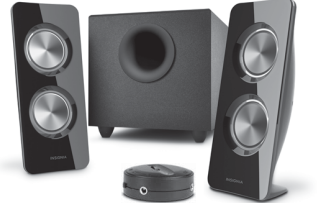
Front
Control Pod
Connecting
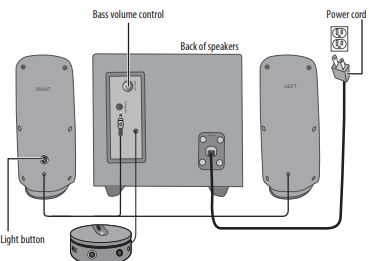
- Plug the satellite speakers into the To Speaker jack on the back of the subwoofer.
- Plug the power cable into a power outlet or surge protector
Turning On/Off
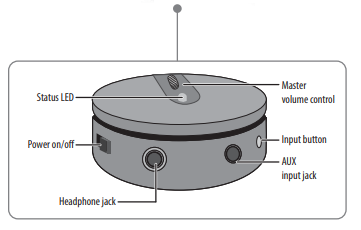
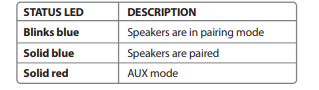
Slide the ON/OFF on the control pod to the left to turn on your speakers or right to turn off your speakers. When you first turn on your speakers, they are in Bluetooth pairing mode, and the status LED blinks blue.

Bluetooth Connection
- Make sure that your Bluetooth device is turned on and within 33 feet (10 meters) of your speakers. Turn on your speakers. The status LED blinks blue to indicate that they are in pairing mode. If the status LED is red, press the Input button once to switch to Bluetooth mode.
- Turn on your Bluetooth device, then turn on Bluetooth. Set your device to pairing mode, then select Insignia NS-5004BT. If you are asked for a password, enter 0000. When pairing is complete, the status LED lights solid blue
LED Status
Reconnecting with the previous device
- Make sure that the last paired Bluetooth device is near your speakers.
- When your speakers are on, they automatically search for and try to connect to the last paired device.
New Device
If you have paired your speakers to a device and want to pair with a different device, press and hold the Input button for three seconds until the blue LED begins blinking. Search your new device’s Bluetooth list for Insignia NS-5004BT, then tap to pair and connect.
Wired Connection
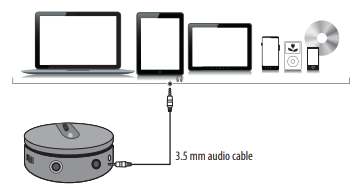
- Connect an external sound source, such as an MP3 player, by plugging the included audio cable into the AUX jack on the back of your control pod and the sound source
- Press the Input button to enter AUX mode. The status LED lights red.
Music
- Turn on your speakers, then connect to your audio device.
- Press the Input select button to select a Bluetooth or wired (AUX) connection.
- The status LED lights blue for Bluetooth or red for AUX.
- Begin playback on your device.
- Turn the master volume control to adjust the volume.
- Use the controls on your audio device to control playback.
Light Colour Pattern
- Press the LIGHT button repeatedly to select a color for the LED lighting.
- The color options cycle as follows: Blue -> Green -> Red -> Purple -> Yellow -> Light blue -> Repeating six colors -> Lights off
- Press and hold the LIGHT button for three seconds to dim the LED lighting by 50%.
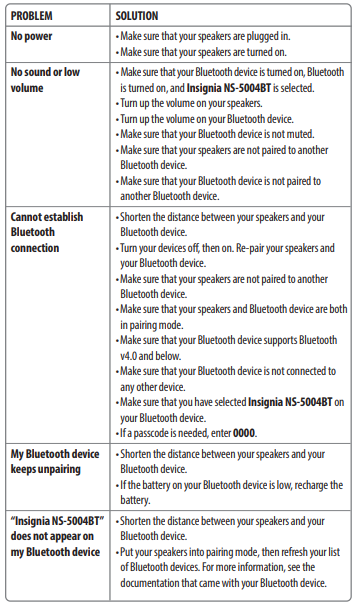
Troubleshooting
Specification
- Dimensions (H×W×D): 7.3 × 14 × 7.3 in. (185.4 × 355.6 × 185.4 mm)
- Wattage: 25W total (16W sub, 4.5W for each satellite speaker)
- Range: 32.8 ft (10 m)
- Power cord length: 5.5 ft (1.67 m)
One-Year Warranty
Definitions
The Distributor* of Insignia-branded products warrants to you, the original purchaser of this new Insignia-branded product (“Product”), that the Product shall be Insignia NS-AF5DSS2 Digital Control Air Fryer free of defects in the original manufacturer of the material or workmanship for one (1) year from the date of your purchase of the Product (“Warranty Period”).
How to obtain warranty service?
If you purchased the Product at a Best Buy retail store location or from a Best Buy online website, please take your original receipt and the Product to any Best Buy store. Make sure that you place the Product in its original packaging or packaging that provides the same amount of protection as the original packaging. To obtain warranty service, in the United States and Canada, call 1-877-467-4289. Call agents may diagnose and correct the issue over the phone.
Where is the warranty valid?
This warranty is valid only in the United States and Canada at Best Buy branded retail stores or websites to the original purchaser of the product in the country where the original purchase was made.
Customer Service
- Tel: 1-877-467-4289
- Visit: http://www.insigniaproducts.com
INSIGNIA is a trademark of Best Buy and its affiliated companies. Registered in some countries. Distributed by Best Buy Purchasing, LLC 7601 Penn Ave South, Richfield, MN 55423 U.S.A.
©2021 Best Buy. All rights reserved.
FAQs
Q: Can I connect multiple devices simultaneously?
No, only one device connection at a time is supported by the NS-5004BT. Disconnect the existing device before pairing the new one to connect it.
Q: What is the effective Bluetooth range?
In open areas, the speakers’ usual range is up to 33 feet (10 meters). Walls and other obstacles could lower the effective range.
Q: Can I use the speaker while it is charging?
The NS-5004BT can function while charging, but if the speaker is in use, the charging process can take longer.
Q: Can I use the NS-5004BT with a wired connection?
The NS-5004BT can function while charging, but if the speaker is in use, the charging process can take longer.
Q: What audio formats are supported via USB/TF?
WAV and MP3 files are supported by the NS-5004BT. It’s possible that other formats won’t work.
Q: Does the speaker have a built-in microphone for calls?
It does have an integrated microphone, yes. You can use the speaker to answer and make hands-free calls while connected via Bluetooth.
Q: Can I use the speaker outdoors?
It is not waterproof, but it is lightweight and portable, making it appropriate for outdoor use. Steer clear of liquids and rain.
Q: Is there a warranty for the NS-5004BT?
Yes, it usually has a one-year manufacturer’s guarantee that covers workmanship and material flaws. For particular terminology, refer to your handbook and receipt.