


Insignia NS-CMSS12 Programmable Coffee Maker
Introduction
Congratulations on your purchase of a high-quality Insignia product. This scale/body fat analyzer offers you a seamless way to manage your health. It measures weight and uses bio-electrical impedance analysis (BIA) technology to estimate body fat, total body water percentage, bone mass, and muscle mass in generally healthy children 10-17 years old and healthy adults. By measuring this current, this device can estimate body fat, body water, muscle mass, and bone mass. BIA technology is safe, non-invasive, toxin-free, and harmless. It’s also simple to use and provides a great deal of information.
Safety Instructions
Additional cautions and instructions
- Don’t expose this device to extreme temperatures, direct sunlight, in a moist or corrosive environment.
- Do not step on the scale when your body or feet are wet, especially after bathing or showering, to prevent slipping.
- Keep the device out of reach of infants, children, or pets, because the inhalation or swallowing of small parts (such as batteries) is dangerous or even fatal.
- If you have an allergy to stainless steel, avoid contact with the electrodes on the device.
- The customer is the intended operator of this device and can maintain the device and its accessories, under normal circumstances, according to the User Guide.
- The manufacturer will make available, on request, circuit diagrams, parts lists, etc.
Features
- 12-cup glass carafe
- Automatic pause and serve feature
- Keep warm mode
- Delayed brew mode
- Two-hour automatic shut-off
- Multiple brew functions
- Coffee filter
Package contents
- Coffee maker
- Filter basket
- Coffee filter
- Glass carafe
- Carafe lid
- User Guide

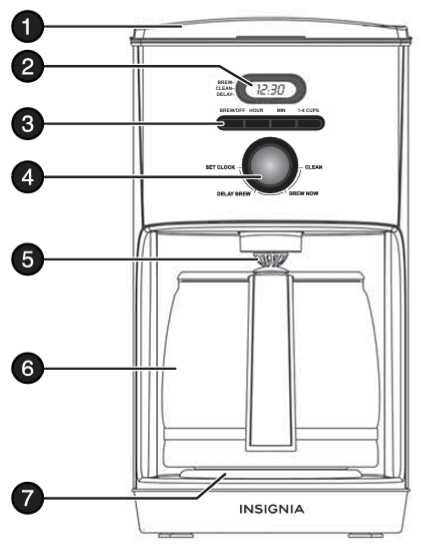
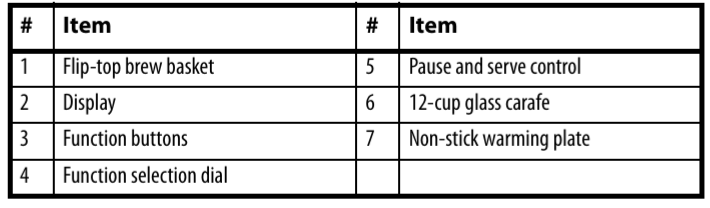
Display
Function buttons
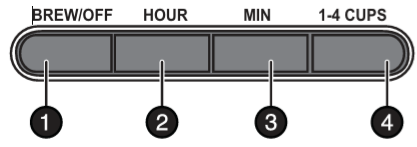
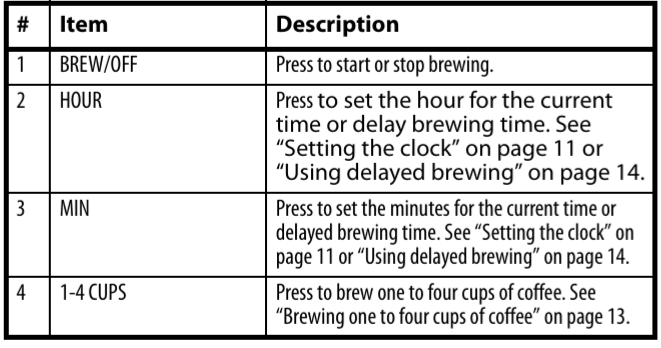
Control dial
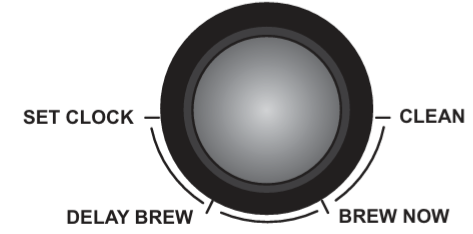
- SET CLOCK to set the current time. See “Setting the clock” on page 11.
- BREW NOW to start brewing coffee. See “Brewing coffee” on page 11.
- CLEAN to start the cleaning cycle. See “Cleaning your coffee maker” on page 15.
- DELAY BREW to set up a delayed brewing time. See “Using delayed brewing” on page 14.
Pause and serve feature
- You can pour a cup of coffee before the brewing cycle is complete.
- When you remove the glass carafe during the brewing cycle, your coffee maker automatically pauses brewing so coffee does not drip onto the warming plate.
- When you replace the carafe, brewing starts again.
- To use pause and serve, make sure that the carafe is in the correct position on the warming plate and that at least one to two cups of coffee have been brewed.
Power cord storage feature
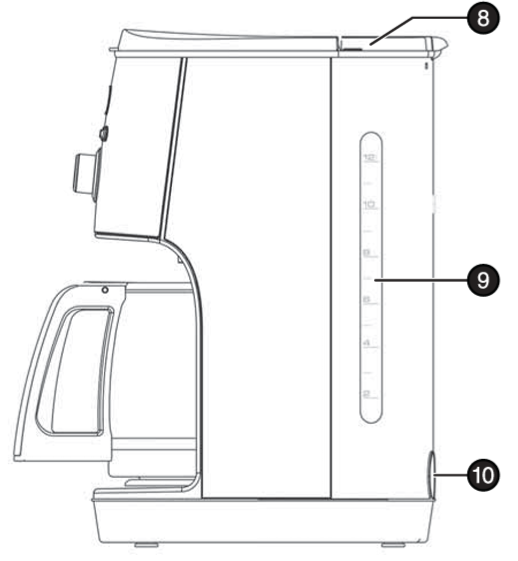
- Your coffee has a power cord storage compartment on the back.
- You should store the power cord in the compartment when you are not using it or when you are storing your coffee maker.
Unpacking Your Coffee Maker
To unpack your coffee maker
- Carefully unpack your coffee maker and all its parts.
- Remove any tape, labels, or packaging materials.
- Wash the filter basket, coffee filter, glass carafe, and carafe lid with warm, soapy water.
- Rinse well and dry thoroughly. Do not wash the parts in a dishwasher.
- Wipe the exterior surfaces of your coffee maker with a soft, moist cloth to remove dust particles collected during packing and handling.
- Do not use harsh chemicals or abrasive cleaners on any part of your coffee maker.
- Place your coffee maker on a solid, level, heat-resistant surface.
Preparing your coffee maker
To prepare your coffee maker
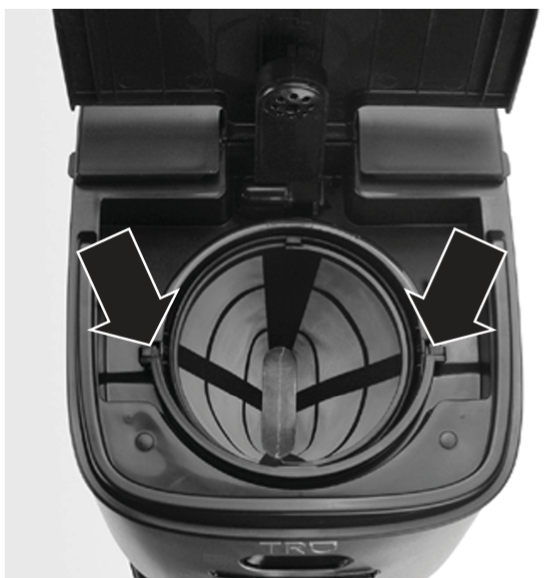
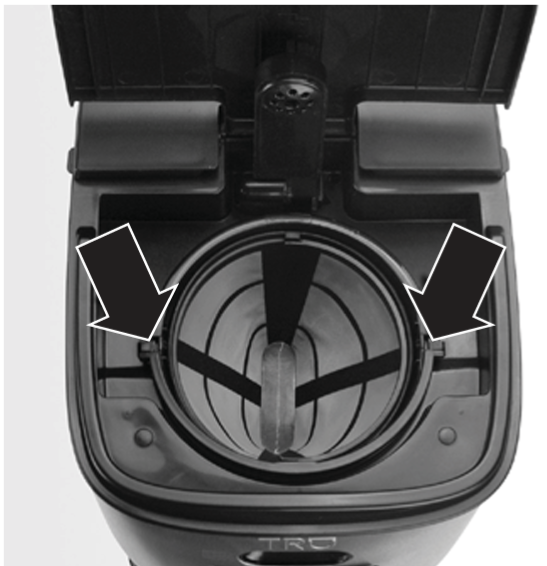
- Make sure that the filter basket and coffee filter are correctly seated and the lid on the filter basket is in the locked position.
- When the coffee filter is in place and the hinged lid is lowered, the filter is locked in position by the lid hinge.
- Plug your coffee maker into a power outlet. The display flashes five times, then shows the clock.
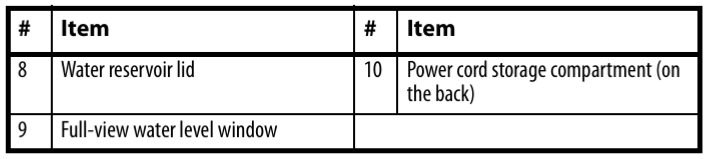
- Fill the glass carafe with cool water, then lift the water reservoir lid and pour the water into the reservoir.
- Turn the control dial to CLEAN, then push the BREW/OFF button.
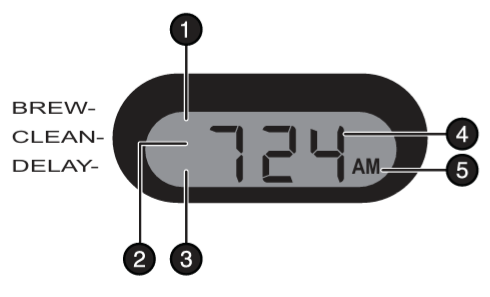
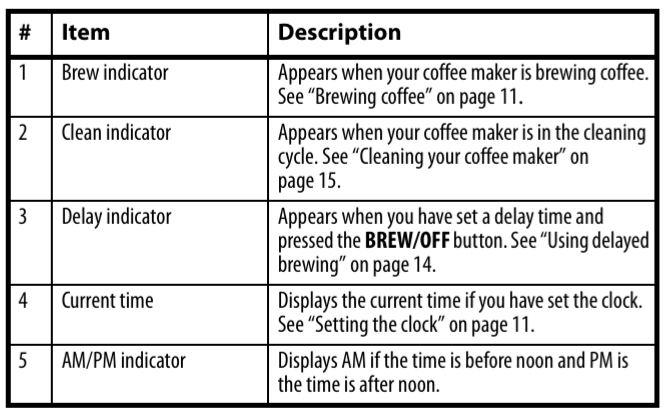
- The clean indicator appears on the display next to CLEAN.
- Your coffee maker cycles for five minutes. The display shows a countdown of the cleaning time.
- When the cleaning cycle is complete, your coffee maker beeps twice.
Setting the clock
To set the clock
- Turn the control dial to SET CLOCK. The display flashes five times.
- Press the HOUR button to set the hour. The display flashes.
- Each time you press the button, the hour increases by one, and you hear a beep.
- You can also press and hold the button to quickly advance the hour.
- 1 Turn the control dial to SET CLOCK.
- The display flashes five times. 2 Press the HOUR button to set the hour.
- The display flashes. Each time you press the button, the hour increases by one, and you hear a beep.
- You can also press and hold the button to quickly advance the hour.
- After you set the time, wait three seconds. The display stops flashing, and the time is set.
- Turn the control dial away from the SET CLOCK position.
Brewing coffee
To brew a pot of coffee
- Set your coffee maker on a dry, level, heat-resistant surface.
- Fill the glass coffee carafe to the maximum fill line with cool water, then lift the water reservoir lid and pour the water into the water reservoir.
- Make sure that the filter basket and coffee filter are correctly seated and the lid on the filter basket is in the locked position. When the coffee filter is in place and the hinged lid is lowered, the filter is locked in position by the lid hinge.
- Add coffee to the coffee filter based on the coffee package instructions and the number of cups you are brewing.
- Turn the function control button to BREW NOW, then press the BREW/OFF button once.
- The brew indicator appears on the display next to BREW.
- The brew cycle takes about 12 minutes. When brewing is complete, your coffee maker beeps twice and switches to the keep warm mode.
- After two hours, your coffee maker automatically shuts off.
Brewing one to four cups of coffee
To brew one to four cups of coffee
- Set your coffee maker on a dry, level, heat-resistant surface.
- Fill the glass carafe to the “4” line with cool water, then pour the water into the water reservoir.
- Make sure that the filter basket and coffee filter are correctly seated and the lid on the filter basket is in the locked position. When the coffee filter is in place and the hinged lid is lowered, the filter is locked in position by the lid hinge.
- Add coffee to the coffee filter, increasing or decreasing the amount to suit your individual taste.
- Turn the control dial to BREW NOW.
- Press the 1-4 CUPS button once, then press the BREW/OFF button once.
- The brew cycle begins, the brew indicator appears on the display next to BREW, and the BREW/OFF and 1-4 CUPS buttons light.
- The brew cycle takes about 3 to 4 minutes.
- When brewing is complete, your coffee maker beeps twice and switches to the keep warm mode.
- After two hours, your coffee maker automatically shuts off.
Using delayed brewing
To use delayed brewing
- Turn the control dial to DELAY BREW.
- The display screen flashes, and the delay indicator appears on the display next to DELAY.
- While the display is flashing, set the time you want your coffee to start brewing.
- Follow the steps in “Setting the clock” on page 11 for setting the hour and minutes.
- When you have finished setting the delay start time, wait three seconds. The display returns to the current time.
- For a full pot of coffee, press the BREW/OFF button.
- The delay indicator appears on the display next to DELAY, and the BREW/OFF button lights. OR For one to four cups, press the 1-4 CUPS button, then press the BREW/OFF button.
- The delay indicator appears on the display next to DELAY, and the BREW/OFF and 1-4 CUPS buttons light. Your coffee maker will begin brewing at the set time.
- When brewing starts, the brew indicator appears on the display next to BREW.
- When brewing is complete, your coffee maker beeps twice and switches to the keep warm mode.
- After two hours, your coffee maker automatically shuts off.
Maintenance & Cleaning
- Empty the coffee filter and wipe out any remaining grounds with a damp cloth.
- Fill the glass carafe with cool water, then pour the water into the water reservoir.
- Turn the control dial to CLEAN, then push the BREW/OFF button.
- The clean indicator appears on the display next to CLEAN.
- Your coffee maker cycles for five minutes.
- The display shows a countdown of the cleaning time.
- When the cleaning cycle is complete, your coffee maker beeps twice.
- If a second cleaning cycle is needed, add water, turn the control dial away from CLEAN, then back to CLEAN, and press the BREW/OFF button to start a second cycle.
- Turn off your coffee maker and unplug from the power cord.
- Wipe the outside surfaces of your coffee maker with a damp cloth and dry thoroughly.
- Never use harsh chemicals or abrasive cleaning pads.
- Never immerse your coffee maker in water or any other liquid.
- Never place your coffee maker under Insignia NS-CMSS12 Programmable Coffee Maker running water.
- Remove the filter basket, coffee filter, and carafe and wash them in warm soapy water.
- Do not use harsh chemicals or abrasive cleaners.
- Do not wash the parts in a dishwasher. Dry thoroughly before using again.
Storing
- Make sure that all parts are clean and dry before storing. Store your coffee maker in its box or in a clean, dry place.
- Never store your coffee maker while it is hot or wet.
- Never wrap the power cord tightly around your coffee maker. Insert the power cord in the storage compartment on the back of your coffee maker.
- Always store your coffee maker in an upright position.
Specifications

One Year Warranty
Definitions
The Distributor* of Insignia-branded products warrants to you, the original purchaser of this new Insignia-branded product (“Product”), that the Product shall be free of defects in the original manufacturer of the material or workmanship for one (1) year from the date of your purchase of the Product (“Warranty Period”).
How to obtain warranty service?
If you purchased the Product at a Best Buy retail store location or from a Best Buy online website, please take your original receipt and the Product to any Best Buy store. Make sure that you place the Product in its original packaging or packaging that provides the same amount of protection as the original packaging. To obtain warranty service, in the United States and Canada, call 1-877-467-4289. Call agents may diagnose and correct the issue over the phone.
Where is the warranty valid?
This warranty is valid only in the United States and Canada at Best Buy branded retail stores or websites to the original purchaser of the product in the country where the original purchase was made.
Customer Service
- tel: 1-877-467-4289
- Visit: http://www.insigniaproducts.com
INSIGNIA is a trademark of Best Buy and its affiliated companies. Registered in some countries. Distributed by Best Buy Purchasing, LLC 7601 Penn Ave South, Richfield, MN 55423 U.S.A.
©2021 Best Buy. All rights reserved.
FAQs
Q: What type of coffee filters does the NS-CMSS12 use?
Ans: Standard paper coffee filters in the basket design (8–12 cup size) are used with this model. A reusable mesh filter might also be included with some models. You can use either filter if it’s included, but never both at once.
Q: Can I pause the brewing to pour a cup early?
Ans: Indeed! There is a Pause and Serve feature on the coffee machine. To prevent overflow, be sure to replace the carafe as soon as possible.
Q: Can I make fewer than 12 cups?
Ans: Indeed. As little as two glasses can be brewed. Make the necessary adjustments to the water and coffee grinds (usually 1 to 2 tablespoons of coffee per 6 ounces of water).
Q: The display is blinking—what does that mean?
Ans: The clock frequently needs to be reset when the display blinks, such as during a power loss. To get everything running normally again, reprogram the time and any brew settings.
Q: Does the coffee maker have an auto shut-off feature?
Ans: Indeed. The NS-CMSS12 coffee maker automatically switches off the warming plate two hours after brewing for both safety and energy savings.
Q: Can I use pre-ground coffee or coffee pods?
Ans: Only pre-ground coffee should be used in the basket filter. K-Cups and coffee pods are not compatible with this model.