



Insignia NS-CZ12XWH7 WiFi Connected Chest Freezer
Introduction
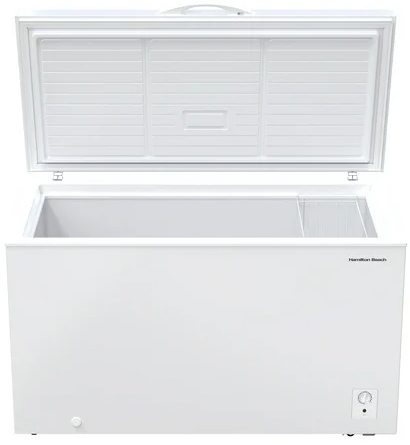
Download the Insignia Connect app to use additional features such as open-door and temperature alerts. App download is optional – your freezer works normally without it. Congratulations on your purchase of a high-quality Insignia product. This model features a dry-erase front door panel, allowing you to mark notes and other information with the provided erasable markers.
Safety Instructions
- Do not use this appliance near water.
- Clean only with a damp cloth.
- Do not block any ventilation openings. Install according to the manufacturer’s instructions.
- Do not install near any heat sources such as radiators, heat registers, stoves, or other apparatus (including amplifiers) that produce heat.
- Do not defeat the safety purpose of the polarized or grounding-type plug.
- A polarized plug has two blades with one wider than the other.
- A grounding type plug has two blades and a third grounding prong.
- The wide blade or the third prong is provided for your safety.
- Do not attempt to modify or extend the power cord of this appliance.
- Make sure that the available AC power matches the voltage requirements of this appliance.
- Do not handle the plug with wet hands. This could result in an electric shock.
- Unplug the power cord by holding the plug, never by pulling the cord.
Electric Shock Hazard
- Keep ventilation openings in the appliance enclosure or built-in structure clear of obstruction.
- Do not touch the interior of the chiller compartment with wet hands. This could result in frostbite.
- Do not use mechanical devices or other means to accelerate the defrosting process, other than those recommended by the manufacturer.
- Do not damage the refrigerant circuit when handling, moving, or using the refrigerator.
- Do not use electrical appliances inside the food storage compartment of the refrigerator, unless they are of the type recommended by the manufacturer.
Grounding requirement
- This refrigerator must be grounded.
- This refrigerator is equipped with a cord having a grounding wire with a grounding plug.
- The plug must be inserted into an outlet that is properly installed and grounded.
- Improper use of the grounding plug can result in a risk of electric shock.
Features
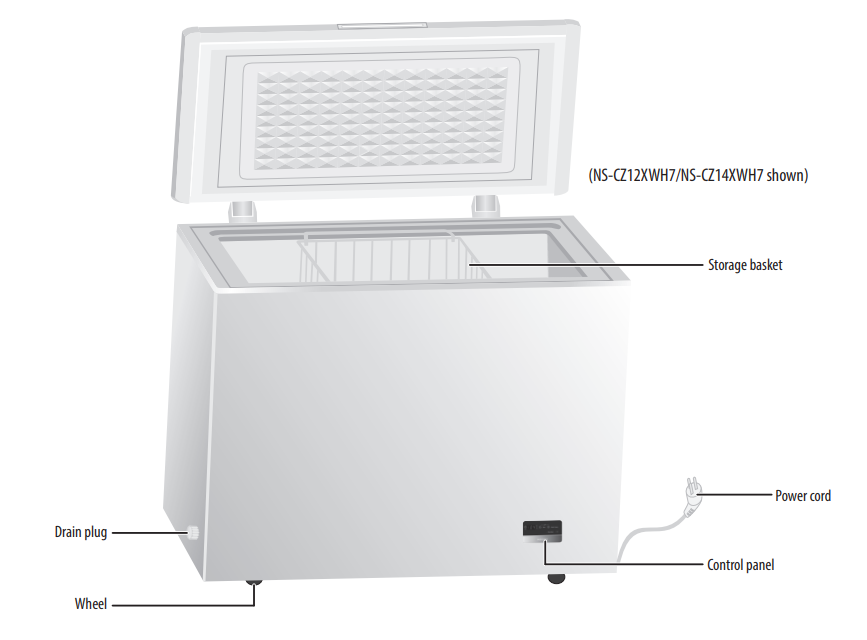
Exterior
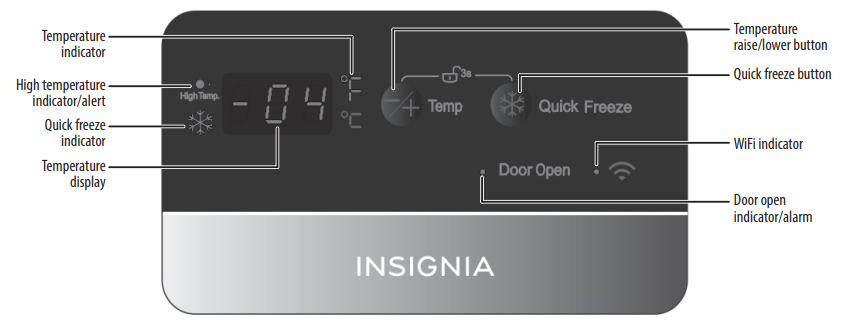
Touch pad controls
Setting
Before using your freezer
- Remove the exterior and interior packing.
- Let the freezer stand upright for approximately two hours before connecting it to power.
- Wipe the inside.
- When moving your freezer, do not tilt it beyond 45° from upright.
Finding a suitable location
- This freezer is designed to be free-standing only, and should not be recessed or built-in.
- Place your freezer on a floor that is strong enough to support the freezer when it is fully loaded.
- If your freezer is located too far from your WiFi router, the signal may be too weak for a good connection. In such cases, a WiFi range extender will improve connectivity.
- Allow 7.9 inches (20 cm) of space between the sides of the freezer and the walls, 3.9 inches (10 cm) between the back of the freezer and the wall, and 27.5 inches (70 cm) between the top of the freezer and the ceiling.
- If you locate the freezer next to a fixed wall, allow sufficient space on the hinge side for the door to swing open.
- Locate the freezer away from direct sunlight and sources of heat, such as a stove, heater, or radiator. Direct sunlight may affect the acrylic coating, and heat sources may increase electrical consumption. Extremely cold temperatures may also prevent the freezer from performing properly.
- Avoid locating the freezer in moist areas.
USE
- Plug in your freezer. Wait for 30 minutes, then open the freezer door to determine if the freezer is working properly.
- Press the -/+ and Quick Freeze buttons at the same time for three seconds to unlock the control panel.
- Press + or – to set the temperature inside the freezer. The temperature loops back to the warmest setting when the coldest temperature is reached.
Using the Lock button
- To prevent accidental activation, the control panel automatically locks after 30 seconds. To use the control panel, press and hold the -/+ and Quick Freeze buttons at the same time for three seconds.
Quick Freezing Foods
The quick freeze mode lowers the temperature below the normal operating temperature to quickly freeze foods.
- Press and hold the -/+ and Quick Freeze buttons at the same time for two seconds to unlock the control panel.
- Press the Quick Freeze button to enter quick freeze mode. The blue snowflake turns on. The quick freeze mode turns off after three hours.
Switching between Fahrenheit and Celsius
- Press and hold the -/+ and Quick Freeze buttons at the same time for three seconds to unlock the control panel.
- Press and hold the -/+ for three seconds to change temperature units.
Connecting to Wifi
- Download and open the free Insignia Connect Device app from the App Store or Google Play. (Apple: iOS 9 or later, Android: 6.0.1 Marshmallow or later)
- Log in or sign up for a Best Buy or Insignia Connect Device account.
- On your freezer, press and hold the -/+ and Quick Freeze buttons for two seconds to unlock the control panel.
- Press and hold the Quick Freeze button for five seconds until you see “0” on the control panel.
- Press -/+ once. “AP” is displayed.
- In the app, tap Set Up Device, then follow the on-screen directions to complete setup.
Specification
For specifications, see your online User Guide.
Troubleshooting
For troubleshooting information, see your online User Guide.
One Year Warranty
Definitions
The Distributor* of Insignia-branded products warrants to you, the original purchaser of this new Insignia-branded product (“Product”), that the Product shall be free of defects in the original manufacturer of the material or workmanship for one (1) year from the date of your purchase of the Product (“Warranty Period”).
How to obtain warranty service?
If you purchased the Product at a Best Buy retail store location or from a Best Buy online website, please take your original receipt and the Product to any Best Buy store. Make sure that you place the Product in its original packaging or packaging that provides the same amount of protection as the original packaging. To obtain warranty service, in the United States and Canada, call 1-877-467-4289. Call agents may diagnose and correct the issue over the phone.
Where is the warranty valid?
This warranty is valid only in the United States and Canada at Best Buy branded retail stores or websites to the original purchaser of the product in the country where the original purchase was made.
Customer Service
- Tel: 1-877-467-4289
- Visit: http://www.insigniaproducts.com
INSIGNIA is a trademark of Best Buy and its affiliated companies. Registered in some countries. Distributed by Best Buy Purchasing, LLC 7601 Penn Ave South, Richfield, MN 55423 U.S.A.
©2021 Best Buy. All rights reserved.
FAQs
Q: Can I silence alerts or notifications from the app?
Ans: Indeed. To customise alerts and temperature warnings, navigate to Settings > Notifications in the Insignia Connect app.
Q: Can multiple users monitor the freezer via the app?
Ans: Indeed. Other users can view and control the freezer settings as long as they are logged into the same Insignia account.
Q: Can I use an extension cord with the freezer?
Ans: It is not advised. To avoid fire or electrical concerns, plug the freezer straight into a grounded wall outlet.
Q: How do I lock or childproof the freezer?
Ans: Verify your model to see if it has a lid lock or latch. If not, use a universal chest freezer lock for children’s protection.
Q: Will I lose WiFi settings during a power outage?
Ans: No, when the power is restored, the freezer keeps your temperature and WiFi settings. If alerts aren’t updating, though, you might need to restart the app or reload the connection.