

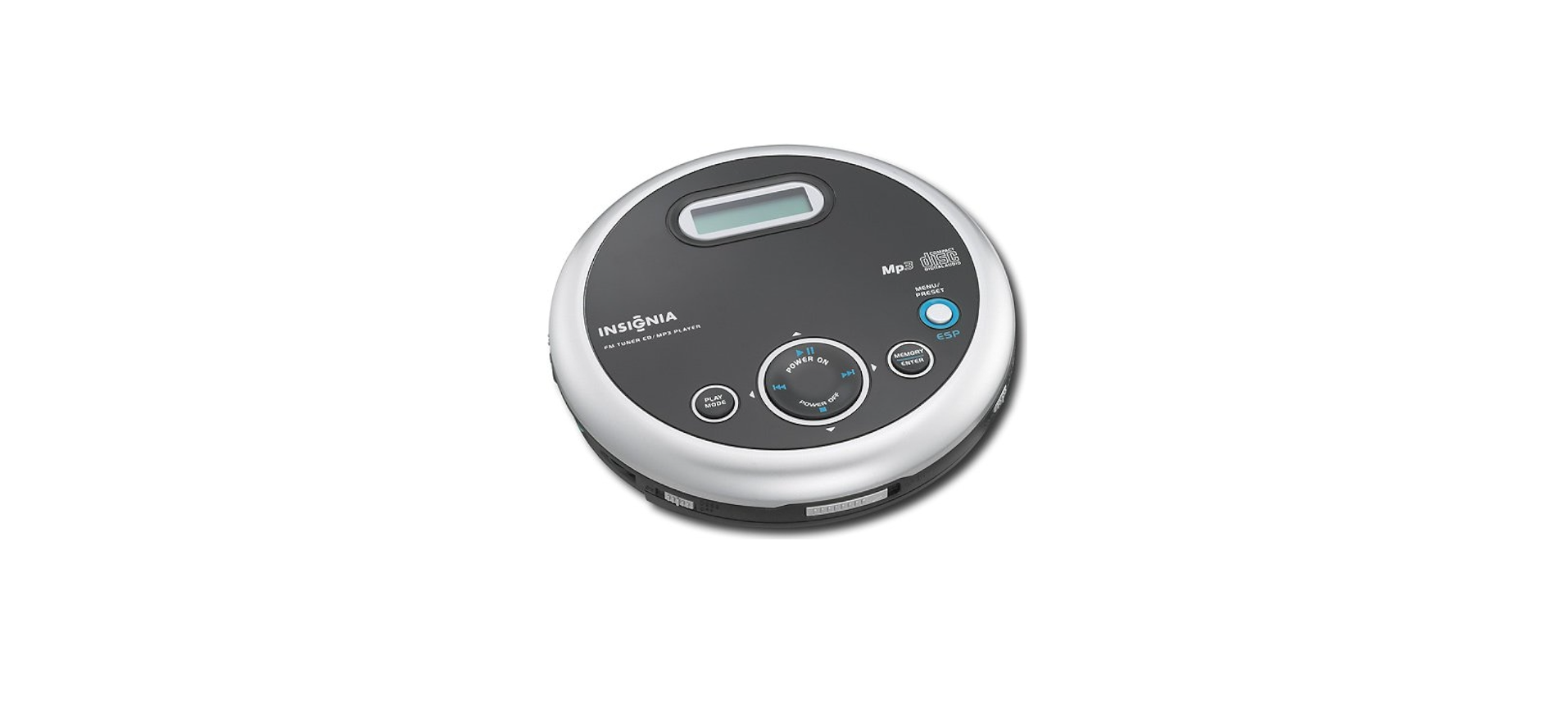

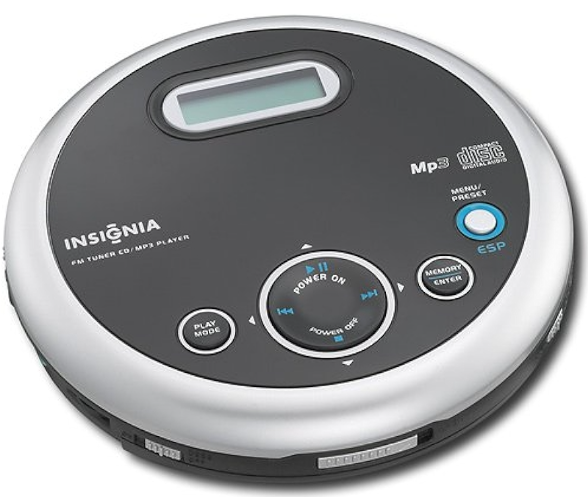
INSIGNIA NS-P5113 FM Portable CD Player
Safety Instructions
- To completely disconnect the apparatus from the mains power, the mains plug of
The AC adapter shall be disconnected from the mains outlet. - Excessively high sound pressure could harm or damage hearing.
- Minimum distances of 4 inches (10 cm) around the apparatus and AC adapter shall be
available for sufficient ventilation. - Read and retain all instructions.
- Do not open the CD door while the CD is spinning.
- Always keep the CD door closed when not in use.
- Keep all foreign objects out of the CD compartment.
- Place your CD player on a stable surface.
- Avoid installing your CD player in any of the following locations:
- Places exposed to direct sunlight or close to heat-radiating appliances, such as electric heaters.
- On top of other stereo equipment that radiates too much heat.
- Places that lack correct ventilation or are dusty.
- Places subject to constant vibration.
- Humid or moist places.
Package contents
- Portable CD Player with FM
- 2 AA batteries
- User Guide
- Headphone
Features
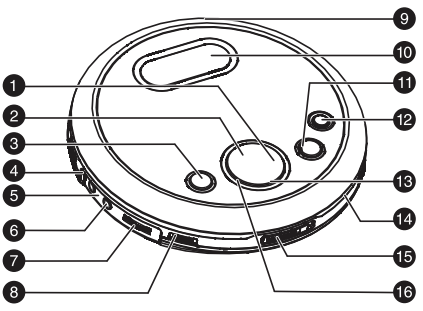
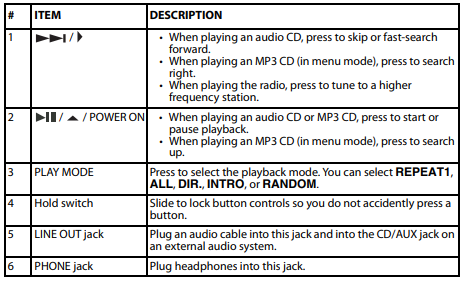
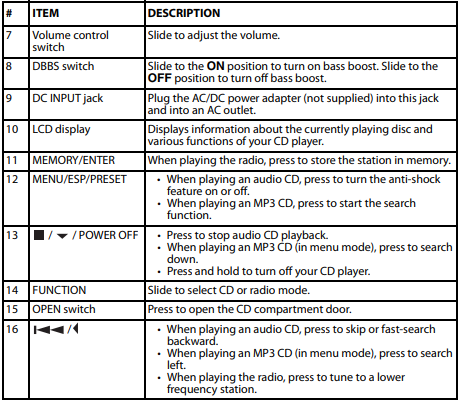
Setting
To install batteries
- Lift the battery compartment door on the bottom of your CD player. Do not remove the door.
- Insert two AA alkaline batteries into the battery compartment. Make sure that the + and – symbols on the batteries match the + and – symbols inside the battery compartment.
- Close the battery compartment door.
Use
- Plug one end of the AC/DC power adapter (not supplied) into the DC INPUT jack on the back of your CD player.
- Plug the other end of the AC/DC power adapter into an AC outlet.
Connecting to System
- Make sure that your CD player is turned off and unplugged (if you are using the AC/DC power adapter).
- Plug one end of an audio cable into the LINE OUT jack on your CD player.
- Plug the other end of the audio cable into the CD/AUX jack on the external audio system.
- Do not plug the cable into an amplifier PHONE jack.
Connecting the headphones
- Plug the headphone cable into the PHONE jack on your CD player.
Playing a CD
- Connect the headphones (included) or optional earphones to the PHONE jack on your CD player.
- Set the VOLUME control to minimum.
- Press the / / POWER ON button.
- Adjust the volume to a comfortable level.
- Do not play a disc at a loud volume level because you may damage your hearing.
- To pause playback, press the / / POWER ON button.
- The elapsed time and track number flash on the display.
- Press the button again to resume playback.
- To stop playback, press the / / POWER OFF button once.
- To turn off your CD player, press and hold the / / POWER OFF button.
Automatic power off
- If your CD player has been in stop (standby) mode for 60 seconds, or paused for five minutes, it turns off automatically to save battery power.
- When your CD player turns off, all settings, such as program and playing modes, are erased.
Searching for a track
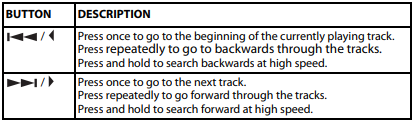
- Low-level audio is played when you search on an audio CD to help you locate the track or section you want.
Searching for a track
- When playing an MP3 CD, press the MENU/ESP/PRESET button once. ABCDEFGHIJKL appears on the display. Press the / / POWER ON button.
- MNOPQRSTUVWX appears on the screen. Press the / / POWER ON button again. YZ0123456789 appears on the screen.
- Press the / or / button to select a letter. The letter flashes on the display.
- Press the MEMORY/ENTER button.
- If your CD player finds more than one track that starts with the letter you selected, the first track name flashes on the display.
- Press the / or / button to select a track, then press the MEMORY/ENTER button. Playback begins after you select a track.
Using repeat playback
- Press the / / POWER ON button.
- To repeat the same track, press the PLAY MODE button once.
- REP 1 appears on the display.
- Your CD player repeats the current track until you press the / / POWER OFF button or press the PLAY MODE button four times for an audio CD and 5 times for an MP3 CD.
- To repeat the entire CD, press the PLAY MODE button twice.
- REP A appears on the display. Press the PLAY MODE button three times for an audio CD or four times for an MP3 CD to cancel repeat mode.
- To repeat an MP3 album (folder), press the PLAY MODE button three times.
- REP D appears on the display. Press the PLAY MODE button three times to cancel repeat mode.
Using Intro play
You can play the first 10 seconds of each track on a CD to help you find the track you want.
To use INTRO play:
- Press the / / POWER ON button.
- Press the PLAY MODE button three times for an audio CD or four times for an MP3 CD to start INTRO play. INTRO appears on the display. Your CD player plays the first 10 seconds of each track.
- Press the PLAY MODE button twice more to cancel INTRO play and resume normal playback.
Playing tracks randomly
- Press the PLAY MODE button four times for an audio CD or five times for an MP3 CD to start random mode. RANDOM appears on the display.
- Press the / / POWER ON button to start playback in random order.
- Press the / or / button to go to the previous or next random track.
- Press the PLAY MODE button to return to normal playback.
Using the anti-shock feature
- When your CD player moves during playback (for example, when you are walking or in a moving vehicle), your player may be subject to bumps or vibrations.
- During playback, press the MENU/PRESET/ESP button. The anti-shock feature turns on, and ESP flashes on the display.
- The CD spins faster, and your CD player stores the audio in memory to make sure that playback does not pause or skip.
- If the memory buffer gets full, ESP stops flashing on the display.
Playing the radio
- The headphone cable is the FM antenna. For the best reception, make sure that the cable is fully extended.
To play the radio
- Set the FUNCTION switch to RADIO, then press the / / POWER ON button.
- Press the PLAY MODE button to select FM MONO or FM STEREO.
- To turn off the radio, press and hold the / / POWER OFF button.
Tuning to a radio station
- Quickly press and release the / or / button one or more times until you find the station you want.
- Press and hold the / or / button. Your CD player automatically tunes to the first clear station.
Programming radio stations
- Set the FUNCTION switch to RADIO.
- Tune to the station you want to program.
- Press the MEMORY/ENTER button. MEMORY:01 appears on the display.
- Press the MENU/ESP/PRESET button to select the storage location, then press the MEMORY/ENTER button to save. Repeat steps 3 and 4 to program additional stations.
- Set the FUNCTION switch to RADIO.
- Press the / / POWER ON button to turn on the radio.
- Press the MENU/ESP/PRESET button one or more times until the preset number you want appears on the display.
Maintaining
Handling CDs
- To remove a CD from its case, hold it at the edges while you press down gently on the
center hole. - Do not touch the shiny surface of the CD or bend the CD.
- Place the CD into the CD compartment with the label facing up.
- Store CDs in their cases when you are not using them.
- Do not store CDs in areas where they can get hot, such as an automobile.
- Do not write on the label side of the CD with a ballpoint pen because you may scratch the surface.
- A dirty CD may not play correctly.
- With a soft cloth, wipe the CD in a straight line from the center to the edge.
- Use a soft, clean cloth moistened with plain, lukewarm water to clean the exterior of your CD player.
- Never use solvents such as benzene or other strong chemical cleaners because these could damage your CD player’s finish.
- Do not let liquid drip into the inside of your CD player.
Specifications
Radio
| Frequency | 87.5MHz-107.9MHz |
| Step | 200 KHz |
Audio
| D/A conversion | 1-bit DAC, 8 times oversampling |
| Frequency response | 20-20,000 Hz |
| Anti-shock | CD: 45 seconds MP3: 120 seconds |
| Wow and flutter | Below measurable limits |
| Number of channels | 2 channels (stereo) |
| Output level | Line output: 0.6V rms (47K Ohm) Headphone: 15mW (32 Ohm) |
MP3
| MPEG rate | 32-384 Kbps |
| Sampling frequency | 8/48 KHz |
| MP3 playback | ISO9660-format compatible |
| MPEG rate supported | MP3 format: Supported 32~384kbps and VBR compatible |
Power
| General power requirements | 2 LR6 / UM-3 / AA alkaline batteries DC IN 4.5 V jack accepts AC power adapter (center positive) |
| Power consumption | 0.8 W (DC 3V) |
Troubleshooting
| PROBLEM | POSSIBLE CAUSE | POSSIBLE SOLUTION |
| CD player will not turn on. | Batteries are inserted incorrectly. | Make sure that the + and – symbols on the batteries match the + and – symbols inside the battery compartment. |
| Batteries are dead. | Replace the batteries. | |
| AC power adapter is not connected correctly. | Make sure that the AC power adapter is connected correctly. | |
| CD does not play or stops playing | CD compartment door is not closed. | Press down on the CD compartment door to make sure that it is completely closed. |
| Water may have condensed on the lens. | Open the CD compartment door and Leave it open for about one hour to let it dry out. | |
| CD is scratched or damaged. | Try another CD. | |
| MP3 files may have been corrupted when they were created or downloaded, or when they were being recorded to the CD. | Make sure that the MP3 files are not corrupt. If necessary, burn the files to a new CD. | |
| No sound or poor sound quality. | Cables may not be connected correctly and securely. | Make sure that all the cables are connected correctly and securely. |
| Volume is set too low. | Increase the volume. | |
| The headphone connector may be dirty. | Clean the headphone connector. | |
| Your CD player may be too close to magnetic interference, such as unshielded speakers. | Move your CD player away from magnetic fields. | |
| The temperature inside the car may be too cold or too hot. | Adjust the car temperature. | |
| The cigarette socket may be dirty. | Clean the cigarette socket. |
FCC Statements
This device complies with Part 15 of the FCC Rules. Operation of INSIGNIA NS-P5113 FM Portable CD Player this product is subject to the following two conditions: (1) this device may not cause harmful interference, and (2) this device must accept any interference received, including interference that may cause undesired operation.
This equipment generates, uses, and can radiate radio frequency energy and, if not installed and used according to the instructions, may cause harmful interference to radio communications. However, there is no guarantee that interference will not occur in a particular installation.
- Reorient or relocate the receiving antenna.
- Increase the separation between the equipment and receiver.
- Consult the dealer or an experienced technician for help.
One Year Warranty
Definitions
The Distributor* of Insignia-branded products warrants to you, the original purchaser of this new Insignia-branded product (“Product”), that the Product shall be free of defects in the original manufacturer of the material or workmanship for one (1) year from the date of your purchase of the Product (“Warranty Period”).
How to obtain warranty service?
If you purchased the Product at a Best Buy retail store location or INSIGNIA NS-P5113 FM Portable CD Player from a Best Buy online website, please take your original receipt and the Product to any Best Buy store. Make sure that you place the Product in its original packaging or packaging that provides the same amount of protection as the original packaging. To obtain warranty service, in the United States and Canada, call 1-877-467-4289. Call agents may diagnose and correct the issue over the phone.
Where is the warranty valid?
This warranty is valid only in the United States and Canada at Best Buy branded retail stores or websites to the original purchaser of the product in the country where the original purchase was made.
Customer Service
- Tel: 1-877-467-4289
- Visit: http://www.insigniaproducts.com
FAQs
Q: Can I play MP3 files with this CD player?
Ans: Indeed. The NS-P5113 is capable of playing MP3 files from CD-R/CD-RW discs. For optimal navigation, ensure that the files are appropriately encoded and arranged in folders.
Q: Does the CD player have built-in speakers?
Ans: No, speakers are not included in the NS-P5113. It needs headphones, which are supplied, or a 3.5mm audio port to connect to external speakers.
Q: What kind of batteries does it use?
Ans: For portable use, the player requires two AA batteries. You can also use a DC 4.5V AC adapter (separately available) to power it for longer periods of time.
Q: Can I use rechargeable batteries?
Ans: It is compatible with NiMH rechargeable AA batteries. Batteries INSIGNIA NS-P5113 FM Portable CD Player must be charged externally, though, as the device lacks a charging feature.
Q: Does the device remember the last track played?
Ans: There isn’t a memory resume feature on the player. It INSIGNIA NS-P5113 FM Portable CD Player begins at the beginning of the CD when it is turned off.
Q: What headphones are compatible?
Ans: Any earbud or regular 3.5mm wired headphones will function. Use headphones with an impedance of 16–32 ohms for the optimum sound quality.
Q: Is there a bass boost or sound enhancement feature?
Ans: Indeed, a “Bass Boost” option on the side of some NS-P5113 models improves low-end audio response.
Q: Can I use Bluetooth headphones?
Ans: No, Bluetooth is not supported by this device. Only wired 3.5mm audio output is supported.