



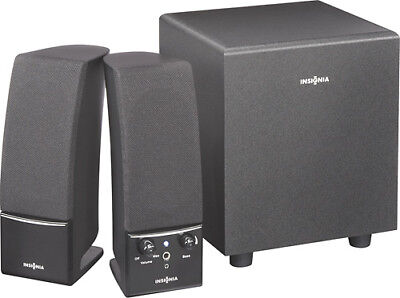
Insignia NS-PCS21 2.1 Computer Speaker Package
Safety Instructions
- Read, follow, and save all instructions and documentation.
- Do not use this apparatus near water.
- Clean only with a dry cloth.
- Do not block any ventilation openings. Install according to the manufacturer’s instructions.
- Do not install near any heat sources such as radiators, heat registers, stoves, or other apparatus (including amplifiers) that produce heat.
- Do not defeat the safety purpose of the polarized or grounding-type plug. A polarized plug has two blades, with one wider than the other. A grounding-type plug has two blades and a third grounding prong. The wide blade or the third prong is provided for your safety. If the provided plug does not fit into your outlet, consult an electrician for replacement of the obsolete outlet.
- Protect the power cord from being walked on or pinched, particularly at plugs, convenience receptacles, and the point where they exit from the apparatus.
- Only use attachments/accessories specified by the manufacturer.
- Unplug this apparatus during lightning storms or when unused for long periods of time.
- Refer all servicing to qualified service personnel.
FEATURE
CONNECTING TO A COMPUTER
POWER SUPPLY SPECIFICATIONS
- Input: AC 120V, 60Hz, 0.15A
- Output: 5VDC, 2A
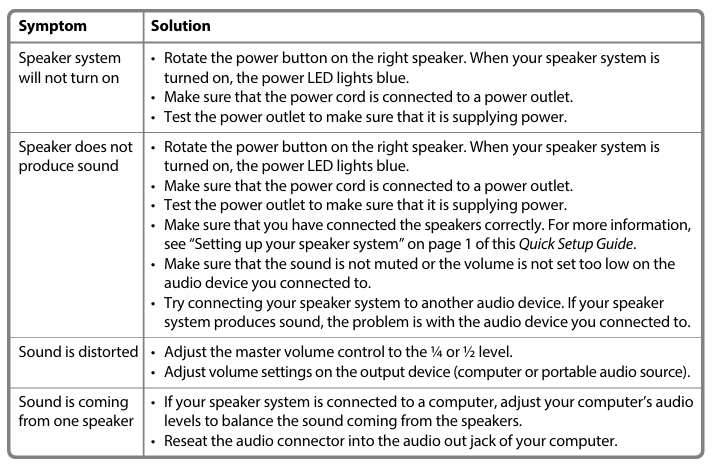
TROUBLESHOOTING
LEGAL NOTICES
FCC Part 15
This device complies with Part 15 of the FCC Rules. Operation of this product is subject to the following two conditions:
- This device may not cause harmful interference, and
- This device must accept any interference received, including interference that may cause undesired operation.
This equipment has been tested and found to comply with the limits for a Class B digital device, under Part 15 of the FCC Rules. These limits are Insignia NS-PCS21 2.1 Computer Speaker Package designed to provide reasonable protection against harmful interference in a residential installation. This equipment generates, uses, and can radiate radio frequency energy and, if not installed and operated according toed by the instructions, may cause harmful interference to radio communications. However, there is no guarantee that interference will not occur in a particular installation. If this equipment does cause harmful interference to radio or television reception, which can be determined by turning the equipment off and on, the user is encouraged to try to correct the interference by one or more of the following measures:
- Reorient or relocate the receiving antenna.
- Increase the separation between the equipment and receiver.
- Connect the equipment to an outlet on a circuit different from that to which the receiver is connected.
- Consult the dealer or an experienced radio/TV technician for help.
FCC warning
Changes or modifications not expressly approved by the party responsible for compliance with the FCC Rules could void the user’s authority to operate this equipment.
Canada ICES-003 statement
This Class B digital apparatus complies with Canadian ICES-003.
ONE-YEAR LIMITED WARRANTY
Visit www.insigniaproducts.com for details
CONTACT INSIGNIA
For customer service, call 1-877-467-4289 (U.S. and Canada) or 01-800-926-3000 (Mexico) www.insigniaproducts.com
FAQs
What devices can I connect to this speaker system?
Any device having a standard 3.5mm audio output or headphone connector, including PCs, laptops, tablets, smartphones, TVs, and game consoles, can use the NS-PCS21.
Does this speaker system use Bluetooth?
No. With a 3.5mm audio connection, the NS-PCS21 is a wired 2.1 system that provides dependable sound without wireless lag.
What does “2.1” mean in the speaker’s name?
A balanced and complete stereo sound is provided by the system’s two satellite speakers (which provide treble and midrange sounds) and one subwoofer (which produces deep bass).
How do I control the volume?
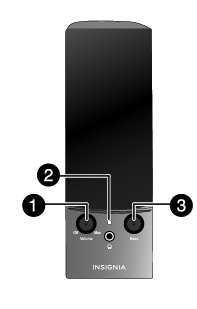
Depending on your version, use the control pod or the volume/power knob on the right speaker. Additionally, you can immediately change the volume of the device you’re connected to.
How do I adjust the bass level?
To adjust the low-frequency output to your liking, turn the bass control knob on the rear of the subwoofer.
Can I use these speakers with my TV or gaming console?
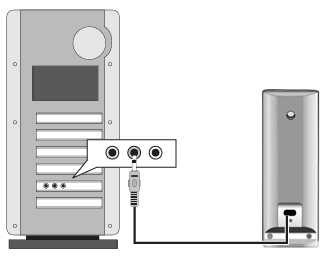
Indeed. Just use the included or compatible cable to connect your TV or console to any 3.5mm or RCA audio output. It might be necessary to connect the speakers on consoles with HDMI to your TV’s headphone jack.
How should I position the speakers for the best sound?
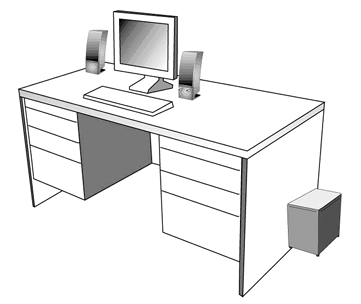
For deeper bass, place the subwoofer on the floor next to your desk or entertainment centre. The satellite speakers should be placed at ear level, arm’s length apart, and slightly inclined towards you.