

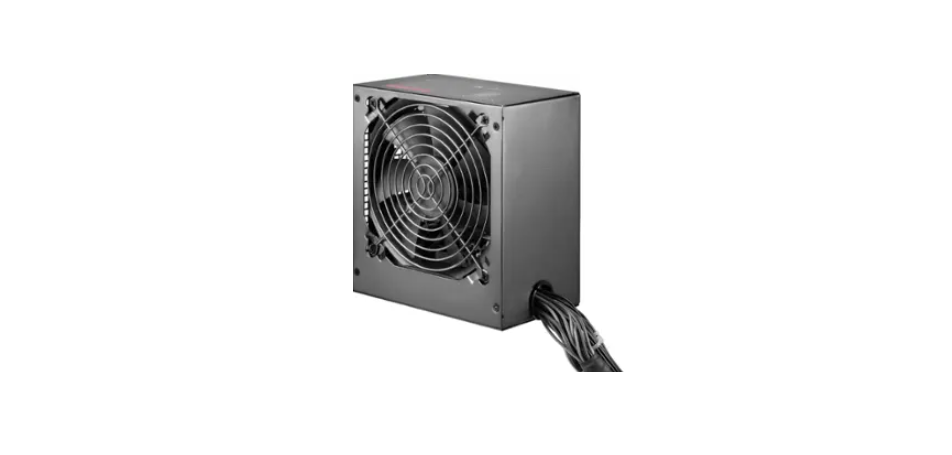

INSIGNIA NS-PCW4508 Watt Power Supplies

Introduction
This is an advanced power supply with excellent acoustic and thermal performance and intelligent thermal fan control technology that makes it virtually silent. The power supply provides perfect protection for your system and comes equipped with two +12V rails that can handle a maximum load of 18A for additional system reliability.
Safety Instructions
- Do not place your system near a radiator or other heat source.
- Do not place your system close to a source of strong magnetic fields.
- Do not place your system in a moist or dusty environment, or an area subject to strong vibration.
- Do not place your system in direct sunlight.
- Your computer must operate at a stable AC input voltage.
- Do not open the cover on the power supply case.
- Dangerous voltages are present inside the cover. Your warranty is void if the cover is removed.
- Never operate the device with wet or moist hands.
- Never place items in the openings or the fan of the power supply.
- Make sure that the power cord is plugged into a powered electrical outlet.
- Make sure that the power cord is plugged into the power supply.
- Make sure that you connect your power supply properly.
- Check your motherboard and graphics card manuals for compatibility before connecting the power supply to any of your devices.
Components & Features
- The PSU complies with the newest Intel standard ATX 12V
- Supports Intel and AMD dual-core and multi-core processors
- High-performance components designed for better reliability
- Dual +12V outputs for higher power capacity
- One 4+4 pin +12V CPU connector for high-end CPUs
- Two 6+2 pin PCI Express connectors for high-end video cards
- 120 mm low-noise cooling fan
- 20+4 pin DC cables are mesh-sleeved and are 21.65 in. (55 cm) long.
- High reliability, including built-in protection circuit OVP, OLP, SCP, and line input fuse protection

Connector Types

Installation
Preparing your power supply
- Make sure that your motherboard, graphics card, and other components are compatible with this power supply. Refer to the documentation that came with each component.
- Check your local AC voltage (115VAC for the USA, Canada, Japan, and others, and 230VAC for Europe, Southeast Asia, and others). The NS-PCW4508/NS-PCW5508 is compatible with 100-240VAC.
Are you replacing a power supply?
- If yes, start at “Removing your old power supply” below.
- If no, go to “Installing the power supply” on pg 4.
Removing your old power supply
- Turn off your computer. Unplug the power cord from your computer.
- Open your computer case. (See the instructions that came with your computer.)
- Disconnect your old power supply from all computer components.
- Remove the screws that secure your old power supply to your computer case, then remove it from the case.

- Position your power supply in the computer case, making sure that the AC power jack and cooling fan are facing out, then secure your power supply using the screws included with your computer case.
- Connect the power supply cables to the motherboard and compatible computer components (see below). Make sure that each connection is secure. Connect the 20+4-pin main power connector to your motherboard (either 20 or 24 pins).


- Connect the 8-pin (4+4) or 4-pin +12V power connector to your motherboard.
- Connect all of the following that apply to your computer:
- The 4-pin peripheral connectors (4) can be used with any computer components with a 4-pin connector, such as an IDE drive or a case fan.
- The floppy drive power connector is for the floppy drive.
- The Serial ATA connectors (4) to any computer components that have a Serial ATA connector, such as a CD/DVD/Blu-ray or hard drive.
- The 8-pin PCI-E or 6-pin PCI-E connector to a PCI-E graphics card.
- Close your computer case.
- Connect the AC power cord to the power supply, then to a surge protector or wall outlet.
- Turn on your computer by pressing the power button on the front of the case.


Troubleshooting
If your new power supply is not working correctly, try the following
- Make sure that the computer power cord is firmly plugged into the power cord connector on your computer. If you are using a surge protector, make sure that it is plugged in and turned on.
- Make sure that the wall outlet is supplying power. For example, plug a lamp into the outlet and turn it on. Make sure that the system board power supply cable is securely connected to the system board connector 24-pin or 20-pin).
- Make sure that all power supply cables to peripheral devices, such as hard drives, optical drives, and fans, are securely connected. Any loose power cable connections may cause the power supply to operate incorrectly.
- The power supply may be overloaded. Unplug any unnecessary components, such as extra drives, then try again. If the power supply is very hot, check the case fans and the power supply fan. Replace any faulty case fans, then try again.
Specifications
450 Watt Power Supply

550-Wattatt Power Supply

One Year Warranty
Definitions
The Distributor* of Insignia-branded products warrants to you, the original purchaser of this new Insignia-branded product (“Product”), that the Product shall be Insignia NS-AF5DSS2 Digital Control Air Fryer free of defects in the original manufacturer of the material or workmanship for one (1) year from the date of your purchase of the Product (“Warranty Period”).
How to obtain warranty service?
If you purchased the Product at a Best Buy retail store location or from a Best Buy online website, please take your original receipt and the Product to any Best Buy store. Make sure that you place the Product in its original packaging or packaging that provides the same amount of protection as the original packaging. To obtain warranty service, in the United States and Canada, call 1-877-467-4289. Call agents may diagnose and correct the issue over the phone.
Where is the warranty valid?
This warranty is valid only in the United States and Canada at Best Buy branded retail stores or websites to the original purchaser of the product in the country where the original purchase was made.
Customer Service
- Tel: 1-877-467-4289
- Visit: http://www.insigniaproducts.com
INSIGNIA is a trademark of Best Buy and its affiliated companies. Registered in some countries. Distributed by Best Buy Purchasing, LLC 7601 Penn Ave South, Richfield, MN 55423 U.S.A.
©2021 Best Buy. All rights reserved.
FAQs
Q: What type of power supply is the NS-PCW4508?
The NS-PCW4508 is a desktop AC-to-DC power supply made to securely and effectively supply variable voltage and current to a variety of electronics projects, testing equipment, and small appliances.
Q: What is the output voltage range?
The NS-PCW4508 can power devices with varying voltage requirements thanks to its variable output voltage, which normally ranges from 0V to 45V DC.
Q: Does the NS-PCW4508 have short-circuit or overload protection?
Indeed, the device has short-circuit and overcurrent protection. The power supply will automatically cut off or restrict output if the connected device takes too much current in order to safeguard both the supply and the device.
Q: Can I use this power supply for sensitive electronics?
As long as you carefully adjust voltage and current in accordance with device specifications, the NS-PCW4508 is appropriate for testing and powering delicate devices.
Q: How do I know the output voltage and current in real time?
The majority of devices have analogue or digital displays that show current (A) and voltage (V) in real time. To avoid unintentional overvoltage or overcurrent, always keep an eye on these readings while using the device.
Q: Can the NS-PCW4508 power multiple devices at once?
It is possible to power several devices in parallel, but make sure the voltage and total current don’t exceed 8A for each connected item.