


Insignia NS-PNK5001-C USB Keyboard
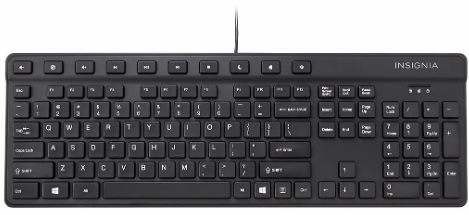
Package contents
- Wired keyboard
- Quick Setup Guide
System requirements
- Windows® 8.1, Windows® 8, Windows® 7, Windows Vista®, or Mac OS 10.X or higher
- One available USB port
Setting
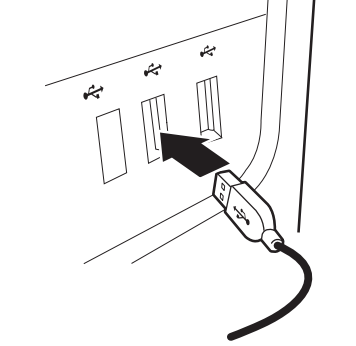
- Plug the keyboard into an available USB port on your computer. Windows automatically finds and installs the appropriate driver, and you can immediately begin using your keyboard.

Features
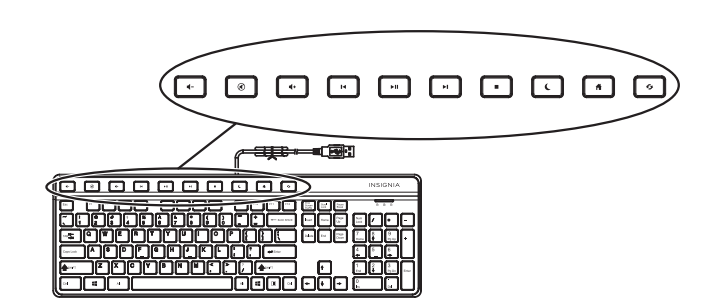
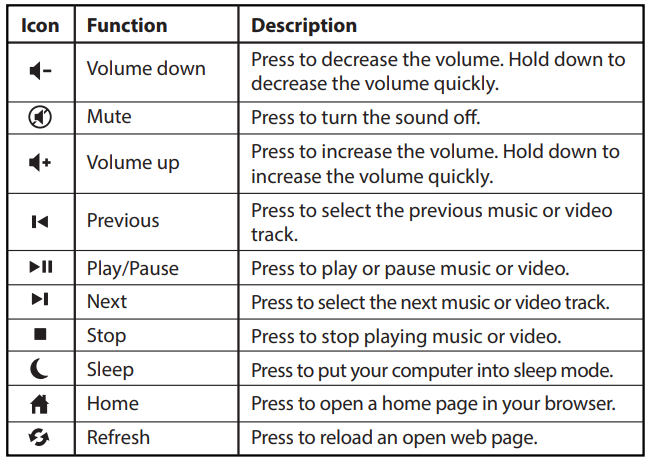
Shortcut keys
Cleaning your keyboard
- Wipe the keyboard with a damp, lint-free cloth.
Troubleshooting
My keyboard is not working.
- Make sure that your computer meets the system requirements.
- Make sure that your USB cable is securely attached to the USB port on your computer.
- Try connecting your keyboard to a different USB port on your computer.
Specifications
- Dimension (L×W×H): 17.32 × 5.78 × 1.18 in. (44.0 × 14.7 × 3.0 cm)
- Weight: 17.46 oz. (.495 kg)
- Cable length: 59 in. (1.5 m)
Legal notices
FCC Statement: This device complies with Part 15 of the FCC Rules. Operation is subject to the following two
conditions: (1) this device may not Insignia NS-PNK5001-C USB Keyboard cause harmful interference, and (2) this device must accept
any interference received, including interference that may cause undesired operation.
This equipment has been tested and found to comply with the limits for a Class B digital device,
under Part 15 of the FCC Rules. These limits are designed to provide reasonable protection
against harmful interference in a residential installation.
This equipment generates, uses, and can radiate radio frequency energy and, if not installed and used in accordance with the instructions, may cause harmful interference to radio communications. However, there is no guarantee that interference will not occur in a particular installation. If this equipment does cause harmful interference to radio or television reception, which can be determined by turning the equipment
off and on, the user is encouraged to try to correct the interference by one or more of the following measures:
- Reorient or relocate the receiving antenna.
- Increase the separation between the equipment and receiver.
- Connect the equipment to an outlet on a circuit different from that to which the receiver is
connected. - Consult the dealer or an experienced radio/TV technician for help.
Warning: Changes or modifications not expressly approved by the party responsible for
compliance could void the user’s authority to operate the equipment.
IC Statement
CAN ICES-3 (B)/NMB-3 (B)
One-Year Limited Warranty
Visit www.insigniaproducts.com for details.
Customer Support
- Website: www.insigniaproducts.com
- Ph: 1-877-467-4289 (U.S. and Canada) 01-800-926-3000 (Mexico)
INSIGNIA is a trademark of Best Buy and its affiliated companies. Distributed by Best Buy Purchasing, LLC
©2015 Best Buy. All rights reserved.
FAQs
Q: How do I connect the Insignia NS-PNK5001-C keyboard to my computer?
Connect the USB connector to a USB port on your laptop or PC. Since the keyboard is plug-and-play, no extra drivers should be required for it to be recognised.
Q: Is this keyboard compatible with Windows and Mac?
Indeed. The keyboard is compatible with macOS and Windows 7, 8, 10, and 11. Standard typing functions flawlessly on Macs, while some function keys may act differently.
Q: How do I use the multimedia keys?
On compatible operating systems, multimedia keys (such as volume control, play/pause, mute, etc.) function. On Windows, they work instantly. For some shortcuts on macOS, you might need to press the Fn key in combination.
Q: Does the keyboard support wireless connections?
No, the NS-PNK5001-C is merely a USB connected keyboard. There is no wireless functionality.
Q: Can I use this keyboard on a tablet or smartphone?
Yes, provided that USB OTG (On-The-Go) technology is supported by your tablet or smartphone. Connect the keyboard using an OTG adapter that is suitable.
Q: Why do some multimedia keys not work on my system?
The operating system’s support is necessary for certain multimedia keys. Some keys might not work on previous OS versions. For custom key mapping, consult your operating system’s documentation or utilise third-party software.
Q: Is this keyboard ergonomic or backlit?
The NS-PNK5001-C lacks sophisticated ergonomic features and has a small, conventional form.