



INSIGNIA NS-PS10CC Crosscut Paper Shredder
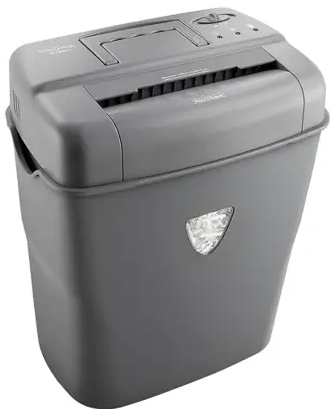
Features
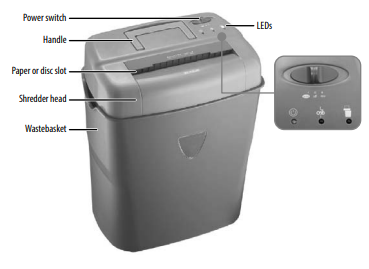
Power switch
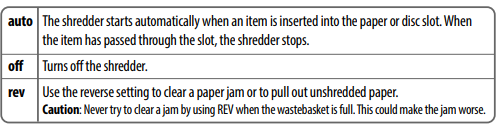
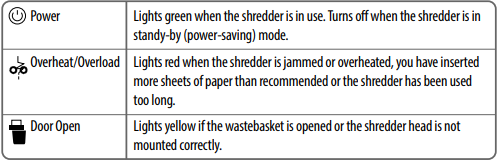
Setting
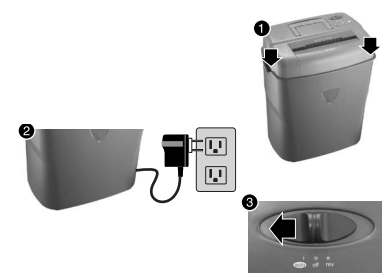
- Place the shredder head securely on the rim of the supplied wastebasket.
- Connect the power cord to a power outlet.
- Slide the power switch from off to auto
Use
To shred paper
- Insert the paper into the paper or disc slot. When the paper has passed through, the shredder will stop.
To shred discs and credit cards
- Hold the disc or credit card by the edge and feed it into the paper or disc slot one at a time, releasing when shredding begins. The shredder stops when the entire disc or credit card has been destroyed.
- Never shred plastic (except credit cards, CDs, or DVDs), continuous forms, or anything
with adhesive, including labels and envelopes, newsprint, or any hard materials. - While this shredder will shred staples and small paperclips, it is recommended that you remove them whenever possible to extend the life of your shredder.
Maintaining
- Once a month, drizzle vegetable oil or cooking oil (nothing petroleum-based) on a few pieces of paper and feed them through the shredder.
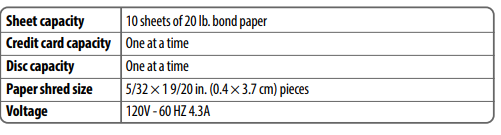
Specifications
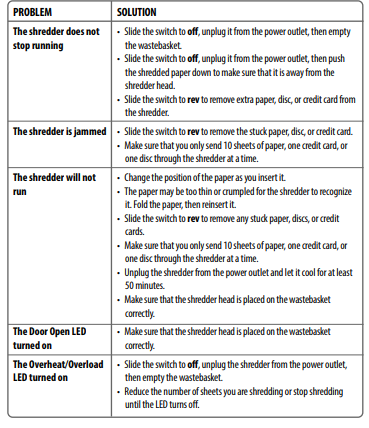
Troubleshooting
Legal notices
FCC Statement
This device complies with Part 15 of the FCC Rules. Operation is subject to the following two conditions: (1) this device may not cause harmful interference, and (2) this device must accept any interference received, including interference that may cause undesired operation.
FCC Caution
Changes or modifications not expressly approved by the INSIGNIA NS-PS10CC Crosscut Paper Shredder party responsible for compliance could void the user’s authority to operate this equipment.
EMC guidance
- Don’t use near active HF Insignia NS-GLSBFSCW1 Glass Scale surgical equipment or the RF shielded room of an ME system for magnetic resonance imaging, where the intensity of EM disturbances is high.
- Use of accessories, transducers, and cables other than those specified or provided by the manufacturer of this equipment could result INSIGNIA NS-PS10CC Crosscut Paper Shredder in increased electromagnetic emissions or decreased electromagnetic immunity of this equipment and result in improper operation.
- Otherwise, degradation of the performance of this equipment could result.
One-Year Warranty
Definitions
The Distributor* of Insignia-branded products warrants to you, the original purchaser of this new Insignia-branded product (“Product”), that the Product shall be free of defects in the original manufacturer of the material or workmanship for one (1) year from the date of your purchase of the Product (“Warranty Period”).
How to obtain warranty service?
If you purchased the Product at a Best Buy retail store location or from a Best Buy online website, please take your original receipt and the Product to any Best Buy store. Make sure that you place the Product in its original packaging or packaging that provides the same amount of protection as the original packaging. To obtain warranty service, in the United States and Canada, call 1-877-467-4289. Call agents may diagnose and correct the issue over the phone.
Where is the warranty valid?
This warranty is valid only in the United States and Canada at Best Buy branded retail stores or websites to the original purchaser of the product in the country where the original purchase was made.
Customer Support
- Ph: 1-877-467-4289
- Website: www.insigniaproducts.com
INSIGNIA is a trademark of Best Buy and its affiliated companies. Distributed by Best Buy Purchasing, LLC 7601 Penn Ave South, Richfield, MN 55423 U.S.A.
©2021 Best Buy. All rights reserved.
FAQs
What type of shredding does the NS-PS10CC perform?
For added protection, the shredder features crosscut shredding technology, which cuts paper into tiny, confetti-like fragments.
How many sheets can I shred at once?
Up to 10 sheets of normal 20-pound paper can be shredded by the NS-PS10CC at once.
Can it shred materials other than paper?
Indeed, it can securely shred CDs and DVDs, paper clips, credit cards, and staples; however, always refer to the handbook for precise material limits.
What is the shred size and security level?
With a shred size of roughly 4 x 40 mm, it is appropriate for confidential papers and has a security rating of P-4.
Is the shredder jam-resistant?
Indeed, the shredder has reverse and jam prevention features to make it easier to remove paper jams.
How large is the waste bin?
Longer shredding sessions without frequent emptying are made possible by the shredder’s 7-gallon (about 26-liter) pull-out waste container.
Can the shredder operate continuously?
The shredder can operate continuously for approximately five minutes, but to avoid overheating, it needs to cool down for thirty minutes.
Is there an automatic start and stop feature?
Yes, there is an automatic sensor in the shredder that begins shredding as soon as paper is input and stops when the shredding is finished.