

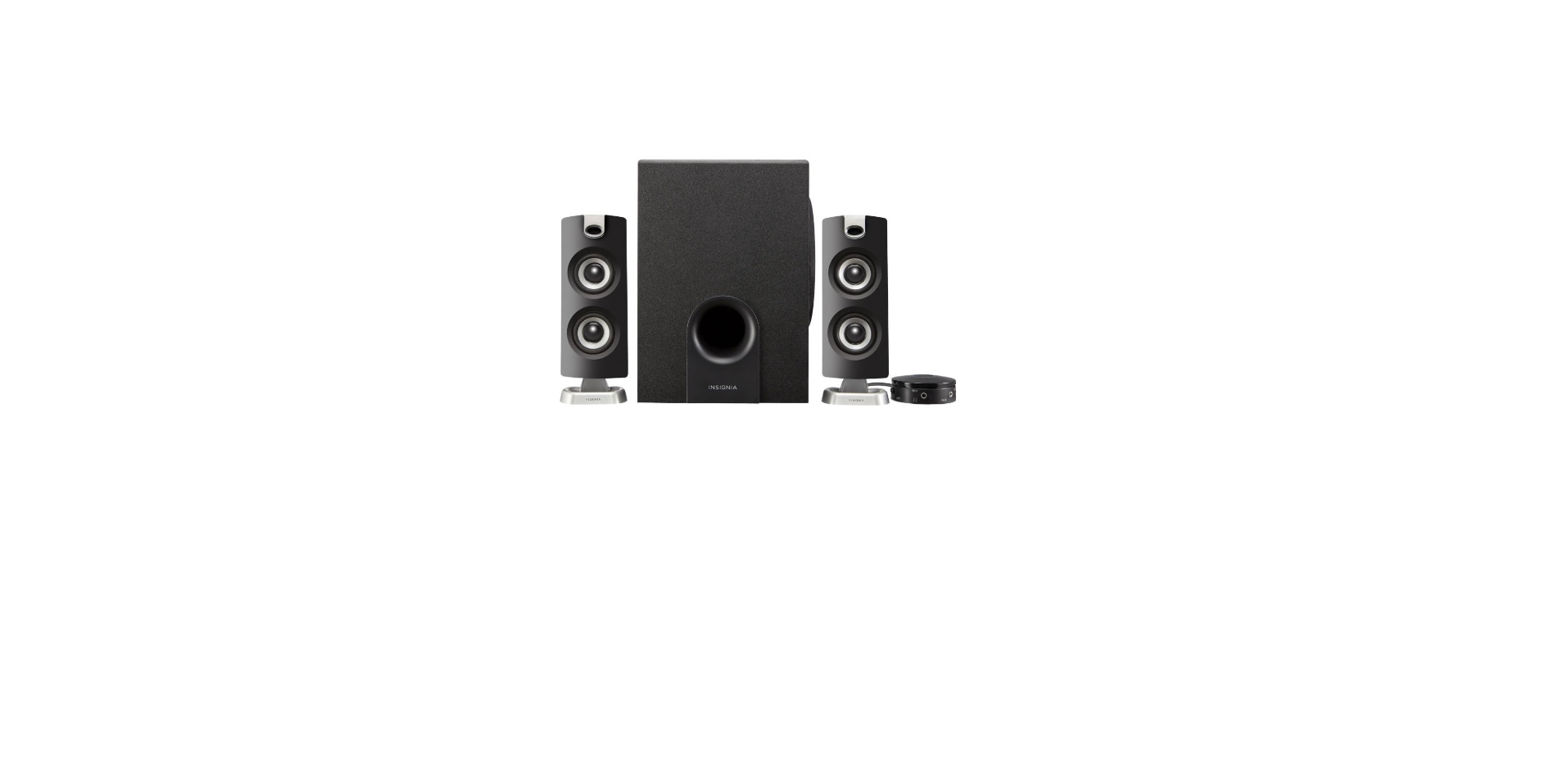

Insignia NS-PSB4721 2.1 Bluetooth Speaker System
Quick Setup Guide
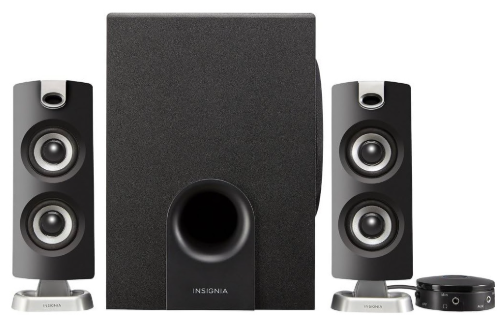
- Bluetooth Speaker System
Safety Instructions
- Read, follow, and save all instructions and documentation.
- Do not use this apparatus near water.
- Clean only with a dry cloth.
- Do not block any ventilation openings. Instby with the manufacturer’s
instructions. - Do not install near any heat sources such as radiators, heat registers, stoves, or other
apparatus (including amplifiers) that produce heat. - Do not defeat the safety purpose of the polarized or grounding-type plug. A
polarized plug has two blades, with one wider than the other. Agrounding-typeeA
plug has two blades and a third grounding prong. The wide blade or the third prong
is provided for your safety. If the provided plug does not fit into your outlet,
consult an electrician for replacement of the obsolete outlet. - Protect the power cord from being walked on or pinched, particularly at plugs.
Convenience receptacles and the point where they exit from the apparatus. - Only use attachments/accessories specified by the manufacturer.
- Use only with the cart, stand, tripod, bracket, or table specified by the
manufacturer, or sold with the apparatus. When a cart is used, use caution when
moving the cart/apparatus combination to avoid injury from tip-over. - Unplug this apparatus during lightning storms or when unused for long periods of
time. - WARNING: The wall plug is the disconnecting device. The plug must remain readily
operable. - The apparatus is classified as a Class II apparatus.
Package Contents
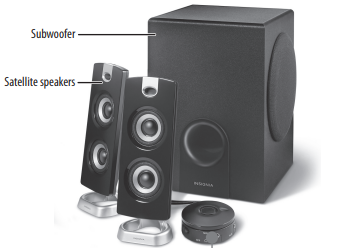
- Satellite speakers (2)
- Subwoofer
- Control pod
- Quick Setup Guide
Features
- Wirelessly stream from any Bluetooth device
- Volume and bass controls on the control pod
- Compatible with Bluetooth version V4.2/V4.1/V4.1 BLE, V3.0, & V2.1.
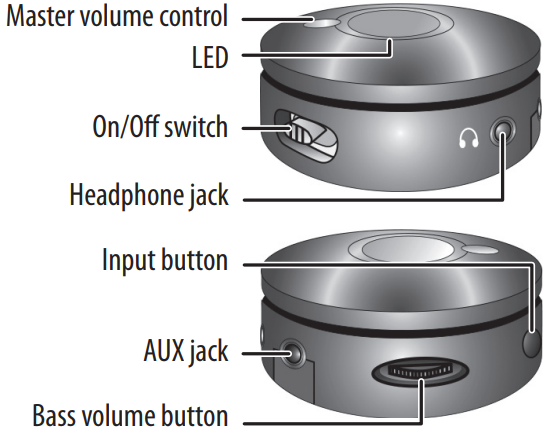
Control Pod
Connect The Speakers
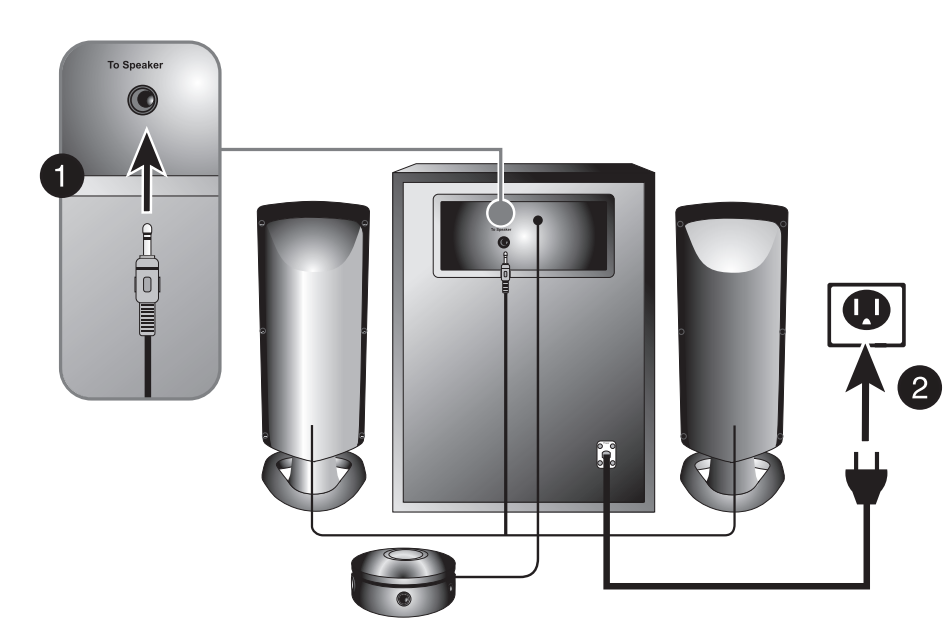
- Plug the satellite speakers into the To Speaker jack on the back of the subwoofer.
- Plug the power cable into a power outlet or surge protector.
Turning Your Speakers on and Off
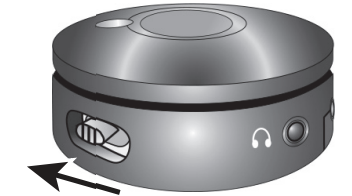
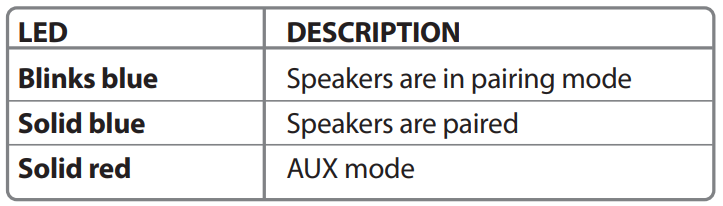
Move the ON/OFF switch on the side of your Control Pod to the ON position. When you first turn on your speakers, they are in Bluetooth pairing mode, and the indicator LED blinks blue.
Connecting with Bluetooth
- Make sure that your Bluetooth device is turned on and within 33 feet (10 meters) of your speakers.
- On your control pod, turn your speakers on. The indicator LED blinks blue to indicate that it’s in pairing mode.
- Turn on your Bluetooth device and turn on Bluetooth. Set your device to pairing mode, then select NS-PSB4721. See the instructions https://onyxguides.com/ that came with your Bluetooth device for information about pairing.
- If you are asked for a password, enter 0000. When pairing is complete, the LED lights solid blue.
- To disconnect from the paired Bluetooth device, turn your speakers off.
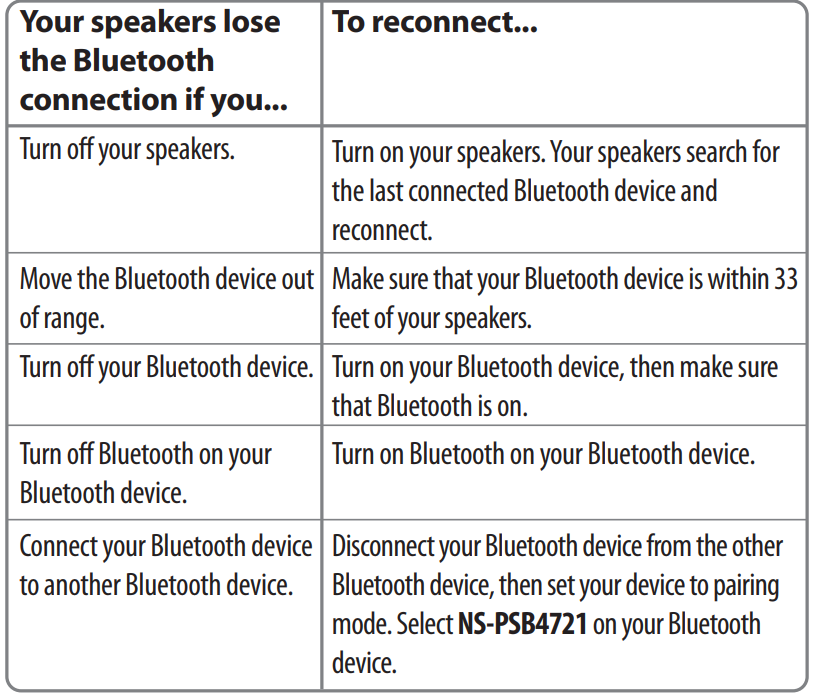
Reconnecting to a Paired Device
When your speakers are not paired to a device, the LED blinks blue slowly.
Listening to Music
- Turn on your speakers, then connect to your Bluetooth device.
- Press the input select button to select the input you want. The blue LED indicates Bluetooth, and the red LED indicates AUX mode
- Begin playback on your Bluetooth device.
- Adjust the volume on your speakers by turning the master volume control. To control the bass, adjust the bass volume button.
Playback Using Aux In
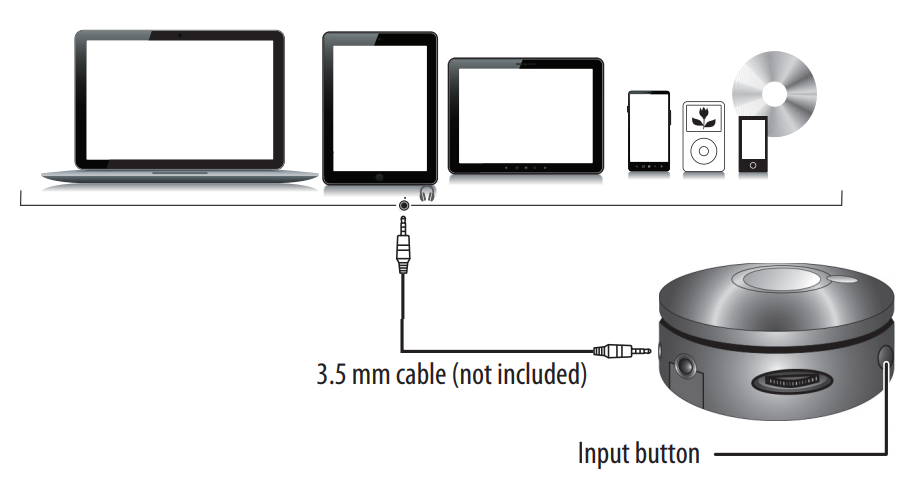
- Connect an external sound source, such as an MP3 player, by plugging a 3.5 mm audio cable (not included) into the AUX jack on your control pod.
- Press the Input button to enter AUX mode. The LED lights red.
- Start playback on the external device.
- Turn the master volume control to adjust the volume.
- Control playback using the controls on the audio device.
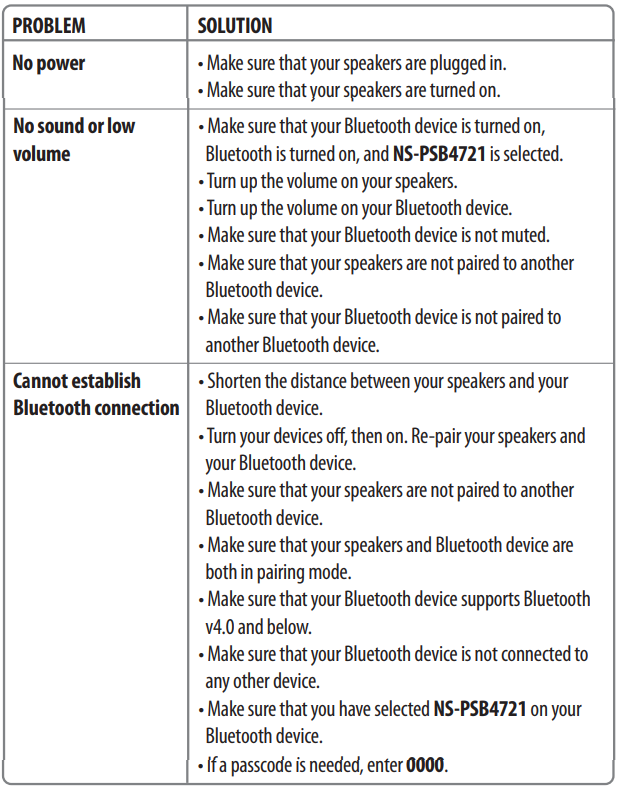
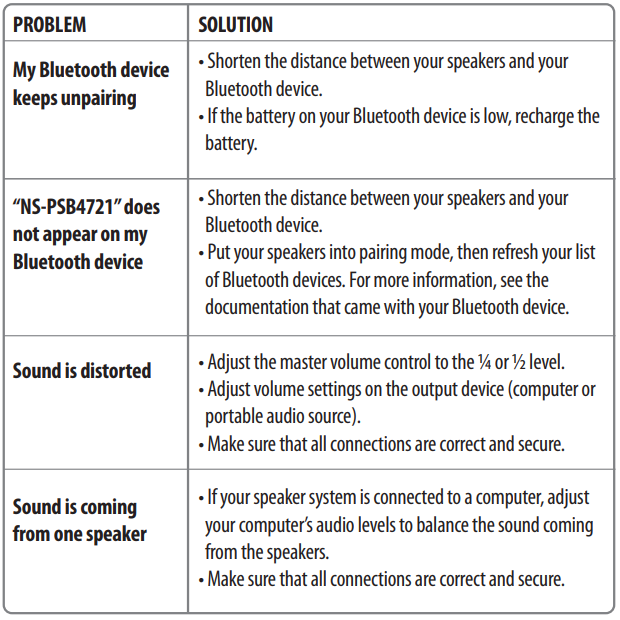
Troubleshooting
Legal Notices
This device complies with Part 15 of the FCC Rules. Operation is subject to the following two
conditions:
- This device may not cause harmful interference, and
- This device must accept any interference received, including interference that may cause undesired operation.
FCC Caution:
This device complies with Part 15 of the FCC Rules. Operation of this product is subject to the following. Two conditions:
- This device may not cause harmful interference, and
- This device must accept any interference received, including interference that may cause undesired operation.
This equipment has been tested and found to comply with the limits for a Class B digital device,
under Part 15 of the FCC Rules. These limits are designed to provide reasonable protection
against harmful interference in Insignia NS-PSB4721 2.1 Bluetooth Speaker System a residential installation.
- Reorient or relocate the receiving antenna.
- Increase the separation between the equipment and receiver.
- Connect the equipment to an outlet on a circuit different from that to which the receiver is connected.
- Consult a dealer or an experienced radio or TV technician for assistance.
FCC warning
Changes or modifications not expressly approved by the party responsible for compliance with the FCC Rules could void the user’s authority to operate this equipment.
Canada ICES-003 statement
This Class B digital apparatus complies with Canadian ICES
One-Year Limited Warranty
- Visit: www.insigniaproducts.com for details
Customer Support
- Website: www.insigniaproducts.com
- Ph: 1-877-467-4289 (U.S. and Canada) 01-800-926-3000 (Mexico)
INSIGNIA is a trademark of Best Buy and its affiliated companies. Distributed by Best Buy Purchasing, LLC 7601 Penn Ave South, Richfield, MN 55423 U.S.A. ©2016 Best Buy. All rights reserved. Made in China
FAQs
Q: How do I set up my Insignia NS-PSB4721 speaker system for the first time?
Using the supplied wires, connect the satellite speakers to the subwoofer unit. Turn the system on by plugging the power cord into an outlet. Depending on your device, you can now connect by Bluetooth, AUX, or RCA input.
Q: How do I pair the speaker system with my Bluetooth device?
On the remote or control panel, press the Bluetooth button. The indicator light on the Bluetooth device will begin to flash. Open Bluetooth settings on your computer, tablet, or phone, then choose “Insignia NS-PSB4721.” The light will stay steady after pairing.
Q: Can I connect non-Bluetooth devices to this system?
Indeed! 3.5mm RCA and AUX inputs are included with the NS-PSB4721 for wired connections. To connect your PC, TV, or other audio device, use the proper cable.
Q: What is the wireless range for Bluetooth?
In an open area, the speaker system can be heard up to 33 feet (10 meters) away. This range may be lowered by furniture, walls, and electrical interference.
Q: Can I pair multiple devices at once?
No. Only one Bluetooth device can be connected to the speaker system at once. Disconnect the existing device and pair a new one to switch devices.
Q: How do I adjust the bass and treble?
To change the sound to your liking, use the subwoofer’s bass adjustment knob or the remote control, if one is available. You can use your connected device or the same controls to change the volume and treble.