



JABLOTRON JA-103KR GSM Control Panel
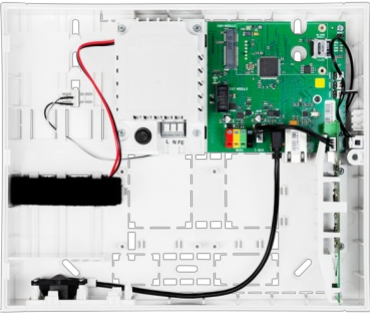
Installation
The module is to be installed directly on the control panel’s motherboard using a flat connector labelled GSM Module (see the control panel installation manual).
- Prepare a suitable SIM card (nano SIM). It must be activated (test is using a mobile phone), and DATA (GPRS, LTE) services must be enabled. If the SIM card requires a PIN code, deactivate it using the mobile phone.
- Insert the SIM card into the SIM card slot.
- Disconnect the control panel from its power supply (backup battery, USB, and mains electricity)
- Insert the communicator module into the system connector on the control panel and use two screws (1) to fix it to the motherboard.
- Attach the GSM antenna to the connector (2) on the communicator module (included with the JA-194Y-LITE). When installing the antenna, follow the orientation shown in Fig. 1.

Description
- safety screws;
- GSM antenna SMA connector;
- system connector;
- SIM card slot;
- SIM card
Communicator Activation
- Before connecting the power supply, check whether the communicator is properly fixed to the motherboard, the antenna is attached, and the SIM card is inserted into the SIM card slot.
- Removing the communicator module to insert the SIM card is not necessary.
- Connect the control panel’s power supply (backup battery and then the mains electricity).
- A flashing red communicator LED indicates connecting to a GSM network and will stop flashing within 1 minute = connected.
- Disconnect the power supply if the red LED indicator keeps flashing.
- Insert the SIM card into a mobile phone to make sure the SIM card works correctly and does not require a PIN code.
- Remain in Service mode and close the control panel box.
- Configure the communicator settings using the F-Link software (see the Control panel installation manual).
Communication to ARC and Communication Monitoring
- The communicator periodically checks the JABLOTRON JA-103KR GSM Control Panel status of the connection to the ARC, and if there is a problem in communication with the ARC, a fault is triggered.
- The communicator works in the Forward mode – it receives a message from the control panel and forwards it immediately; events are not buffered and sent later.
Technical specifications
- Installation type: Fixed installation
- Control panel power supply ~ 110 – 230 V/50 – 60 Hz, max. 0.28 A with F1.6 A/250 V fuse, security grade II
- Electrical power / current Max. 23 VA / 0.1 A
- Protection class II.
- Back-up battery 3.7V, 5000 mAh, Li-Polymer
- Low battery backup voltage (fault indication) ≤3.5V
- Maximum battery recharge time (80% capacity) 72 h
- Maximum number of sections 4
- Maximum number of devices: 31 devices + 31 remote controllers
- Maximum number of use: R.ss 32
- Max. number of PG outputs 2
- Alarm connections Wireless connection– unspecified wireless connection, Jablotron wireless protocol
Classification Environment Grade II
- @ According to standards EN50131-1, EN 50131-3, EN 50131-6, EN 50131-5-3, EN 50131 10, EN 50136 1, EN 50136- 2
- @ operational temperature range / humidity range -10 °C to +40 °C / 75% RH without condensation
- @ power supply Type A – primary mains power supply with a powered back-up battery.
- @ event memory capacity approx. 7 million events, including sources and timestamps.
- @ system reaction to loss of device communication: Fault or Tamper – Dependent on selected profile
- @ wireless communication within 2h (from last communication)
- @ Wireless communication within20-minuten blocks section setting
- Dimension 182 x 132 x 58 mm
- Weight with battery / without battery 510 g/430 g
- Based parameters of the JA 111R module 868.1 MHz, <25 mW, GFSK <80 kHz
- Radio emissions ETSI EN 300 220-1,2
- EMC EN 50130-4, EN 55032, ETSI EN 301 489-1, ETSI EN 301 489-3
- Safety conformity EN IEC 62368-1
- Conditions of operation ERC REC 70-03
- Certification body TREZOR TEST (no. 3025)
Customer Service
- Tel.: +420 483 559 999
- Fax: +420 483 559 993
- Website: www.jablotron.com
- Address: Pod Skalkou 4567/33 46601 Jablonec nad Nisou, Czech Republic
Hereby, Jablotron Ltd. declares that this TP-98 complies with the essential requirements and other relevant provisions of Directive 1999/5/EC.
FAQs
What is the primary function of the JA-103KR GSM Control Panel?
The JA-103KR functions as a central security control panel that oversees linked devices and sends and receives commands remotely via GSM cellular connectivity.
Can the JA-103KR work without a SIM card?
No, a SIM card is needed to use the GSM capabilities. The panel cannot receive remote commands or issue alerts without it.
How do I set up the JA-103KR for remote control via SMS?
Using the keypad or software, program the phone numbers that are authorised for control into the panel. Then, arm, disarm, or check the status of the system using pre-programmed SMS commands.
What GSM networks are compatible with the JA-103KR?
GSM networks that use common 2G frequencies are supported by the JA-103KR. Make that the network operator from which you purchased your SIM card offers 2G access.
How does the panel notify me in case of an alarm?
The control panel instantly notifies you by sending SMS messages or calling the pre-programmed phone numbers when it detects an alarm event.