

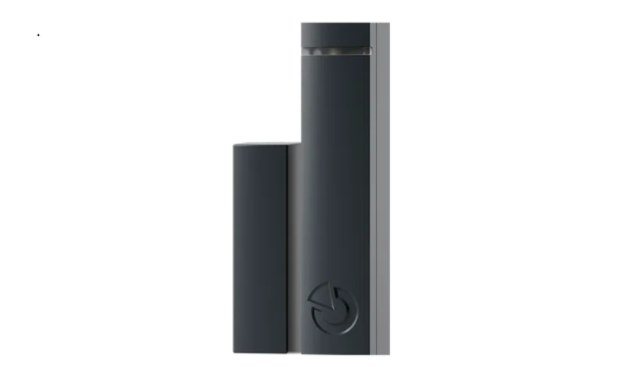

JABLOTRON JA-153M Wireless Magnetic Detector
Installation
During installation, if possible, avoid placing the device directly onto metal surfaces, which may negatively impact the device’s ability to communicate with the system. Two types of magnets are supplied with the detector. A ferrite magnet in a plastic housing (A) and a ring magnet (B).
The correct location of both types of magnets is shown in the illustration. The distances for activation/deactivation of the detector with the ferrite magnet (for a nonmagnetic mounting surface) are shown in the table. For other magnet types or opposite polarity, these values may vary.

- Open the device cover by pressing the housing tab (2).
- Mount the device’s backplate onto a chosen location.
- Screw the selected magnet onto a moving part, e.g., a door leaf. The bottom edge of the ferrite magnet plastic must coincide with the bottom edge of the detector housing. It is recommended to use a special non-magnetic screw (included in the package) to attach the ring magnet.
- Proceed according to the control panel installation manual: Basic procedure:
- In the F-Link software, select the required position in the Devices window and launch the enrolment mode by clicking on the Enrol option.
- Insert the battery (mind the correct polarity). The enrolment signal is transmitted when the battery is inserted into the detector.
- Close the detector cover.
- In order to comply with norms, the front cover must be secured with the supplied locking screw (1).
Detector communication in the system
The detector uses bi-directional asynchronous communication, which allows changing the internal settings remotely and saving battery capacity simultaneously. After enrollment in the system, the detector operates in an accelerated mode until the service mode is exited (but no longer than 24 h). In this mode, the detector checks every 990 seconds whether the system is still in service mode or if new settings should be taken over.
In service mode, the detector communicates once every 19 minutes or with each activation. Therefore, when switching from operational mode to service mode, it can take up to 19 minutes for the detector to recognize control panel status or an internal settings change, which is indicated by the red font on the internal settings button. This period can be reduced by activating JABLOTRON JA-153M Wireless Magnetic Detector the detector or its tamper sensor.
Please note: It is not necessary to wait 90 seconds (or 19 minutes) until the detector confirms delivery of the new setting when changes are applied. The system remembers the requested change and forwards the new settings to the detector during the next period of regular communication.
Internal settings of the detector
- LED indication: On/Off
- Detection of external magnetic field: When switched on, the detector will analyze its surrounding magnetic field, and in case of its disturbance (e.g., by an external magnet), the detector will declare Input Activation and a Fault. The function brings higher protection to the object.
- Calibration: button to start the calibration process.
- LED Off = the device is waiting for a connection. To continue, activate and deactivate the magnet (open and close the window/door).
- Yellow LED on = detector has established a connection. Start calibration to continue.
- Activate the detector to confirm the presence of the magnet. The LED indicates yellow, with the red LED regularly flashing twice.
- Please return the magnetic detector to its unactivated state. Yellow LED on + rapid flashing of red LED = magnetic detector calibration takes place for approx. 4 s.
- Yellow LED on + slow flashing red LED = detector is ready to continue calibration. To continue, activate the detector by opening and closing the window/door.1 s. Then the red LED will go out, and the setting status will change to complete; the yellow LED remains lit.
Tables of distance values for activation and deactivation of the detector when using the supplied ferrite magnet (values may vary when used with other permanent magnets).
Table 1: Distances for activation/deactivation of a detector installed on a non-magnetic surface.
Table 2: Distances for activation/deactivation of a detector installed on a magnetic surface.
Battery replacement
The system sends a report automatically when the battery is low. Check the right function of the detector after battery replacement.
Technical Specifications
- Power 1x alkaline battery, type: AAA (LR03, 1.5 V / 1.2 Ah)
- The typical lifetime of a battery is about 2 years (max. 10 activations daily)
- LowBatt state <0.95 V
- Quiescent current consumption 50 μA
- Maximum current consumption 30 mA
- Communication frequency 868.1 MHz, JABLOTRON protocol
- Maximum radio-frequency power (ERP) <25 mW
- Communication range approx. 500 m (open area)
- Dimensions transmitter part 20 x 86 x 20 mm
- Dimensions magnet part 16 x 55 x 15 mm
- Weight (without battery) 25 g
- Classification security grade 3 / environmental class II (according to EN 50131-1)
- Operational environment indoor general
- Operating temperature range -10 °C to +40 °C
- Average operating humidity 75% RH, non-condensation
- Certification body Trezor Test s.r.o. (no. 3025), Kiwa Nederland b. v.
- Complies with EN 50131-1, -2-6, -5-3, -6, ETSI EN 300 220-2, T 031, EN 50130-4, EN 55032, EN 62368-1, EN IEC 63000
Customer Service
- Website: www.jablotron.com – Section
FAQs
Q: What is the communication range of the JA-153M?
Ans: In an open area, the detector’s wireless communication range with the control panel is typically up to 300 meters; however, obstructions like walls may limit this range.
Q: How do I install the detector?
Ans: Place the magnet on the moving component and the sensor on the door or window’s fixed frame, making sure they line up precisely (typically within 15mm). As directed by the handbook, use sticky tape or screws.
Q: Is the detector compatible with all Jablotron security systems?
Ans: Wireless security systems from Jablotron’s 100 series and later are compatible with the JA-153M.
Q: How do I pair the detector with the control panel?
Ans: Follow the enrolment instructions on the control panel, which often include putting the system in learn mode and turning on the detector by pressing a test button or opening/closing the door.
Q: How is the detector powered?
Ans: Under usual conditions, it can operate for three to five years on a replacement lithium battery.
Q: How do I know when the battery is low?
Ans: When the battery level falls below a predetermined threshold, a low battery message will be displayed on the system control panel.