



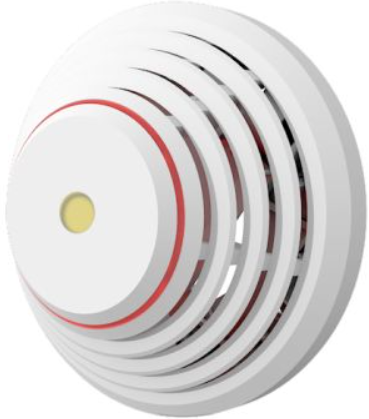
JABLOTRON SD-283ST Wired Smoke And Heat Detector
Introduction
The JA-150ST is a component of the JABLOTRON system. We recommend you buy them together with the detector. The JJABLOTRON JA-150ST Smoke And Heat Detector consists of an optical smoke detector and a heat detector. The optical smoke detector is very sensitive to large dust particles, which are present in dense smoke. It is less sensitive to smaller particles generated by the combustion of liquids such as alcohol.
Detector location
It is not suitable for interiors where smoke can disperse over a large area and cool down (e,.g. interiors with extremely high ceilings – above 5 m) – the smoke would not reach the detector position.
Do not install the detector in an environment exposed to dust, cigarette smoke, and steam. Dusty environments shorten the detector’s lifespan.
In buildings and family houses with multiple floors, detectors should be installed above stairwells. It is recommended to place additional detectors in rooms where people sleep.
Installtion
Installation on level ceilings
Place the detector in the centre of the room if possible. The detector must not be recessed into the ceiling due to the possible existence of a warm air layer on the ceiling. Never place the detector in the corner of the room (always keep at least 0.5 m distance from the corner), see g 4. There is insufficient circulation of air in the corners.
Installation on sloping ceilings
If the ceiling is not suitable for mounting on a level surface (e.g., a room under a roof ridge), then the detector can be installed as in g 5.
- centre of the room, best location
- acceptable location
Avoid installing the detector in the following locations
- Places with poor air circulation (niches, corners, apexes of A-shaped roofs, etc.)
- places exposed to dust, cigarette smoke, or steam
- Places with over-intense air circulation (close to ventilators, heat sources, air conditioning outlets, etc.)
- In kitchens and other cooking places (because steam, smoke, or oily fumes can reduce detector sensitivity, thus causing false alarms and detection faults).
- Within a 1m radius of fluorescent tubes or energy-saving light bulbs (electrical interference may negatively affect the detector’s radio communication)
- In areas with lots of small insects
Installation
Abide by the procedures recommended in the previous paragraphs.

Detector cover opening; 2 – detector cover closing; 3 – optical status signalling; 4 – arrow showing where to insert the detector onto the bottom part; 5 – production code; 6 – configuration jumpers; 7 – battery holders; 8 – arresting screw
Instructions
- Open the detector cover by turning it anti-clockwise (1).
- Attach the removed plastic base to the JABLOTRON JA-150ST Smoke And Heat Detector desired place with screws.
- Set the configuration jumpers (6) according to the table below.
- Proceed according to the control panel installation manual. Basic procedure:
- Go to the F-Link program, select the required position in the Devices window, and launch Enrollment mode by clicking on the Enroll option.
- Insert all batteries into the detector.
- Insert the detector into the plastic base. Close the detector cover by turning it clockwise (2).
- During this period of time, the detector doesn’t detect anything. The test ends when the LED shuts down (3), and the detector becomes fully operational.
- To be fully compliant with regulations, it is necessary to lock the cover in place with the use of an (8) arresting screw.
Detector settings

Jumper 1 MEM – Signalling the alarm memory. The signalling LED remains active for 24 hours after the reason for the alarm ceases to exist. Jumper 2 and 3 TEMP and SMOKE – The combination of these configuration jumpers defines how the detector will react to smoke and heat. It’s possible to change the system’s reaction to something other than Fire using the F-Link program. This setting is in the Reaction options in the Devices window.
Fire alarm
- Optical detector: The indication lasts until the room is ventilated (thus also ventilating the detector’s detection chamber).
- Heat detector: The indication lasts until the temperature drops (e.g., when the room is ventilated).
- Alarm memory: If enabled, the LED alarm indication continues flashing slowly (approx. 4 times per second) for a further 24 hours after the alarm stops.
Battery replacement
The system sends a report automatically when the battery is low. Optical indication then flashes briefly once every 30 seconds. It is always essential to replace all three batteries. Use the same type and the same brand for all of them. Wait for 90 seconds to let the detector’s circuitry discharge before inserting new batteries.
Fault indication
The detector checks its functionality. An operating temperature range fault will disappear the moment the temperature of the environment returns to normal. If this test results in a fault, send the detector to the repair service.
Technical specifications
- Power 3x LR6 (AA) type alkaline batteries, 1.5 V
- Quiescent current consumption 22 μA
- Maximum current consumption 50 mA
- Low Battery voltage 3.3 V
- Typical battery lifetime is approximately. 3 years
- Communication band 868.1 MHz, Jablotron protocol
- Maximum radiofrequency power (ERP) < 25 mW
- Communication range approx. 300 m (unrestricted area)
- Dimensions: diameter 126 mm, height 50 mm
- Weight (without batteries) 150 g
- Smoke detection optical light scattering
- Smoke detector sensitivity m = 0.11 ÷ 0.13 dB/m pursuant to EN 54-7
- Heat detection class A2 according to EN 54-5
- Alarm temperature +60 °C to +70 °C
- Operating temperature range -10 °C to +70 °C
- Complies with EN 54-5, -7, -25, ETSI EN 300 220-1, -2, EN 50130-4, EN 55032, EN 62368-1, EN 63000
- Recommended screw 4x ø 3.5 x 40 mm (countersunk head)
Customer Service
- Tel.: +420 483 559 999
- Fax: +420 483 559 993
- Website: www.jablotron.com
- Address: Pod Skalkou 4567/33 46601 Jablonec nad Nisou, Czech Republic
Hereby, Jablotron Ltd. declares that this TP-98 complies with the essential requirements and other relevant provisions of Directive 1999/5/EC.
FAQs
What types of hazards does the SD-283ST detect?
The SD-283ST provides thorough fire detection by detecting both smoke particles and sudden spikes in temperature.
Is this detector compatible with all alarm systems?
The SD-283ST is intended to be used with wired alarm systems that are compatible with traditional detectors. To ensure compatibility, please review your system specifications.
Where should I install the smoke and heat detector?
To prevent false alerts, place the detector high on a wall or on the ceiling, away from fans, vents, and places where steam or dust can be present.
Can I install the detector myself?
A qualified expert should do the installation to guarantee correct wiring and adherence to safety regulations.
How does the detector alert me in case of smoke or heat detection?
When the gadget detects heat or smoke, it sets off an alarm that activates sirens or other alerts via the linked security system.
Does the detector have a test function?
Indeed, there is a test feature on the SD-283ST to ensure correct operation. For information on the test procedure, consult the manual.
How often should I test the detector?
To make sure the detector is functioning properly, it is advised to test it at least once each month.
How do I clean the detector?
Use a gentle, dry towel to clean the outside. Steer clear of cleaning supplies and solvents. To preserve sensitivity, make sure the detector is clear of dust or debris.