

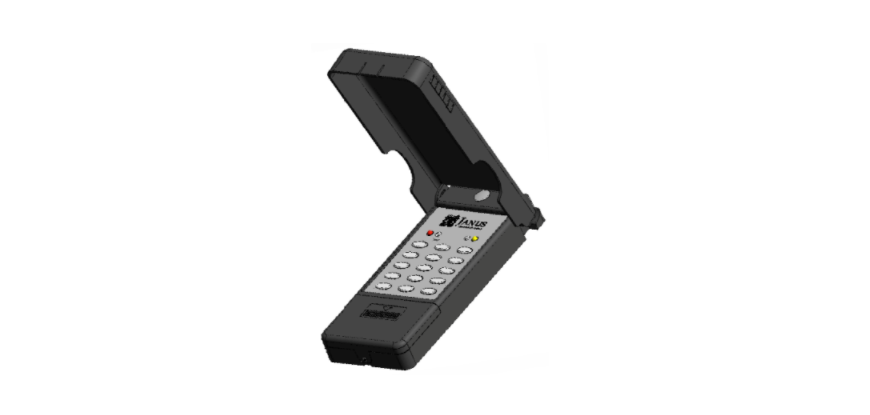

JANUS TX2000 Pantheon Wireless Keypad
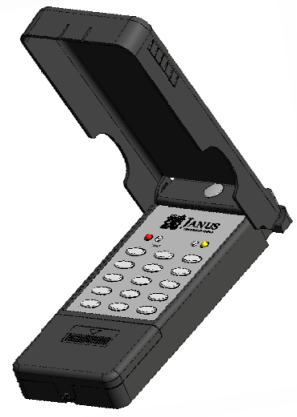
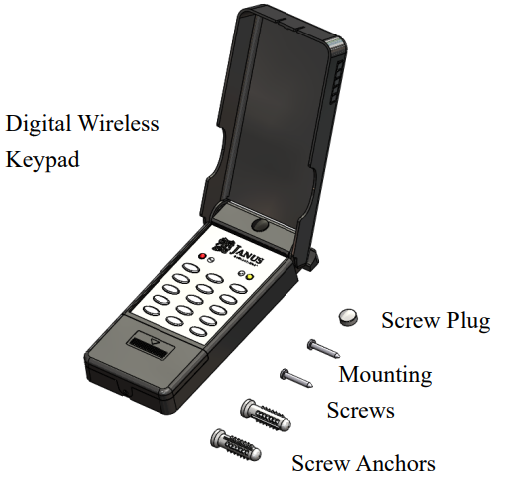
Box Contents
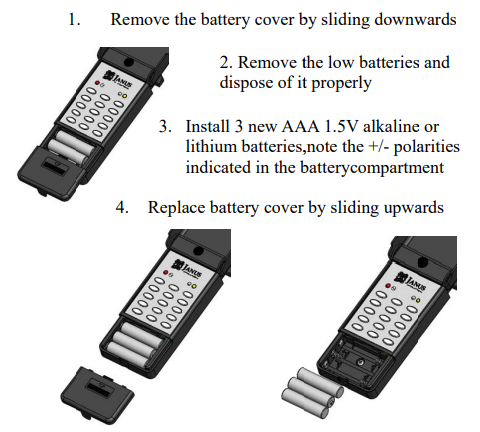
To begin use, firstly remove the insulation from the battery compartment. Please refer to 6. Changing Batteries instructions.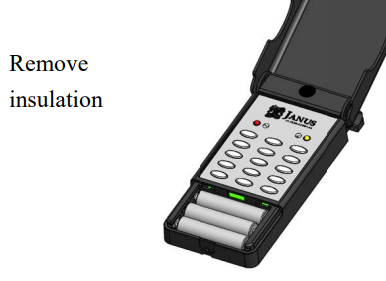
Setting Your Wireless Keypad Master PIN
NOTE: The Master PIN MUST be reset to begin use.
Activate programming mode:
- Press the factory preset default PIN 12 34(PROG
- While in PROG mode, both O& Dare on Press
- Beep to signal Master PIN selected, U&V flashing for PIN input
- Enter your New PIN (4 to 8 digits-MUST BE numbers other than 1234), then press
- Re-enter your New PIN to confirm, then press again.
- Two beeps to signal Master PIN has now been successfully changed- Keypad will automatically exit PROG mode after 20 seconds.
IMPORTANT: Please write down your designated PIN below and keep this instruction manual in a secure place for future reference. If the Master PIN is lost and unrecoverable, the keypad is required to be returned to the factory, and a reset fee is applicable.
Keypad Door Operation Key Setting
Programming Single Door Installation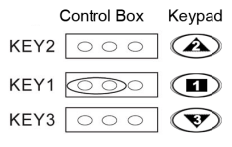
The above jumper configuration will allow the keyboard to be coded.
Programming Single Door Installation
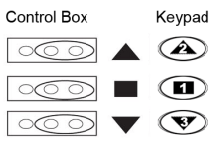
The above configuration uses all three keys.
- open
- stop
- close
Two or Three-Door Installation
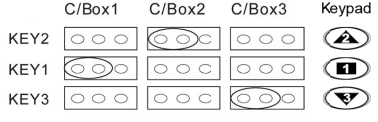
- Door 1 – C/Boxl
Jumper configuration for a - Door 2 – C/Box2
Jumper configuration for - Door 3 – C/Box3
Jumper configuration for
Code Setting to Controller
Once the key configuration is set, you can now program in the security code from your keypad.
- On the control box, press the LEARN code key once
- Learn LED indicator will light
- Enter your PIN, then press
- Press the door operation key that will operate the door. e.g, for A. single door installation, you would
- Press Learn LED will go out
- The wireless keypad is now programmed to the control box
NOTE: To program more than one wireless keypad to the control box, repeat the above instructions.
IMPORTANT: If a wireless keypad is lost or stolen. Please refer to the control box instruction manual for procedures to erase the code memory.
Mounting Instructions
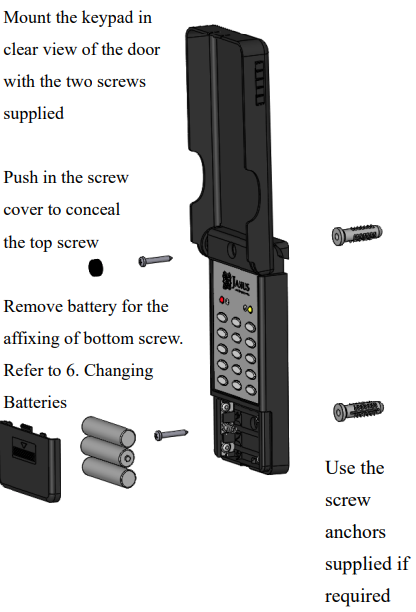
Keypad Operation
- Enter the keypad PIN QO00G 4-8 digits PIN
- VLED is on if PIN is correct. Press the designated keypad operation key
- VLED will remain on for 20 seconds for consecutive door operations, without re-entering the PIN.
Charging Batteries
Optional Secondary PIN Operations
Below is the instruction to set a secondary PIN for CODE 06 (Replace 06 with other CODE numbers 02-10 as required).
NOTE: CODE 01 is the MASTER PIN
- Enter MASTER PIN (4 to 8 digits), then press
- PROG to enter PROG Mode
- Press to select Code 06 flashing for PIN input
- Enter your PIN for Code 06 (4 to 8 digits), then press
- The keypad will automatically exit PROG mode after 20 seconds
Erasing a Secondary PIN
Below is the instruction to erase a secondary PIN for Code 06 (Replace 06 with other Code numbers 02-10 as required).
- Enter MASTER PIN (4 to 8 digits), then press (PROG to enter PROG Mode Press to select Code 06
- W& flashing for PIN input
- Press to erase.
- The keypad will automatically exit PROG JANUS TX2000 Pantheon Wireless Keypad mode after 20 seconds.
Specification
- Power: 4.5V (AAA*3)
- Operating Freq: 315MHz
- Operating Power consumption: 14mA
- Modulation Type: ASK
FCC STATEMENT
This device complies with Part 15 of the FCC Rules. Operation is subject to the following two conditions:
- This device may not cause harmful interference, and
- This device must accept any interference received, including interference that may cause undesired operation.
This equipment generates and uses can radiate radio frequency energy and, if not installed and used in accordance with the instructions, may cause harmful interference to radio communications.
However, there is no guarantee that interference will not occur in a particular installation. Reorient or relocate the receiving antenna. Increase the separation between the equipment and receiver.
Customer Support
- Address: Janus Henderson 801 Pennsylvania JANUS Pana40Plus 2D-3D Detector Controller Ave, Suite 219109 Kansas City, MO 64105-1307
- Website: https://www.janushenderson.com/
- Tel: 800-525-3713.
- Tomings: Weekdays, 9 a.m. – 6 p.m.
FAQs
What is the JANUS TX2000 Pantheon Wireless Keypad used for?
It offers safe, PIN-based wireless access control without requiring a remote control or physical key.
How does the TX2000 communicate with my opener or receiver?
The keypad communicates with a suitable JANUS or Pantheon receiver via encrypted wireless radio frequency transmissions. It transmits a coded message to activate the linked gadget when you enter a valid PIN.
What power source does the keypad use?
Two AAA or lithium batteries, depending on the model version, power the TX2000. For optimal performance and extended lifespan, always use premium alkaline or lithium cells.
How far is the wireless operating range?
The TX2000 can travel up to 30–50 meters (100–160 ft) in open spaces under typical circumstances. Environmental elements, including walls, metal surfaces, and interference, can affect the angle
Can I use the TX2000 with non-JANUS or third-party openers?
Signal protocol and frequency determine compatibility with external systems. Before attempting pairing, consult the manufacturer or your installer.