



Keurig Vue V1200 Commercial Coffee Brewer
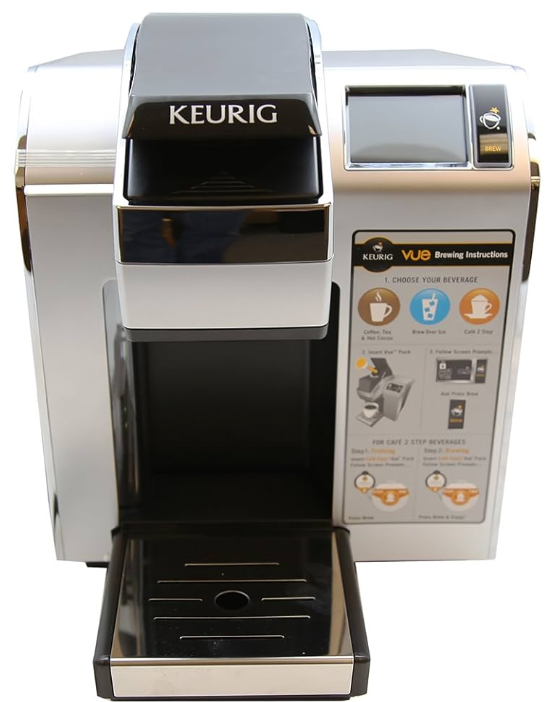
The Keurig Vue V1200 Commercial Coffee Brewer is designed for offices, hotels, and small commercial setups. If you are looking for a similar home-friendly option, check out our Keurig K-Duo Essentials K-Cup Pod Coffee Maker User Guide. This manual will guide you through setup, brewing, cleaning, and troubleshooting.
Safety Instructions
Before using your Keurig Vue V1200 Commercial Coffee Brewer, review these essential safety instructions to ensure proper operation.
- Read all instructions before using.
- Do not touch hot surfaces. Use handles and knobs when available.
- Do not place on or near a hot gas or electric burner, or in a heated oven.
- Do not overfill the Water Reservoir with water.
- Turn off and unplug the Brewer before cleaning or maintenance.
- Allow to cool before putting on or taking off parts and before cleaning the appliance.
- Do not let the cord hang over the edge of the table or counter, or touch hot surfaces.
- Do not lift the Handle to open the Brewer while brewing is in progress.
- Always keep the Water Reservoir Lid on the Water Reservoir unless you are refilling it.
- Do not use the appliance for anything other than its intended use.
Brewer
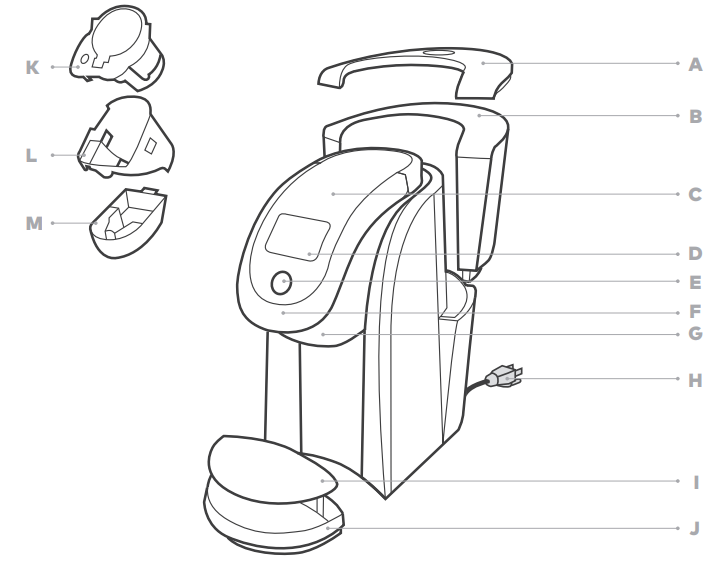
- Water Reservoir Lid
- Water Reservoir
- Top Housing
- Touch Screen/Power Button
- Brew Button
- Handle
- Brew Head
- Power Cord
- Drip Tray Plate
- Drip Tray
- Pod Holder
- Housing (K and L are the Pod Holder Assembly)
- Base
Settings and Touch Screen Controls
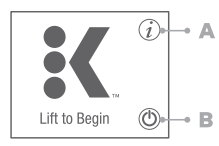
Home Screen
- Settings Button
- Power Button
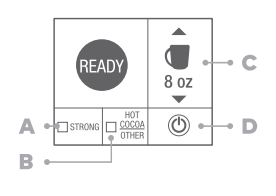
Screen for K-Cup® Pods
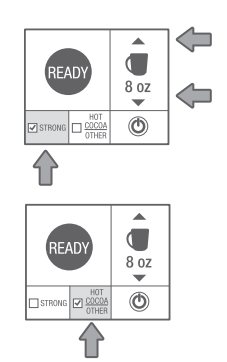
- STRONG (only available for coffee)
- HOT COCOA/OTHER (for select non-coffee beverages)
- Brew Size
- Power Button
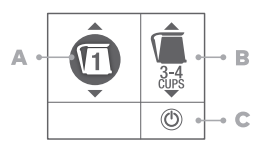
Screen for K-Carafe® Pods
- KEURIG BREW Setting 1
- Brew Size
- Power Button
Brew Settings
Select the KEURIG BREW setting that matches the number on the pod lid for K-Mug® and K-Carafe® pods.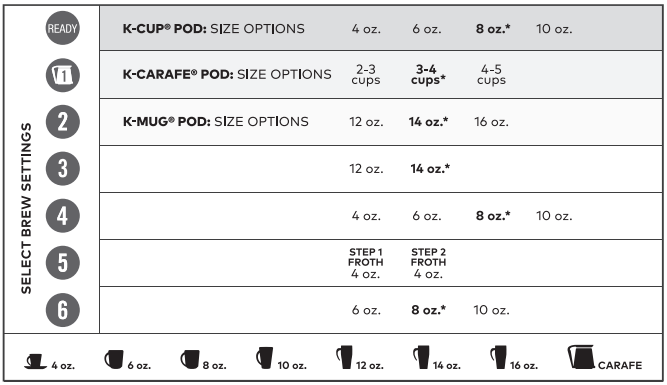
Before You Brew
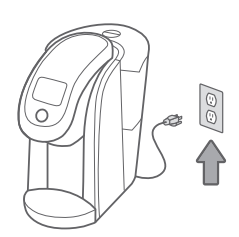
Plug & Place
Remove packing tape from the brewer and plug it into a grounded outlet. Place a large mug (12 oz. minimum) on the drip tray plate.
Rinse & Fill
Remove the water reservoir lid, then lift the reservoir straight up to remove it. Rinse the reservoir with fresh water and fill to the MAX line. Replace the water reservoir, making sure the lock tabs engage with the brewer. Replace lid. NOTE: Do not use distilled water.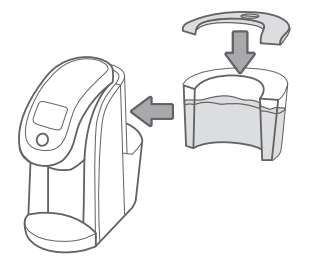
Power On
Press the power button. Lift the handle—remove and discard the orange shipping disk. Lower the handle. Wait for preheating to complete, about 3 minutes.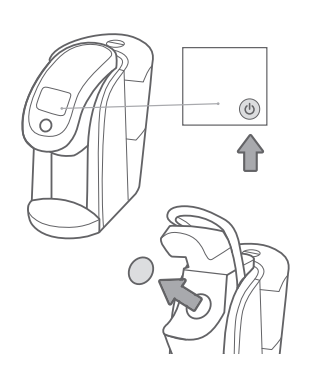
Cleansing Brew Setup
Lift and lower the handle. Press the blinking brew button to start a cleansing brew. Pour the hot water into the sink. The one-time setup process is now complete, and you are ready to brew!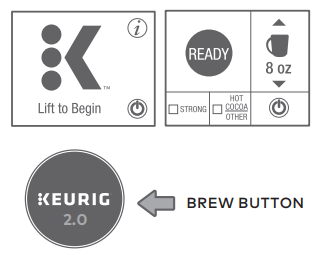
Brew Your First K-Cup® Pod
Place Mug
Place a mug on the drip tray plate of your Keurig Vue V1200 Commercial Coffee Brewer. If using a travel mug, remove the drip tray and place the mug on the base. If using a travel mug, remove the drip tray and place the mug on the drip tray base. Hot Water: To dispense hot water into a mug, lift and lower the handle without inserting a K-Cup® pod. Select your cup size, then press the blinking brew button to dispense hot water. NOTE: Between brew cycles, the brewer may take about a minute to reheat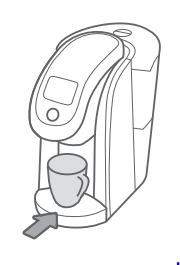
Lift & Insert
Lift the handle and place a K-Cup® pod in the K-Cup® pod holder. Lower the handle completely to close the lid. Do not remove the foil lid on the K-Cup® pod.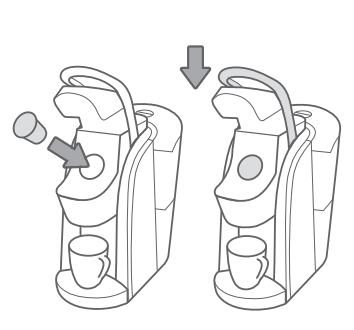
Size & Strength
Select your brew size using the arrows on the screen. Select STRONG if desired. (STRONG setting is for coffee.) Press HOT COCOA/OTHER for select non-coffee beverages. NOTE: Make sure to check the instructions on the pod packaging.
Brew & Enjoy
Press the blinking brew button. The button will remain illuminated while brewing, about 1 minute. The brewer will notify you when the brew cycle is complete. Lift the handle and dispose of the used K-Cup® pod. The brewer will be ready to brew another cup in about a minute.
NOTE: To stop the brewing process, press and hold the power button for one second.
Brew Your First K-Carafe® Pod
Place Carafe
Make sure the Keurig® Carafe is empty. Remove the drip tray and insert the Keurig® Carafe securely in its place.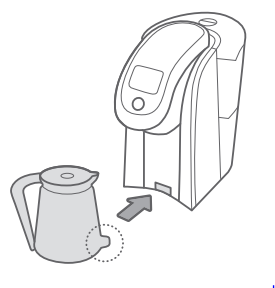
Lift & Insert
Lift the handle and place a K-Carafe® pod in the pod holder. Lower the handle completely to close the lid. Do not remove the foil lid or puncture the K-Carafe® pod.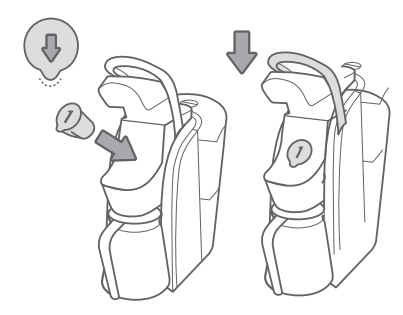
Select Brew Size
Select the KEURIG BREW setting that matches the number on the pod lid. Then select the number of desired cups.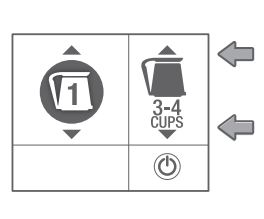
Brew & Enjoy
Press the blinking brew button. The button will remain illuminated while brewing. The brewer will notify you when the brew cycle is complete. Lift the handle and dispose of the used K-Carafe® pod.
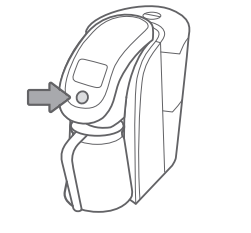
Settings Menu
For all settings, press the BACK button to return to the settings menu or press the HOME button to return to the home screen. Your settings on the Keurig Vue V1200 Commercial Coffee Brewer will be automatically saved.
Access Settings
Explore everything your Keurig® Plus Series brewer has to offer by accessing the Settings Menu. From the home screen, select the settings button. Use the arrows to scroll through the menu. To exit, press the BACK button or HOME button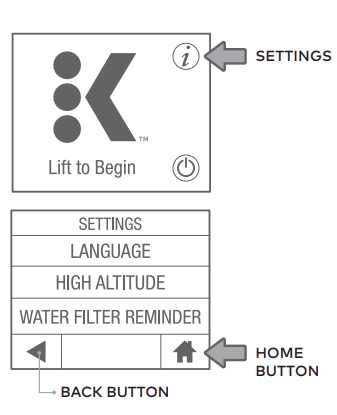
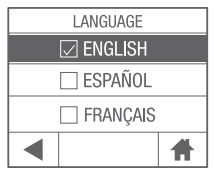
Choose Language
Press English, Spanish, or French to select the language.
High Altitude
To ensure your brewer works properly at higher altitudes (5,000 feet), ENABLE the high altitude mode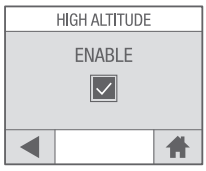
Water Filter Reminder
If you are using a Keurig® Water Filter, select ENABLE to activate the water filter reminder.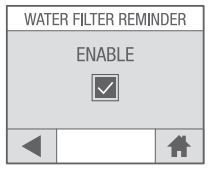
Caring For Your Brewer
Regular cleaning keeps your Keurig Vue V1200 Commercial Coffee Brewer running smoothly. Always be sure to turn off and unplug your brewer before cleaning.
Brewer Exterior
Keep your Keurig® brewer looking its best by cleaning the exterior from time to time. Just clean with a damp, soapy, lint-free, non-abrasive cloth. Never immerse the brewer in water or other liquids.
Drip Tray
The drip tray can hold up to 8 ounces of overflow and should be emptied and cleaned occasionally. To remove, slide it toward you, keeping it level to avoid spilling. Rinse and clean with a damp, soapy, lint-free, non-abrasive cloth.
Water Reservoir & Reservoir Lid
The water reservoir lid and water reservoir of the Keurig Vue V1200 Commercial Coffee Brewer should be periodically cleaned with a damp, soapy, non-abrasive cloth and rinsed thoroughly. The water reservoir lid and water reservoir should not be put into the dishwasher. Do not dry the inside of the water reservoir with a cloth, as lint may remain. If needed, repeat the above procedures.
Cleaning Entrance Needles
Lift the brewer handle and locate the top entrance needles on the underside of the lid. To clean both holes in the needles, hold the brewer handle in the upward position and with your other hand, carefully insert a straightened paper clip into the holes. Gently move it around to loosen any coffee grounds. Lower the handle completely and run two water-only brew cycles. Do not insert a K-Cup® pod.
Pod Holder
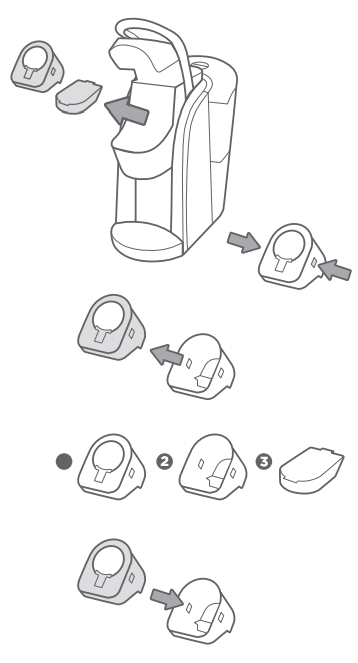
Lift the handle. Push up while grabbing the sides of the pod holder assembly. Pull away from the brewer. Pull out the pod holder assembly and base. Press the release buttons on both sides of the pod holder assembly. Separate the pod holder from the housing. Clean the pod holder (1), housing (2), and base (3) with a damp, soapy, lint-free, nonabrasive cloth and rinse thoroughly. After all pieces are cleaned, reassemble the pod holder assembly by inserting the pod holder back into the housing. Place the base, then the pod holder assembly, into the brew head. Lower the handle.
Cleaning the Exit Needle
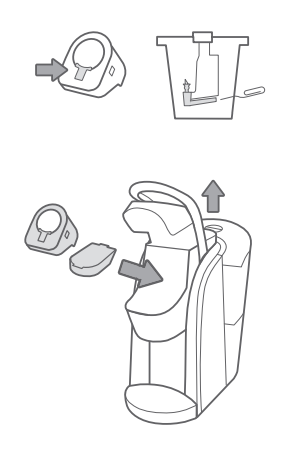
If a clog arises in the exit needle on your Keurig K200 Series Coffee Brewer, push the lever of the pod holder to reveal the exit needle. Use a paper clip or similar tool to loosen the clog. Rinse thoroughly with hot water. After all the pieces are cleaned, place the base, then the pod holder assembly into the brew head. Lower the handle.
Troubleshooting
- Plug the brewer into its own grounded outlet.
- If the brewer still doesn’t have power, contact Customer Service.
- If the touch screen indicates “More Water Please” even after refilling, remove the water reservoir and empty the water. Then thoroughly clean the reservoir. Refer to Caring For Your Brewer for instructions.
Grounds in Your Coffee
Grounds may have gathered in the exit or entrance needles and can be cleaned using a straightened paper clip or similar tool.
- Clean the exit needle of the K-Cup® pod holder. Refer to the Exit Needle care instructions.
- Clean the brewer entrance needles. Refer to the Entrance Needle care instructions.
Brewing a Partial Cup
- The exit needle may be clogged. Refer to the Exit Needle care instructions.
- The water reservoir may have been removed during brewing. Replace the water reservoir and perform a rinsing brew without a K-Cup® pod.
- The brewer may need to be descaled. If you have repeated the descale procedure on your brewer two times and it is still only brewing a partial cup, contact Customer Service.
Touch Screen Alerts
- “More Water Please” – If the water level is not low, remove the water reservoir and empty the water. Clean the reservoir. Return the reservoir to the brewer and ensure it is seated properly in its base.
- “Sorry, Brew Interrupted” – Slowly lift the handle, remove the pod, lower the handle and perform a rinsing brew.
- “Sorry, there’s a Problem” – Coffee grounds may be stuck in the entrance needle. Refer to Caring For Your Brewer for cleaning instructions.
- “Time To Replace the Keurig® Water Filter” – Your brewer will indicate that it is time to replace the water filter after every 1,000 ounces or two months. Once you’ve replaced the Keurig® Water Filter, press YES to reset the water filter reminder.
Recycling K-Mug® and K-Carafe® Pods
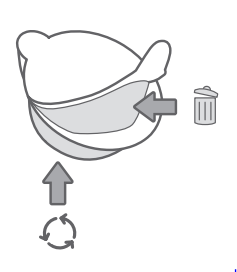
The plastic cups of K-Mug® and K-Carafe® pods can be recycled wherever #5 plastic is accepted. #5 plastic
may not be recyclable in your Keurig K200 Series Coffee Brewer community today, so please check locally with your municipality or waste haulier, or visit KeurigRecycling.com for more information. #5 Plastic is recyclable everywhere in Canada.
- Once brewing is complete and the pod is cool, separate the lid and filter from the cup. The filter will adhere to the lid.
- Once separated, discard the lid and the attached filter. Recycle the plastic cup wherever #5 plastic is accepted.
Descaling Your Brewer
You should descale your brewer every 3-6 months. Properly follow the descaling procedure. Depending on the mineral content of your water, calcium deposits or scale may build up in your brewer. Scale is non-toxic, but if left unattended can hinder brewer performance. Regularly descaling your brewer every 3-6 months helps maintain the heating element and other internal parts that come in contact with water. Calcium deposits may build up faster, making it necessary to descale more often. You should promptly descale when the touch screen indicates “Time to descale the brewer!”
Descaling Procedure
Before you begin, you will need a large ceramic mug, fresh water, Keurig® Descaling Solution, and access to a sink. Do not use a paper cup. Ensure that there is no beverage pod in the K-Cup® pod holder. Please allow approximately 45 minutes for the descaling procedure. Empty the water from the water reservoir. If there is a Keurig® Water Filter, remove and set it aside.
Descaling Solution Rinse
Press and hold the power button to power the brewer off. Pour the entire bottle of Keurig® Descaling Solution into an emptied water reservoir. Then fill the empty bottle with water and pour it into the water reservoir. Press and hold the power button to turn the brewer back on. Place a large mug on the drip tray and run a cleansing brew by lifting and lowering the handle, selecting the largest brew size and pressing the brew button.
Descaling Rinse & Repeat
Repeat the rinsing brew process until the touch screen indicates “More Water Please”. Do not use a K-Cup® pod. Let the brewer stand for at least 30 minutes while still on. After 30 minutes, discard any residual solution from the water reservoir and rinse thoroughly.
Fresh Water Rinse
Fill the water reservoir with Keurig K200 Series Coffee Brewer fresh water to and not beyond the MAX line. Place a large mug on the drip tray plate and run a rinsing brew using the largest brew size. Do not use a K-Cup® pod. Pour the contents of the mug into the sink. Repeat the brewing process until you have completed at least 12 rinsing brews. You may need to refill the water reservoir at least one time during this process.
If this occurs, you may see only a small or no output dispensed, followed by the sound of air blowing out. If this occurs:
- Turn off and unplug the brewer.
- If there is Keurig® descaling solution in the water reservoir, discard the contents, rinse the water reservoir thoroughly and refill with water.
- Plug the brewer back in, power on, and repeat the Step 3 Fresh Water Rinse cycle.
- If the problem persists, allow the brewer to sit unplugged for at least 30 minutes before continuing with the rinse.
Limited Warranty One-Year
Keurig warrants that your Keurig Vue V1200 Commercial Coffee Brewer will be free of defects in materials or workmanship under normal use for one year from the date of purchase. Keurig will, at its option, repair or replace the Brewer without charge upon its receipt of proof of the date of purchase. If a replacement Brewer is necessary to service this warranty, the replacement Brewer may be new or reconditioned.
This warranty only applies to Brewers operated in the United States and Canada. This warranty gives you specific legal rights, and you may also have other rights that vary from state to state and, in the case of Canada, from province to province. Only the use of Keurig Brewed® VueTM brand packs and accessories will guarantee the proper functioning and lifetime of your Keurig® Brewer.
US
Changes or modifications not expressly approved by Keurig, Incorporated could void the user’s authority to operate the equipment. This equipment generates, uses, and can radiate radio frequency energy and, if not installed and used in accordance with the instructions, may cause harmful interference to radio communications.
However, there is no guarantee that interference will not occur in a particular installation.
- Reorient or relocate the receiving antenna.
- Increase the separation between the equipment and receiver.
- Consult the dealer or an experienced radio/TV technician for help.”
Canada
Under Industry Canada regulations, this radio transmitter may only operate using an antenna of a type and maximum (or lesser) gain approved for the transmitter by Industry Canada. This device complies with Industry Canada licence-exempt RSS standard(s). Operation is subject to the following two conditions: (1) this device may not cause interference, and (2) this device must accept any interference, including interference that may cause undesired operation of the device.
Other Limitations: Some states or provinces do not allow disclaimers of such implied warranties or limitations on how long an implied warranty lasts, so the above limitation may not apply to you depending on the state or province of purchase.
Customer Service
- Ph: 1-866-901-2739
- Website: https://support.keurig.com/
FAQs
Q: What type of brewer is the Keurig Vue V1200?
A single-serve coffee maker of professional quality, the Keurig Vue V1200 is intended for use in small businesses, hotels, and offices. It has programmable settings for beverage size, strength, and temperature and uses Vue® packs rather than conventional K-Cups®.
Q: What beverages can I brew with the Vue V1200?
Coffee, tea, hot chocolate, chilled drinks and speciality drinks such as café lattes may all be brewed using compatible Vue® packs. For a comparison of other single-serve models, see our Keurig K-1550 Single Serve Coffee Maker Use & Care Guide.
Q: Is the Vue V1200 compatible with K-Cup® pods?
No. Vue® packs, which are bigger and made especially for the Vue brewing system, are only used with the V1200. Poor brewing performance or malfunctions could result from using K-Cup® pods.
Q: What cup sizes can I select on the Vue V1200?
You can select from a variety of cup sizes with the brewer, usually 4 oz, 6 oz, 8 oz, 10 oz, and 12 oz. To personalise your coffee, you can also change the temperature and strength.
Q: Does the brewer have a water reservoir?
Indeed. With its detachable 90-ounce water tank, the Vue V1200 lets you brew several drinks before replenishing. For optimal taste and machine performance, always use fresh, filtered water.
Q: Can I adjust the temperature of my beverage?
Indeed. For the best flavour control, you can change the brewing temperature with the V1200 between 187°F and 197°F.
Q: How long does it take to brew a cup of coffee?
Once the brewer is preheated, the brewing procedure usually takes less than a minute. As the machine boils the water, the first cup after turning on could take a little longer.
Q: How often should I descale the Keurig Vue V1200 Commercial Coffee Brewer?
Descale every 3–6 months, depending on water hardness.