
Close Menu
onyxguides.comonyxguides.com

    Subscribe to Updates

    Get the latest creative news from FooBar about art, design and business.

    What's Hot

    Majority BARTON LED Display Digital Radio User Guide

    March 6, 2026

    AWOL VISION ThunderBeat Home Theater Sound System User Guide

    March 6, 2026

    Valerion Vision Master Max Triple Laser Projector User Manual

    March 5, 2026
    Facebook X (Twitter) Instagram
    onyxguides.comonyxguides.com
    Facebook X (Twitter) Instagram Pinterest
    • Home
    • About us
    • Terms & Conditions
    • Privacy Policy
    • FAQs
    • Contact us
    onyxguides.comonyxguides.com
    Home » Klipsch PIC-450-T In-Ceiling Loud Speakers User Manual

    Klipsch

    Klipsch PIC-450-T In-Ceiling Loud Speakers User Manual

    By Gabriel SmithDecember 2, 2025Updated:March 5, 20261 Comment3 Mins Read
    Facebook Twitter Pinterest LinkedIn Tumblr WhatsApp Telegram Email
    Klipsch PIC-450-T In-Ceiling Loud Speakers
    Share
    Facebook Twitter LinkedIn Pinterest Email

    Klipsch-Logo

    Klipsch PIC-450-T In-Ceiling Loud Speakers

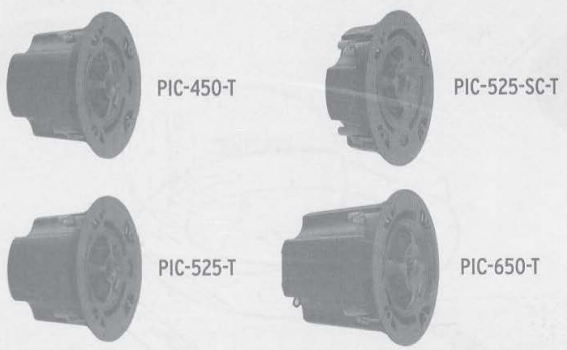
    Front view of a circular audio device designed for ceiling mounting

    Package Content

    Rear panel showing wiring terminals and mounting hardware

    • X2 Speaker Modules
    • X2 Black Round Grilles
    • x2 White Round Grilles
    • x2 Tilebridge Reinforcement Rings
    • x4 Rails
    • x2 Cardboard Cutout Template
    • x8 Screws (Attach Rails to Reinforcement Ring)
    • x2 3/4″ Conduit fittings

    All included components arranged on a flat surface for reference

    • xl Speaker Module X2 Rails
    • xl Black Round Grille xl Cardboard Cutout Template
    • xl White Round Grille x 4 Screws (Attach Rails to Reinforcement Ring)
    • xl Tilebridge Reinforcement Ring xl 3/4″ Conduit fitting

    Installation

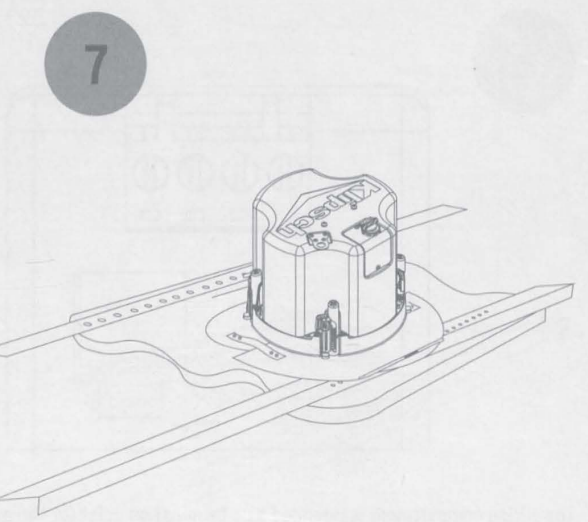
    1. The bridge is composed of three parts: a reinforcement ring and two rails.
      Round metal grille in a matte black finish
    2. To install your sp, easpearspeaker, cut a hole in the ceiling using either the cardboard cutout template provided with your speakers or consult the measurements shown. The wiring through the ugh hole.Round white grille designed for blending with ceiling décor

    Metal mounting ring used for ceiling installation support

    1. To install the tilebridge, fold the rail side of the ring back upon itself using the spring tensioner on the reinforcement ring to allow insertion into the cutout hole. Long metal rails for supporting in-ceiling mounting
    2. The wiring compartment is intended as a termination point for the audio circuit. Circular template used for marking the ceiling cutout area
    3. If your conduit/wire feeds easily into the bottom of the cover.

    Small mounting screws arranged alongside installation accessories

    1. Insert the speaker into the cutout hole.Plastic conduit fittings used for cable entry management
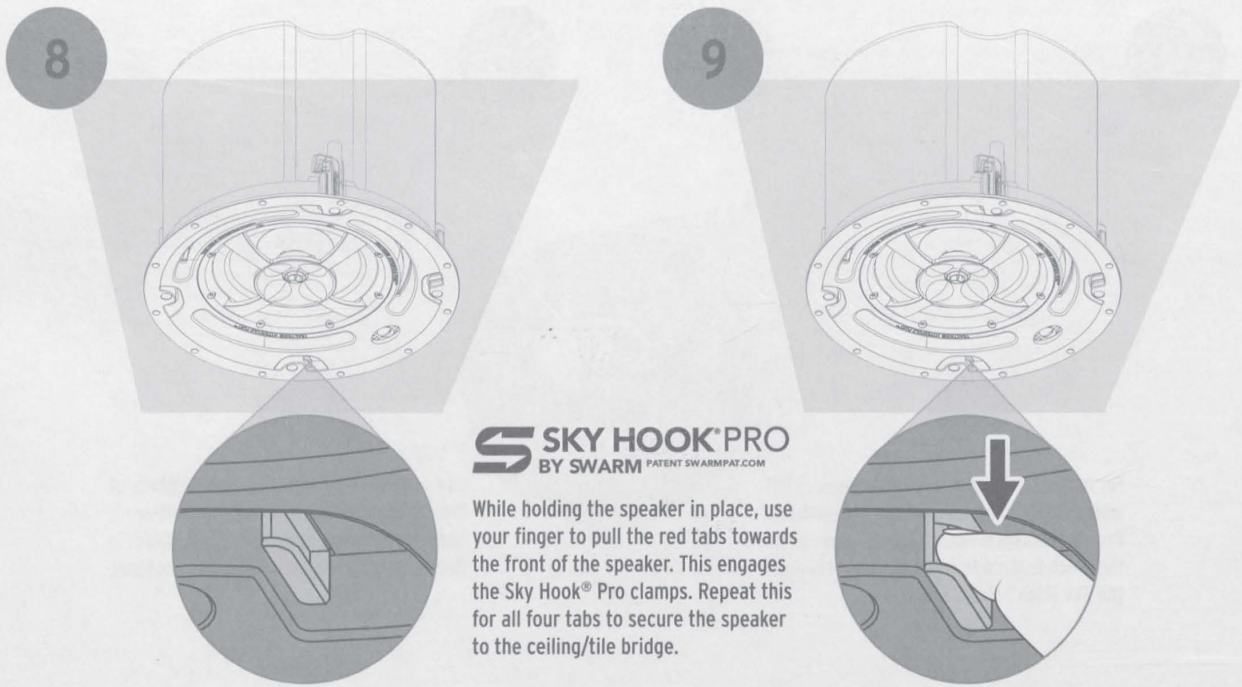
    2. While holding the speaker in place, use your finger to pull the red tabs towards the front of the speaker. Diagram showing how the reinforcement ring and rails connect
    3. For uneven ceilings or installations where the holding force of the SkyHook Pro mechanism is not sufficient, use the cinch feature to manually tighten the SkyHook Pro clamps.Illustration showing how to cut the correct opening in a ceiling surface
    4. Repeat this step for each clamp.Example of electrical wiring routed through a ceiling opening
    5. Uninstall all the speakers, usea  Phillipsps screwdriver inserted into the center of the Sky Hook® Pro clamp, and turn counter-clockwise to loosen the clamp.Step-by-step visual showing placement of the support ring into the ceiling
    6. Continue to turn the screwdriver counter-clockwise while also pushing up to reset the Sky Hook® Pro clamp. Repeat this for each clamp.Demonstration of inserting the audio device into the prepared cutout
    7. For installations using 7OV/1OOV input connection, set the switch on the front panel to the desired setting. Close-up of red mounting tabs pulled forward for securing the unit
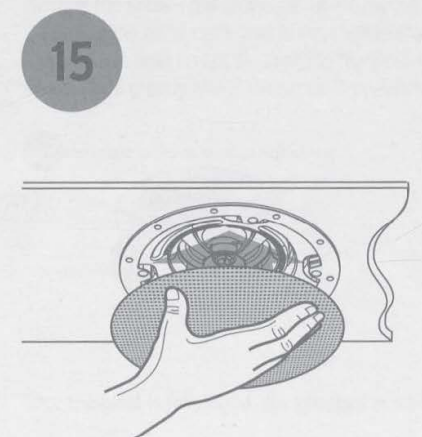
    8. Using the flat of your hand, attach the magnetic grille beneath the speaker frame, making sure it is centered and flush. Using a screwdriver to tighten the built-in mounting clamp mechanism
    9. Included with the grille is a tether that can be threaded through the grille and attached to the speaker.
    Resetting the mounting clamp by turning it counterclockwiseSeimic Tab

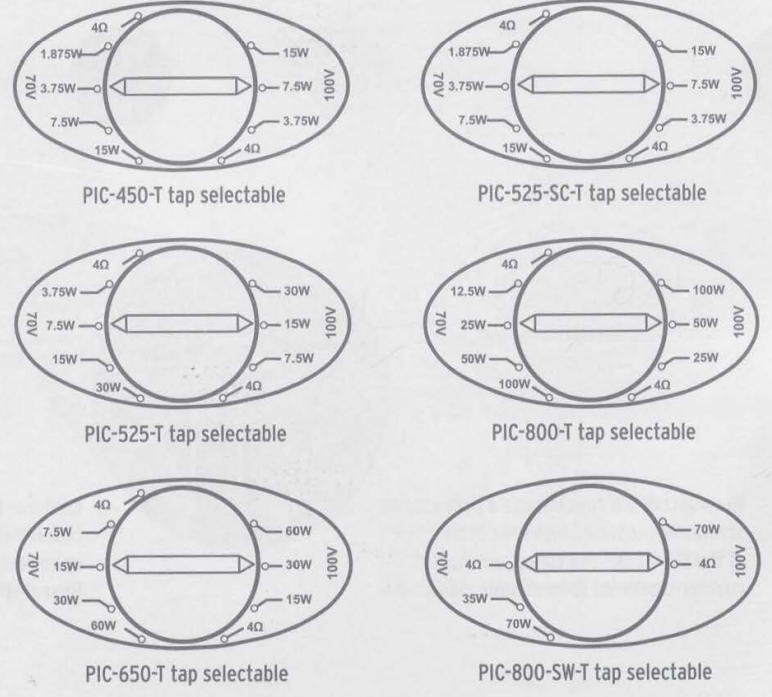
    Front panel showing adjustable wattage tap selector

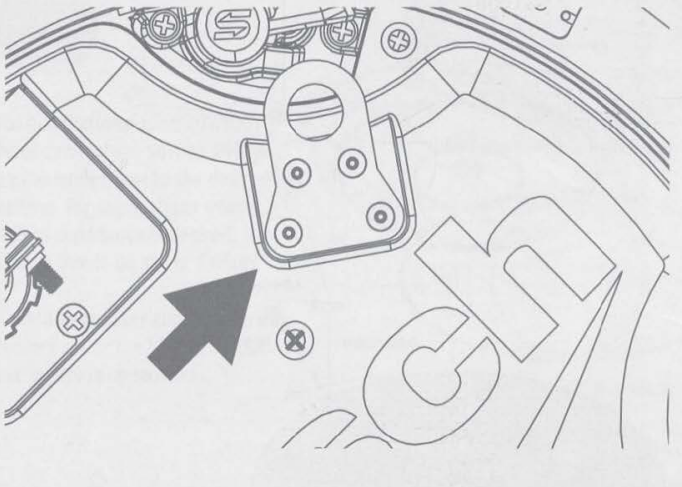
    Some construction codes may require its use. To utilize the seismic tab, run a support wire from a secure point in the ceiling and attach it to the tab. Be sure to consult the construction codes in your area. Klipsch recommends the use of this tab in all installations as a secondary means of support.

    Grille Painting
    Magnetic grille snapping into place beneath the frame

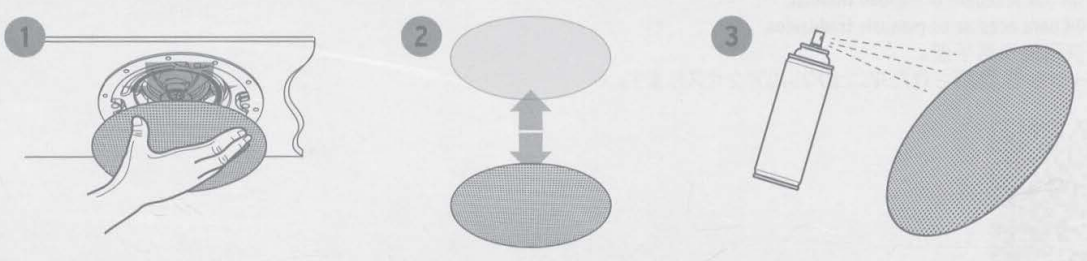
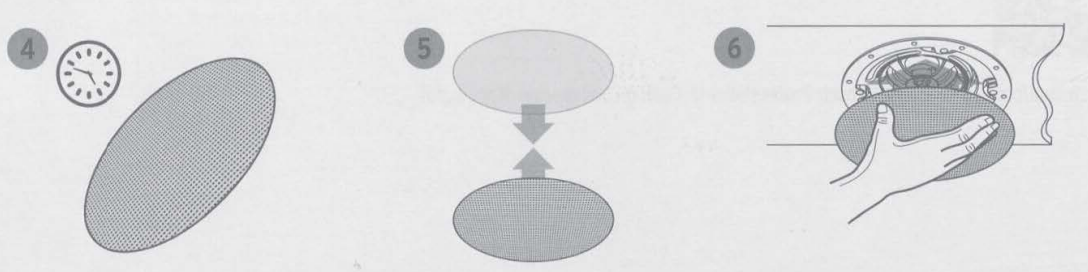
    1. Painting the Grille – the grilles for all PIC models can be painted to match any decor.
    2. When painting the grille, it is highly recommended that you use a spray paint with multiple light layers.
      Painting the grille using light coats of spray paint
    3. Once the paint is fully dried, you can then place the grille cloth back onto the back of the grille and place the grille onto the speaker.
    Translations

    • Scan the OR code to access translated manuals.QR code that links to multilingual setup instructions

    Customer Service

    • Website: Klipsch.com
    • Ph:  1-800-554-7724
    Audio Installation Guide Ceiling Speaker Installation onyxguides Transformer Tap Settings User Manual
    Share. Facebook Twitter Pinterest LinkedIn Tumblr Email
    Gabriel Smith

      Related Posts

      Sony ILCE-6700 Interchangeable Lens Digital Camera User Guide

      December 7, 2025

      Bose MA12 Panaray Modular Line Array Loudspeaker User Manual

      December 4, 2025

      Bowers & Wilkins Px8 Wireless Headphones User Manual

      December 4, 2025

      Sonos Arc Black Voice Control Ultra Soundbar User Manual

      December 4, 2025

      JANAM GT1 Self Mobile Entry Head Unit Instruction Manual

      December 4, 2025

      Ronix 1250 Carpet Vacuum Cleaner Instruction Manual

      December 4, 2025
      View 1 Comment

      1 Comment

      1. binance signup on February 19, 2026 12:00 am

        Your point of view caught my eye and was very interesting. Thanks. I have a question for you. https://accounts.binance.info/cs/register-person?ref=OMM3XK51

        Reply
      Leave A Reply Cancel Reply

      Don't Miss
      Majority

      Majority BARTON LED Display Digital Radio User Guide

      March 6, 2026

      Majority BARTON LED Display Digital RadioWhat’s In The Box Majority Barton Radio Power Supply…

      AWOL VISION ThunderBeat Home Theater Sound System User Guide

      March 6, 2026

      Valerion Vision Master Max Triple Laser Projector User Manual

      March 5, 2026

      InFocus LitePro 610 Conference Room Projector User Manual

      March 5, 2026
      Stay In Touch
      • Facebook
      • Twitter
      • Pinterest
      • Instagram
      • YouTube
      • Vimeo

      Subscribe to Updates

      Subscribe to Updates

      Follow us

      Facebook X-twitter Instagram Pinterest

      © 2025 All rights reserved Onyx Guide.