


Labnet C2400 Spectrafuge 24D Microcentrifuge User Manual
Introduction
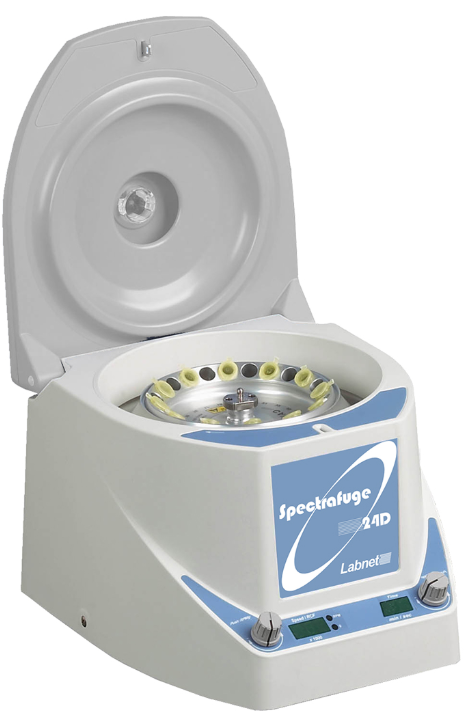
The Labnet Spectrafuge™ 24D Microcentrifuge is a small benchtop centrifuge designed for separation of various research samples. The motor is brushless and requires no routine maintenance. The Spectrafuge 24D is supplied with an 24 x 1.5/2.0 mL rotor for microsamples. Adapters are available for tubes smaller than 1.5 mL. The Spectrafuge 24D reaches speeds of up to 13,300 rpm/16,300 x g.
Symbols and Conventions
The electrical warning indicates the presence of a potential hazard which could result in electrical shock.
CAUTION: This symbol refers you to important operating and maintenance (servicing) instructions within this Instruction Manual. Failure to heed this information may present a risk of damage or injury to persons or equipment.
This symbol identifies a Protective Earth (PE) terminal, which is provided for connection of the supply system’s protective earth (green or green/yellow) conductor.
Safety Information
NOTE: All users of the centrifuge must read the Safety Information section of this manual before attempting to operate the unit. If this equipment is used in a manner not specified by the manufacturer, the protection provided by the equipment may be impaired.
- Never use the centrifuge in any manner not specified in these instructions.
- Never operate the centrifuge without a rotor properly attached to the shaft.
- Never tighten rotor nut by hand only, use a wrench.
- Never fill tubes while they are in the rotor. Liquid spillage may harm unit.
- Never put hands in the rotor area unless the rotor is completely stopped.
- Never move the centrifuge while the rotor is spinning.
- Never use solvents or flammables near this or other electrical equipment.
- Never centrifuge flammable, explosive, or corrosive materials.
- Never centrifuge hazardous materials outside of a hood or proper containment facility.
- Always load the rotor symmetrically. Each tube should be counterbalanced by another tube of the same type and weight.
- Always locate the centrifuge within easy access to an electrical outlet.
- Always use only microcentrifuge tubes made from plastic and designed to withstand centrifugal forces of at least 16,500 x g.
Do not operate the centrifuge if any of the following conditions exist:
- The centrifuge has not been installed properly.
- The centrifuge is partially dismantled.
- Service has been attempted by an unauthorized or unqualified personnel.
- The rotor has not been installed securely on the motor shaft.
- Rotors and accessories not belonging to the standard range are being used without permission being obtained from the manufacturer to use such rotors and/or accessories in the centrifuge. Exception: Microcentrifuge tubes made of plastic, normally available in the laboratory.
- The centrifuge is located in an explosive atmosphere.
- Materials to be centrifuged are combustible and/or explosive.
- Materials to be centrifuged are chemically reactive.
- The rotor load is not properly balanced.
- The rotor nut was not tightened with a wrench.
Technical Specifications
Dimensions (W x D x H) 9.3 x 11.5 x 8.5 in. (23.5 x 29.2 x 21.6 cm)
| Maximum Speed | 13,300 rpm |
| Maximum RCF | 16,300 x g |
| Maximum Volume | 24 x 1.5/2.0 mL |
| Admissible Density | 1.2 kg/dm3 |
| Electrical/Fuse Rating C2400 C2400-100V C2400-230V | 120V~, 50/60 Hz, 200W, 2.6A 100V~, 50/60 Hz, 190W, 2.7A 230V~, 50/60 Hz, 170W, 1.2A |
| Temperature Range | 5°C to 40°C (up to 80% RH at 31°C, decreasing linearly to 50% RH at 40°C) |
| Protection Class | IP21 |
The Labnet Spectrafuge™ 24D Microcentrifuge is designed to be safe at least when operated under the following conditions:
- Indoor use only
- Altitude up to 2,000 meters
- Pollution degree 2
Changes or modifications not expressly approved by the party responsible for compliance could void the user’s authority to operate the equipment.
NOTE: This equipment has been tested and found to comply with the limits for a Class A digital device, pursuant to Part 15 of the FCC Rules. These limits are designed to provide reasonable protection against harmful interference when the equipment is operated in a commercial environment. The equipment generates, uses, and can radiate radio frequency energy and, if not installed and used in accordance with the user manual, may cause harmful interference to radio communications. Operation of equipment in a residential area is likely to cause harmful interference in which case the user will be required to correct the interference.
CAUTION: This equipment is not intended for use in residential environments and may not provide adequate protection to radio reception in such environments. This ISM device complies with Canadian ICES-001. Cet appareil ISM est conforme à la norme NMB-001 du Canada.
Package Contents
- Spectrafuge 24D microcentrifuge
- Angle rotor for 24 x 1.5/2.0 mL tubes
- Rotor removal tool
- Power cord
- Instruction manual
Installation
Unpacking the Centrifuge
Before unpacking the centrifuge, inspect the outside of the carton for any shipping damage. The centrifuge is delivered in a carton with protective cushions. Remove the centrifuge from the carton. Retain the carton and cushions until it has been established that the centrifuge is working properly. Inspect the centrifuge for any visible signs of shipping damage. Shipping damage is the responsibility of the transportation carrier. Any claims for damage must be filed within 48 hours. The accessories supplied with the centrifuge should be kept with the instruction manual near the centrifuge’s place of installation.
Required Space
The centrifuge should be installed on a rigid, even surface such as a stable laboratory bench, cabinet, etc. To guarantee sufficient ventilation, ensure that the centrifuge has at least 15 cm (6 inches) of free space on all sides, including the rear. The centrifuge should not be located in areas subject to excessive heat such as in direct sunlight or near radiators or the exhaust of a compressor, as a buildup of heat may occur within the chamber.
Installation
Before operating the centrifuge, check that the power source corresponds to that on the manufacturer’s rating label, then connect the power cord to the centrifuge and the power source.
Rotors and Rotor Maintenance
Rotors and Accessories
The following accessories are available for the Labnet Spectrafuge™ 24D Microcentrifuge
| Cat. No. | Tube Measurement (mm) | Max. Speed (rpm) | Centrifuging Radius (cm) | RCF (g-Value) (x g) | |
| Angle rotor for 18 x 1.5 mL tubes | Included with unit | 10 x 40 | 13,300 | 8.23 | 16,276 |
| Adapter for 0.5 mL tubes (6/pack) | C-1205 | 8 x 30 | 13,300 | 7.53 | 14,892 |
| Adapter for 0.4 mL tubes (6/pack) | C-1206 | 6 x 47 | 13,300 | 8.23 | 16,276 |
| Adapter for 0.2 mL tubes (6/pack) | C-1222 | 6 x 21 | 13,300 | 7.03 | 13,903 |
| Strip spin adapter | C0240-SS | 0.2 mL tubes or 8 x 0.2 mL strips | 13,300 | 4.32 to 5.33 | 8,549 to 10,539 |
| Rotor wrench (included) | C0240-RT | – | – | – | – |
| Rotor lid (included) | C0240-RC | – | – | – | – |
| Rotor securing screw (included) | C0240-RSS | – | – | – | – |
Rotor Maintenance
The rotor should be cleaned thoroughly after each use. NOTE: Thorough cleaning must be performed when spinning samples containing phenol or phenol chloroform. Periodically inspect the rotor for dents, dings, scratches, discoloration and cracks. If any damage to the rotor is found, discontinue use of the rotor immediately and replace.
Removing and Installing the Angle Rotor
The Spectrafuge 24D Microcentrifuge comes complete with a standard 24-place rotor installed. To remove the rotor for cleaning, remove the rotor securing screw from the motor shaft by turning the screw counterclockwise, using the rotor wrench. Lift the rotor directly upward \ in a straight vertical motion.
To replace the rotor, first make sure the motor shaft and rotor mounting hole are clean. Place the rotor on the motor shaft. Reinstall the rotor securing screw on the motor shaft by turning it clockwise. Hold the rotor with one hand and tighten the rotor securing screw, using the rotor wrench.
Loading the Rotor
Tubes to be loaded should be filled equally by eye. The difference in the weight between the tubes should not exceed 0.1 gram. Tubes should always be loaded so that there is equal spacing between all tubes. One or two additional loaded tubes may need to be added to achieve this. One typical balancing scheme is shown in Figure 1.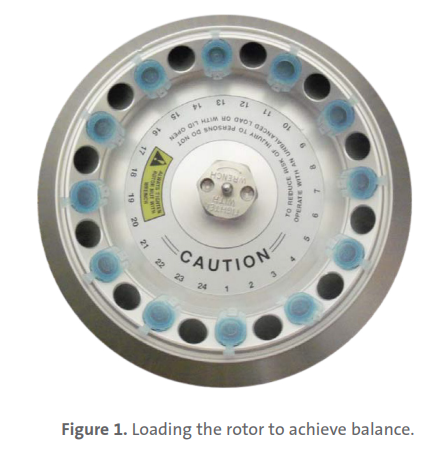
Overloading Rotors
The maximum load of the rotor and the maximum speed have been established by the manufacturer. Do not attempt to exceed these values. The maximum speed of the rotor has been measured for liquids having a homogeneous density of 1.2 g/mL or less. In order to centrifuge liquids with a higher density it is necessary to reduce the speed. NOTE: Failure to reduce the speed may result in damage tothe rotor and centrifuge. The revised maximum speed can be calculated with the following formula:

Example:
Where the density of the liquid is 1.7, the new maximum speed would be calculated as follows:
If in doubt concerning maximum speeds, please contact the manufacturer for assistance.
Operating Instructions
CAUTION: Never attempt to operate the centrifuge with rotors or adapters that show signs of corrosion or mechanical damage. Never centrifuge strongly corrosive materials that may damage the rotors, accessories, or bowl of the unit.
Attaching Rotor Lid
After the rotor has been properly secured and loaded, attach the rotor lid to the rotor. Always use the rotor lid for safety and to allow the rotor to reach proper speed. Make sure the rotor lid snaps securely into place, by pressing down on center catch.
Closing the Lid
Close the centrifuge lid. This microcentrifuge has a lid lock that activates only when a run is started.
Lid Release
The lid will remain locked during a centrifuge run. Once the run has been completed and the rotor has come to a stop, a beep will indicate the end of a run, and the lid will unlock automatically.
CAUTION: Do not attempt to open the lid of any centrifuge until the rotor has come to a complete stop. In the event of a power failure or malfunction, it may be necessary to open the lid manually.
- Disconnect the power cord from the wall socket.
- Remove the plastic plug, located on the left side of the unit.
- Pull the wire (attached to the plug) to open the lid lock manually.
Lid Lock
The centrifuge can be started only when the lid is securely closed. When a run is started, the lid lock automatically activates.
CAUTION: Do not attempt to open the lid during a centrifuge run. At the end of the run, the lid will automatically unlock. Never attempt to override the lid lock mechanism. Doing so is dangerous and could damage the centrifuge.
Speed Selection
The speed (rpm or g-force) can be selected from 500 to 13,300 rpm in 100 rpm increments or from 100 to 16,300 x g with the knob on the right. Rpm or g-force display is set by pressing the knob. Turn the knob to increase or decrease the value.
Selection of Operating Time, Momentary Operation, Start/Stop
Operating time can be selected from 0.5 min. to 30 min. by turning the timer knob on the left. The time can be set in 0.5-minute increments from 0 to 10 minutes and in 1-minute increments from 10 to 30 minutes. After 30 minutes, the display shows “–” which indicates continuous run. In this mode, the centrifuge will run until manually stopped. To start a run, press the timer knob.
When the preselected time expires, the centrifuge will stop automatically. To stop the centrifuge prior to the expiration of set time, press the timer knob. The centrifuge may be operated for a short run by pressing and holding the timer knob. The centrifuge will continue to run as long as the timer knob is depressed, the time (in seconds) will count up on the time display.

Service and Maintenance
Centrifuge Service
The brushless motor in this microcentrifuge requires no routine maintenance. Any required service should be performed by authorized, qualified personnel only. Repairs performed by unauthorized personnel may void the warranty.
Cleaning
Always keep the centrifuge housing, rotor chamber, rotor and rotor accessories clean. All parts should be wiped down periodically with a soft cloth. For more thorough cleaning, use a neutral cleaning agent (pH between 6 and 8) applied with a soft cloth. Excessive amounts of liquid should be avoided. Liquid should not come into contact with the motor. After cleaning, ensure that all parts are dried thoroughly by hand or in a warm air cabinet (maximum temperature 50°C).
The rotor should be cleaned after each use. When spinning samples containing phenol or phenol chloroform, the rotor should be cleaned immediately after use. Should a spill of infectious materials occur within the rotor or chamber, the unit should be disinfected. This should be performed by qualified personnel with proper protective equipment.
Replacing Fuses
Check the fuse when it is recommended (see Troubleshooting Guide section). Disconnect the power cord from the wall socket before checking the fuses. The fuse holder is located in the power inlet on the rear of the unit. Open the fuse holder drawer by inserting a small screwdriver under the tab and prying it open. Remove the innermost (operative) fuse from its retaining tabs, and replace the fuse if necessary. A spare fuse is located in the outermost chamber of the fuse drawer. Replace only with a fuse of exactly the same value as the original. See Specifications section for information on fuse type.
Troubleshooting Guide
Problem Possible Cause Solution
| Centrifuge will not start | No power supply | Check if power is being supplied to the outlet. Check if the power cord is plugged into both the wall outlet and the back of the centrifuge. Check if the power cord is damaged. |
| Blown fuse | Check the fuse and replace if necessary. | |
| Lid lock will not release | Defective lid lock | Open manually, and have the unit serviced. |
| No power from the PC board | Call for service. | |
| The lid lock is jammed | Call for service. | |
| The centrifuge is not receiving power | See “Centrifuge will not start”. | |
| The centrifuge cannot be started, although the power is On | The lid is not closed correctly | Close the lid correctly. |
| No speed or time has been selected | Set the speed and/or time. | |
| bAL (Error Message) | Tubes are not inserted symmetrically in the rotor holes | Load the tubes symmetrically (see Section 7.4: Loading the Rotor). |
| The sample liquid in the tubes is not balanced | Make sure the same volume of liquid is in each tube. | |
| Defective or improperly adjusted balance sensor | Call for service. | |
| Lid (Error Message) | Lid is not closed completely | Close the lid. |
| Lid lock or sensor is defective | Call for service. | |
| Other Error Messages Er on Display | – | Press the time or speed knob to clear the error. Call for service. |
Should you have a question about the operation of the Labnet Spectrafuge™ 24D Microcentrifuge or if service is required, contact Corning Customer Service. Labnet C2400 Spectrafuge 24D Microcentrifuge. Do not send in a unit for service without first calling to obtain a repair authorization number. Should the unit require service return, it should be properly packed to avoid damage. Any damage resulting from improper packaging shall be the responsibility of the user
Determination of G-values
The centrifuging radius of the 1.5/2.0 mL rotor is 8.23 cm. The Labnet Spectrafuge™ 24D Microcentrifuge has an automatic g-force conversion program, so g-values are automatically calculated and can be displayed on the control panel, for this centrifuging radius. If adapters or smaller tubes are used, the centrifuging radius changes as does the g-force. The chart below can be used to manually determine g-values for any centrifuging radius.

To calculate the RCF value at any point along the tube or bottle, Labnet C2400 Spectrafuge 24D Microcentrifuge measure the radius (in mm), from the center of the centrifuge spindle to the particular point. Draw a line from the radius value on the right-hand column to the appropriate centrifuge speed on the lefthand column. The RCF value is the point where the line crosses the center column. The nomogram is based on the formula: RCF = (11/17 x 10-7) RN2 where: R = Radius in mm from centrifuge spindle to point in tube bottom N = Speed of spindle in RPM
Limited Warranty
Corning Incorporated (Corning) warrants that this product will be free from defects in material and workmanship for a period of one (1) year from date of purchase. Corning’s sole obligation shall be to repair or replace, at its option, any product or part thereof that proves defective in material or workmanship within the warranty period, provided the purchaser notifies Corning of any such defect. Corning is not liable for any incidental or consequential damages, commercial loss or any other damages from the use of this product. This warranty is valid only if the product is used for its intended Labnet C2400 Spectrafuge 24D Microcentrifuge purpose and within the guidelines specified in the supplied instruction manual. This warranty does not cover damage caused by accident, neglect, misuse, Labnet C2400 Spectrafuge 24D Microcentrifuge improper service, natural forces or other causes not arising from defects in original material or workmanship. This warranty does not cover motor brushes, fuses, light bulbs, batteries or damage to paint or finish. Labnet C2400 Spectrafuge 24D Microcentrifuge Claims for transit damage should be filed with the transportation carrier. In the event this product fails within the specified period of time because of a defect in material or workmanship, contact Corning
Customer Service at: USA/Canada 1.800.492.1110, outside the U.S. +1.978.442.2200, visit www.corning.com/lifesciences, or contact your local support office. Corning’s Customer Service team will help arrange local service where available or coordinate a return authorization number and shipping instructions. Products received without proper authorization will be returned. All items returned for service should be sent postage prepaid in the original packaging or other suitable carton, padded to avoid damage.
Corning will not be responsible for damage incurred by improper packaging. Corning may elect for on-site service for larger equipment. Some states do not allow limitations on the length of implied warranties or the exclusion or limitation of incidental or consequential damages. This warranty gives you specific legal rights. You may have other rights which vary from state to state. No individual may accept for, or on behalf of Corning, any other obligation of liability, or extend the period of this warranty. For your reference, make a note of the serial and model number, date of purchase, and supplier here.
Equipment Disposal
According to Directive 2012/19/EU of the European Parliament Labnet C2400 Spectrafuge 24D Microcentrifuge and of the Council of 4 July 2012 on waste electrical and electronic equipment (WEEE), this product is marked with the crossed-out wheeled bin and must not be disposed of with domestic waste. Consequently, Labnet C2400 Spectrafuge 24D Microcentrifuge the buyer shall follow the instructions for reuse and recycling of waste electronic and electrical equipment (WEEE) provided with the products and available at www.corning.com/weee.
To request certificates, please contact us at www.labnetlink.com. Warranty/Disclaimer: Unless otherwise specified, all products are for research use or general laboratory use only.* Not intended for use in diagnostic or therapeutic procedures. Not for use in humans. These products are not intended to mitigate the presence of microorganisms on surfaces or in the environment, where such organisms can be deleterious to humans or the environment.
Corning Life Sciences makes no claims regarding the performance of these products for clinical or diagnostic applications. *For a listing of US medical devices, regulatory classifications or specific information on claims, visit www.corning.com/resources. Corning’s products are not specifically designed and tested for diagnostic testing. Many Corning products, though not specific for diagnostic testing, can be used in the workflow and preparation of the test at the customer’s discretion. Customers may use these products to support their claims. We cannot make any claims or statements that our products are approved for diagnostic testing, either directly or indirectly. The customer is responsible for any testing, validation, and/or regulatory submissions that may be required to support the safety and efficacy of their intended application.
NORTH AMERICA
- t 800.492.1110
- t 978.442.2200
FAQs
What is the Labnet Spectrafuge 24D Microcentrifuge used for?
The C2400 Spectrafuge 24D is a high-speed microcentrifuge that can be used for micro-volume separations, protein work, spin-downs, nucleic acid purification, and rapid pelleting. It is perfect for clinical labs and molecular biology.
What is the maximum speed and RCF?
The Spectrafuge 24D is appropriate for a variety of high-speed microcentrifugation techniques since it can generate up to 16,000 x g at a maximum speed of 13,300 RPM.
How many tubes can it accommodate at once?
It has a 24-position fixed-angle rotor that can accommodate microcentrifuge tubes with a capacity of 1.5 or 2.0 millilitres. For smaller tube sizes, there are adapters available.
Is the speed and time adjustable?
Yes, the digital control panel allows you to change the speed (in RPM or RCF) and the time (up to 99 minutes or continuous mode).
Can I switch between RPM and RCF on the display?
Indeed. The unit provides simplicity for protocol-specific requirements by enabling users to switch between RPM and RCF display modes.
Can I use PCR tubes or smaller volumes?
Yes, the Spectrafuge 24D can hold 0.2 mL and 0.5 mL tubes in addition to PCR strips if the proper tube adapters are used.
Is the rotor autoclavable?
Indeed, sterile processing and simple decontamination are made possible by the incorporated rotor’s complete autoclavability.
What is the noise level during operation?
Because of its quiet operation design, which produces less than 58 dB of noise, the centrifuge is appropriate for tabletop usage in communal areas.