

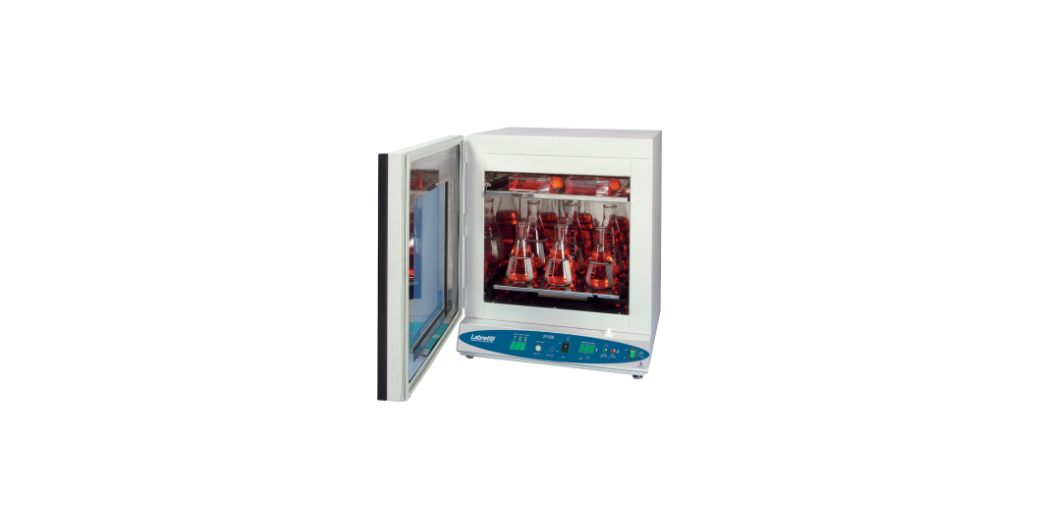

Labnet I-5311-DS 311DS Shaking Incubator
Introduction
This manual covers the specifications, operation, and use of the Labnet 311DS Shaking Incubator and its accessories. Please pay special attention to the Safety Information section in this manual.
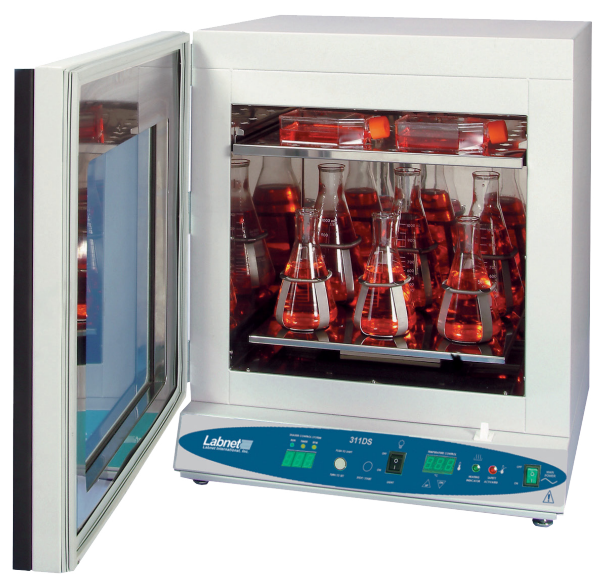
The Labnet 311DS Shaking Incubator provides an extremely stable temperature environment and an aggressive shaking motion for the mixing of materials for cell culture growth at ambient and above ambient temperatures. It uses microprocessor controls and mechanical convection to maintain a stable temperature environment and to achieve fast chamber temperature recovery after a door opening. The incubator interior is constructed from stainless steel for corrosion resistance and easy clean-up of accidental spills. All incubator doors have an integral glass window, and the incubator has a light to allow observation of samples without opening the door. Each door is fully thermal gasketed.
The Labnet 311DS Shaking Incubator comes with one removable full shelf and four large, rrubber-paddedadjustable feet for leveling the unit. Additional half and full shelves may be purchased. The 311DS shaking mechanism supports a wide range of optional rack and flask platforms, which are user-changeable.
Safety Information
The Labnet 311DS Shaking Incubator uses internationally accepted graphic symbols to help convey information to the user and to call the user’s attention to important safety precautions and guides for using this equipment.
- Indicates a potential risk and alerts you to proceed with caution.
- Indicates AC “Power On”.
- Indicates the presence of a potential hazard which could result in electrical shock.
- CAUTION: To avoid accidental bodily harm or burning, be very careful when touching the metal parts of the unit. It can be very hot after it is used at high temperatures. Allow the metal parts to cool down before handling.g
- Indicates “Temperature”.
- Identifies a Protective Earth (PE) terminal, which is provided for connection of the supply system’s protective earth (green or green/yellow) conductor.
Use of this product in any manner not specified by the manufacturer may impair the safety protection provided by the equipment and may result in physical damage and/or personal injury. Please read all operating instructions in this manual prior to use of this equipment.
- Do not operate this unit in an explosive or flammable environment.
- Do not incubate or shake flammable or explosive materials or highly reactive chemicals.
- Lifting/handling: These units are heavy, and care should be taken to use appropriate lifting devices. Units should only be lifted from their bottom surfaces and not by the doors, handles, or knobs.
- Leveling: The unit must sit level and solidly on the four leveling feet.
- Load testing: Test all loads to be shaken under observation to ensure load and unit stability.
- Units are not stackable. Do not stack one unit on top of another unit.
Unpacking
Upon receipt of your Labnet 311DS Shaking Incubator, examine the carton and unit for damage. If shipping damage has occurred, a claim must be filed with the carrier. The carrier is responsible for correcting shipping damages. Save all packaging until the unit has been shown to operate properly to your satisfaction. Carefully remove the unit from the carton and shipping pallet. The Labnet 311DS Shaking Incubator includes the following components:
- 311-DS Digital Shaking Incubator
- 1 full shelf
- 2 shelf brackets
- 4 adjustable feet
- Power cord (both EU and UK cords in 230V models)
- Instruction manual
Installation
Install the four adjustable feet and place the Shaking Incubator on a stable, flat, very solid surface near a grounded electrical outlet. The location selected should be out of direct sunlight and away from heat-producing sources or hot or cold air drafts. At least 2 in. (5 cm) ventilation clearance is required around all sides of the incubator. Level the incubator using the four adjustable feet.
Clockwise rotation of a foot raises the incubator. Plug the unit into a properly rated and grounded electrical outlet, and the unit will be ready for use. Install the optional platform you have selected by plugging in the four bottom protrusions. Larger flask platforms may require being screw clamped to the shaking mechanism. The shelf may be installed when using shaker flasks 1L or smaller. However, the shelf severely limits the illumination from the hamber light, and the shelf may rattle under aggressive shaking conditions.
Controls
The controls for the Labnet 311DS Shaking Incubator include power to the oven, temperature setting, safety temperature overshoot setting, shaker speed, and shaking time. In addition, there is a door-open shaker shut-off switch and a chamber light switch.
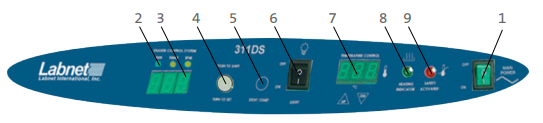
- Main power switch: Turns the power to the union on/off. Illuminates green when On.
- Shaker controls: The shaker controls are also microprocessor-based:
- Run lamp – Illuminates when the shaker is started and stays illuminated when the shaker is running.
- Timer lamp – Illuminates when the shaker display is in the Time display mode, counting down the remaining run time or showing the set run time.
- RPM lamp – Illuminates when the shaker display is in Speed display mode, showing the current shaking speed or showing the set shaking speed.
- Shaker display: This three-digit display shows the shaker speed setting, or shaker time setting, or the remaining shaker run time while counting down. It also shows:
- Hld – When the shaker is set for continuous untimed running.
- Opn – When the incubator door has been opened, it automatically stops the shaking motion.
- End – When a timed shaking run has ended.
- F60/F50 – When the shaking incubator is first powered up, it indicates the line frequency of the power line.
- Push to shift/turn set button: This encoder provides the following multiple functions:
- Increases and decreases the shaker speed setting in 1 rpm increments from 20 to 300 rpm.
- Increases and decreases the run time setting from 30 seconds to 99 minutes and 50 seconds, and HOLD (Hld) for continuous operation. Time is changed in 1-second increments to 10 minutes and then 10-second increments thereafter.
- Shifts the shaker display from Time display to Speed display and back.
- Stop/Start: Stops and starts the shaking mechanism and causes the RUN lamp to be illuminated.
Calibration
The Labnet 311DS Shaking Incubator is calibrated at 37°C at the factory. The unit can be recalibrated after the chamber temperature has stabilized at the setpoint for several hours. Suspend a certified reference thermometer in the chamber. Compare the units displayed to the reference thermometer. If there is an unacceptable difference, put the controller into calibration mode by pressing both the Up and Down arrows at the same time until the two outside decimal points begin to flash. While the decimal points are flashing, the display can be calibrated to match the reference thermometer by pressing the Up or Down arrows until the display reads the correct value. Allow the shaker incubator to stabilize again, and recalibrate if necessary.
Operation
As advised in the installation section, it is very important that the unit be level and placed on a very solid surface. When loading the platforms, it is also important to load them in a balanced manner, or the unit can vibrate and possibly walk. Shaking unbalanced loads for extensive periods may also damage the shaker.
Before powering on the unit, you should first set the mechanical Safety Thermostat on the back of the unit to a temperature just above your intended operating temperature or at the maximum (setting of 10). After you first power on the unit, you should notice the shaker Labnet I-5311-DS 311DS Shaking Incubator display first showing dashes, then the power input line frequency (F60 or F50 for 60 Hz or 50 Hz), and the temperature controller display showing some random numbers and dots blinking. You may now set the desired operating temperature, shaking speed, and shaking time (see Controls section).
The user may switch the shaker display to show the shaking speed by pressing the Push to Shift button.
Cleaning and Maintenance
Be sure to disconnect the power cord before cleaning or decontaminating the oven. No routine maintenance is required for the electrical or mechanical components of the unit. The incubator exterior, interior, and shaking platform should be wiped down periodically with a soft, damp cloth with mild soap. Do not use chlorine-based bleach or abrasives.
Specifications
| Chamber temperature range | Ambient, +5°C to 80°C (shaker off) Ambient, +10°C to 80°C (shaker on) |
| Accuracy/uniformity | ±0.3°C to ±0.5°C at 37°C |
| Temperature accuracy | ±0.2°C |
| Temperature controller | Microprocessor, user-calibratable |
| Over-temperature safety | Independently settable |
| Shaker speed | 20 to 300 rpm |
| Shaker orbit | 0.75 in. (19 mm) |
| Shaker maximum load | 16.3 lbs. (7.4 kg)* |
| Shaker timer | Continuous (Hld) or 30 seconds to 99 minutes. 50 seconds |
| Timer increments | 30 seconds to 9 minutes. 59 seconds in 1-second steps 10.0 min. to 99 min. 50 seconds in 10-second increments |
| Interior electrical outlet | 1 amp (115V units only) |
| Chamber volume | 2.5 cu. ft. (70.8L) |
| Exterior dimensions (W x D x H) | 22.6 x 21.4 x 25 in. (57.4 x 54.4 x 63.5 cm) |
| Chamber dimensions (W x D x H) | 17.4 x 15.6 x 16 in. (44.2 x 39.6 x 40.6 cm) |
| Overvoltage category | Category II |
Troubleshooting and Service
Problem/Solution
| n will not power on or heat | Check the power cord, outlet, and unit circuit breaker. |
| The shaking platform will not operate. | Check the timer set to Hld or a time setting. Check that nothing is blocking the shaker platform. Press the shaker Stop/Start button. |
| Temperature too high | Check the setpoint and readjust, if necessary. Check calibration. |
| Temperature will not remain stable or display shows “LO” | Check that the setpoint is at least 5°C above ambient (or 10°C above ambient when the shaker is on), which is the minimum operating point. |
| The indicated temperature is unstable. | A slight variation of ±0.1°C is normal. Larger fluctuations may be ambient variations from drafts, door opening and closing, a fan obstruction, or failure or electrical noise from RFI (motors, etc.). |
| The unit will not heat above the temperature that is below the setpoint | Confirm temperature setpoint. Check the temperature of the chamber with a thermometer, and recalibrate if needed. |
| Cannot adjust setpoint, calibration, or display | Turn the unit off for 5 seconds to reset. If the problem persists, call for service. |
| Unit calibrated at one temperature and not at another | This can be a normal condition if temperatures or load vary widely. For best accuracy, calibrate at the set point. |
Accessories
Descirption
| I-5322 | Full-sized shelf for digital shaking incubator |
| I-5330 | Shaking platform for flask clamps |
| I-5331 | Flat platform with rubber mat |
| I-5330-50 | Platform with 30 x 50 mL flask clamps |
| I-5330-125 | Platform with 20 x 125 mL flask clamps |
| I-5330-250 | Platform with 12 x 250 mL flask clamps |
| I-5330-500 | Platform with 8 x 500 mL flask clamps |
| I-5330-1000 | Platform with 6 x 1,000 mL flask clamps |
| I-5330-2000 | Platform with 4 x 2,000 mL flask clamps |
Limited Warranty
Corning Incorporated (Corning) warrants that this product Labnet I-5311-DS 311DS Shaking Incubator will be free from defects in material and workmanship for a period of one (1) year from the date of purchase. Corning’s sole obligation shall be to repair or replace, at its option, any product or part thereof that proves defective in material or workmanship within the warranty period, provided the purchaser notifies Corning of any such defect. Corning is not liable for any incidental or consequential damages, commercial loss, or any other damages from the use of this product.
Corning’s Customer Service team will help arrange local service where available or coordinate a return authorization number and shipping instructions. Corning may elect for on-site service for larger equipment. Some states do not alllimitationsion on the length of implied warranties or the exclusion or limitation of incidental or consequential damages. This warranty gives you specific legal rights. You may have other rights that vary from state to state. No individual may accept for, or on behalf of Corning, any other obligation of liability, or extend the period of this warranty.
Warranty/Disclaimer
Unless otherwise specified, all products are for research use or general laboratory use only.* Not intended for use in diagnostic or therapeutic procedures. Not for use in humans. Corning Life Sciences makes no claims regarding the performance of these products Labnet I-5311-DS 311DS Shaking Incubator for clinical or diagnostic applications. *For a listing of US medical devices, regulatory classifications, or specific information on claims, visit www.corning.com/resources.
Equipment Disposal
According to Directive 2012/19/EU of the European Parliament and of the Council of 4 July 2012 on waste electrical and electronic equipment (WEEE), this product is marked with the crossed-out wheeled bin and must not be disposed of with domestic waste. Consequently, the buyer shall follow the instructions for reuse and recycling of waste electronic and electrical equipment (WEEE) provided with the products and available at www.corning.com/weee.
Customer Service
- Website: www.labnetlink.com.
- Visit: www.corning.com/lifesciencs
- Visit: www.corning.com/resources
- USA/Canada: 1.800.492.1110
- Others: +1.978.442.2200
- North America: 978.442.2200
- Australia/New Zealand: 61 427286832
FAQs
What is the primary use of the Labnet I-5311-DS 311DS Shaking Incubator?
Applications such as cell culture, bacterial growth, hybridisation, and solubility research are perfect for it.
What temperature range does the incubator support?
Operating between ambient +5°C and 60°C, the unit provides versatility for a range of chemical and biological activities that are sensitive to temperature.
What is the shaking orbit diameter?
With a 19 mm orbital diameter, the 311DS is designed for effective mixing and aeration without using too much shear force.
Can I program both temperature and shaking speed together?
Yes, you may precisely control your experiments by simultaneously programming and monitoring the temperature and shaking speed using the digital control system.
Is the shaker motion orbital or reciprocal?
The 311DS solely offers orbital shaking, which is perfect for uniform mixing in tubes, plates, and culture flasks.