



Labnet S2030-RC-B Pro 30 Reciprocal Shaker
Introduction
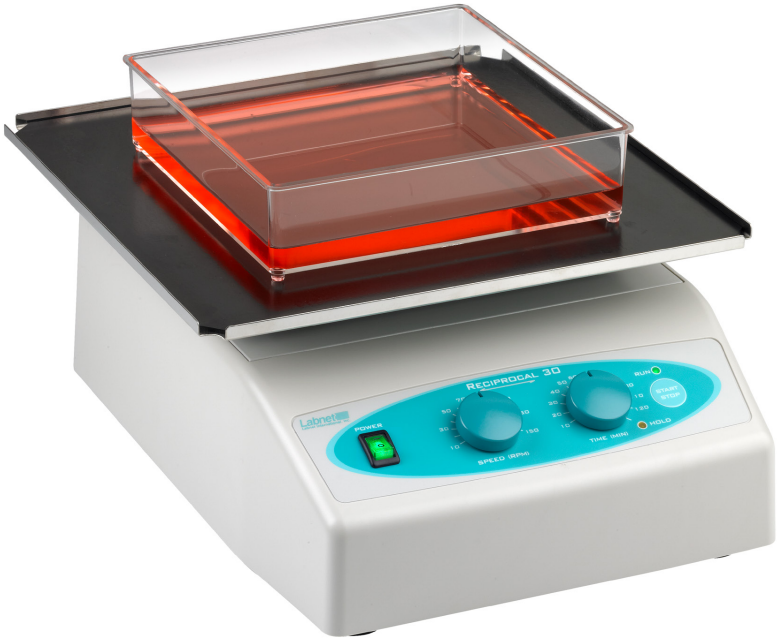
Congratulations on purchasing your Labnet Pro 30 Reciprocal Shaker. This shaker features a left-to-right linear action to provide gentle to vigorous shaking. Four platform configurations make this model valuable for a variety of applications.
Unpacking
The Labnet Orbit LS Low Speed Orbital Shaker includes the following components:
- Labnet Orbit LS Low Speed Orbital Shaker
- Flat platform (29.5 x 29.5 cm)
- Instruction Manual
Safety Information
Do not shake flammable or explosive samples.
- Do not use the shaker near water sources. Be sure that water doesn’t get on the device, especially during the cleaning procedures.
- Do not expose the shaker to aggressive vapors (e.g., organic solvents).
- Do not insert objects into the shaker (such as a screwdriver or metal rods).
- Never operate the shaker without the platform securely attached.
- Hazardous samples should be shaken only in appropriate containment vessels.
Symbols and Conventions
The following chart is an illustrated glossary of the symbols that may be used in this manual or on the product.
- Indicates the presence of a potential hazard which could result in electrical shock.
- Identifies a Protective Earth (PE) terminal, which is provided for connection of the supply system’s protective earth (green or green/yellow) conductor.
- Do not put your fingers between the platform and the housing. Danger of mechanical injury
Installation
Device Placement
When selecting the right place for the device, please consider the following:
- Put the device on a smooth, horizontal, and stable surface.
- Leave enough space beyond the device for normal air circulation (6 in./15 cm minimum).
- Leave enough space around the device for easy access and maintenance.
- Avoid locations subject to shocks and vibrations.
- Avoid locations subject to frequent power fluctuations or power losses. It may affect shaker performance.
NOTE: There has to be easy access to the shaker control panel and main plug in case of emergency.
Attaching the Power Cord
First, connect the main power cord to the shaker. Then, connect the plug end of the cord to a grounded wall socket. Avoid lines on which powerful electric motors, refrigerators, and similar devices are connected.
- Be careful when you plug the cord into a grounded wall socket.
- Do not touch the plug with wet hands.
- Do not pull the plug by the cord.
Operating Instructions
Control Panel
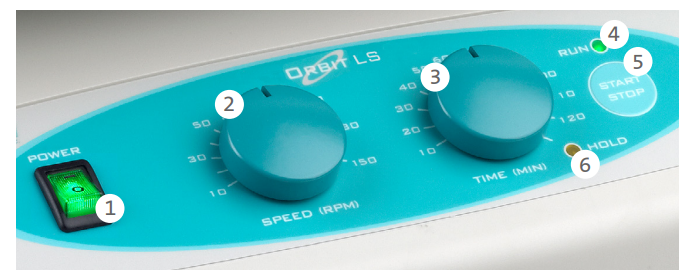
- POWER switch: Turns the shaker ON (power switch illuminates) or OFF.
- SPEED knob: Sets the shaker speed.
- TIME knob: Sets the timed operation.
- HOLD yellow signal light: Illuminates when the shaker is set to HOLD (continuous operation).
- START/STOP button: START or STOP the shaking operation.
- RUN green signal light: Illuminates when the shaker is running.
Maintenance and Cleaning
- No routine maintenance or lubrication is required.
- It is recommended that the shaker be kept clean to ensure long trouble-free operation.
- The outside housing can be cleaned with a soft, damp cloth when needed.
- Do not use any aggressive or abrasive cleaners (acetone, nitro, polish, etc.).
- This may permanently damage the shaker finish.
Specifications
| Shaker orbit | 0.75 in. (19 mm) |
| Timer | 20 to 120 min. in 10 min. step, HOLD function |
| Maximum load | 11 lbs. (5 kg) |
| Dimensions (W x L x H) | 11.6 x 13.4 x 6.3 in. (29.5 x 34 x 16 cm) |
| Platform dimensions (W x L) | 11.6 x 11.6 in. (29.5 x 29.5 cm) useable area |
| Weight | 14.6 lbs. (6.6 kg) |
| Electrical 120V 230V | 120V ±10%, 50/60Hz, 0.3A 230V ±10%, 50/60Hz, 0.15A |
| Fuse | 2 x 1A |
| Operation conditions | 4°C to 65°C, up to 85% RH, non-condensing |
Troubleshooting
Should you have a question about the operation of the Labnet Orbit™ LS Low Speed Orbital Shaker or if service is required, contact Customer Service. Do not send in a unit for service without first calling to obtain a repair authorization number. Should the unit require service return, it should be properly packaged to avoid damage. Any damage resulting from improper packaging shall be the responsibility of the user.
| The power switch doesn’t illuminate when turned on. | Check the connection to the main power supply. Check the fuses. Call for the authorized service. |
| The shaker doesn’t start when you press the START/STOP button. | Check the connection to the main power supply. Check the fuses. Call for authorized service. |
Accessories
| S2031-12D | Stacked platforms (29.5 x 29.5 cm) | 2 |
| E2110-BBS | Blot box, 9.1 x 6.6 cm, 3-50 mL capacity for mini protein gels | 10 |
| E2110-BBL | Blot box, 11.7 x 8.9 cm, 6-10 mL capacity for larger mini protein gels | 10 |
Limited Warranty
Corning Incorporated (Corning) warrants that this product will be free from defects in material and workmanship for a period of one (1) year from the date Labnet S2030-RC-B Pro 30 Reciprocal Shaker of purchase. Corning’s sole obligation shall be to repair or replace, at its option, any product or part thereof that proves defective in material or workmanship within the warranty period, provided the purchaser notifies Corning of any such defect. Corning is not liable for any incidental or consequential damages, commercial loss, or any other damages from the use of this product.
Corning’s Customer Service team will help arrange local service where available or coordinate a return authorization number and shipping instructions. Corning may elect for on-site service for larger equipment. Some states do not alllimitationsion on the length of implied warranties or the exclusion or limitation of incidental or consequential damages. This warranty gives you specific legal rights. You may have other rights that vary from state to state. No individual may accept for, or on behalf of Corning, any other obligation of liability, or extend the period of this warranty.
Warranty/Disclaimer
Unless otherwise specified, all products are for research use or general laboratory use only.* Not intended for use in diagnostic or therapeutic procedures. Not for use in humans. Corning Life Sciences makes no claims regarding the performance of these products for clinical or diagnostic applications. *For a listing of US medical devices, regulatory classifications, or specific information on claims, visit www.corning.com/resources.
Equipment Disposal
According to Directive 2012/19/EU of the European Parliament and of the Council of 4 July 2012 on waste electrical and electronic equipment (WEEE), this product is marked with the crossed-out wheeled bin and must not be disposed of with domestic waste. Consequently, the buyer shall follow the instructions for reuse and recycling of waste electronic and electrical equipment (WEEE) provided with the products and available at www.corning.com/weee.
Customer Service
- Website: www.labnetlink.com.
- Visit: www.corning.com/lifesciencs
- Visit: www.corning.com/resources
- USA/Canada: 1.800.492.1110
- Others: +1.978.442.2200
- North America: 978.442.2200
- Australia/New Zealand: 61 427286832
FAQs
How do I adjust the shaking speed and stroke length?
The computerised control panel allows you to change the speed between 30 and 300 strokes per minute.
Can I use this shaker with flammable solvents?
Always work in an area with enough ventilation, and while handling dangerous products, adhere to safety precautions.
How do I clean and maintain the shaker?
Use a moist cloth and a light detergent to clean the platform and outside. Do not submerge the unit in water or use abrasive cleaning. To preserve performance, regularly inspect for loose screws and mop up spills right away.
What power supply does the shaker require?
Depending on your location, the unit runs on regular AC power, which is usually 110–120V or 220-240V. Before connecting in, always check the voltage rating on the rear panel.
Can I use the shaker inside an incubator?
As long as the temperature and humidity do not beyond the shaker’s operating limits, which are normally up to 60°C, the shaker is indeed suitable for use in an incubator.