

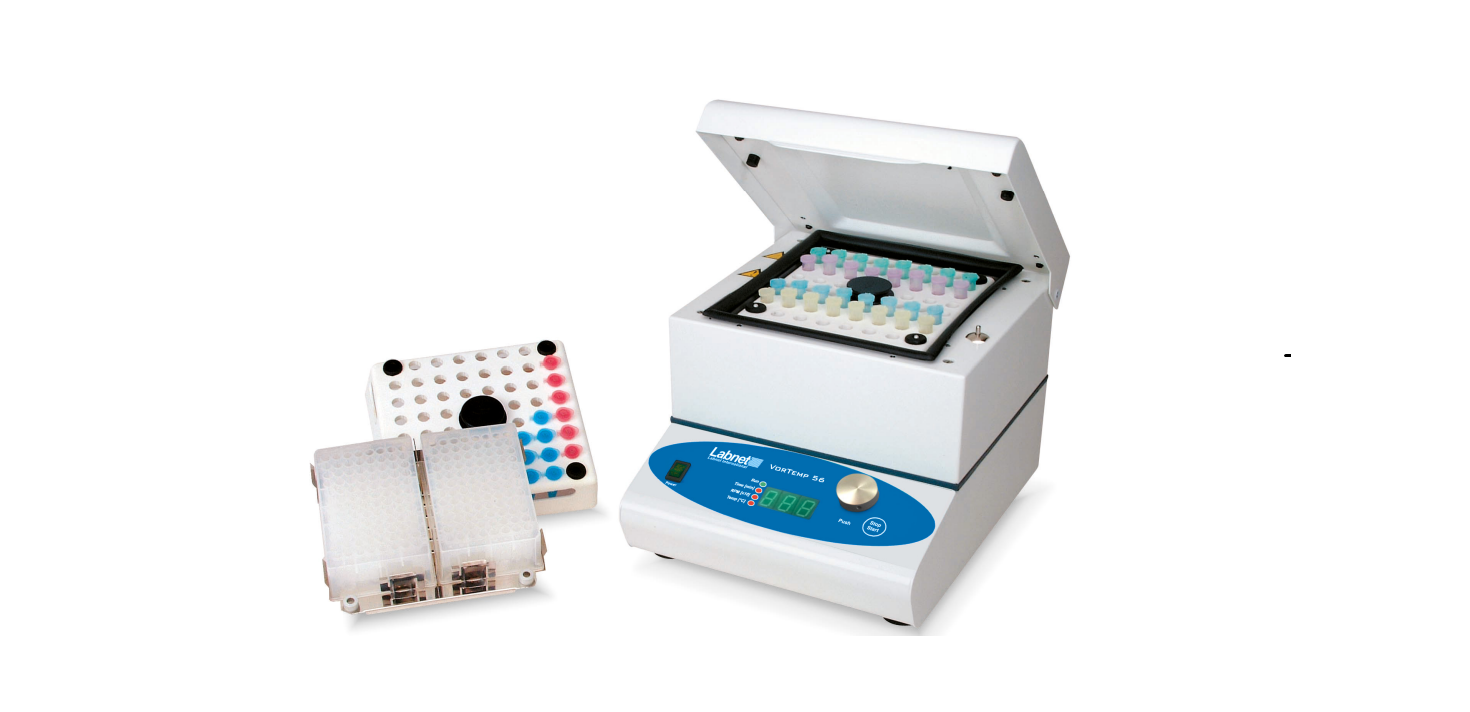

Labnet S2056A VorTemp 56 Shaking Incubator
Introduction
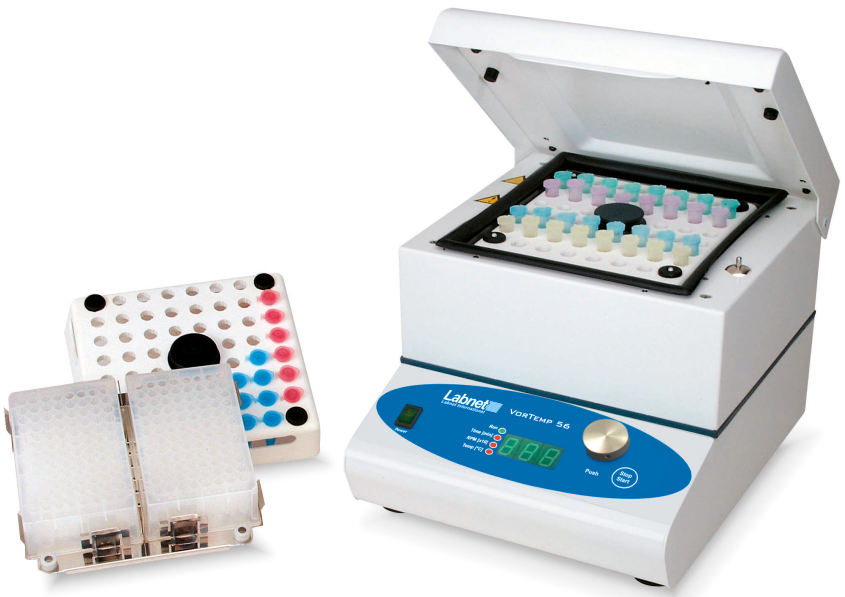
The Labnet VorTemp™ 56 shaking incubator is a benchtop shaker and heating chamber for incubating and shaking sensitive samples. It replaces two devices, reducing both time and space needed. It is suitable for biochemistry, microbiology, and clinical laboratories in which applications require temperature and shaking treatment.
Safety Information
Be careful when changing the microcentrifuge tube platform, especially when you have used the unit at temperatures higher than 60°C. Always wear protective clothing before you handle a hot platform. The unit will continue to shake for 5 seconds after the lid is opened. Be careful when opening the lid, as the parts inside may still be in motion. In addition, never touch the fan unless the unit is turned off or unplugged.
- If the equipment is used in a manner not specified by the manufacturer, the protection provided by the equipment may be impaired.
- Before cleaning the housing, unplug the unit. The housing should only be cleaned with a damp cloth and, if necessary, a mild soap. Don’t use aggressive or aerosol cleaners.
- Do not use the unit near sources of water. Take care to ensure that water will not spill in the device, especially during cleaning procedures.
- Make sure that all test tubes are closed tightly before placing them into the unit to avoid spilling samples inside the chamber. In the case of a malfunction, unplug the device and contact your distributor for service.
Packing
The Labnet VorTemp 56 shaking incubator includes the following components:
- VorTemp 56 shaking incubator (platforms sold separately)
- Instruction manual
Construction
The housing of the Labnet VorTemp™ 56 shaking incubator is constructed of a steel plate coated with highly resistant polyurethane lacquer. The interior chamber is isolated with special thermal protection materials and insulation foam. Both the shaking mechanism and the temperature chamber are regulated via microprocessors, which control all sensors for motor speed, temperature, and time.
Main Components
- Drive motor
- Eccentricity control mechanism chamber
- Fan
- Heating element
- Temperature sensor
- Temperature-controlled chamber control
- Electronics
The motor drives the eccentricity control mechanism chamber, which generates the orbital motion of the sample platform. The motion of the motor also drives the fan, which moves air over the heating element and throughout the temperature chamber. The convection action of the airflow creates a very uniform temperature environment throughout the chamber. Chamber conditions are monitored by the temperature sensor, and the control electronics regulate heater function to maintain the set temperature.
Accessories
Microcentrifuge Tube Platform
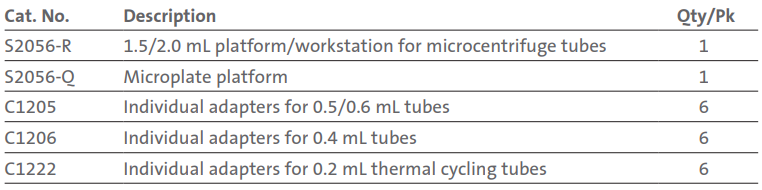
The Microcentrifuge Tube Platform is intended for shaking 56 x 1.5/2 mL test tubes. There are accessory adapters available that allow for running several different microcentrifuge tube sizes. In addition, the platform and adapters are autoclavable.
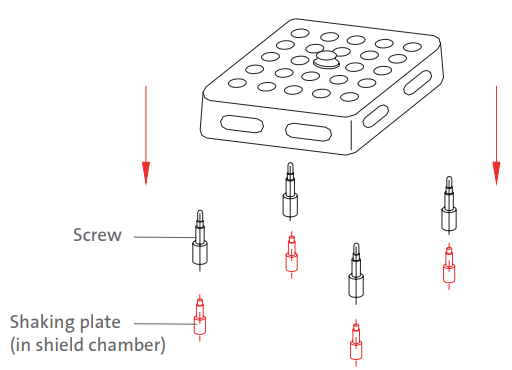
Installing the microcentrifuge tube platform is very simple and requires no special tools. The unit comes pre-assembled with four posts screwed into the shield plate. Grip the microcentrifuge tube platform by the center knob and align the four rubber grommets with the four posts of the platform and press down gently. For processing large sample quantities, it is often more convenient to use more than one microcentrifuge tube platform and switch between them.
Microplate Holder Platform
The Microplate Holder Platform is designed for shaking up to 4 microplates or 2 deepwell microplates. For a more precise temperature-controlled environment, we recommend inserting only one microplate on the platform. Additional microplates can have an insulating effect on other plates, especially when stacked. The working temperature range is ambient from +5°C to 40°C. Please note that the normal maximum temperature for ordinary microplates is below 60°C. The platform is made of stainless steel and is equipped with springs for keeping microplates secure.
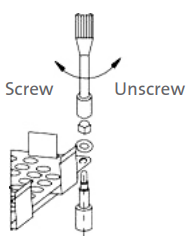
The Labnet VorTemp™ 56 shaking incubator comes with the microcentrifuge tube platform installed. To install the microplate platform, first you have to remove the microcentrifuge tube platform, and then unscrew all four posts from the lower platform.
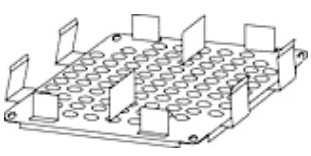
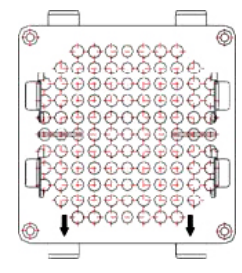
To attach the microplate platform (see the picture below), you must center the platform’s corner holes with the device shield plate. Make sure the alignment arrows are pointing towards the front of the unit, and then press the platform on the shield plate. Take the supplied nuts and washers and screw them onto the microplate platform, and tighten them with the included wrench. Insert the microplates with your samples, and start the device.
Installation
Device Placement
When selecting the right place for the device, please consider the following:
- Put the device on a smooth, horizontal, and stable surface.
- Leave at least 10 cm of space around the device for adequate air circulation.
- Leave enough space around the device for easy access and maintenance.
- Do not place the device where there are rapid temperature and humidity changes. Also, avoid places where the unit would be exposed to direct sunlight or next to devices that output large amounts of heat.
- Avoid locations where the unit may be exposed to excessive shocks or vibrations.
- Avoid locations subject to frequent power fluctuations or power losses.
Attaching the Power Cord
First, connect the main power cord to the incubator, then connect the plug end of the cord to a grounded wall socket. Avoid lines on which powerful electric motors, refrigerators, and similar devices are connected.
- Always use caution when plugging the cord into a grounded power outlet.
- Do not touch the plug with wet hands.
- Do not pull the plug by the cord.
Start Up Checklist
- Unpack and install the device as specified in Sections 6.1 and 6.2.
- Open the lid and attach the microcentrifuge tube platform or the microplate holder platform.
- Close the lid.
- Switch on the device using the ON/OFF switch on the front panel. The switch will illuminate to indicate that the power is on.
- Check the running parameters, and set new parameters if necessary. Refer to the instructions described in Section 7.
Control Panel
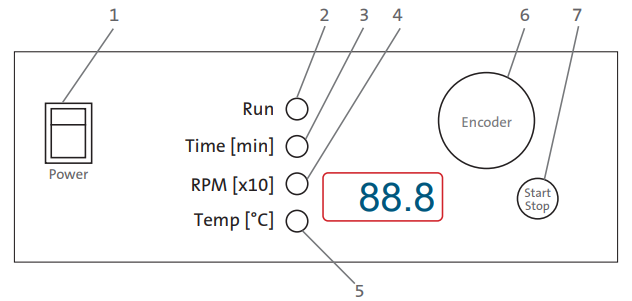
- Power Key
Switch ON (illuminates when on) or OFF. - Run
The green signal light illuminates when the shaker is operating. - Time
The yellow signal light illuminates when the unit is set to adjust time. - RPM
The yellow signal light illuminates when the unit is set to adjust RPM. - Temperature
The yellow signal light illuminates when the incubator is set to adjust the set temperature. - Encoder Knob
Rotate the encoder right (+) or left (-) to modify the Time, Temperature, or RPM settings. Push in the Encoder knob to change between Time, Temperature, and RPM set values. If you rotate the Encoder knob quickly, then the adjustment increments are larger, and it will allow for values to be set more quickly. - Start/Stop Button: Start or stop shaking.
Operation
- Press the Power Key on the control panel. On the LED display, the unit will automatically detect the line frequency F50 (50Hz) or F60 (60Hz).

- After a 2-second delay, the unit will then default to the Time setting.
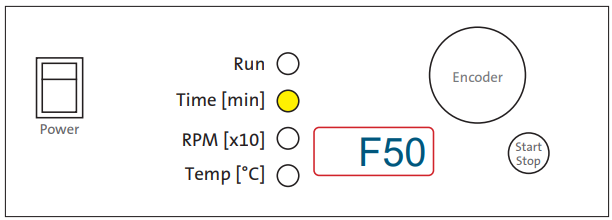
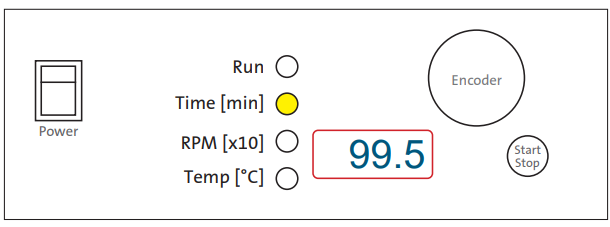
Time Illuminated
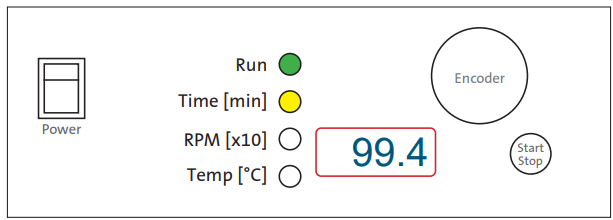
- Rotating the Encoder knob, right (+) or left (-), sets the run time to the desired value from 30 sec. to 99
- min. 50 sec.:
- 99.5 = 99 min. 50 sec.
- 9.59 = 9 min. 59 sec.
- 0.30 = 30 sec.
- If you want the unit to run continuously, set Time on hold. The timer is set to hold when HLd is displayed. Rotate the Encoder knob under 0.30 or above 99.5 to set this hold function. Push the Encoder knob to adjust the RPM setting.
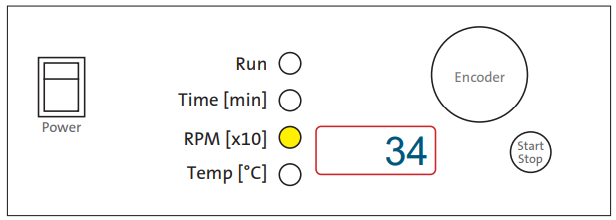
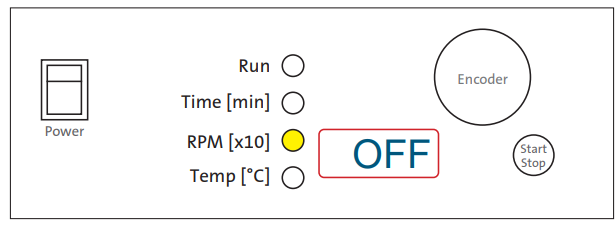
RPM Illuminated
- Rotating the encoder right (+) or left (-) sets the rotating speed to the desired value:
- 34 = 340 rpm
- 90 = 900 rpm
- By turning the RPM setting below 20, the shaking function can be turned off. When the shaker is off, OFF is displayed.
- Push the Encoder knob to adjust the Temperature setting.
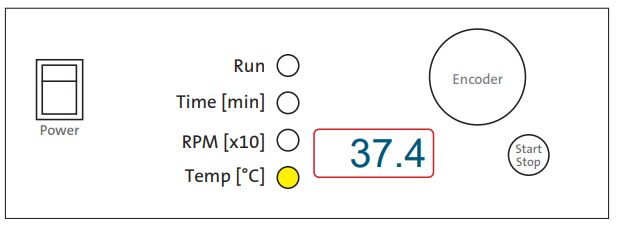
Temperature Illuminated
- Rotating the Encoder knob right (+) or left (-) sets the temperature to the desired value:
- 37.4 = 37.4°C
- If you want to use the incubator without temperature control activated, turn the Encoder knob under 0.5 or above 99.5 until the display reads OFF.
Pressing the Start/Stop Button
- Run and Time are illuminated. The timer will count down from the set time value. You cannot adjust the set time during shaking.
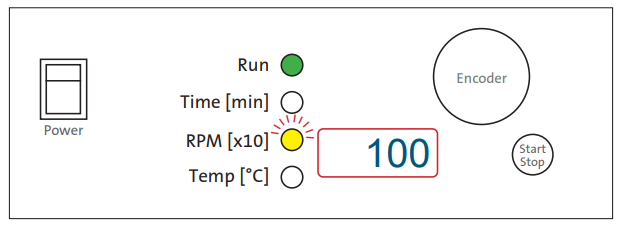
RMP Adjusting During a Run
- Push the Encoder knob until the RPM light is illuminated.
- Rotate the encoder right (+) or left (-) until the new value is set. While adjusting the RPM, the light will blink.
- When you stop rotating the encoder knob, the RPM light will stop blinking after 2 seconds.
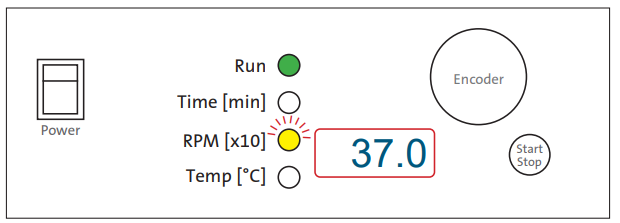
Temperature Adjusting During a Run
- Push the Encoder Knob until the RPM light is illuminated.
- Rotate the encoder right (+) or left (-) until the new value is set. While adjusting the RPM, the light will pulse.
- When you stop rotating the encoder knob, the RPM light will stop blinking after 2 seconds.
- When the set time expires or if you press the Start/Stop button, End will be displayed, and the Run light will blink. When the unit stops shaking, the last set values for Time, RPM, and Temp will be saved in memory.
Shaking Without Heating
If you want to shake samples without heating, set Temp to OFF.
Heating Without Shaking
If you want to heat samples without shaking, set RPM to OFF. The shaker motor drives the fan, which circulates warm air throughout the chamber, aiding in temperature uniformity. If the RPM is set to OFF, the temperature control will not be as precise due to a lack of airflow over the heating element. The maximum set temperature in this program is 70°C.
Additional Operations
RPM during shaking
- Set the unit to RPM mode
- Turn the encoder ONE CLICK right (+) or left (-). On the display, the RPM light will blink for 2 sec. and will display the set RPM. After 2 sec. The display will show the actual RPM, and the light will stop blinking.
Time during shaking
- Set the unit to Time Mode
- Turn the encoder ONE CLICK right (+) or left (-). The Time light will blink for 2 sec. and will display the set Time. After 2 sec. The display will show the actual Time, and the light will stop blinking.
Temperature during shaking
- Set the unit to Temperature Mode
- Turn the encoder ONE CLICK right (+) or left (-). The Temperature light will blink for 2 sec. and will display the set Temperature. After 2 sec. The display will show the actual Temperature, and the light will stop blinking.
Specifications
- Power: 515W
- Heater power: 500W
- Motor power: 15W
- Electrical S2056A S2056A-230V
- 120V ±10%, 50/60Hz, 4.8A
- 230V ±10%, 50/60Hz, 2.4A
- Fuse S2056A S2056A-230V
- 2 x T 6.3A L 250V
- 2 x T 3.15A L 250V
- Environmental temperature: From 5°C to 40°C
- Relative humidity: Up to 85% non-condensing
- RPM regulation: Digital load independent, from 100 to 1,200 rpm in 10 rpm steps, 1,400 rpm (only at 60Hz)
- Shaker orbit: 3 mm
- Temperature operating range: From 5°C above room temperature to 99.5°C
- Temperature sensor: PT100
- Heat time: Approx. 5°C/min.
- Temperature uniformity: ±0.5°C
- Timer: From 30 sec. to 99 min. 50 sec. In 10 sec. Steps, under 10 min. in 1 sec. Steps, timer, HOLD function
- Maximum capacity: 56 test tubes – 1.5, 0.7, 0.5, 0.25 mL
- Dimensions: (W x D x H) 10 x 13 x 9 in. (26.5 x 32.5 x 22.5 cm)
- Weight: 24 lbs. (11 kg)
Labnet VorTemp 56 shaking incubator is designed to be safe when operated under the following conditions:
- Indoor use
- Altitude up to 2,000 meters
- Pollution Degree 2
Troubleshooting
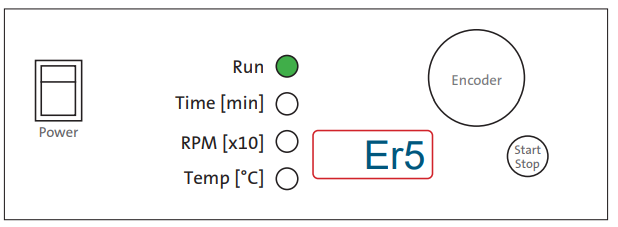
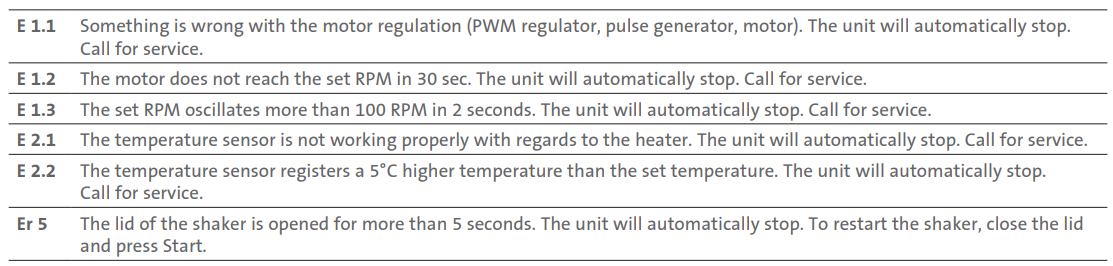
The Labnet VorTemp™ 56 shaking incubator features built-in self-diagnostic procedures that constantly check the operating parameters and performance, as well as functions that are necessary for safe and reliable operation. An error code is shown on the LCD if an error occurs. Sample of Error display:
When shipping your equipment for service, follow the packing guidelines listed below:
- Clean the inside of the chamber and platforms according to GLP (Good Laboratory Practices) standards, especially if you have used the equipment with hazardous biological or radioactive materials.
- A written description of the error should accompany the unit.
- Use the original shipping container and packaging materials if possible.
Temperature Calibration
Temperature calibration should only be performed by qualified personnel. The temperature control software allows for user calibration of the temperature settings. First, measure the temperature in the middle of the chamber after allowing the temperature to equilibrate for 2 hours.
The temperature should be measured with a digital calibrated thermometer with a precision of 0.1°C or more. After allowing the temperature to equilibrate for 2 hours, read the temperature on the thermometer and compare it with the temperature on the LED display. This difference between the thermometer and the display is the value that you will enter into the unit to recalibrate it.
- Example 1: Temperature on the thermometer is 37.9°C, temperature on display is 37°C. The difference is 37.9 – 37 = 0. His value 0.9 is the value that you will enter into the software.
- Example 2: Temperature on the thermometer is 36.2°C, temperature on display is 37°C. The difference is 37 – 36.2 = -0.8. This value, -0.8, is the value that you will enter into the software.
Procedure for temperature calibration
- Hold (press) the encoder for 5 seconds – the display then shows Labnet S2056A VorTemp 56 Shaking Incubator Cor (correction).
- Press the encoder once and then enter the value from the previous section by rotating the encoder left or right to select a value (see Example 1 and Example 2 above). Be sure to note whether your value was positive or negative. After you have entered the value, press the encoder again.
- Press the Start/Stop button to complete the temperature calibration.
Maintenance and Cleaning
Before you begin cleaning the unit, be sure to unplug the unit. Before using any cleaning or decontamination methods other than those recommended by the manufacturer, contact Corning to check that the proposed method will not damage the equipment.
The chamber should be cleaned regularly. Any samples that spill inside or outside the chamber must be wiped up immediately. Use only warm water or a mild soap solution to clean the surfaces of the unit. Using aggressive or abrasive cleaners can cause permanent damage Labnet S2056A VorTemp 56 Shaking Incubator to the finish. To decontaminate the surface of the unit, use only neutral solutions (pH 7-8). The stainless steel platform and nuts can be decontaminated with an autoclave (120°C).
Limited Warranty
Corning Incorporated (Corning) warrants that this product will be free from defects in material and workmanship for a period of one (1) year from the date of purchase. Corning’s sole obligation shall be to repair or replace, at its option, any product or part thereof that proves defective in material or workmanship within the warranty period, provided the purchaser notifies Corning of any such defect. Corning is not liable for any incidental or consequential damages, commercial loss, Labnet S2056A VorTemp 56 Shaking Incubator or any other damages from the use of this product.
Corning’s Customer Service team will help arrange local service where available or coordinate a return authorization number and shipping instructions. Corning may elect for on-site service for larger equipment. Some states do not alllimitationsion on the length of implied warranties or the exclusion or limitation of incidental or consequential damages. This warranty gives you specific legal rights. You may have other rights that vary from state to state. No individual may accept for, or on behalf of Corning, any other obligation of liability, or extend the period of this warranty
Warranty/Disclaimer
Unless otherwise specified, all products are for research use or Labnet S2056A VorTemp 56 Shaking Incubator general laboratory use only.* Not intended for use in diagnostic or therapeutic procedures. Not for use in humans. Corning Life Sciences makes no claims regarding the performance of these products for clinical Labnet S2056A VorTemp 56 Shaking Incubator or diagnostic applications. *For a listing of US medical devices, regulatory classifications, or specific information on claims, visit www.corning.com/resources.
Equipment Disposal
According to Directive 2012/19/EU of the European Parliament and of the Council of 4 July 2012 on waste electrical and electronic equipment (WEEE), this product is marked with the crossed-out wheeled bin and must not be disposed of with domestic waste. Consequently, the buyer shall follow the instructions for reuse and recycling of waste electronic and electrical equipment (WEEE) provided with the products and available at www.corning.com/weee.
Customer Service
- Website: www.labnetlink.com.
- Visit: www.corning.com/lifesciencs
- Visit: www.corning.com/resources
- USA/Canada: 1.800.492.1110
- Others: +1.978.442.2200
- North America: 978.442.2200
- Australia/New Zealand: 61 427286832
FAQs
What is the maximum shaking speed of the Labnet S2056A VorTemp 56?
For a range of chemical and biological mixing applications, the maximum shaking speed is 400 RPM.
Can I use the incubator for both shaking and stationary incubation?
Indeed, by turning off the shaking feature, the Labnet S2056A may function both in stationary mode and in shaking mode.
How do I set the shaking speed and temperature?
The digital control panel allows for the adjustment of both parameters. Choose the preferred temperature and RPM using the up/down buttons, then press “Start.”
Is the shaking platform compatible with different vessel types?
Indeed, the platform has movable clamps that allow it to safely handle tubes, flasks, and other laboratory equipment.
How often should I calibrate the temperature sensor?
Depending on usage frequency and precise needs, calibration is advised every six to twelve months.
What safety features are included in the S2056A model?
It has an audible alarm for out-of-range situations, automatic shutoff in the event of a malfunction, and over-temperature protection.
How do I clean and maintain the incubator?
Using a gentle cloth and a moderate detergent, clean the exterior and interior surfaces. To avoid damage, stay away from abrasive objects and harsh chemicals.