

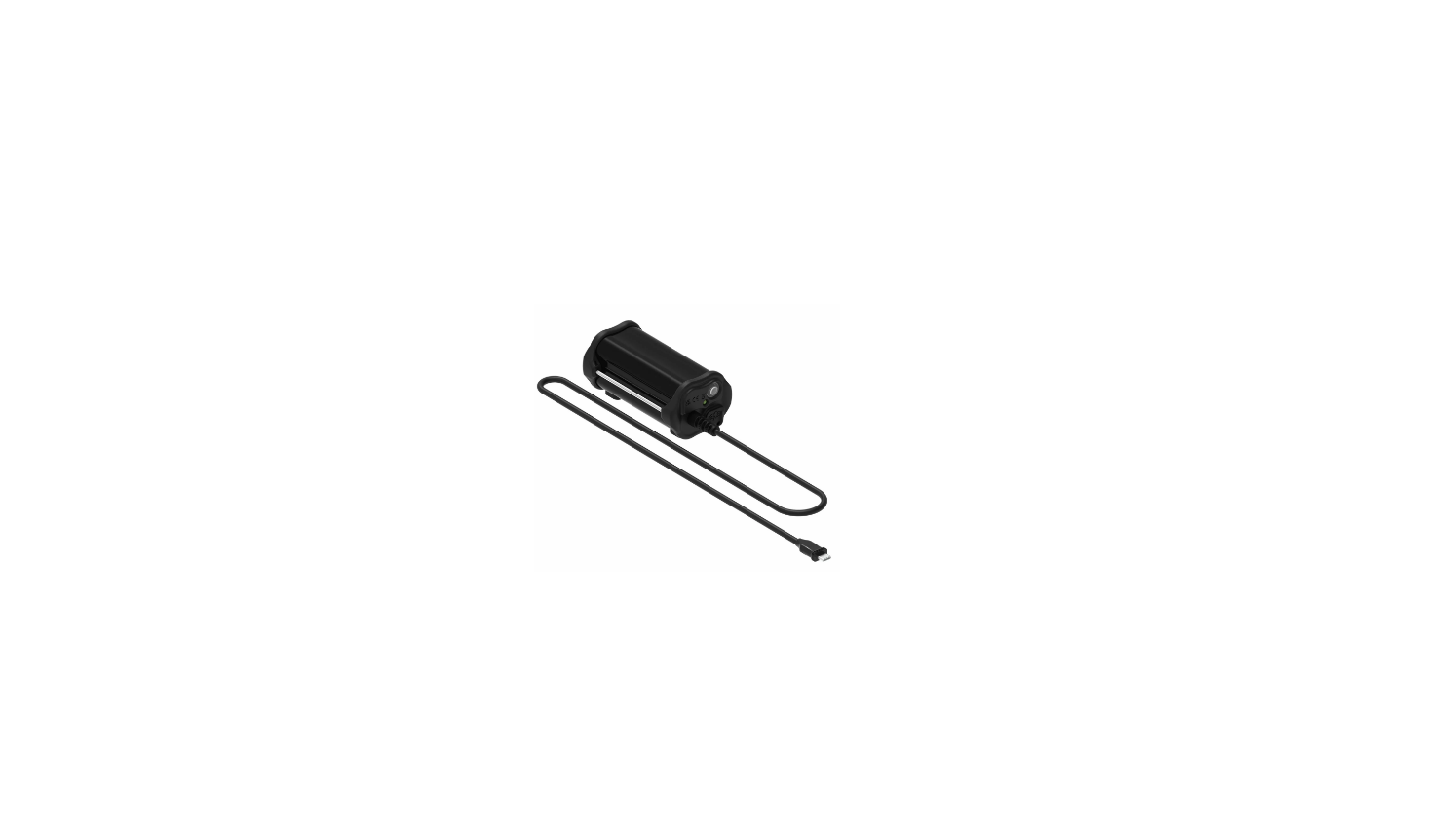

LEZYNE 74670 Power Pack XL-Infinite Light
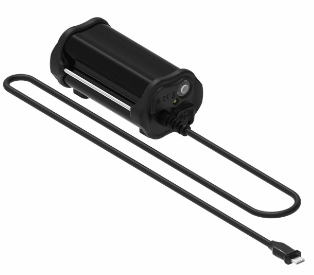
SAFETY
- Lezyne power packs have a water resistance range of IPX7 under IEC standard 60529.
- Submerging the device is not recommended. If moisture does enter the casing, do not turn on; air it out until completely dry.
- Doing so will void the warranty. Lezyne USA, Inc. does not accept any liability for injuries or other damages resulting from the improper use or improper installation of this product in any circumstance.
Mounting
For proper mounting, ensure rubber pads are in contact with the frame. Then fasten the Velcro strap firmly. INFINITE LIGHT POWER PACK+, INFINITE LIGHT POWER PACK XL+.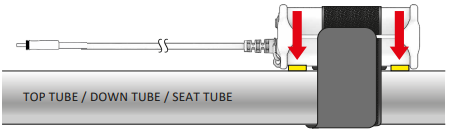
POWER PACK XL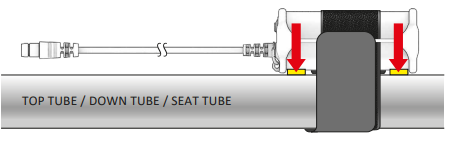
Operation
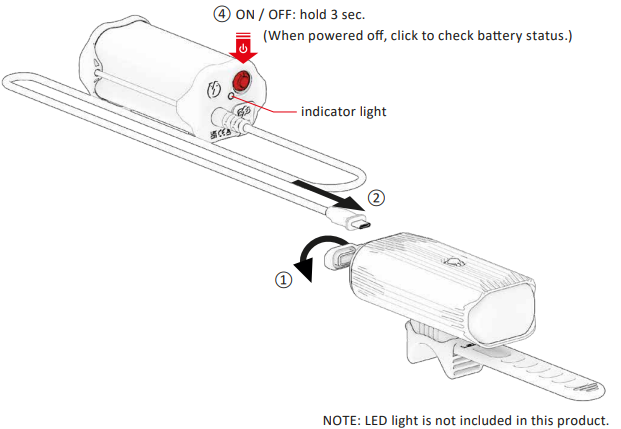
- Open the LED light USB seal.
- Insert the Infinite Light Power Pack USB-C power cable into the LED light USB-C port.
- The Infinite Light Power Pack will automatically power on when connected to the light Infinite Light Power Pack indicator light will illuminate (showing battery status), and the LED light power button will start flashing blue (HE charging mode).
- When the Infinite Light Power Pack is not in use, hold the Infinite Light Power Pack power button for 3 seconds to POWER OFF, or disconnect the USB-C cable to POWER OFF. (When the Infinite Light Power Pack powers off, the LED power button will stop flashing, Infinite Light Power Pack indicator light will turn off.)
- The Infinite Light Power Pack will not automatically turn the LED light ON/OFF; hold the LED power button to power the LED light ON/OFF.
- Do not insert the Infinite Light Power Pack USB-C power output cable into power outlets/charging ports or into the Infinite Light Power Pack USB-C port. See information below for Infinite Light Power Pack charging instructions.
Compatible LEDS
- MEGA DRIVE 2400+,
- SUPER DRIVE 1800+,
- MACRO DRIVE 1400+,
- LITE DRIVE 1200+,
- MICRO DRIVE PRO 1000+,
- MICRO DRIVE 800+,
- CLASSIC DRIVE XL 700+,
- CLASSIC DRIVE 500+,
- FUSION DRIVE PRO 600+,
- FUSION DRIVE 500+,
- KTV DRIVE PRO 300+,
- DECA STVZO 1250,
- SUPER STVZO 600+,
- MACRO STVZO 500+,
- MACRO STVZO 500+ REVERSE
POWER PACK XL
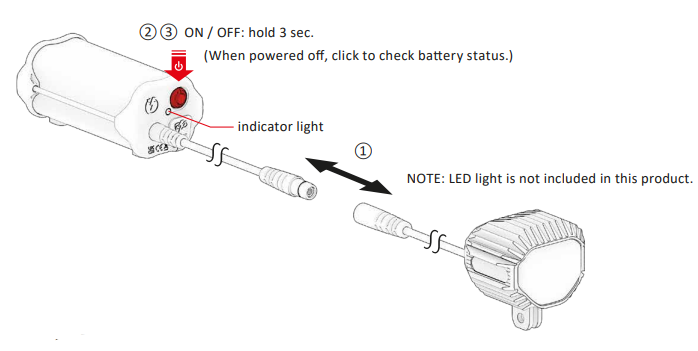
- Connect the Power Pack XL DC Jack to the LED DC Jack.
- Hold the Power Pack XL power button for 3 seconds to POWER ON: The Power Pack XL indicator light will illuminate (showing battery status), and the LED will POWER ON.
- When the LED light is not in use, hold the Power Pack XL power button for 3 seconds to POWER OFF. (When the Power Pack XL is powered off, the LED light will turn off, Power Pack XL indicator light will turn off.)
Battery Indicator
When powered off, click the button once to momentarily LEZYNE 74670 Power Pack XL Infinite Light battery status.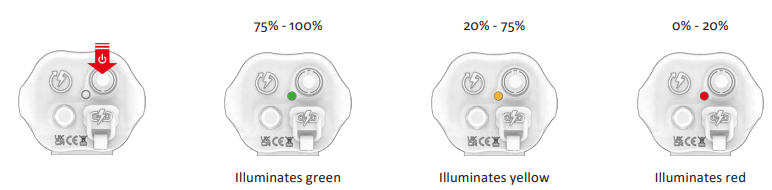
Charging
Before using your Lezyne Power Pack for the first time, fully charge the battery. Ensure the Power Pack output cable is unplugged from the LED light.
- Open the USB seal on the Power Pack.
- Insert the USB-C charging cable into the Power Pack charging port.
- Once charging, the power button will flash LEZYNE 74670 Power Pack XL-Infinite Light blue or green depending on the power source.
- Remove Power Pack from charger and reinstall the USB seal—ensure USB seal is fully installed for water resistance.
If the power button does not flash when plugged in, the selected USB port may not be powered—try another USB port. Power Pack will be fully charged when the power button illuminates solid green (standard charging) or solid blue (high efficiency charging).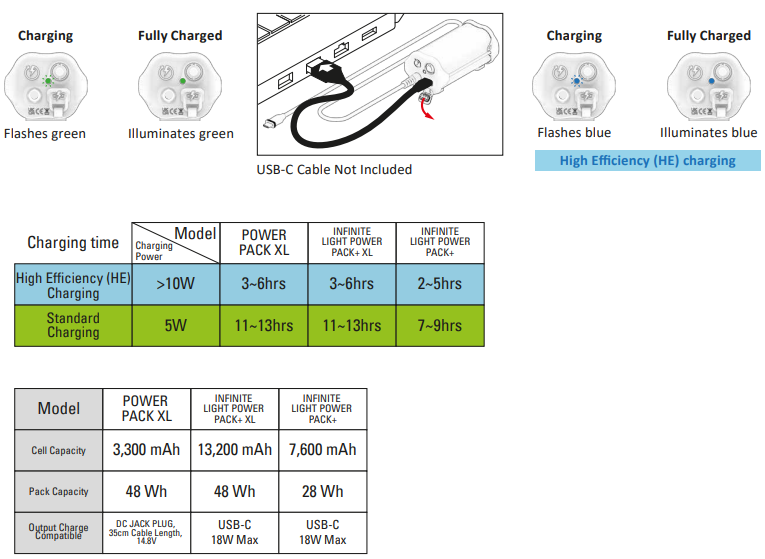
More Information
For more information on Lezyne products, visit: www.lezyne.com
Warranty
In order to claim our warranty, you must have the original proof of purchasing documentation for the product, including but not limited to Order Number and QR Code, and present it when requested. This guarantee is valid for the original retail purchaser from the date of initial retail purchase and is not transferable.
Upon receipt of your claim, Gevi will seek to resolve your difficulties. Should your product develop any defect within 12 months of purchase because of faulty materials or workmanship, we will repair or replace this product or any component of the product, at our discretion.
Our replacement or repair warranty only applies where a defect arises as a result of faulty material or workmanship during the warranty period. Your warranty does not cover misuse or negligent handling (including damage caused by failing to use the product by this instruction booklet), accidental damage, normal wear and tear, or lack of maintenance. Do not attempt to repair or adjust any electrical or mechanical functions on this product. Doing so will void this guarantee.
- power surges, power dips, voltage supply GEVI GECMD008-U 4-Cup Drip Coffee Machine problems, or use of the product on incorrect voltage;
- servicing or modification of the product other than by Gevi or an authorized Gevi service center;
- use of the product with other accessories, attachments, product supplies, parts, or devices that do not conform to Gevi specifications; or
Customer Support
For any questions relating to Gevi-branded products(coffee machines, grinders, milk frothers, toasters, air fryers, and related accessories), please contact us through the information below.
- Web: https://www.gevilife.com
- E-mail: gevi-home@gevi-home.com
- Phone: 855-9922-888
- FB: https://bit.ly/3pqt61v
- YT: https://bit.ly/3fxrFqq
FAQs
Q: What lights are compatible with the Power Pack XL?
Ans: It is made especially to work with front lights that have the LEZYNE Infinite Light port, like those in the Mega Drive or Super Drive series. Prior to connecting, always make sure it is compatible.
Q: Can I mount the Power Pack on the handlebars?
Ans: Although technically feasible, it is not advised because of balance and weight issues. When riding, the top tube or frame is the best option for protection and stability.
Q: Do I need to charge the Power Pack separately?
Ans: Indeed. Before your ride, make sure the Power Pack is fully charged using the included USB cable. Your light’s runtime can be greatly increased with a full charge, particularly when using higher output modes.
Q: How do I know the Power Pack is connected properly?
Ans: The system of the light will detect the Power Pack and automatically draw power from it when it is attached to a compatible light. Some light models display a change in runtime estimation or an indicator LED.
Q: Can I use the Power Pack to charge other devices (e.g. phone, GPS)?
Ans: No. The Power Pack XL is purpose-built for LEZYNE lights only and doesn’t act as a universal USB power bank. Attempting to use it with other devices may damage the battery or device.
Q: Will the Power Pack affect the waterproofing of my setup?
Ans: Although not completely waterproof, the Power Pack and cable connections are water-resistant.