

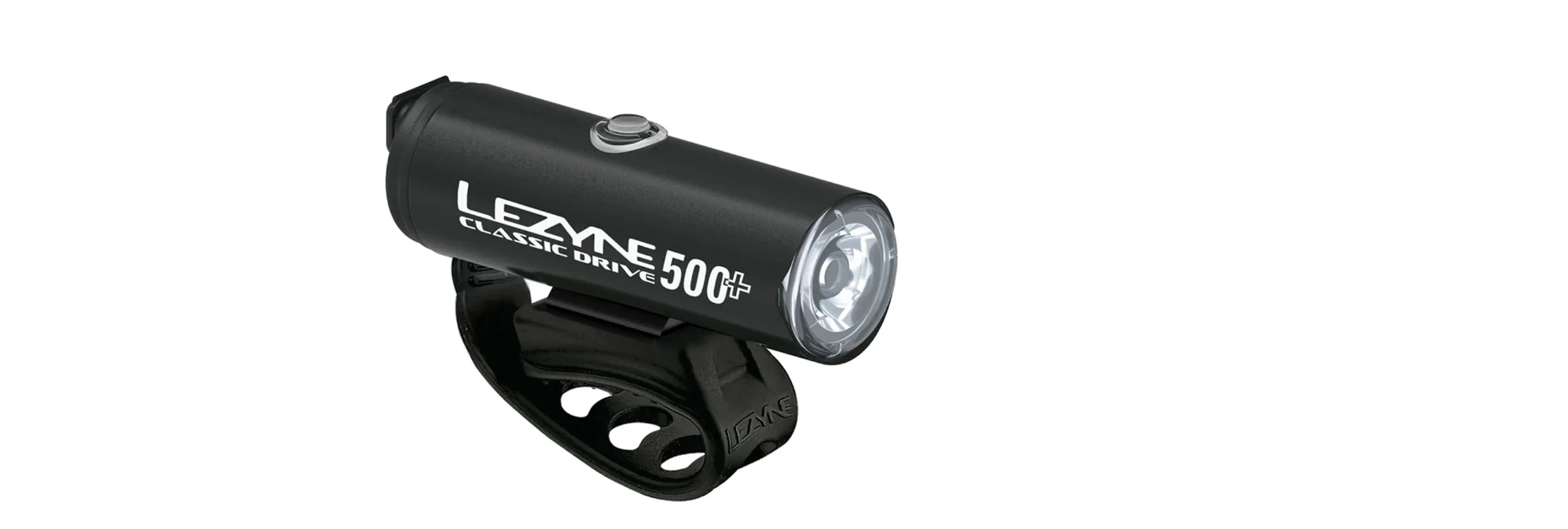

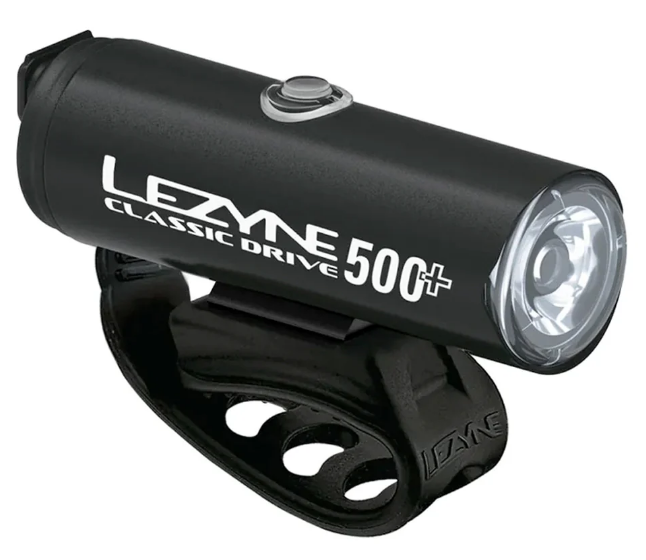
LEZYNE CLASSIC DRIVE 500+ Front Bike Light
Safety Instructions
EAD ENTIRE MANUAL BEFORE OPERATION to ensure proper use and care of your new Lezyne LED light. Traffic laws manda�ng ligh�ng vary from country to country. Inform yourself about the lighting laws and regulations in the country of use. Lezyne LED lights do not conform to the German road traffiregulationsla�on StVZO.
Installation
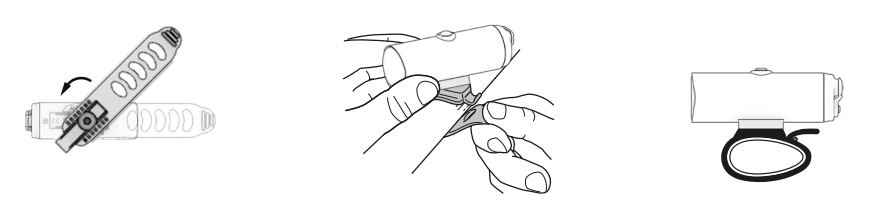
Mounting
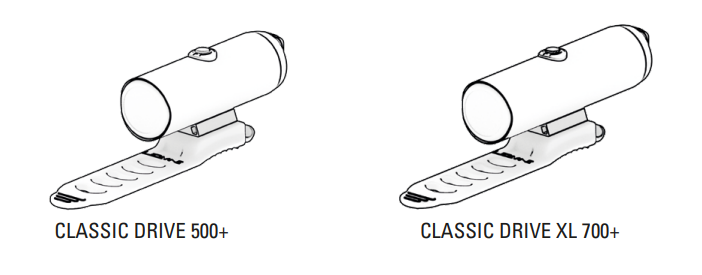
CLASSIC DRIVE 500+
CLASSIC DRIVE XL 700+ 
Operation
- On/Off: hold bu�on two (2) seconds.
- Mode cycle: click bu�on

RACE MODE (Classic Drive XL 700+ only): With the light OFF, hold bu�on for five (5) seconds unthel the light flashes. The light is now in Race Mode, where only Overdrive and Economy outputs are selectable. The light will remain in Overdrive Race Mode even when switched OFF. Repeat the step above to return to the normal mode set.
MODE MEMORY: The light remains in the output section�ng it is switched off.
THERMAL PROTECTION: If the opera�ng temperature of the light is too high, the light automatically lowers the lumen output.
Run Times and Modes
Classic Drive 500+ FRONT 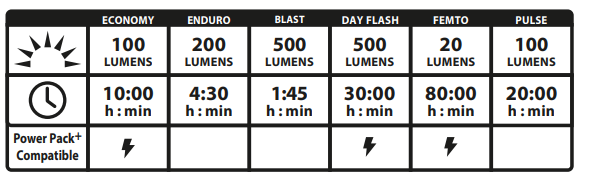
Classic Drive XL 700+ FRONT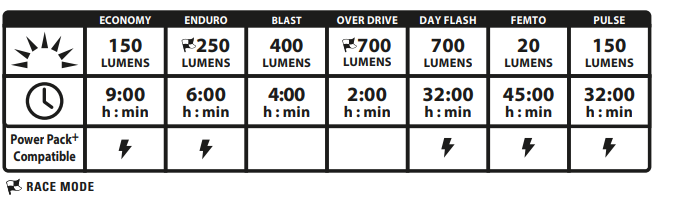
Battery Indicator
An LED, located in the bu�on, displays current battery status while the light is ON. When light is OFF, click once to momentarily display battery status.

Charging for Classic Drive 500+ FRONT
Before using your Lezyne LED Light for the first �me, fully charge ba�ery. To charge your light
- Switch the light OFF
- Remove the USB-C protective cover
- Insert the USB-C plug into the powered USB-C port
- Once charging, the battery will flash green
If the bu�on does not flash when plugged in, the selected USB-C port may not be powered—try another USB-C port. Light will be charged a�er 3–5 hours or when the bu�on is solid green. - If the bu�on does not flash when plugged in, the selected USB-C port may not be powered—try another USB-C port. Light will be charged a�er 3–5 hours or when the bu�on is solid green.
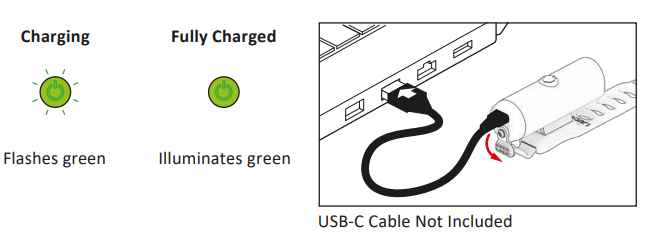
Charging for Classic Drive XL 700+ FRONT
Before using your Lezyne LED Light for the first �me, fully charge the battery. To charge your light:
- Switch the light OFF
- Remove the USB-C protective cover
- Connect the USB-C cable and the light to the powered USB-C port
- Once charging, bu�on will flash green; if the USB-C port is capable, light will use High Efficiency (HE) charging and bu�on will flash blue.
If the bu�on does not flash when plugged in, the selected USB-C port may not be powered—try another USB-C port.
Light will be charged a�er 5–6 hours (3–5 with HE charging) or when the bu�on illuminates solid green or blue. - Remove light from charger and reinstall USB-C protective cover—ensure USB-C protective cover is fully installed for water resistance.

USB Seal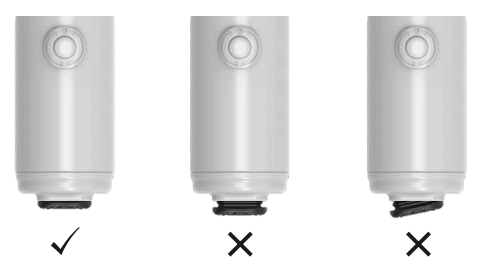
More Information
For more information on Lezyne products, visit: www.lezyne.com
Warranty
In order to claim our warranty, you must have the LEZYNE CLASSIC DRIVE 500+ Front Bike Light original proof of purchasing documentation for the product, including but not limited to Order Number and QR Code, and present it when requested. This guarantee is valid for the original retail purchaser from the date of initial retail purchase and is not transferable.
Upon receipt of your claim, Gevi will seek to resolve your difficulties. Should your product develop any defect within 12 months of purchase because of faulty materials or workmanship, we will repair or replace this product or any component of the product, at our discretion.
Our replacement or repair warranty only applies where a defect arises as a result of faulty material or workmanship during the warranty period. Your warranty does not cover misuse or negligent handling (including damage caused by failing to use the product by this instruction booklet), accidental damage, normal wear and tear, or lack of maintenance. Do not attempt to repair or adjust any electrical or mechanical functions on this product. Doing so will void this guarantee.
- power surges, power dips, voltage supply GEVI GECMD008-U 4-Cup Drip Coffee Machine problems, or use of the product on incorrect voltage;
- servicing or modification of the product other than by Gevi or an authorized Gevi service center;
- use of the product with other accessories, attachments, product supplies, parts, or devices that do not conform to Gevi specifications; or
Customer Support
For any questions relating to Gevi-branded products(coffee machines, grinders, milk frothers, toasters, air fryers, and related accessories), please contact us through the information below.
- Web: https://www.gevilife.com
- E-mail: gevi-home@gevi-home.com
- Phone: 855-9922-888
- FB: https://bit.ly/3pqt61v
- YT: https://bit.ly/3fxrFqq
FAQs
Q: What type of bike is the Classic Drive 500+ best suited for?
Ans: For commuting bikes, road bikes, hybrids, and gravel bikes, the Classic Drive 500+ is perfect. Its 500-lumen output is strong enough for both city and mild trail riding, and its traditional cylinder shape blends in nicely with urban aesthetics.
Q: Is this light compatible with all handlebar sizes?
Ans: Indeed. The majority of normal and big handlebars (22.2 mm to 35 mm) are compatible with the rubber strap system. A separate mount could be needed for aero bars.
Q: Can I mount the light upside-down (under the bar)?
Ans: Mounting the Classic Drive 500+ upright is part of its design. Although it is physically feasible, placing it upside down could change visibility and beam pattern. The “Reverse Mount” models from LEZYNE are good choices for under-bar solutions.
Q: Do I need tools for installation?
Ans: You don’t need any tools. It takes only a few seconds to adjust or remove the provided strap mount, which requires no tools.
Q: How long does it take to install?
Ans: Less than two minutes are needed for the initial installation. It only takes a few seconds to attach or detach the light once the mount is in position.
Q: How do I charge the light before first use?
Ans: Connect the lamp to a power source (such as a laptop or USB wall charger) using the USB-C cable that comes with it. It takes roughly two and a half to three hours to fully charge. When the battery is fully charged, the indicator light will change.
Q: Will the light remember the last mode used?
Ans: Yes, it has mode memory, which saves you time on your next ride by turning back on in the previous mode you picked.
Q: Is the light waterproof?
Ans: The Classic Drive 500+ can withstand rain, splashes, and wet riding conditions because it has an IPX7 water-resistance rating. After charging, be sure to firmly close the USB-C port cover.