



Makita DTC303 18V LXT Cordless Crimper
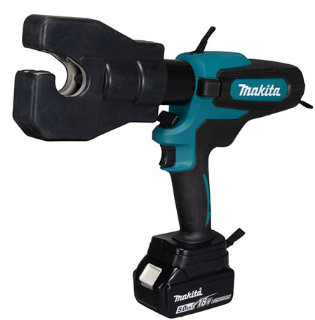
Safety Instructions
- Before using the battery cartridge, read all instructions and cautionary markings on (1) the battery charger, (2) the battery, and (3) the product using the battery
- Do not disassemble or tamper with the battery cartridge.
- It may result in a fire, excessive heat, or explosion.
- If operating time has become excessively shorter, stop operating immediately.
- It may result in a risk of overheating, possible burns, and even an explosion.
- If electrolyte gets into your eyes, rinse them out with clear water and seek medical attention right away. It may result in loss of your eyesight.
- Do not short the battery cartridge:
- Do not touch the terminals with any conductive material.
- Avoid storing the battery cartridge in a container with other metal objects such as nails, coins, etc.
- Do not expose the battery cartridge to water or rain.
- A battery short can cause a large current flow, overheating, possible burn, and even a breakdown.
- Do not store or use the tool and battery cartridge in locations where the temperature may reach or exceed 50°C (122°F).
- Do not incinerate the battery cartridge even if it is severely damaged or is completely worn out.
- The battery cartridge can explode in a fire.
- Do not nail, cut, crush, throw, or drop the battery cartridge, or allow a hard object to hit the battery cartridge.
- Such conduct may result in a fire, excessive heat, or explosion.
- Do not use a damaged battery.
- Keep the battery away from children.
Maintaining Battery Life
- Charge the battery cartridge before it is completely discharged.
- Always stop the tool operation and charge the battery cartridge when you notice less tool power.
- Never recharge a fully charged battery cartridge. Overcharging shortens the battery’s service life.
- Charge the battery cartridge at room temperature at 10°C–40°C (50°F–104°F).
- Let a hot battery cartridge cool down before charging it.
- When not using the battery cartridge, remove it from the tool or the charger.
- Charge the battery cartridge if you do not use it for a long period (more than six months).
Parts and Standard Accessories

- Strap
- Head
- Release knob
- LED work light
- Trigger with lock
- For service (Do not remove the cover.)
- Auto retract function (see page 10).
Battery
- Button
- Red part
- Battery

- At the time of purchase, the battery protection function may be activated due to the battery not being sufficiently charged.
- Correctly charge the battery with the rapid charger before use.
- Attach the battery cover when not using the product.
- It will help protect the battery from water and dust.
- When not using the product for a long period, store it with the battery removed.
Increasing Battery Life
- When you sense that the force of the tool has become weak, stop using it and charge the battery.
- Do not recharge a battery that is fully charged.
- Charge the battery in an ambient temperature range of 10°C to 40°C.
- When the battery has become hot, such as immediately after use, we recommend inserting it into the charger to cool and charge it.
- When a lithium-ion battery is not used for a long period of time (at least 6 months), we recommend charging and then storing it.
Indicating the Remaining Battery Capacity

- Indicator lamps
- Check button
Press the check button on the battery cartridge to indicate the remaining battery capacity. The indicator lamps light up for a few seconds.

Applicable Compression Range
Applicable compression range Opening between nibs: 32 mm
Specifications
- Nominal output 60 kN
- Oil capacity 78 ml
- Electric motor DC motor
- Dimension (mm) D398 × H298 × W81
- Weight 5.3–5.7 kg
How to Use
Attaching the Battery Pack
- While pressing the latch, pull out the battery pack.
- To replace the battery pack, push the new pack firmly into place.
- After sliding a battery pack on, check if it is securely in place by pulling it gently.
- Do not press the latch when pulling the battery.

Latch
Select Auto retract / Manual
Auto-retract is a function to automatically retracts the ram to the original position after completing compression. The auto-retract function is set to ON at shipment. To set the function to manual, remove the cover and set the direction of the groove using a flat-head driver. To set the function to ON again, change the direction of the groove.

- Cover
- OFF
- ON
- Groove
Crimping Operations
- Retract the nibs by pressing the release knob.
- Insert the connector and center it between the nibs.
- Activate the trigger and advance the nibs; th, en the connector is held between the nibs.
- Insert the conductor into the connector.
- Press the trigger until the compression is completed.
- A click will be heard when compression is completed.
- Keep pressing the trigger. The ram automatically retracts to the lower end. (Auto retract mode)
- Remove the conductor from the tool.

Attaching the Shoulder belt
The shoulder belt can be attached to the hanging rings of the tool to carry the tool.
Maintenance/Inspection
- Daily maintenance is required to ensure that the tool is kept in good condition.
- Do not store the tool in a humid environment to maintain smooth movement of parts and to prevent rust.
- If the tool is damaged by normal operation over 10,000 times, it is the end of its life.
- Do not use the tool again, even after replacement of the damaged part.
- When a resin part becomes dirty, wipe it away with a soapy cloth.
- The tool performance may deteriorate due to the degradation of its parts or hydraulic oil.
- Have your tool maintained every two years to use it to the end of its life (with a charge).
- For further information, please contact an authorized service facility.
Customer Service
- Website: https://www.makitauk.com/
- Ph: 1-800-462-5482
FAQs
Q: What is the Makita DTC303?
Professional electricians and technicians may effectively crimp insulated and non-insulated terminals, lugs, and connectors with the DTC303, an 18V LXT cordless crimper. Its cordless design offers flexibility and portability in a range of job settings.
Q: What types of terminals can the DTC303 crimp?
Within the range given in the instructions, it works with cable lugs, ferrules, insulated terminals, and non-insulated terminals. For precise sizes, refer to the crimping dies chart.
Q: What battery does the DTC303 use?
Makita 18V LXT lithium-ion batteries are used in the device. All 18V LXT batteries, including BL1815, BL1830, BL1840, and BL1860, are compatible with it.
Q: Is the DTC303 suitable for heavy-duty applications?
Indeed, it was made for electrical and industrial uses, but to avoid tool overload, make sure the right die is used for the terminal size.
Q: Does the tool have an overload protection system?
In order to guard against damage from over-crimping, battery overcharge, or jammed connections, the DTC303 does indeed have mechanical and electronic protection.
Q: Can the crimper work in tight or confined spaces?
Yes, it may be used in cabinets, panels, and small locations due to its compact form. The limitations of cables are removed with the cordless feature.
Q: Can the DTC303 be used for both copper and aluminum terminals?
Yes, but make sure you utilise the appropriate die and terminal parameters. Certain die sizes or extra attention may be needed for some aluminium terminals.
Q: Is the tool compatible with all Makita 18V LXT batteries?
All Makita 18V LXT batteries can be utilised; however, longer runtime for continuous operation is offered by higher-capacity batteries (such as 5.0Ah or 6.0Ah).