


Makita GA7090 180 mm Angle Grinder

Safety Instructions
- Hold the power tool by its insulated gripping surfaces, because the sanding surface may contact its own cord. Cutting a “live” wire may make exposed metal parts of the power tool “live” and could give the operator an electric shock.
- Ventilate your work area adequately when you perform sanding operations.
- Some material contains chemicals that may be toxic.
- Take caution to prevent dust inhalation and skin contact. Follow the material supplier’s safety data.
- Always use the correct dust mask/respirator for the material and application you are working with.
- Always use safety glasses or goggles. Ordinary eye or sunglasses are NOT safety glasses.
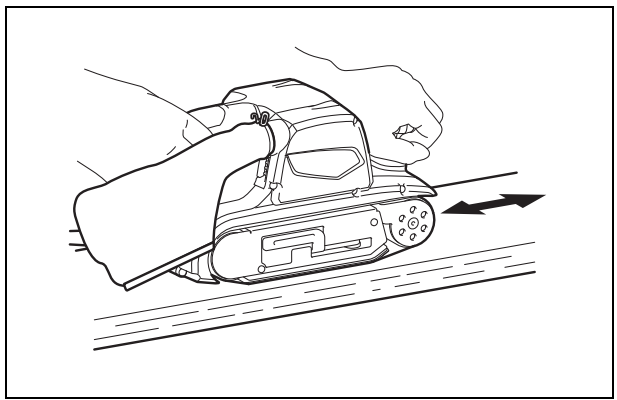
- Hold the tool firmly with both hands.
- Make sure the belt is not contacting the workpiece before the switch is turned on.
- Keep your hands away from rotating parts.
- Do not leave the tool running. Operate the tool only when hand-held.
- This tool has not been waterproofed, so do not use water on the workpiece surface.
Intended Use
The tool is intended for the sanding of large surfaces of wood, plastic, and metal materials, as well as painted surfaces.
Power Supply
The tool should be connected only to a power supply of the same voltage as indicated on the nameplate, and can only be operated on a single-phase AC supply. They are double-insulated and can, therefore, also be used from sockets without an earth wire.
Functional Description
Switch Action

Before plugging in the tool, always check to see that the switch trigger actuates properly and returns to the “OFF” position when released. To start the tool, simply pull the switch trigger. Release the switch trigger to stop. For continuous operation, pull the switch trigger and then push in the lock button, and then release the switch trigger. To stop the tool from the locked position, pull the switch trigger fully, and then release it.
Assembly
Installing or removing the abrasive belt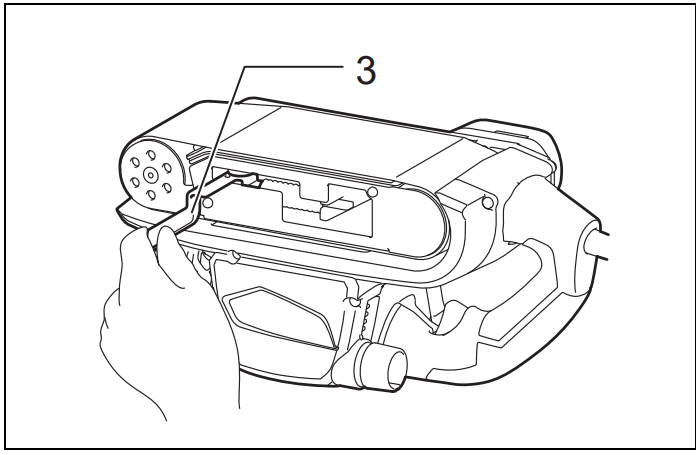
Pull the lever all the way out and install the belt over the rollers, and then return the lever to the original position.
Using the step with the tool turned upside down allows sanding in another way of use. Remove the knob and then place the step on the place the knob was seated and secure it with the knob.
Adjusting belt tracking
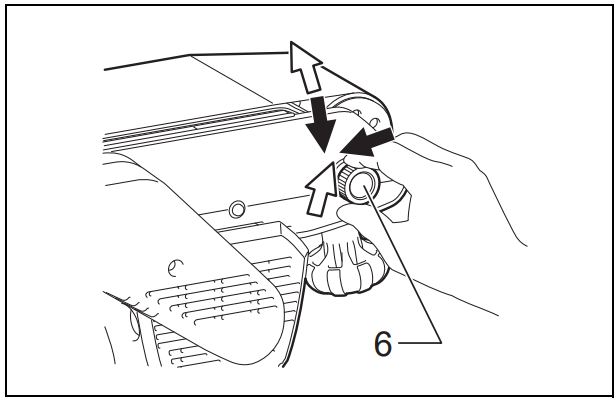
While the belt is running, use the adjusting knob to center the belt tracking. Failure to do so can result in frayed belt edges and wear on the sander frame.
Dust Bag
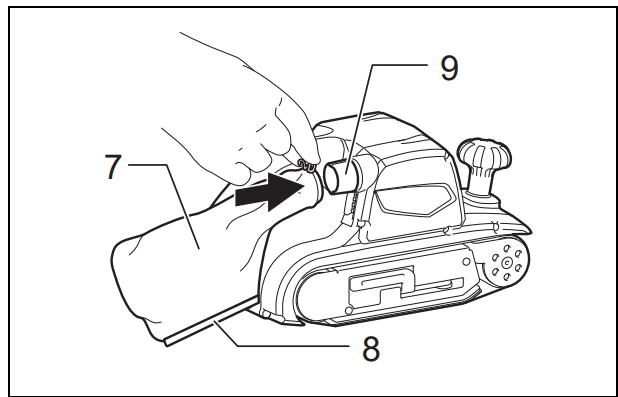
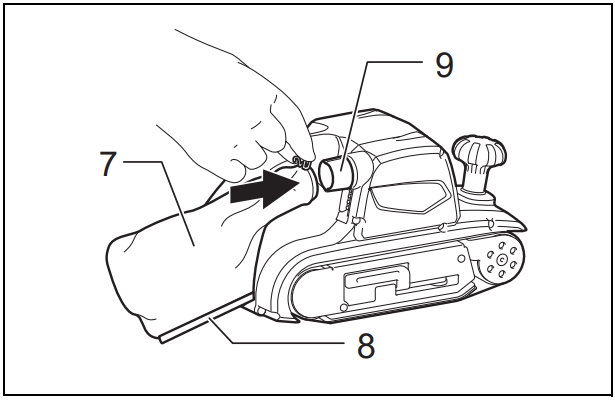
The use of the dust bag makes sanding operations clean and dust collection easy. To attach the dust bag, fit it onto the dust spout. When the dust bag is about half full, remove the dust bag from the tool and pull the fastener out. Empty the dust bag of its contents, tapping it lightly so as to remove particles adhering to the insides, which might hamper further collection.
Operation
Sanding operation
Maintainance
Always be sure that the tool is switched off and unplugged before attempting to perform inspection or maintenance. Never use gasoline, benzine, thinner, alcohol, or the like. Discoloration, deformation, or cracks may result.
Replacing the Carbon Plate
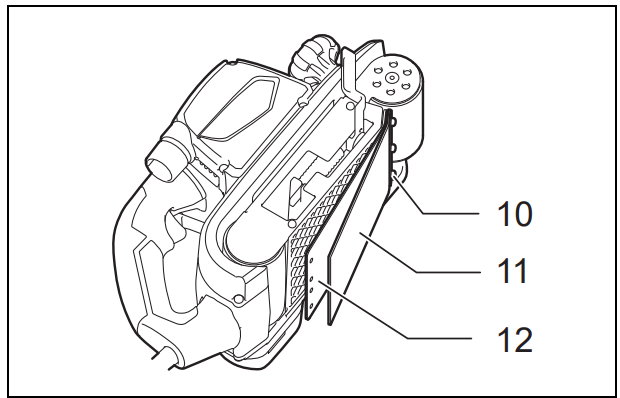
Replace the carbon plate on the cork rubber plate when it is worn down. Remove the screws on the strap washer and the worn carbon plate, place a new carbon plate, and then secure it with the screws.
Carbon Brushes
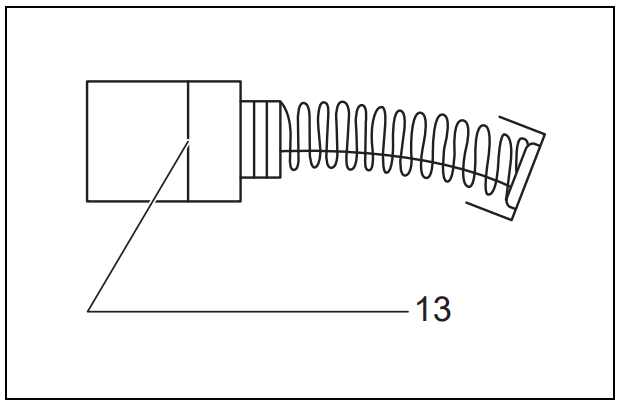
Remove and check the carbon brushes regularly. Replace them when they are worn down to the limit mark. Keep the carbon brushes clean and free to slip in the holders. Both carbon brushes should be replaced at the same time. Use only identical carbon brushes.
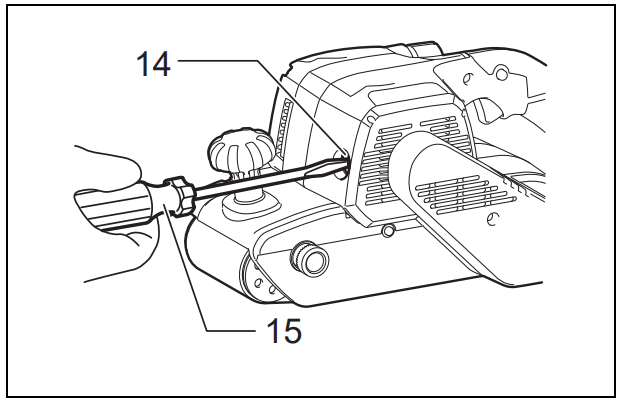
Use a screwdriver to remove the brush holder caps. Take out the worn carbon brushes, insert the new ones, and secure the brush holder caps. To maintain product SAFETY and RELIABILITY, repairs, any other maintenance, or adjustments should be performed by Makita Authorized Service Centers, always using Makita replacement parts.
Noise
The typical A-weighted noise level determined according to EN62841-2-4:
- Sound pressure level (LpA): 90 dB (A)
- Sound power level (LWA): 98 dB (A)
- Uncertainty (K): 3 dB (A)
Vibration
The vibration total value (tri-axial vector sum) is determined according to EN62841-2-4:
- Work mode: sanding the metal plate
- Vibration emission (ah): 2.5 m/s2 or less
- Uncertainty (K): 1.5 m/s2
Specifications
- Model M9400
- Belt size 100 mm x 610 mm
- Belt speed 380 m/min
- Overall length 354 mm
- Net weight 6.2 kg
- Safety class /II
Optional Accessories
- Switch trigger
- Lock button
- Lever
- Step
- Knob
- Adjusting knob
- Dust bag
- Fastener
- Dust spout
- Strap washer
- Cork rubber plate
- Carbon plate
- Limit mark
- Brush holder cap
- Screwdriver
Customer Service
- Website: https://www.makitauk.com
- Ph: 1-800-462-5482
FAQs
Q: What is the Makita GA7090 angle grinder used for?
The powerful 180 mm (7-inch) GA7090 angle grinder is ideal for heavy-duty workshop, construction, and industrial applications. It can be used to cut, grind, deburr, and polish metal, stone, concrete, and other hard materials.
Q: What is the maximum no-load speed of the GA7090?
The GA7090 offers high-speed cutting and grinding capabilities at 6,600 RPM. Learn more about comparable grinders like the Ronix 3250 180mm 2200 W Angle Grinder to see their specifications and safety tips.
Q: What power supply does it require?
The GA7090 is a corded electric device that requires an AC supply between 220 and 240 volts. To be safe, use an outlet that is properly grounded.
Q: Can I use the angle grinder for wet cutting?
No, the GA7090 is only intended for dry cutting and grinding. Electric shock or tool damage may result from using it in damp conditions.
Q: Can I use discs larger or smaller than 180 mm?
No, always use discs measuring 180 mm with an arbour hole measuring 22.23 mm. Inappropriate disc size can result in mishaps, broken discs, or damaged tools.
Q: Can I use the GA7090 for prolonged periods?
Yes, but to avoid operator fatigue and motor overheating, take short breaks.
Q: What safety certifications does the GA7090 have?
The GA7090 ensures environmental compliance and electrical safety by adhering to CE and RoHS standards.
Q: Who should I contact for repairs or spare parts?
For warranty service, replacement parts, or repairs, get in touch with an authorised Makita service centre. Preserve safety and warranty validity by avoiding unapproved repairs.