

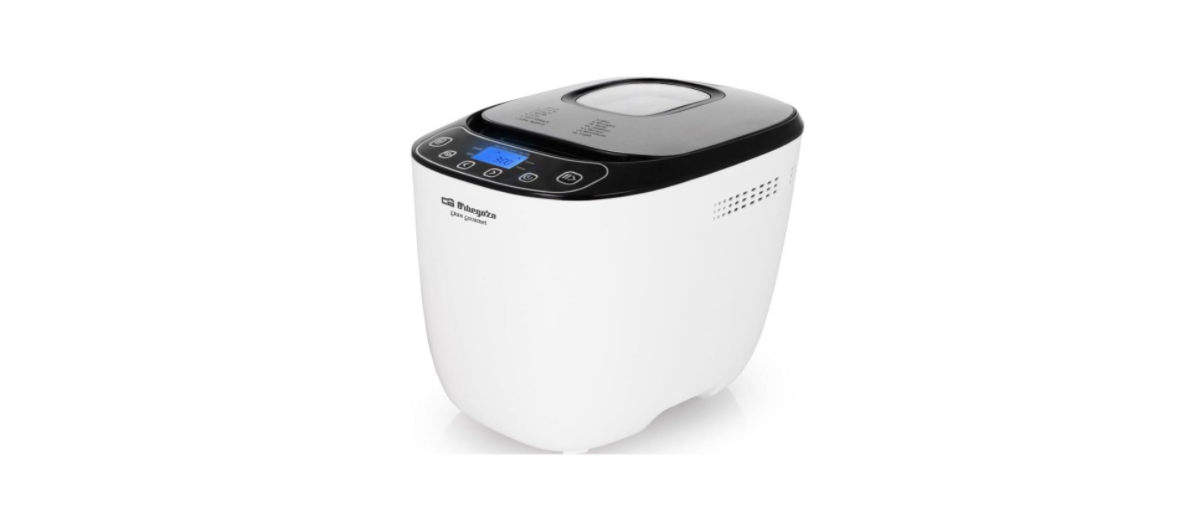
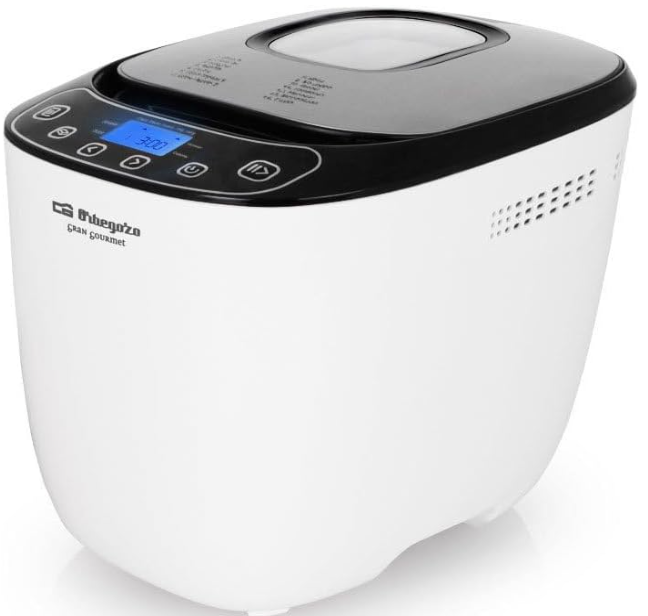
Orbegozo MHP 3500 Automatic Bread Maker
SAfety Instructions
When using electrical appliances, basic safety precautions should be followed, including the following:
- Children should be supervised to Orbegozo Automatic Bread Maker ensure that they do not play with the appliance.
- Keep the appliance and the cable cord out of the reach of children less than 8 years old.
- Never pull on the cord when unplugging.
- Do not use the unit with a damaged cord or plug, or if it is not working properly.
- Do not handle the appliance with wet hands.
- Never immerse the appliance in Orbegozo Automatic Bread Maker water or any other liquid.
- Make sure the appliance has been unplugged before cleaning.
- This appliance must be installed following the national regulations for electrical installations.
- This appliance is for household use only.
- Do not operate the device connected to an external timer or a separate remote control system.
- Do not let the cord hang over the edge of a table or hot surface.
- Do not touch any moving or spinning parts of the machine when baking.
- Never switch on the appliance without properly placing the bread pan-filled ingredients.
- Never beat the bread pan on the top or edge to remove the pan; this may damage the bread pan.
- Do not use the appliance to cook any food other than bread and jams.
- Do not place paper, card, or plastic in the appliance and place nothing on it.
- For your safety, only use accessories and spare parts designed for your appliance.
- Be very careful, steam can be released when you open the lid at the end of or during the program.
- Do not exceed the quantities indicated in the recipes.
- Do not exceed a total of 1000 g of dough. Do not exceed a total of 620 g of flour and 11 g of yeast.
Know Your Product
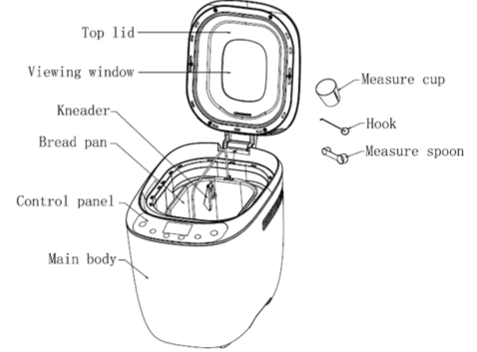
Description
- Basic
- French
- Whole wheat
- Quick
- Sweet
- Ultra Fast1
- Ultra Fast2
- Dough
- Gluten-free
- Cake
- Sandwich
- Bake
- Jam
- Pasta
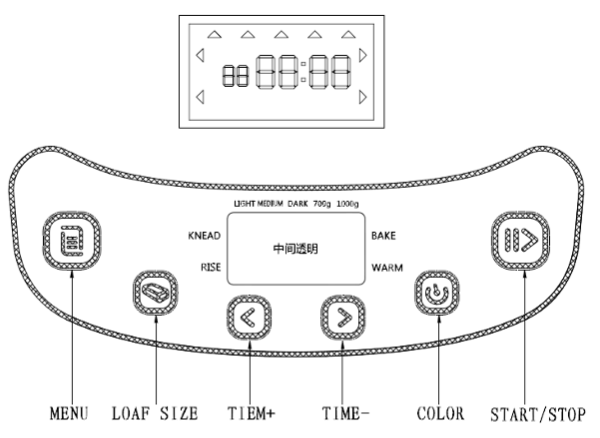
After Power-Up
As soon as the bread maker is plugged into the power supply, a beep will be heard and “ 3:00” appears in the display after a short time. But the two dots between the “3” and “00” don’t flash constantly. The arrow points to 1000g and MEDIUM. It is the default setting.
Start/Stop
For starting and stopping the Orbegozo Automatic Bread Machine, select the bread baking program. To start a program, press the “START/STOP” button once. A short beep will be heard, and the two dots in the time display begin to flash, and the program starts. Any other button is inactivated except the “START/STOP” button after a program has begun.
To stop the program, press the “START/STOP” button. 3 seconds until a beep confirms that the program has been switched off. This feature will help to prevent any unintentional disruption to the operation of the program.
Colour: With the button, you can select a LIGHT, MEDIDARK colour for the crust. Press this button to select your desicolourolor.
Loaf Size: Press this button to select the Loaf size of the bread. Please note that the total operation time may vary with the different loaf sizes.
Delay
If you want the appliance not to start working immediately, you can use this button to set the delay time. You must decide how long it will be before your bread is ready by pressing the “TIME + ”or “TIME – ”. Please note that the delay time should include the baking time of the program. That is, after the delay time, there is hot bread that can be served. At first, the program and degree of browning must be selected, and then pressing.
Keep Warm
Bread can be automatically kept warm for 60 minutes after baking. If you would like to take the bread out, switch the program off with the START/STOP button.
Memory
If the power supply has been broken off during the course of bread making, the process of bread making will be continued automatically within 10 minutes, even without pressing the Start/stop button. If the break time exceeds 10 minutes, the memory cannot b,e kept, and the bread maker must be restarted. But if the dough is no further than the kneading phase when the power supply breaks off, you can press the “STARbutton T/STOP” straight to continue the program from the beginning.
For the first use
- Please check if all parts and accessories are complete and free of damage.
- Clean all the parts according to the latter section“Cleaning and Maintenance”
- Set the bread maker in baking mode and bake empty for about 10 minutes.
- After cooling it down, clean it once more.
- Dry all parts thoroughly and assemble them so the appliance is ready for use.
For Quick breads
Quick breads are made with baking powder and baking soda, which are activated by moisture and heat. For perfect quick breads, it is suggested that all liquids be placed in the bottom of the bread pan, with dry ingredients on top. During the initial mixing of quick bread batters and dry ingredients may collect in the corners of the pan; it may be necessary to help the machine mix to avoid flour clumps. If so, use a rubber spatula.
About Ultrafastprogram
The bread maker can bake a loaf within 1 hour with the ultra-fast program. These 2 settings can bake bread in 58 minutes, and the bread is denser in texture. Ultra fast I is for baking of 700g, bread, whil, Ultra fast II is for 1000g. Please ingredient of water ingredient should be hot water in the range of 48—50℃ You must use a cooking thermometer to measure the temperature. The water temperature is very critical to the performance of baking. If the water temperature is too low, the bread will not rise to the expected size; if the water temperature is too high, it will kill the yeast before risiwill also will also largely affect the baking performance.
Cleaning and Maintenance
Disconnect the machine from the power and let it cool down prior to cleaning.
- Bread pan: Rub inside and outside with a damp cloth.
- Do not use any sharp or abrasive agents for the consideration of protecting the non-stick coating.
- The pan must be dried completely prior to installation.
- Kneading blade: If the kneading bar is difficult to remove from the axle, in such an event, fill the Container with warm water and allow it to soak for approximately. 30 minutes.
- The kneader can then be easily removed for cleaning. Also, wipe the blade carefully with a cotton cloth. Please note that both the bread pan and kneading bladedishwasher-safe-safe components.
- Lid and window: Clean the lid inside and outside with a slightly damp cloth.
- Housing: gently wipe the outer surface of the housing with a wet cloth.
- Do not use any abrasive cleaner to clean, as this would degrade the high polish of the surface.
- Never immerse the housing in water for cleaning.
- Before the bread maker is packed away for storage, ensure that it has completely cooled down, is clean and dry, and put the spoon and the kneading blade in the drawer, and the lid is closed.
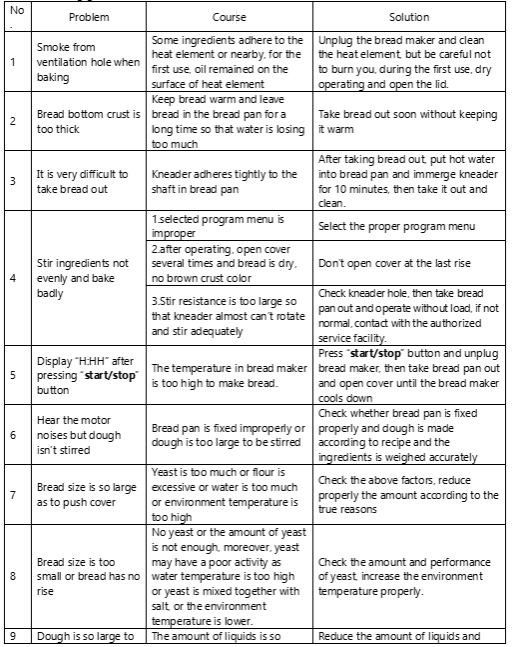
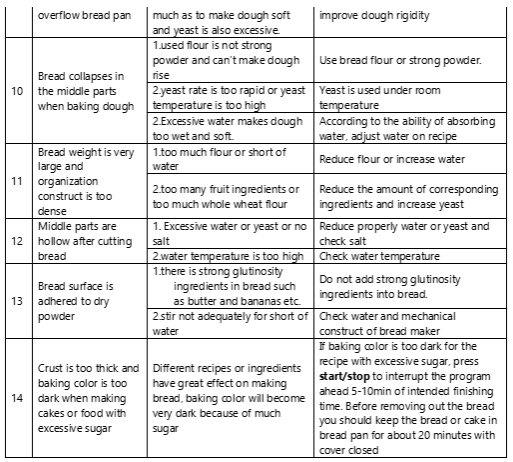
Troubleshooting
Disposal
- The European directive 2012/19/EU on Waste Electrical and Electronic Equipment (WEE) requires that old household electrical appliances must not be disposed of in the normal unsorted municipal waste stream.
- Old appliances must be collected separately to optimise the recovery and recycling of the materials.
They contain and reduce the impact on human health and the environment.
Declaration of Conformity
- This device complies with Orbegozo Electric Grill the requirements of the Low Voltage Directive 2014/35/EU and the requirements of the EMDirective 2014/30/EU.
Guarantee
Orbegozo is not responsible for components and accessories that are subject to wear and tear due to use, as well as perishable compounds or those that have deteriorated due to improper use. Nor will it be held responsible if the owner has technically modified the device. Check the legal conditions on our website.
Customer Service
- Website: https://orbegozo.com/
- Visit: https://orbegozo.com/contacto/.
- Ph: 965072847
FAQs
Q: How much bread can it make at once?
500g, 750g, or 1000g loaves can be produced by the machine, depending on the program and loaf size setting chosen.
Q: Can I delay the baking start time?
Yes, you can program the machine to start up to fifteen hours later using the delay timer, ensuring that your bread is ready when you need it.
Q: Can I make dough only?
Indeed, the Dough software kneads and combines dough without baking, making it ideal for buns, rolls, and pizza. Just take out the dough after the show is over.
Q: Can I use frozen ingredients?
You can use a fruit/nut dispenser if your model has one, or you can add frozen fruits or nuts, although it’s better to do so after the kneading cycle.
Q: Can I make gluten-free bread?
The machine does indeed have a gluten-free program. Make use of gluten-free flour and adhere to a recipe created especially for the program.
Q: Can I bake jam or yoghurt?
Yes, some programs permit making yoghurt or jam. For optimal results, use the measured amounts of ingredients and adhere to the recipe.
Q: Can I add extra ingredients like nuts or seeds?
Yes, you can add ingredients like nuts, seeds, or dried fruits after the initial kneading cycle or during the program’s add-in beep, if your model has one.
Q: Can I use milk or butter in recipes?
Yes, you can use oils, butter, and milk. To guarantee enough kneading, according to the recipe’s instructions and add liquids before dry ingredients.
Q: What is the warranty for the MHP 3500?
A two-year manufacturer’s guarantee covering material or workmanship flaws is included with the bread maker. To preserve your warranty, keep your receipt.