



OTOFIX EvoScan Ultra Diagnostic Scan Tool
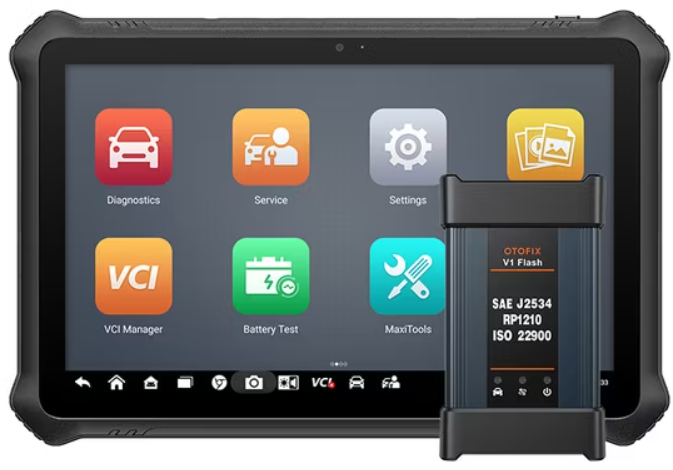
Description
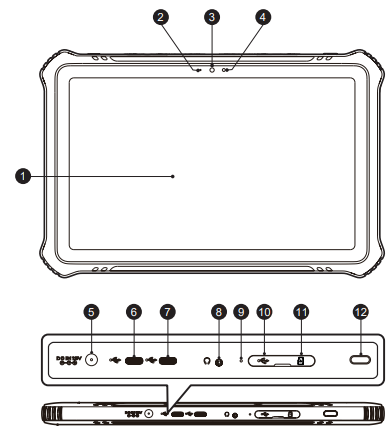
- 10.4-inch Touchscreen
- Ambient Light Sensor — detects ambient brightness
- Front Camera
- Power LED
- DC Power Supply Input Port
- USB Port
- USB Port
- Headphone Jack
- Microphone
- Mini USB Port
- SD Card Slot
- Power/Lock Button — turns the device on & off with a long press, or locks the screen with a short press.
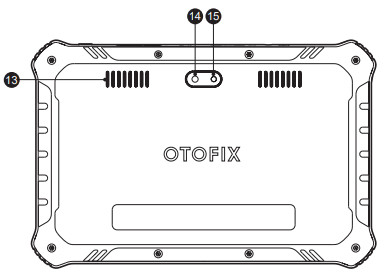
- Speaker
- Rear Camera
- Camera Flash
OTOFIX V1 Flash
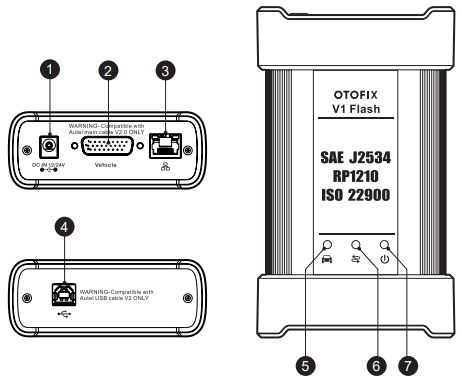
- DC Power Supply Input Port
- Vehicle Data Connector
- Ethernet Port
- USB Port
- Vehicle LED — flashes green when the device is communicating with the vehicle OTOFIX EvoScan Ultr.
- Connection LED — refer to Table 1-1 Connection LED Description for details
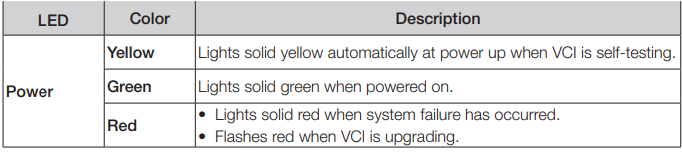
- Power LED — refer to Table 1-2 Power LED Description for details
Connection LED Description

Power LED Description
Getting Started
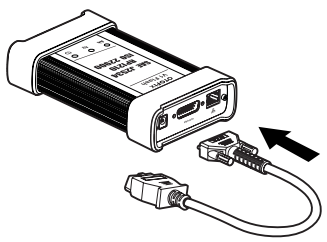
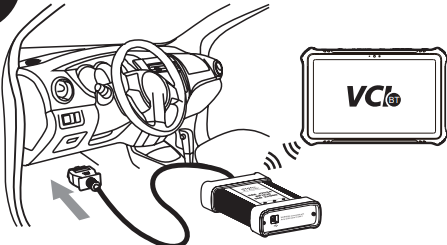
- Connect the OTOFIX main cable V2.0 to the Vehicle Data Connector on the V1 Flash and tighten the thumb screws.
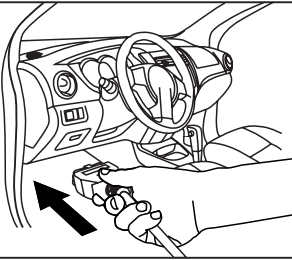
- Connect the cable’s 16-pin adapter to the vehicle’s DLC, which is generally located under the vehicle’s dashboard.rd
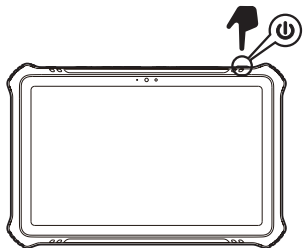
- Long-press the Power Lock button to power up the tablet. Ensure the tablet has a charged battery or is connected to the supplied DC power supply
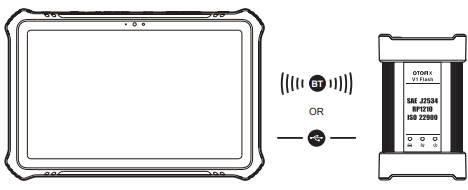
- Connect the tablet with the V1 Flash via Bluetooth or the included USB cable to establish a communication link. Use only the USB cable connection when programming
- When the V1 Flash is properly connected to the vehicle and the tablet, the VCI status button at the bottom bar on the screen displays a green badge. This indicates your diagnostics tablet is ready to start vehicle diagnosis.
Dear Customer
Thank you for purchasing this OTOFIX EvoScan Ultra diagnostics tool. This tool is manu- EN factured to a high standard and — when used according to these instructions and properly maintained — will provide years of trouble-free performance.
Customer Service
- Website: www.otofixtech.com
- Ph: +86-755-21612590
- Scan the QR code
FAQs
What is the OTOFIX EvoScan Ultra Diagnostic Scan Tool used for?
A sophisticated automotive diagnostic tool, the EvoScan Ultra can read and clear diagnostic trouble codes (DTCs), run active tests, and carry out sophisticated operations including ECU coding, service resets, and real-time data streaming on a variety of automobiles.
What types of vehicles is it compatible with?
In addition to supporting protocols including CAN, KWP2000, ISO9141, and others, it offers broader coverage for more recent model years.
Does the scan tool require a subscription or update plan?
Indeed. Free software upgrades are included with the device for a set amount of time, generally a year. After that, a subscription renewal is necessary to maintain access to updates and cloud capabilities.
Does the EvoScan Ultra support wireless diagnostics?
Indeed. During tests, personnel can move freely thanks to the scan tool’s wireless VCI (car Communication Interface), which allows the equipment and car to connect via Bluetooth.
Can I perform bi-directional (active) tests with this tool?
Of course. Depending on the car manufacturer’s access, the EvoScan Ultra can test active components, including opening/closing EGR valves, turning on fuel pumps, and turning on fans.
What operating system and interface does the tool use?
The touchscreen interface of the EvoScan Ultra is based on Android and features multilingual support, easy-to-use menus, and Wi-Fi real-time updates.
Can the EvoScan Ultra access live data and freeze frame info?
Indeed. Ideal for sophisticated diagnostics, it offers customisable charting, real-time data stream views, and freeze frame data taken at the moment of a malfunction.