

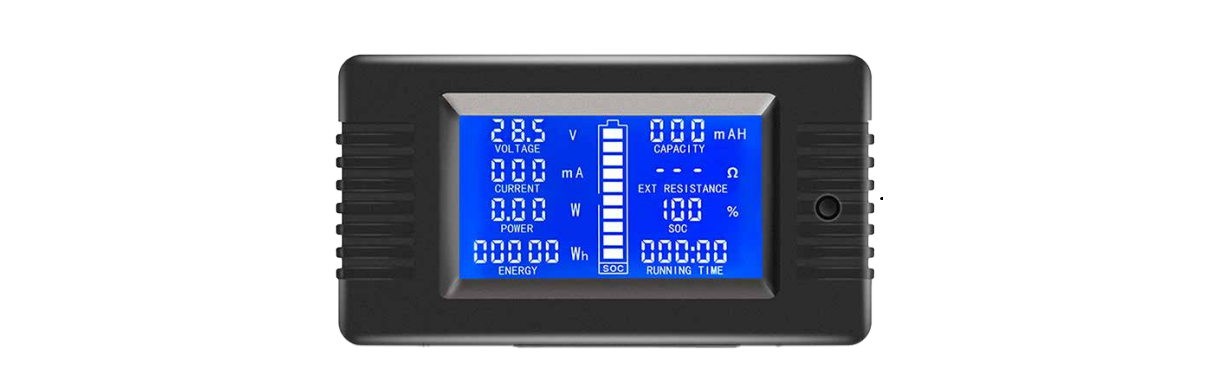

POWERTEC QP2322 Multi-function Battery Meter
Safety Instructions
Before using the POWERTEC QP2322 Multi-function Battery Meter, please read these safety instructions carefully.
- This module is suitable for indoor use; please do not use it outdoors.
- Applied load should not exceed the rated voltage, current.
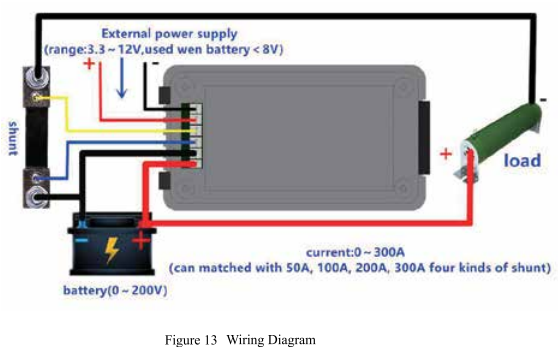
- Wiring order can’t be wrong.
Before First Use
Before using the POWERTEC QP2322 Multi-function Battery Meter for the first time, please read all the safety and operating instructions thoroughly.
Prior to using your product, please read all the safety and operating instructions thoroughly. Please ensure you follow the steps below before using the product. We recommend you keep the original packaging for storing the product when not in use.
Please pay close attention to the section entitled Warnings & Safety Information. Find a safe and convenient place to keep this instruction manual for future reference. Unpack the product, but keep all packaging materials until you have made sure your new product is undamaged and in good working order. Ensure you have all accessories listed in this manual.
Box Content
- 1 x Multi-function Battery Meter
- 1 X User Manual
Overview
The POWERTEC QP2322 Multi-function Battery Meter is a DC multifunction battery tester mainly used to measure all kinds of batteries’ voltage, discharge current, discharge power, discharge impedance, capacity, SOC, energy, and running time. It displays the measurement data through the LCD screen. Measuring Range: 300A (using an external shunt, compatible with 50A, 100A, 200A, and 300A shunts).
If you are also using a UPS system alongside your batteries, you might find the POWERTEC PT-1150LI UPS Line Interactive Instruction Manual helpful for proper setup and maintenance.
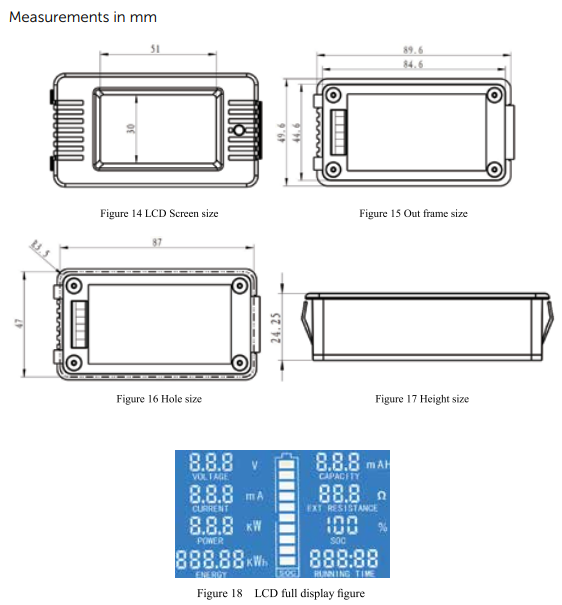
ProductDiagram
Functions
Voltage
- Measuring range: 0-200V. (When the test voltage is <8V, please use the
- independent power supply mode)
- Display format:
- <10V display as: 9.99V
- < 100V display as: 99.9V
- ≥ 100V display as: 199V
- Minimum resolution: 0.01V
- The starting test voltage: 0.05V
- Measurement accuracy: 1%
Current
- Measuring range: 0-50A, 100A, 200A,300A, four ranges depend on the external shunt; the factory default is 100A.
- Display format:
- < 1A display as: 999mA
- < 10A display as: 9.99A
- < 100A display as: 99.9A
- ≥ 100A display as: 199A
- Minimum resolution: 1mA
- Measurement accuracy: 1%
Power
- Measuring range: 0-60000W
- Display format:
- < 10W display as: 9.99W
- < 100W display as: 99.9W
- < 1000W display as: 999W
- < 10000W display as: 9.99kW
- ≥ 10000W display as: 19.9kw
- Minimum resolution: 0.01W
- Measurement accuracy: 1%
Impedance = Voltage/ Current
- Measuring range: 0-10008
- Display format:
- < 1005 display as: 99.952
- ≥100 displays as: 9999
- When over the test range or the current is zero, it displays “–”
- Minimum resolution: 0.192
- Measurement accuracy: 1%
Capacity
- Measuring range: 0-1000AH
- Display format.
- < 1AH display as: 999mAh
- <10AH display as: 9.99mAH
- <100AH display as: 99.9mAH
- <1000AH display as: 999mAh
- Minimum resolution: 1mAH
- Measurement accuracy: 1%
SOC
Before the test, you should preset the full voltage and the cut-off voltage, depending on the battery type; every grid voltage = (the highest voltage – the lowest voltage) / 10.
Running time
- Measuring range: 0 ~ 999 hours (without load, the time will not accumulate)
- Display format: 0:00:00 ~ 999:59:59
- Over the test range will become zero.
Operation
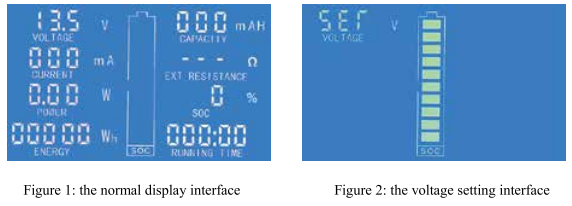
- In the normal display interface(like fig. 1), long-press the button until the LCD screen displays the interface like fig. 2, then release the button
- SET character blink present it is the setting status of full/cut-off voltage, long-press the button until the LCD screen displays the interface like fig. 3, then release the button.
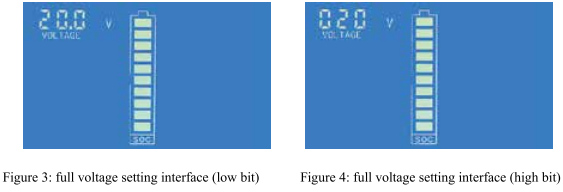
- At this time, the battery symbol displays full grid energy means the full voltage setting status. factory default, the full voltage is 020.OV, the numerical code circulation flashing from the low bit to the high bit shows that the current setting digit, short-press to set the digit; please pay attention that, as the full voltage setting value has 4 digits, but the numerical code has only 3 digits.
- So the setting is divided into two parts: low bit (fig. 3), thigh bit (fig. 4). For example, the default full voltage is 020.OV, then the display state is 20.0V to 020V, with low and high cyclic switching. If you need to set the full voltage is 199.0V, then please set the low bit to 99.0V.
- When the cycle reaches the high bit, it will display 099V, and only the highest zero bit flickers to prompt that it can be set. Setting the high bit to 199V represents the full voltage is 199.0V.
Cut-off Voltage
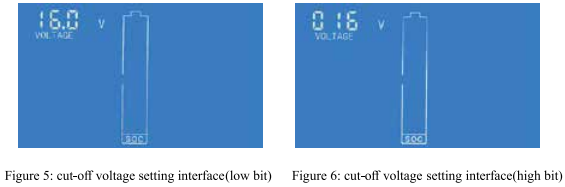
- After you set the full voltage, longer press the button until the LCD shows the interface of Fig. 5, then release the button.;
- At this time, the battery symbol shows the zero-grid to indicate the cut-off voltage setting state, the default cut-off voltage is 016.0V, the setting method is the same as above; the cut-off voltage is 0.8 times of the full voltage by default, after setting the full voltage, the cut-off voltage is automatically generated in the relationship of 0.8 times; otherwise, you can reset it;
- After all the above settings are completed, long-press the button until the settings are saved and exit the settings status, restoring the normal display interface.
Current Range Setting
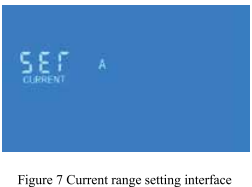
- In the normal display interface, long-press the button until the LCD shows the interface of Figure 2, then release the button, short-press the button again to switch to the interface of Figure 7, which indicates that this state is the current range setting state.
- Press the button longer until the LCD shows the interface of Figure 8, then release the button, short-press the button again to switch the current range. This meter provides four current ranges; the factory default is 100A. The corresponding range according to the shunt.
- After the current range setting is completed, long-press the button until the settings are saved and exit the setting status, the normal display interface.

Clear the Capacity
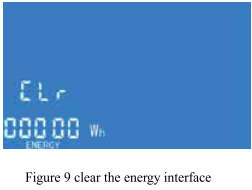
- In the normal display interface, long-press the button until the LCD shows the interface of Figure 2, then release the button, short-press the button again to switch to the interface of Figure 10, which indicates that this state is the clearing capacity setting state.
- Press the button longer until the data has been cleared and exit the setting status, restoring the normal display interface.
Clear the Running Time
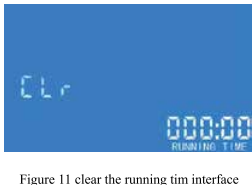
- In the normal display interface, long-press the button until the LCD shows the interface of Figure 2, then release the button, short-press the button again to switch to the interface of Figure 11, which indicates that this state is the clearing running time setting state.
- Press the button until the data has been cleared and exit the setting status, and return, the normal display interface.
Wiring Diagram
Specifications
The POWERTEC QP2322 Multi-function Battery Meter operates efficiently under the following conditions:
- Normal Working State 0.03 – 1.2W
- Sleep State 0.5mW – 0.5W
- Working Temp -20ºC to 60ºC
The power consumption is related to the test voltage value; the higher the voltage, the greater the power consumption.
Warranty
If your POWERTEC QP2322 Multi-function Battery Meter becomes defective during this period, Electus Distribution will repair, replace, or refund it if the product is faulty or not fit for its intended purpose. This warranty will not cover a modified product, misuse or abuse of the POWERTEC QP2322 Multi-function Battery Meter contrary to user instructions or packaging label, change of mind, or normal wear and tear.
To claim warranty, please contact the place of purchase. You will need to show a receipt or other proof of purchase. The benefits to the customer given by this warranty are in addition to other rights and remedies of the Australian Consumer Law in relation to the goods or services to which this warranty relates.
This warranty is provided by
- Electus Distribution
- Address 46 Eastern Creek Drive, Eastern Creek NSW 2766
- Ph. 1300 738 555
Customer Service
- Distributed by: Electus Distribution Pty Ltd 46 Eastern Creek Dr, Eastern Creek NSW 2766 Australia
- Ph: 1300 738 555
- Website: www.electusdistribution.com.au
FAQs
Q: What is the POWERTEC QP2322 Battery Meter used for?
The QP2322 is a multipurpose battery meter that helps track the performance and health of different rechargeable batteries by measuring their voltage, current, and capacity.
Q: What types of batteries can it measure?
Lead-acid, Li-ion, Li-Po, LiFe, NiMH, and NiCd batteries are supported. For precise voltage and cell count limitations, always refer to the handbook.
Q: Can it measure battery voltage while charging?
Indeed, when the battery is charging or discharging, the QP2322 can track voltage, current, and charge/discharge status in real-time.
Q: How accurate is the measurement?
Depending on the kind and condition of the battery, the meter can deliver high-precision readings with an accuracy of 1–2%.
Q: Does it display battery capacity in mAh?
Indeed, it can determine and show battery capacity (mAh or Ah), assisting users in keeping track of charges and battery life.
Q: How is the meter powered?
Usually, the battery being measured powers it. There is no need for an additional power source.
Q: Can it measure current in both directions?
The QP2322 is perfect for battery testing and diagnostics because it can detect both charge and discharge current.
Q: Does it work with series-connected battery packs?
It does support series battery packs, but make sure the overall voltage doesn’t go over the meter’s limit.
1 Comment
Pingback: POWERTEC MS-6108 Mains Power Meter User Manual